# Vue Konva

 
Vue Konva provides declarative Vue components for the [Konva](https://konvajs.org/) 2D canvas scene graph. Use it to build design editors, whiteboards, diagrams, annotations, and other interactive graphics.
Vue Konva is MIT licensed. Each component uses the name of its Konva node with a `v-` prefix.
- [Vue tutorial](https://konvajs.org/docs/vue/index.html)
- [Live demos](https://konvajs.org/docs/sandbox.html)
- [Konva API](https://konvajs.org/api/Konva.html)
- [Star the project](https://github.com/konvajs/vue-konva)
[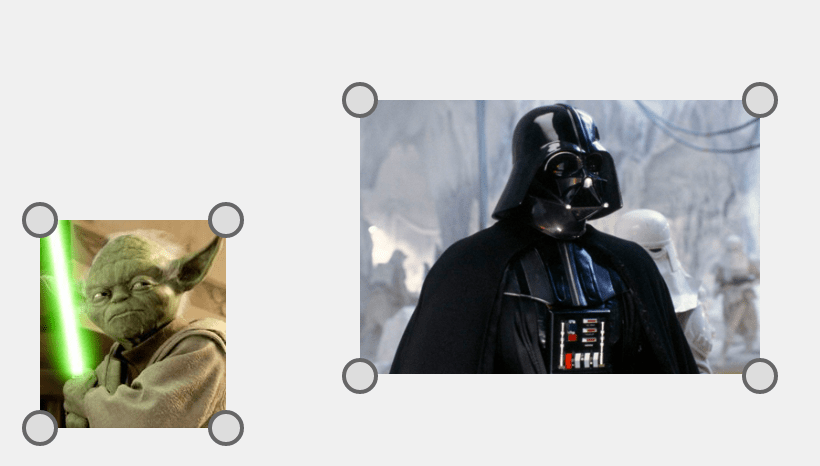](https://konvajs.org/docs/vue/Transformer.html)
Each `vue-konva` component corresponds to a Konva node and uses the `v-` prefix. Pass Konva properties through the component `config` prop.
Core shapes include `v-rect`, `v-circle`, `v-line`, `v-image`, `v-text`, and `v-path`. You can also create a custom shape.
To get more info about `Konva` you can read [Konva Overview](https://konvajs.org/docs/overview.html).
## Quick Start
[Vue 3](https://vuejs.org/) is required for the current package.
### 1 Install via npm
```npm
npm install vue-konva konva
```
For Vue 2, use `vue-konva@2`.
### 2 Import and use VueKonva
```js
import { createApp } from 'vue';
import App from './App.vue';
import VueKonva from 'vue-konva';
const app = createApp(App);
app.use(VueKonva);
app.mount('#app');
```
### 3 Reference in your component templates
```html
```
```javascript
```
### Or use a CDN
The UMD build registers itself as the global `VueKonva`.
```html

Vue Konva provides declarative Vue components for the [Konva](https://konvajs.org/) 2D canvas scene graph. Use it to build design editors, whiteboards, diagrams, annotations, and other interactive graphics.
Vue Konva is MIT licensed. Each component uses the name of its Konva node with a `v-` prefix.
- [Vue tutorial](https://konvajs.org/docs/vue/index.html)
- [Live demos](https://konvajs.org/docs/sandbox.html)
- [Konva API](https://konvajs.org/api/Konva.html)
- [Star the project](https://github.com/konvajs/vue-konva)
[](https://konvajs.org/docs/vue/Transformer.html)
Each `vue-konva` component corresponds to a Konva node and uses the `v-` prefix. Pass Konva properties through the component `config` prop.
Core shapes include `v-rect`, `v-circle`, `v-line`, `v-image`, `v-text`, and `v-path`. You can also create a custom shape.
To get more info about `Konva` you can read [Konva Overview](https://konvajs.org/docs/overview.html).
## Quick Start
[Vue 3](https://vuejs.org/) is required for the current package.
### 1 Install via npm
```npm
npm install vue-konva konva
```
For Vue 2, use `vue-konva@2`.
### 2 Import and use VueKonva
```js
import { createApp } from 'vue';
import App from './App.vue';
import VueKonva from 'vue-konva';
const app = createApp(App);
app.use(VueKonva);
app.mount('#app');
```
### 3 Reference in your component templates
```html
```
```javascript
```
### Or use a CDN
The UMD build registers itself as the global `VueKonva`.
```html
```
> **Building a full design editor?** [Polotno](https://polotno.com/?utm_source=konvajs&utm_medium=readme&utm_content=vue-konva) is a commercial design editor SDK built on Konva by the Konva maintainers. It ships templates, text editing, and export, so you integrate an editor instead of building one: `npm install polotno`. Polotno has a [Vue integration guide](https://polotno.com/docs/vue-js?utm_source=konvajs&utm_medium=readme&utm_content=vue-konva).
# Core API
## Getting reference to Konva objects
You can use `ref` feature from `vue`.
```html
```
### Strict mode
By default `vue-konva` works in "non-strict" mode. If you changed a property **manually** (or by user action like `drag&drop`) properties of the node will be not matched with properties passed as `config`. `vue-konva` updates ONLY changed properties.
In strict mode `vue-konva` will update all properties of the nodes to the values that you provided in `config`, no matter changed they or not.
You should decide what mode is better in your actual use case.
To enable strict mode pass \_\_useStrictMode attribute:
```html
```
## Configurable prefix
By default `vue-konva` is using `v-` prefix for all components.
You can use your own prefix if default one conflicts with some other libs or your components.
```javascript
import Vue from 'vue';
import VueKonva from 'vue-konva'
Vue.use(VueKonva, { prefix: 'Konva'});
// in template:
```
## Custom Konva Nodes
By passing a `Record Node>` object to `customNodes` in options, you can use your own konva node classes in Vue Konva.
```js
import Vue from 'vue';
import VueKonva from 'vue-konva'
class MyRect extends Konva.Rect {
constructor() {
super()
console.log('MyRect')
}
}
Vue.use(VueKonva, {
// The keys are used as component names.
customNodes: { MyRect }
})
// in template:
```
## Minimal Bundle (Tree-Shaking)
By default, `vue-konva` imports the full `konva` package with all shapes included. If you want to minimize your bundle size, you can use the core build that only includes what you explicitly import.
```js
// Use core build instead of full build
import VueKonva from 'vue-konva/core';
// Import only the shapes you need
import 'konva/lib/shapes/Rect';
import 'konva/lib/shapes/Circle';
import 'konva/lib/shapes/Text';
const app = createApp(App);
app.use(VueKonva);
app.mount('#app');
```
Or if you prefer individual component imports:
```js
import { Stage, Layer, Rect, Circle } from 'vue-konva/core';
// You still need to import the Konva shapes you use
import 'konva/lib/shapes/Rect';
import 'konva/lib/shapes/Circle';
```
This approach only includes the Konva shapes you actually use, significantly reducing bundle size.
**Note:** `Layer`, `Group`, `FastLayer`, and `Label` are always available in the core build since they are part of Konva's core module. You only need to import individual shapes like `Rect`, `Circle`, `Text`, etc.
## Change log
The change log can be found on the [Releases page](https://github.com/konvajs/vue-konva/releases).