# Guspread [![Build Status](https://travis-ci.org/misu007/vue-guspread.svg?branch=master)](https://travis-ci.org/misu007/vue-guspread)
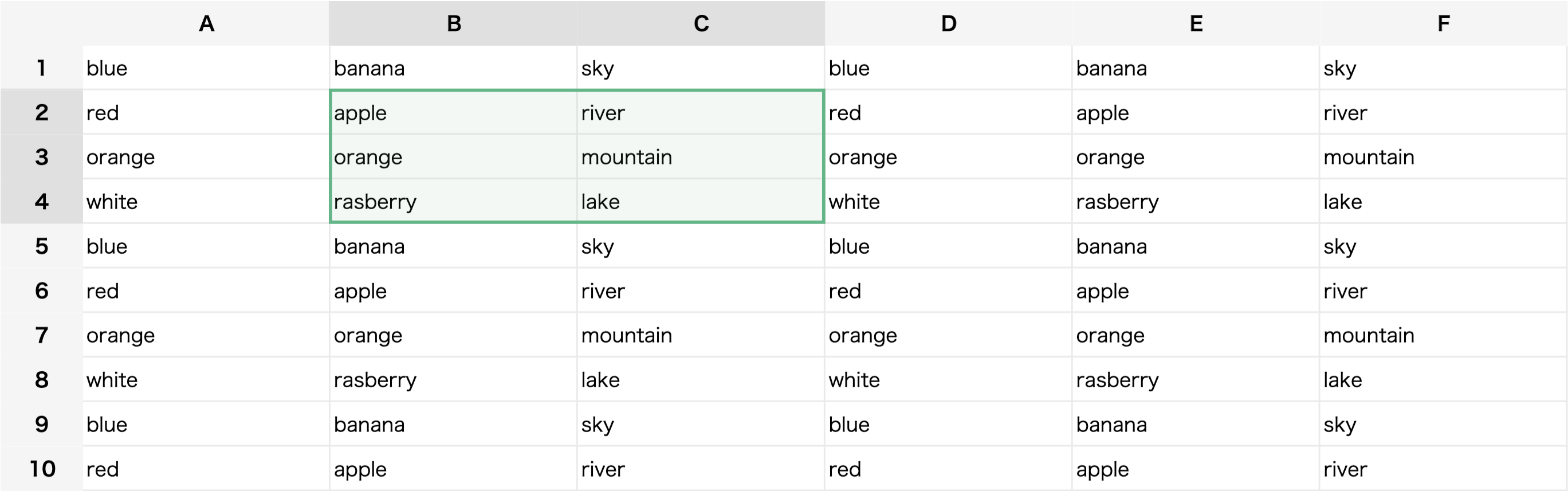
Guspread is a Javascript Spreadsheet Component for Vue.

<p align="center"> 
  <img src="https://misu007.github.io/vue-guspread/vue-guspread-demo.png" alt="demo-image"/>
</p>

## DEMO
[https://misu007.github.io/vue-guspread/](https://misu007.github.io/vue-guspread/)

## Install

### NPM
```
npm install vue-guspread
```

After installing, please register the component either globaly or localy you would like.

#### Global Registration
```js
import VueGuspread from 'vue-guspread';
import 'vue-guspread/dist/vue-guspread.css';
Vue.use(VueGuspread);
```

#### Local Registration
```js
import VGuspread from "vue-guspread";

export default {
  components: {
    VGuspread
  }
}
```

### CDN
`<v-guspread></v-guspread>` tag will be available after loading the javascript library. 
```html
<link href="https://cdn.jsdelivr.net/npm/vue-guspread@latest/dist/vue-guspread.css" rel="stylesheet"/>

<script src="https://cdn.jsdelivr.net/npm/vue/dist/vue.js"></script>
<script src="https://cdn.jsdelivr.net/npm/vue-guspread@latest"></script>
```

## Get Started
### npm
```vue
<template>
  <div style="width:100%;height:400px;">
    <v-guspread v-model="dataset" :fields="fields"></v-guspread>
  </div>
</template>

<script>
import VGuspread from "vue-guspread";

export default {
  components: {
    VGuspread
  },
  data: () => ({
    fields: [
      { name: "c1", label: "A" },
      { name: "c2", label: "B" },
      { name: "c3", label: "C" }
    ],
    dataset: [
      { c1: "blue", c2: "banana", c3: "sky" },
      { c1: "red", c2: "apple", c3: "river" },
      { c1: "orange", c2: "orange", c3: "mountain" },
      { c1: "white", c2: "rasberry", c3: "lake" }
    ]
  })
};
</script>
```

### CDN
```html
<!DOCTYPE html>
<html>
    <head>
        <title>Guspread Sample</title>
        <meta name="viewport" content="width=device-width, initial-scale=1, maximum-scale=1, user-scalable=no, minimal-ui"/>
        <link href="https://cdn.jsdelivr.net/npm/vue-guspread@latest/dist/vue-guspread.css" rel="stylesheet"/>
    </head>
    <body>
        <div id="app">
            <v-guspread v-model="dataset" :fields="fields"></v-guspread>
        </div>
        
        <script src="https://cdn.jsdelivr.net/npm/vue/dist/vue.js"></script>
        <script src="https://cdn.jsdelivr.net/npm/vue-guspread@latest"></script>
        
        <script>
        new Vue({
            el: '#app',
            data: {
                fields: [
                    { name: "c1", label: "A" },
                    { name: "c2", label: "B" },
                    { name: "c3", label: "C" }
                ],
                dataset: [
                    { c1: "blue", c2: "banana", c3: "sky" },
                    { c1: "red", c2: "apple", c3: "river" },
                    { c1: "orange", c2: "orange", c3: "mountain" },
                    { c1: "white", c2: "raspberry", c3: "lake" }
                ]
            }
        });
        </script>
    </body>
</html>
```

### Visualforce
```html
<apex:page docType="html-5.0" applyHtmlTag="false" applyBodyTag="false" standardStylesheets="false" showHeader="false">
    <html xmlns:v-bind="http://vue.org" xmlns:v-on="http://vue.org" xmlns:v-slot="http://vue.org">
        <head>
            <title>Guspread Sample For Visualforce</title>
            <meta name="viewport" content="width=device-width, initial-scale=1, maximum-scale=1, user-scalable=no, minimal-ui"/>
            <link href="https://cdn.jsdelivr.net/npm/vue-guspread@latest/dist/vue-guspread.css" rel="stylesheet"/>
        </head>
        <body>
            <div id="app">
                <v-guspread v-model="dataset" v-bind:fields="fields"></v-guspread>
            </div>
            
            <script src="https://cdn.jsdelivr.net/npm/vue/dist/vue.js"></script>
            <script src="https://cdn.jsdelivr.net/npm/vue-guspread@latest"></script>
            
            <script>
            new Vue({
                el: '#app',
                data: {
                    fields: [
                        { name: "c1", label: "A" },
                        { name: "c2", label: "B" },
                        { name: "c3", label: "C" }
                    ],
                    dataset: [
                        { c1: "blue", c2: "banana", c3: "sky" },
                        { c1: "red", c2: "apple", c3: "river" },
                        { c1: "orange", c2: "orange", c3: "mountain" },
                        { c1: "white", c2: "raspberry", c3: "lake" }
                    ]
                }
            });
            </script>
        </body>
    </html>   
</apex:page>
```

## Usage

### Props
<table>
  <thead>
    <tr>
      <th>Required</th>
      <th>Prop Name</th>
      <th>Type</th>
      <th>Description</th>
      <th>Default</th>
    </tr>
  </thead>
  <tbody>
    <tr>
      <td>*</td>      
      <td>value (v-model)</td>
      <td>Array</td>
      <td>An array of row item objects</td>
      <td>[]</td>  
    </tr>
    <tr>
      <td>*</td>        
      <td>fields</td>
      <td>Array</td>
      <td>An array of column objects that each describe a header</td>
      <td>[]</td>
    </tr>
    <tr>
      <td></td>         
      <td>color</td>
      <td>String</td>
      <td>Apply css color ('#ffffff' or rgb(65, 184, 131)) to the main controled color.</td>
      <td>'#41b883'</td>
    </tr>
    <tr>
      <td></td>     
      <td>nameKey</td>
      <td>String</td>
      <td>The value of this property represents the field key of each items</td>
      <td>'name'</td>
    </tr>
    <tr>
      <td></td>        
      <td>labelKey</td>
      <td>String</td>
      <td>The value of this property represents the default label of each fields</td>
      <td>'label'</td>
    </tr>
    <tr>
      <td></td>       
      <td>cellClass</td>
      <td>Function</td>
      <td>You can optionaly customize the classname for each cells (td)</td>
      <td>null</td>
    </tr>
    <tr>
      <td></td>       
      <td>rowClass</td>
      <td>Function</td>
      <td>You can optionaly customize the classname for each row (tr)</td>
      <td>null</td>
    </tr>
    <tr>
      <td></td>      
      <td>cellReadonly</td>
      <td>Function</td>
      <td>You can optionaly apply readonly behavior for each cells</td>
      <td>null</td>
    </tr>
    <tr>
      <td></td>      
      <td>hideMinimap</td>
      <td>Boolean</td>
      <td>Hide default mini map</td>
      <td>false</td>
    </tr>
  </tbody>
 </table>

### Events
<table>
  <thead>
    <tr>
      <th>Event Name</th>
      <th>Payload</th>
      <th>Description</th>
    </tr>
  </thead>
  <tbody>
    <tr>
      <td>changeEditMode</td>
      <td>True (Edit mode) or False (Show mode)</td>
      <td>Fired when changed between edit mode and show mode</td>        
    </tr>
    <tr>
      <td>changeScrolling</td>
      <td>True (Edit mode) or False (Show mode)</td>
      <td>Fired on scrolling started or finished</td>        
    </tr>
    <tr>
      <td>changeFocused</td>
      <td>{"a": Object, "b": Object}</td>
      <td>Fired when changed the rect focued cells. Both keys "a" and "b" have row index and col index</td>        
    </tr>
  </tbody>
 </table>

### Slots
<table>
  <thead>
    <tr>
      <th>Slot Name</th>
      <th>Slot Props</th>
      <th>Description</th>
    </tr>
  </thead>
  <tbody>
    <tr>
      <td>field</td>
      <td>{"field": Object}</td>
      <td>"field": Each field Object given as "fields" prop</td>        
    </tr>
    <tr>
      <td>cell</td>
      <td>{"field": Object, "item": Object, "row": Number, "col": Number, "value": Any}</td>
      <td>"item": Each row Object given as "value(v-model)" prop</td>        
    </tr>
    <tr>
      <td>input</td>
      <td>{"field": Object, "item": Object}</td>
      <td></td>        
    </tr>
  </tbody>
 </table>

## Example
```vue
<template>
  <div style="width: 100%; height:600px;">
    <v-guspread
      v-model="dataset"
      :fields="fields"
      nameKey="apiName"
      :cellClass="cellClass"
      :cellReadonly="cellReadonly"
    >
      <!-- Each Field -->
      <template #field="{field}">{{field.label}}</template>
      <!-- Each Field -->

      <!-- Each Cell -->
      <template #cell="{field, item}">
        <!-- Checkbox-->
        <template v-if="field.dataType == 'Boolean'">
          <template v-if="item[field.apiName] == true">✅</template>
          <template v-else-if="item[field.apiName] == false">☐</template>
          <template v-else></template>
        </template>
        <!-- Checkbox-->

        <!-- Text-->
        <template v-else>
          <span>{{item[field.apiName]}}</span>
        </template>
        <!-- Text-->
      </template>
      <!-- Each Cell -->

      <!-- Input Form -->
      <template #input="{field, item}">
        <!-- Checkbox -->
        <template v-if="field.dataType == 'Boolean'">
          <input type="checkbox" v-model="item[field.apiName]" />
        </template>
        <!-- Checkbox -->

        <!-- Number-->
        <template v-else-if="field.dataType == 'Int'">
          <input type="number" v-model="item[field.apiName]" />
        </template>
        <!-- Number -->

        <!-- Text -->
        <template v-else>
          <input type="text" v-model="item[field.apiName]" />
        </template>
        <!-- Text -->
      </template>

      <!-- Input Form -->
    </v-guspread>
  </div>
</template>

<script>
export default {
  data: () => ({
    fields: [
      { dataType: "Boolean", label: "Field1", apiName: "c1", updateable: true },
      { dataType: "Int", label: "Field2", apiName: "c2", updateable: true },
      { dataType: "String", label: "Field3", apiName: "c3", updateable: false },
      { dataType: "String", label: "Field4", apiName: "c4", updateable: true }
    ],
    dataset: [
      { c1: true, c2: 58, c3: "Japan", c4: "Tokyo" },
      { c1: false, c2: 30, c3: "US", c4: "New York" },
      { c1: true, c2: 48, c3: "China", c4: "Beijing" },
      { c1: false, c2: 27, c3: "UK", c4: "London" },
      { c1: true, c2: 75, c3: "Korea", c4: "Seoul" }
    ],
    cellClass: ({ field }) => {
      let ret = [];
      if (field.dataType == "Boolean" || field.dataType == "Int") {
        ret.push("text-align-right");
      }
      return ret;
    },
    cellReadonly: ({ field }) => {
      return !field.updateable;
    }
  })
};
</script>

<style lang="stylus">
.guspread-table {
  .guspread-table-cell.text-align-right {
    text-align: right;
  }
}
</style>

```