# 布局
页面布局是一个后台系统最直观的结构，通常会包含顶部导航、侧边菜单栏、主体内容区域等。在真实项目中，页面布局通常统领整个应用的界面，有非常重要的作用。  
## 基础布局
基于我们的设计原则，我们对页面结构的定义如下图（登录、注册页面除外）： 

![](../.vuepress/public/img/layoutIndex.png)

页面主体分为左右结构，左边为菜单栏，右侧为上下结构，顶部为导航区域，下面为主体内容区。  

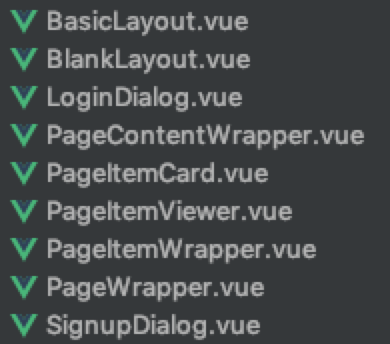
Pro内置了一些页面布局组件:  
![](../.vuepress/public/img/buildInComponents.png)  

## 页面布局
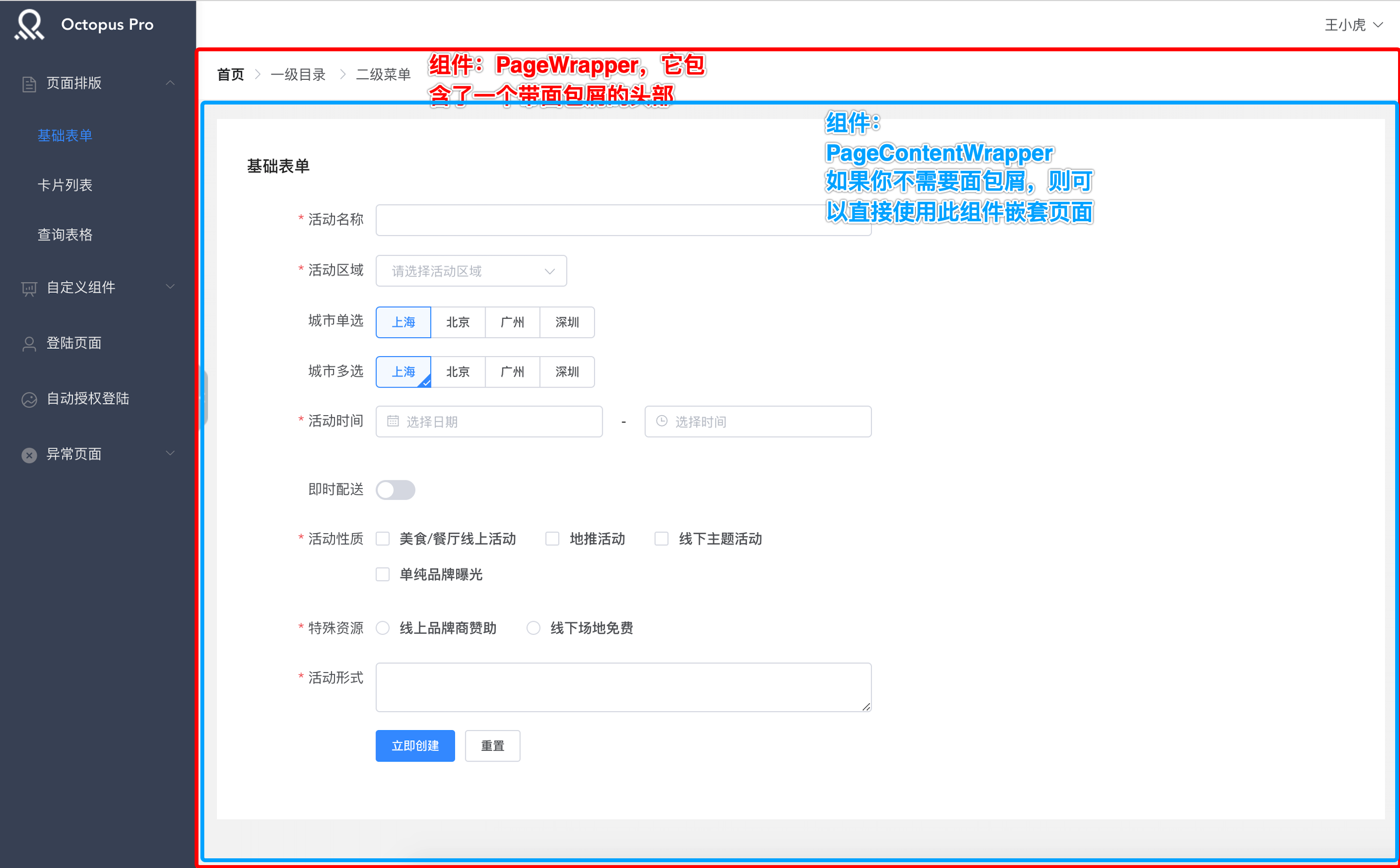
一个典型的内容区域长这样：

![](../.vuepress/public/img/layoutWrapper.png)

它的代码结构是这样的
```html
<template>
    <PageWrapper> 
	    <PageContentWrapper>
            <!--   页面内容   -->
	    </PageContentWrapper>
    </PageWrapper> 
</template>

<script>
export default {}
</script>
```
在PageContentWrapper你可以放入任何你想放置的内容
顺便说一下，如果你的页面不需要面包屑，你可以使用PageContentWrapper组件包裹整个内容区即可


## 内容区域
如果你需要的内容区域的风格和我们模版中的一致，那么你也可以使用现成的组件进行嵌套，包含三个组件：PageItemCard、PageItemViewer、PageItemWrapper  
#### 对于纯容器展示的页面，类似如下：  
![](../.vuepress/public/img/itemWrapper.png)
那么你只需要嵌套一个\<PageItemWrapper/\>即可，代码如下：
```html
<template>
    <PageWrapper> 
	    <PageContentWrapper>
            <PageItemWrapper>
            <!--页面内容-->
            </PageItemWrapper>
	    </PageContentWrapper>
    </PageWrapper> 
</template>

<script>
export default {}
</script>
```

#### 对于带标题展示的页面板块，类似如下：  
![](../.vuepress/public/img/itemViewer.png)
那么你只需要嵌套一个\<PageItemViewer/\>即可，代码如下：
```html
<template>
    <PageWrapper> 
	    <PageContentWrapper>
            <PageItemViewer>
                <!--页面内容-->            
            </PageItemViewer>
	    </PageContentWrapper>
    </PageWrapper> 
</template>

<script>
export default {}
</script>
```

#### 对于带标题展示以及顶部操作栏的页面板块，类似如下：  
![](../.vuepress/public/img/itemCard.png)
那么你只需要嵌套一个\<PageItemCard/\>即可，代码如下：
```html
<template>
    <PageWrapper> 
	    <PageContentWrapper>
            <PageItemCard>
                <!--页面内容-->            
            </PageItemCard>
	    </PageContentWrapper>
    </PageWrapper> 
</template>

<script>
export default {}
</script>
```
至此，相信你已经掌握了页面嵌套的实现方法。