[English](./README.md) | 简体中文
vConsole
==============================
[](https://badge.fury.io/js/vconsole)
一个轻量、可拓展、针对手机网页的前端开发者调试面板。
## 特性
- 查看 console 日志
- 查看网络请求
- 手动执行 JS 命令行
- 自定义插件
## 上手
下载 vConsole 的[最新版本](https://github.com/WechatFE/vConsole/releases/latest)。(不要直接下载 dev 分支下的 `dist/vconsole.min.js`)
或者使用 npm 安装:
```
npm install vconsole
```
引入 `dist/vconsole.min.js` 到项目中:
```html
```
详细使用方法请参阅[使用教程](./doc/tutorial_CN.md)。
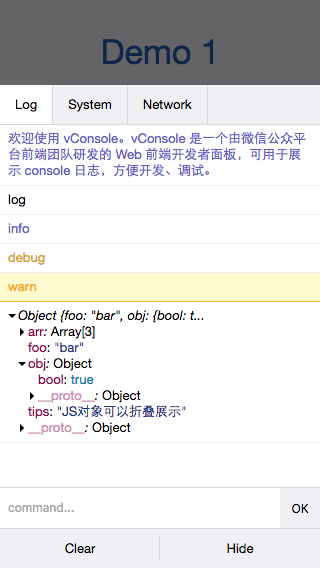
## 手机预览

[http://wechatfe.github.io/vconsole/demo.html](http://wechatfe.github.io/vconsole/demo.html)
## 文档
vConsole 本体:
- [使用教程](./doc/tutorial_CN.md)
- [公共属性及方法](./doc/public_properties_methods_CN.md)
- [辅助函数](./doc/helper_functions_CN.md)
插件:
- [插件:入门](./doc/plugin_getting_started_CN.md)
- [插件:编写插件](./doc/plugin_building_a_plugin_CN.md)
- [插件:Event 事件列表](./doc/plugin_event_list_CN.md)
## 插件列表
- [vConsole-resources](https://github.com/WechatFE/vConsole-resources)
- [vConsole-sources](https://github.com/WechatFE/vConsole-sources)
- [vConsole-elements](https://github.com/WechatFE/vConsole-elements)
## 更新记录
[CHANGELOG_CN.md](./CHANGELOG_CN.md)
## License
The MIT License (http://opensource.org/licenses/MIT)