---
sidebar_position: 8
title: Model 间通信
---
Model 之间不是孤立的, Modern.js 也提供了 Model 间通信的方式。主要分为两种场景:
1. 在 Model 中访问其它 Model 的 State 和 Actions。
2. 在 Model 中监听其它 Model 变化。
这里将【[Model 介绍](/docs/guides/features/runtime/model/model-introduction)】一节的简单计数器应用改造成一个可设置步频的计数器应用。可以通过设置步频,从而影响每次计数器增加的幅度。
我们抽象出两个 Model,分别为 `stepModel`(步频)、`counterModel`(计数器):
```ts
import { model } from '@modern-js/runtime/model';
const stepModel = model('step').define({
state: 1
});
const counterModel = model('count').define((context, { use, onMount }) => {
const [,,subscribeStep] = use(stepModel);
onMount(() => {
return subscribeStep(() => {
console.log(`Subscribe in counterModel: stepModel change to ${use(stepModel)[0]}`)
});
});
return {
state: {
value: 1
},
actions: {
add(state) {
const step = use(stepModel)[0];
state.value = state.value + step
}
}
}
});
export { stepModel, counterModel };
```
`stepModel` 只声明一个 `state`,初始值为 1。
`counterModel` 通过 `use` 函数加载 `stepModel`,拿到返回的 `subscribeStep` 函数用来监听 `stepModel` 状态的变更。这里打印出 `stepModel` 的最新值。
`counterModel` 通过 `use` 函数访问 `stepModel`,在 `add` Action 里可以获取到当前 `stepModel` 的值(步频),以此值来做自增。
修改 **App.tsx**:
```tsx
import { useModel } from "@modern-js/runtime/model";
import { counterModel, stepModel } from "./models/count";
function Counter() {
const [state, actions] = useModel(counterModel);
const [step, stepActions] = useModel(stepModel);
return (
step: {step}
counter: {state.value}
);
}
export default function App() {
return ;
}
```
:::info 补充信息
Modern.js 默认开启 [自动生成 actions](./auto-actions),所以 `stepModel` 中虽然没有手动定义 Actions,但可以使用自动生成的 `setState` Action。
:::
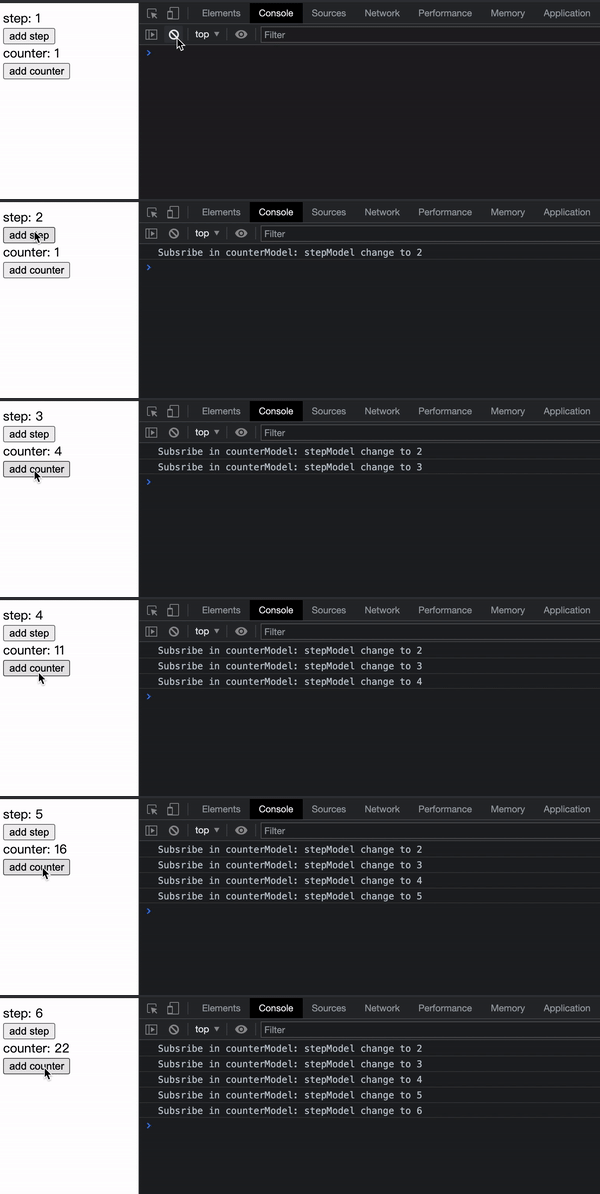
- 点击 **add step** 增加步频。
- 点击 **add counter** 触发计数器增加。
最终效果如下:
:::info 补充信息
- 本节完整的示例代码:[章节示例代码](https://github.com/modern-js-dev/modern-js-examples/tree/main/series/tutorials/runtime-api/model/models-communication)。
- 相关 API 的更多介绍,请参考:[通过函数创建-model](/docs/apis/runtime/model/model_#通过函数创建-model)。
:::