use-google-autocomplete ⌨️
A tiny React Hook that returns Google Autocomplete results with session_token handling.
## Problem
Google's Maps Javascript SDK gives us a default autocomplete experience, with a slightly customizable UI through class names; however, if we want to create a ground up search experience, we'll need to use their [REST API](https://developers.google.com/places/web-service/autocomplete). We want to have a hook that does something like this:
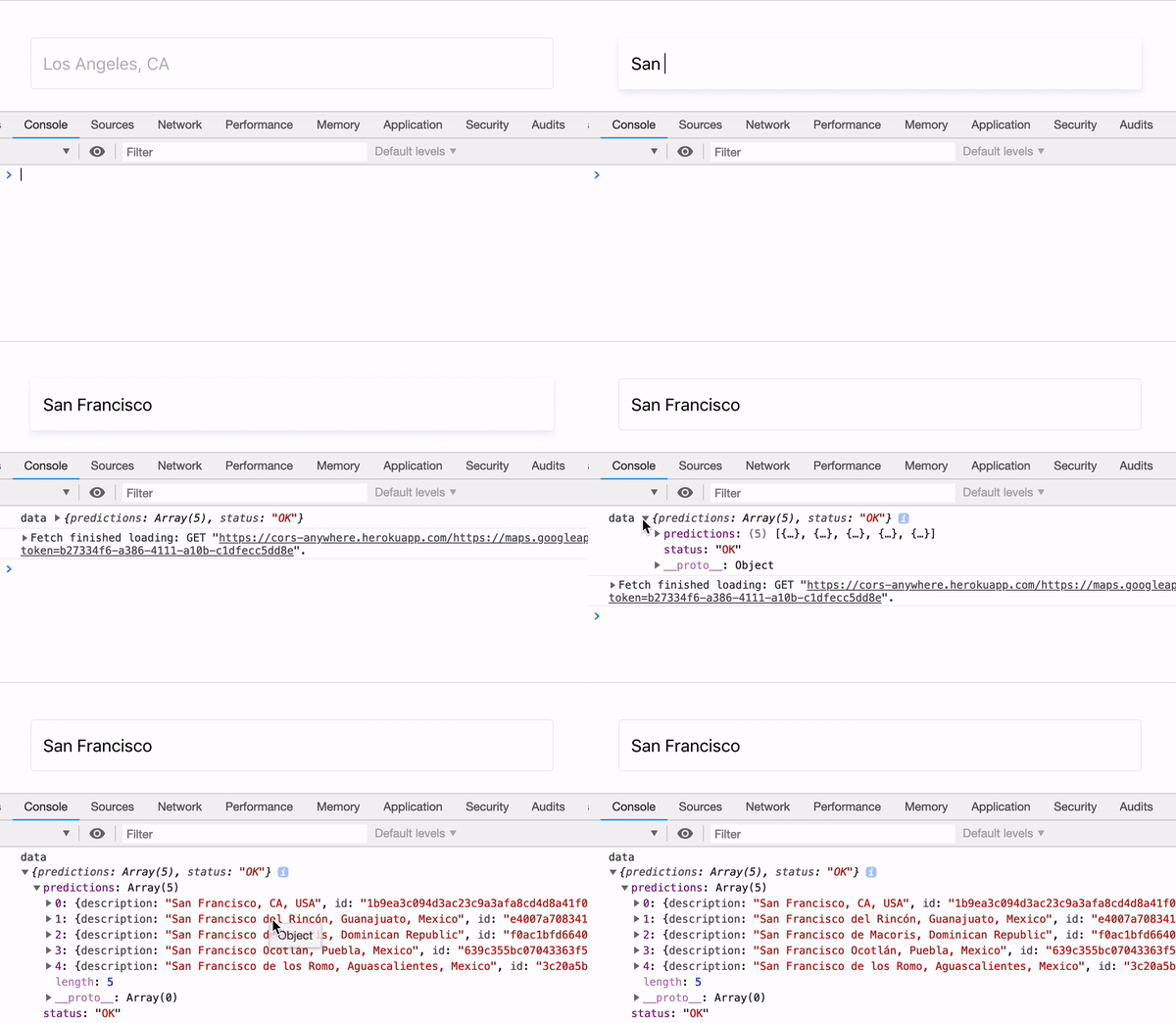
The two primary things we need to focus on are:
### 1. Handle session_tokens
Every time we send a request to the REST endpoint, we need to pass a session_token in order for Google to group
shared calls together for billing purposes. Google recommends uuid4 ids, and after a bit of research, [3 minutes](https://stackoverflow.com/questions/50398801/how-long-do-the-new-places-api-session-tokens-last/50452233#50452233) is the limit for the lifetime of a session_token, though we need to refresh the session_token when we make a new query to fetch more details about a specific place.
### 2. Debounce API calls
We dont' want to be sending an API call on every single keystroke, so we'll need to debounce each
keystroke and only call the API when a user finishes typing.
## The Solution
`use-google-autocomplete` handles session_tokens by using the recommended `uuid4/v4` package to
generate unique ids, renewing every 180000ms (3 minutes), and when a user calls `getPlaceDetails()` to fetch more information regarding a specific place.
The returned values from useGoogleAutocomplete will allow us to focus on creating a custom UI.
## Usage
```
yarn add use-google-autocomplete
```
or
```
npm install use-google-autocomplete
```
```
import useGoogleAutocomplete from 'use-google-autocomplete'
const App = () => {
// This will update each time a new `query` prop is passed.
const { results, isLoading, error, getPlaceDetails } = useGoogleAutocomplete({
apiKey: '',
query: 'New York',
options: {
types: '(cities)',
},
})
return (
{results.predictions.map(prediction => (
-
})
)
}
```
## Props
### apiKey
> String value of your Google API key. Make sure to enable the Maps API in your console.
### type
> String value of 'places' or 'query' | defaults to 'places'
> This will determine if we use 'autocomplete' or 'queryautocomplete' ([reference](https://developers.google.com/places/web-service/autocomplete))
### query
> String value of a search query.
### options
> Object of [Google options](https://developers.google.com/places/web-service/autocomplete)
| property | type | description |
| -------------- | -------- | -------------------------------------------------------------------------------------------------- |
| `types` | `string` | `(cities)`, `geocode`, `establishments`, or `address` |
| `language` | `string` | Language for results to return |
| `location` | `string` | `37.7749, -122.4194` or `San Francisco, CA` |
| `radius` | number | Results within the radius of the search (meters) |
| `strictbounds` | boolean | Returns only those places that are strictly within the region defined by location and radius |
| `offset` | number | The position, in the input term, of the last character that the service uses to match predictions. |
## Return values
### results
> Array of Google search results
### isLoading
> Boolean | True when fetching Google API data
### error
> Null or string value of the current error, if there is any.
### getPlaceDetails
> Function
> getPlaceDetails(
> placeId: string,
> placeDetailOptions: {
> fields?: string[],
> region?: string,
> language?: string
> })
This function must be used if you are trying to get more information about a place (ex;
latitude/longitude). It'll fetch the Place data and renew our session_token.