Version 1.81.8
UR-Nexus Documentation
A practical, tutorial-style reference for installing, configuring, automating, extending, and operating UR-Nexus.
What UR Is
Autonomous engineering workflow engine
UR is not only chat, autocomplete, or code edits. It turns work into a plan, executes patches, tests and verifies them, documents the result, benchmarks behavior, and keeps the run reproducible.
ur for iterative work or ur -p for scripts, CI, webhooks, SDK calls, and agent handoffs.
ur provider and safe ur config set commands select API, local, server, or configured subscription providers without storing secrets.
ur repo-edit maps compiler/graph change impact, indexes files and symbols, plans AST-aware edits, previews patches, and rolls back failed multi-file applies.
ur research persists sanitized sources, cited findings, open questions, independent corroboration checks, and reviewable reports.
ur design3d automates Blender, OpenSCAD, Autodesk 3ds Max, and reviewed custom DCC/CAD applications with dry-run plans, bounded builds, inspection, and glTF validation.
ur test-first detects compile/test/lint commands, stores failure traces, and installs edit-time verifier gates.
ur safety evaluates command risk. ur context-pack writes architecture context and task memory.
Install And Run
Quickstart
Install from npm, verify the binary, then choose interactive or print mode.
Install
npm install -g ur-agent
ur --versionStart a session
ur
ur --model qwen3-coder:480b-cloudRun once in scripts
ur -p --model qwen3-coder:480b-cloud "Summarize this repository"
ur -p --model qwen3-coder:480b-cloud --output-format json "Review the current diff"
Runtime requirement
UR expects Bun. On the first interactive run in a workspace, choose a provider and model; UR validates and saves the pair locally before starting the session. Fresh print-mode workspaces require --model or another explicit model source.
Legal Access Paths
Providers and authentication
UR-Nexus integrates official access paths only. It never scrapes browser sessions, extracts OAuth tokens, reads hidden provider auth files, bypasses provider restrictions, or proxies credentials.
Subscription CLI providers
ur auth chatgpt
ur auth claude
ur auth gemini
ur auth antigravity
ur provider doctor agy
Codex CLI, Claude Code, Gemini CLI, and Antigravity are first-class providers that dispatch each turn through the vendor's official CLI using your subscription login. They are optional and can be disabled.
API and local providers
ur config set provider openai-compatible
ur config set provider openai-api
ur config set base_url http://localhost:11434/v1
ur config set model qwen3-coder:480b-cloud
ur config set provider.fallback ollama
ur config set openai_transport responses
ur config set responses.store false
API providers require explicit selection and read keys from a key stored via ur connect (OS keychain) or from environment variables. OpenAI Responses is opt-in and privacy-first; Chat Completions remains the default. Local providers include Ollama, LM Studio, llama.cpp, and vLLM.
Status bar and updates
Ollama | llama3 | ask | main | update 1.48.0 availableThe interactive status bar shows only important runtime state: provider, model, mode, branch, active tasks, checks status when known, and update availability. It is hidden in CI, dumb terminals, and print mode.
Ollama Cloud latency bounds
UR_STREAM_IDLE_TIMEOUT_MS=300000 urOllama allows long cold-load headers, then uses a five-minute inactivity watchdog for local and Cloud streams. The timer resets on every chunk, so healthy long answers continue; remote sessions remain shorter, and a Cloud stream timeout is surfaced without starting a duplicate non-streaming retry. UR_STREAM_IDLE_TIMEOUT_MS and API_TIMEOUT_MS remain explicit overrides.
Runtime
Architecture
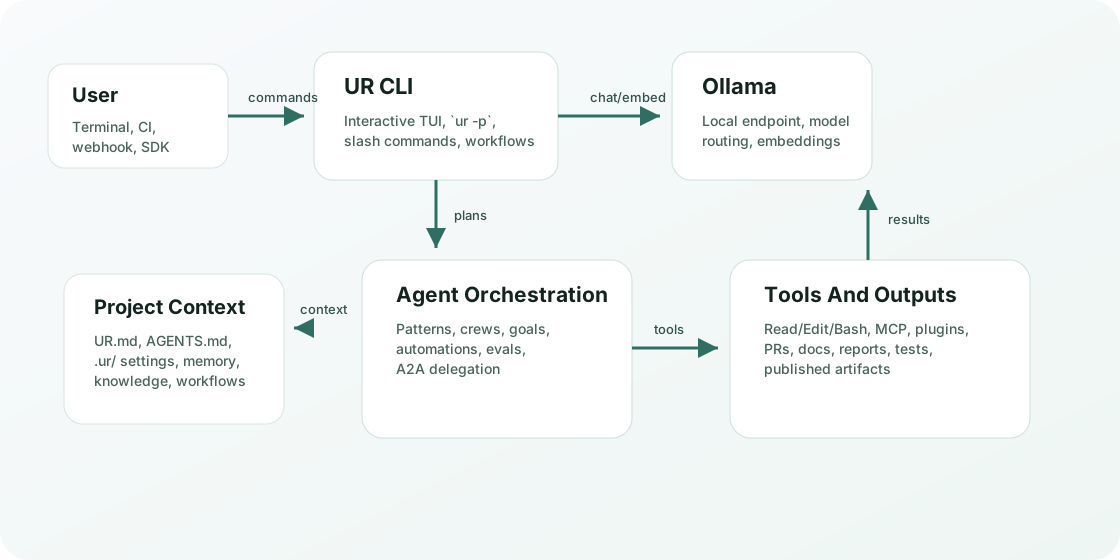
The CLI is the control plane. Project context and .ur assets feed agent orchestration, which uses approved provider adapters, local-first model runtimes, and approved tools to produce auditable results.
How To Think About It
Mental model
Session
A conversation with tools, project context, slash commands, memory, and resumable history.
Headless run
ur -p executes one prompt and exits. This is the base for automations, evals, triggers, SDK calls, and A2A tasks.
Project context
UR.md, AGENTS.md, .ur/agents, .ur/workflows, .ur/project-manifest.json, memory, knowledge, and settings shape behavior.
Permission boundary
Tool access is controlled by permission mode, project safety policy, allowed/disallowed tools, sandbox settings, and user approval.
Agent orchestration
Patterns, workflows, crews, goals, automations, and evals coordinate multiple specialized runs.
Evidence and verification
Self-review, verifier gates, evals, claim ledgers, browser QA, and traces help keep outputs auditable.
Capabilities
Feature map
Each group below links the major UR surfaces to when you should use them.
Production Agent Operations
Ten frontier workflows with explicit trust boundaries
These surfaces keep untrusted task text separate from policy, make publication explicit, and fail closed when evidence is incomplete or changes during verification.
1. Managed cloud fan-out
ur cloud run --runner managed starts isolated candidates. Selection requires a completed session, explicit PASS, and a safe non-empty review branch; ordering is deterministic, not comparative judging. UR never fetches or merges that branch. Cancellation also closes sessions that finish starting concurrently.
2. Idempotent live steering
ur cloud steer and ur bg steer accept bounded messages only for active work. Request IDs are reserved before delivery, digest-bound, and deduplicated across concurrent retries. A2A steering additionally enforces authenticated task ownership.
3. Learned playbooks
ur learn playbooks mines repeated proof-backed safe runs into candidates. Execution requires explicit approval. Rejection is terminal; disable verifies the promoted workflow and moves it into a private disabled archive so it can no longer run.
4. Cited task memory
ur context-pack remember can cite bounded project-file excerpts and run artifacts by SHA-256. Stale, missing, rejected, and superseded entries are excluded by default. User and web sources stay explicitly unverifiable until reopened; memory search performs no network request.
5. Patch-only Agentic CI
ur agent-ci runs from a trusted base in a detached worktree with read-only GitHub permissions and isolated check credentials. Exact NUL-delimited path metadata enforces rename-source, deletion, allow, and deny policy. Pre/post check state digests bind verification to the post-check patch; any staged, unstaged, untracked, or index-visibility mutation suppresses output.
6. Trajectory-aware eval gates
ur eval gate can require pass, trajectory, test, cost, duration, and baseline-regression thresholds. Captures retain control-flow metadata only—never prompts, paths, tool inputs, tool outputs, or assistant text—and a requested missing metric fails closed.
7. Electron desktop QA
ur desktop-qa runs bounded fixtures with guaranteed teardown and masked screenshots. Raw video or trace is refused whenever selector redaction is configured. Evidence is copied into bounded non-symlink attachments; downloads use private/no-store headers, sandbox CSP, a safe inline allow-list, and octet-stream fallback.
8. Durable side chats
/btw creates a private hash-chained side conversation that survives restarts while the main task continues. Every request is a cancellable one-turn, tool-free fork; chat count, turns, content, and storage are bounded, and closed chats reject continuation.
9. Multi-repository coordination
ur workspace pins canonical repository/remote identities and executes a dependency DAG in isolated worktrees. Independent repositories may run concurrently, but each repository has one serialized writer. Changed specifications cannot resume, and PR/rollback commands print plans only.
10. Verified model arena
ur arena --judge model|hybrid exposes only bounded, redacted, anonymous eligible candidates to a one-turn tool-free judge. Candidates need PASS, a non-empty safe patch, and successful checks. Oversized full diffs are excluded rather than truncated into eligibility; malformed decisions yield no winner.
ur cloud run "repair the parser" --runner managed --environment <id> --attempts 3
ur agent-ci validate default
ur eval gate starter --min-pass-rate 1 --min-trajectory-score 0.9
ur desktop-qa validate .ur/desktop-qa/fixtures/smoke.json
ur arena "repair the cache race" --agents 3 --judge hybrid --verify "bun test"
Tutorials
Complete workflows
Use these as practical starting points for the agent features.
Ship a coding change through PR
- Start with
urand make the implementation. - Run
ur agent-task statusto see branch and task state. - Run
ur agent-task difffor the working diff summary. - Dry-run PR creation:
ur agent-task pr --create --dry-run. - Create only after review passes:
ur agent-task pr --create.
ur agent-task status
ur agent-task diff
ur agent-task pr --create --dry-run
Run a checkpointed workflow
- Create a sample workflow under
.ur/workflows. - Validate and inspect the DAG.
- Run it offline first, then live with a concurrency cap.
ur workflow init release
ur workflow validate release
ur workflow graph release --ascii
ur workflow run release --dry-run
ur workflow run release --live --concurrency 2
Plan and apply a safe repo rename
- Build a file and symbol index for the repository.
- Preview the AST-aware JavaScript/TypeScript identifier patch.
- Apply transactionally with a validation command that triggers rollback on failure.
ur repo-edit index
ur repo-edit impact checkoutTotal --depth 5
ur repo-edit search checkoutTotal
ur repo-edit preview rename oldName --to newName
ur repo-edit apply rename oldName --to newName --check "bun test"
Research with a verifiable evidence map
ur research init landscape --question "Which capabilities shipped?"
ur research source landscape --url https://example.com/spec --title "Primary source"
ur research finding landscape --text "A capability shipped." --cite S1
ur research verify landscape
ur research report landscape --out docs/research/landscape.md
Build a reproducible 3D project
ur design3d doctor
ur design3d init product --engine blender --units mm --format glb
ur design3d init studio --engine 3dsmax --units cm --format max
ur design3d build design3d/product --dry-run
ur design3d validate design3d/product
Run test-first command evidence
- Detect the project stack and available quality commands.
- Preview compile, test, and lint evidence without executing it.
- Install the same commands as after-edit verifier gates.
ur test-first detect
ur test-first --dry-run
ur test-first install
Preview command safety and pack context
- Inspect the active safety policy.
- Preview risky command behavior before adding it to scripts or automations.
- Write architecture context and record task decisions.
ur safety status
ur safety check --command "rm -rf build"
ur context-pack scan
ur context-pack remember --decision "Use manifest commands first"
ur context-pack memory verify
ur context-pack compress
Start the ACP server and run a prompt pool
- Start the Agent Client Protocol server for IDE extensions.
- Run one or more prompts in non-interactive mode with concurrency.
- Capture per-prompt outputs to a directory.
ur acp serve --port 8123
ur acp status --json
ur exec "add tests for the parser" --concurrency 4 --json
ur exec --file prompts.jsonl --output-dir ./outputs --dry-run
Connect a user-facing app with AG-UI
- Start the official-schema HTTP/SSE adapter on loopback.
- Inspect its truthful capability document.
- For browser or network use, require a bearer token and exact allowed origin.
ur ag-ui serve
curl http://127.0.0.1:8977/ag-ui/capabilities
UR_AG_UI_TOKEN="$TOKEN" ur ag-ui serve --host 0.0.0.0 --allow-origin https://app.example
Use a multi-agent pattern
- List patterns: PEER, DOE, concurrent, handoff, debate.
- Preview the plan for your task.
- Save or execute the compiled workflow.
ur pattern list
ur pattern show peer
ur pattern run peer "Refactor auth and verify tests" --save
ur pattern run concurrent "Audit browser QA" --execute --dry-run
Build a project knowledge base
- Add curated files, directories, and notes.
- Build lexical or embedding indexes.
- Search with provenance.
ur knowledge add docs --label docs
ur knowledge add --note "Release requires bundle, smoke, package check"
ur knowledge build
ur knowledge search "release checks"
Coordinate a headless crew
- Create a crew from a long goal.
- Add or inspect tasks.
- Run workers in dry-run mode first.
ur crew create docs --goal "Document every public agent feature"
ur crew show docs
ur crew run docs --workers 3 --dry-run
Install recurring automations
- Create project-local automation specs.
- Dry-run due jobs.
- Install a resident scheduler when ready.
ur automation create nightly --schedule "0 9 * * 1-5" --prompt "Review open tasks"
ur automation run-due --dry-run
ur automation install --platform launchd --interval 300
ur automation status
Drive a change from a spec
- Create a spec with requirements, design, tasks, and approval state.
- Inspect or approve each phase.
- Run the task list one item at a time, or use
--all.
ur spec init demo --goal "1. add a utils.add function 2. add a test"
ur spec status demo
ur spec approve demo requirements
ur spec run demo --all --dry-run
Escalate hard work to an oracle model
- Ask UR to plan the fast/oracle model route.
- Run routine work on the fast tier.
- Force or auto-trigger oracle escalation for hard debugging and review.
ur escalate plan "debug the scheduler race"
ur escalate run "refactor the cache layer" --force-oracle --dry-run
ur escalate oracle "is this lock-free queue correct?"
Compare multiple agent attempts
- Run multiple agents against the same task in isolated worktrees.
- Let the deterministic self-review gate score the candidate diffs.
- Apply the winner only when you are ready.
ur arena "implement a debounce helper" --agents 2 --dry-run
ur arena "fix the parser" --agents 3
ur arena "fix the parser" --agents 3 --apply
Repair failing CI in a bounded loop
- Run the build or test command in the printed working directory.
- Preserve the assertion and stack context, then launch a fix attempt only for an actionable failure.
- Rerun until the command passes or the retry budget is exhausted.
A No tests found result stops after the first attempt and points to --cwd; it does not invoke a fix agent.
ur ci-loop --command "bun test" --cwd . --dry-run
ur ci-loop --command "bun test" --cwd ./packages/app --max-attempts 3
ur ci-loop --from-log failure.log --cwd . --dry-run
Capture reviewable artifacts
- Capture the current diff or a test run under
.ur/artifacts. - Review the saved body and status.
- Approve, reject, or add feedback.
ur artifacts capture-diff
ur artifacts capture-tests --command "bun test"
ur artifacts show 1
ur artifacts approve 1
Reference
CLI command reference
The table covers the public top-level commands from ur --help, with examples and common next steps.
Interactive Mode
Slash and local commands
Inside an interactive session, use /help to see what is enabled for your context. These are the main command families shipped by the repo.
Operate Safely
Configuration and security
Models
OLLAMA_MODEL=qwen3-coder:480b-cloud ur
UR_MODEL=qwen3-coder:480b-cloud ur
ur --model qwen2.5-coder:latest
OLLAMA_MODEL wins over UR_MODEL. Without an explicit or workspace model, interactive startup opens the provider/model picker and fresh print mode exits before model execution.
Permissions
ur -p --allowed-tools "Read,Edit,Bash(git:*)" \
  --disallowed-tools "Bash(rm:*)" \
  "Review the current diff"
ur safety check --command "rm -rf build"
Use explicit tool boundaries for automation. Preview risky commands with ur safety. Reserve --dangerously-skip-permissions for disposable sandboxes.
Project context
ur context-pack scan
ur context-pack remember --constraint "Run command evidence before success claims"
ur context-pack memory verify
ur context-pack compress
Context packs summarize architecture and preserve provenance-rich, hash-chained task memory under .ur/context, with verification, quarantine, and rollback recovery.
Verifier
UR_VERIFIER_MODE=strict
UR_VERIFIER_MODE=loose
UR_VERIFIER_MODE=off
UR_VERIFIER_AUTO_SUBAGENT=1
L1 gates catch false done claims, immediate-action promises that end without their tool call, and loops. /verify manually runs deeper verification.
Interactive users can set "verifier": { "askBeforeGates": true } in .ur/settings.json (or via ur config set verifier.askBeforeGates true) to have UR ask once per user turn before running project test/typecheck/lint gates after a task, instead of running them automatically. Default is false (auto-run gates).
MCP and plugins
ur mcp list
ur mcp add-json local-tools '{"command":"node","args":["server.js"]}'
ur mcp serve-http --port 8976
ur skill verify <name-or-directory>
ur ag-ui serve --help
ur plugin list
ur plugin search git
ur plugin show github@ur-plugins-official
ur plugin install <plugin>
The opt-in stateless MCP HTTP adapter exposes negotiated Tasks and Apps. Portable skills load from native and cross-client roots with strict validation and Ed25519 provenance. Plugin search provides ranked cross-catalog discovery with provenance and capability metadata. AG-UI provides a bounded, opt-in frontend stream. Treat MCP servers and plugins as trusted code.
IDE inline diffs
ur ide diff capture --title "Parser fix"
ur ide diff list
ur ide diff show <id>
UR packages its bundled VS Code inline-diffs extension as a local VSIX. The public install path does not depend on the stale marketplace extension ID.
Workspace Layout
Project files UR understands
Examples
Copy-ready examples
Use these snippets as templates for common workflows.
Debugging
Troubleshooting
Installed version is old
npm uninstall -g ur-agent
npm install -g ur-agent@latest --registry=https://registry.npmjs.org/
hash -r
which -a ur
ur --version
Source checkout update message
ur upgrade
# Development build detected. To update, pull latest source or install from npm.
Source checkouts do not self-mutate. npm-installed builds compare against the latest ur-agent version and print the exact install command when an update is available.
Ollama model not found
ollama list
ur model-doctor
ur model-route "Fix a TypeScript test failure"
Automation did not run
ur automation list
ur automation status
ur automation run-due --dry-run
ur automation daemon --once --dry-run
Need evidence of what happened
/trace 20
ur agent-inspect --file session.jsonl
ur artifacts list
ur eval report starter
ur claim-ledger validate
CI loop reports no tests
Use the working directory printed in the result. The loop stops after one attempt because changing code cannot repair a test-discovery cwd error.
ur ci-loop --command "bun test" --cwd . --max-attempts 3
ur ci-loop --command "bun test" --cwd ./packages/app --max-attempts 3
New agent-platform command is missing
ur --version
ur --help | grep -E "repo-edit|test-first|safety|context-pack|spec|arena|escalate|ci-loop|artifacts"
npm install -g ur-agent@latest --registry=https://registry.npmjs.org/
hash -r