# Unicode Emoji Picker
[](https://www.npmjs.com/package/unicode-emoji-picker)
[](https://unicode.org/Public/emoji/17.0/)
[](https://github.com/Julien-Marcou/Unicode-Emoji-Picker)



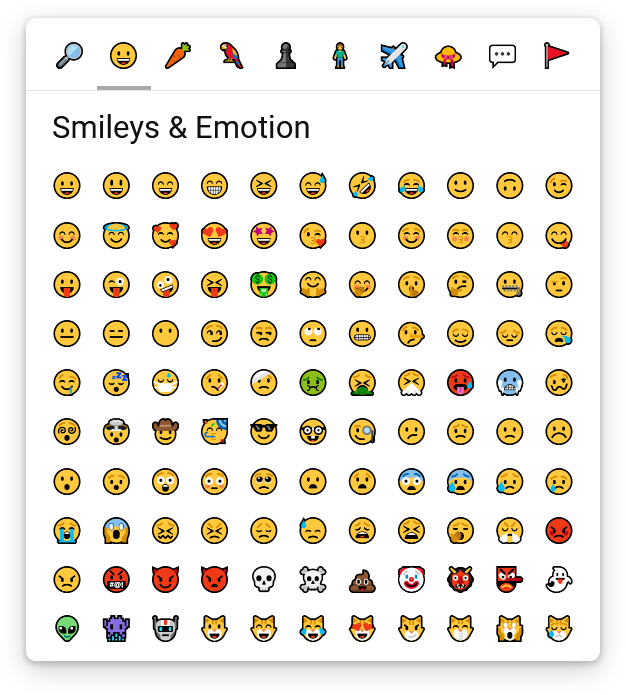
Unicode Emoji Picker is a custom element (Web Component) that allows you to pick an Emoji from the `Unicode Emoji` specification.
```html
```
## Demo
[Check out the demo](https://emoji.julien-marcou.fr/)
## Installation
```shell
npm install unicode-emoji-picker
```
## Usage
This NPM package uses the ECMAScript Modules system, so the easiest way to use it, is with a Bundler (like WebPack), so you don't have to worry about how to make it available and import it.
### With a Bundler
As it is a self-defined custom element, you must import it only once in your main entry file so it's available everywhere :
```javascript
import 'unicode-emoji-picker';
```
In addition to the previous import, if you are using TypeScript, and want the typing of the `EmojiPickerElement`, you can import it where you need it :
```typescript
import { EmojiPickerElement } from 'unicode-emoji-picker';
```
### Without a Bundler
Because `unicode-emoji-picker` have named dependencies to `scrollable-component` (custom scrollbars) and `unicode-emoji` (raw data for Emojis), you will have to use [Import Maps](https://wicg.github.io/import-maps/), so the dependencies can be properly loaded.
You will also need to expose the following files, so they are accessible from the web :
- `scrollable-component/index.js`
- `unicode-emoji/index.js`
- `unicode-emoji-picker/index.js`
Unfortunately, Import Maps are not implemented in any browser yet, so you'll have to use a polyfill :
```html
```
Then you will be able to import it in your HTML using a `module-shim` script :
```html
```
## Documentation
The `EmojiPickerElement` is displayed by default, if you want to place it relative to another HTML element or display/hide it, it's all up to you :
```html
```
To retrieve the emoji picked by the user, you can add an event listener :
```javascript
const emojiPicker = document.querySelector('unicode-emoji-picker');
emojiPicker.addEventListener('emoji-pick', (event) => {
console.log(event.detail.emoji);
});
```
You can display the filters bar on every side of the Unicode Emoji Picker by setting the `filters-position` attribute to one of these values : `top`, `bottom`, `left` or `right` (default to `top`) :
```html
```
You can choose the version of the `Unicode Emoji` specification to use by setting the `version` attribute to one of these values : `0.6`, `0.7`, `1.0`, `2.0`, `3.0`, `4.0`, `5.0`, `11.0`, `12.0`, `12.1`, `13.0`, `13.1`, `14.0`, `15.0`, `15.1`, `16.0` or `17.0` (default to `12.0` as newer versions are currently not widely supported) :
```html
```
You can choose which group will be selected by default by setting the `default-group` attribute to one of these values : `search`, `face-emotion`, `food-drink`, `animals-nature`, `activities-events`, `person-people`, `travel-places`, `objects`, `symbols` or `flags` (default to `face-emotion`)
```html
```
You can use the Unicode Emoji Picker's API after the custom `` element has been defined to programmatically change the selected group or trigger a search :
```javascript
const emojiPicker = document.querySelector('unicode-emoji-picker');
window.customElements.whenDefined('unicode-emoji-picker').then(() => {
emojiPicker.selectGroup('search');
emojiPicker.searchEmoji('love face');
});
```
## Customization
You can customize the look of the Unicode Emoji Picker using CSS properties :
```css
unicode-emoji-picker {
/* Because the component is built using the "em" unit, everything is scaled up from the font-size */
/* So you should probably only change this value if you want to resize the component */
/* It also directly reflects the font-size for the emoji font */
font-size: 24px;
/* Dimensions of the viewport */
--min-emoji-column: 6;
--max-emoji-column: 11;
--min-emoji-row: 4;
--max-emoji-row: 10;
/* Global */
--outer-padding: 0.8em;
--fill-color: #fff;
--text-color: #111;
--border-radius: 10px;
--box-shadow: 0 8px 30px 0 rgba(0, 0, 0, 0.2), 0 2px 6px 2px rgba(0, 0, 0, 0.15);
--transition: 150ms cubic-bezier(0, 0, .2, .1);
--emoji-font-family: apple color emoji, segoe ui emoji, noto color emoji, android emoji, emojisymbols, emojione mozilla, twemoji mozilla, segoe ui symbol;
/* Filters bar */
--filters-border-width: 1px;
--filters-border-color: #e4e4e4;
--filter-fill-color: transparent;
--filter-fill-color-hover: #e9e9e9;
--filter-border-radius: 8px;
--filter-active-marker-border-width: 4px;
--filter-active-marker-border-color: #aaa;
--filter-padding: 0.5em;
--filter-gap: 0.2em;
--filter-size: 2em;
/* Content's viewport */
--content-scrollbar-width: 14px;
--content-scrollbar-thumb-fill-color: #d7d7d7;
--content-scrollbar-thumb-fill-color-hover: #aaa;
/* Title/search bar */
--title-bar-fill-color: rgba(255, 255, 255, 0.95);
--title-bar-height: 3em;
--title-bar-horizontal-padding: 1.1em;
--title-bar-font-size: 1.3em;
--search-input-font-size: 0.85em;
--search-input-line-height: 1.6em;
--search-input-padding: 0.35em 0.4em 0.55em;
--search-input-border-width: 0 0 4px 0;
--search-input-border-color: #e4e4e4;
--search-input-border-color-hover: #222;
/* Emojis */
--emoji-fill-color: transparent;
--emoji-fill-color-hover: transparent;
--emoji-border-width: 4px;
--emoji-border-color: transparent;
--emoji-border-color-hover: #d7d7d7;
--emoji-border-radius: 8px;
--emoji-gap: 0.2em;
--emoji-size: 1.85em;
--emoji-font-size: 1em;
/* Variations panel */
--variations-backdrop-fill-color: rgba(255, 255, 255, 0.7);
--variations-fill-color: var(--fill-color);
--variations-border-radius: var(--border-radius);
--variations-shadow: 0 2px 5px 0 rgba(0, 0, 0, .2), 0 1px 3px 0 rgba(0, 0, 0, .2);
--emoji-variation-marker-size: 8px;
--emoji-variation-marker-border-width: 4px;
--emoji-variation-marker-border-color: #d7d7d7;
--emoji-variation-marker-border-color-hover: #aaa;
}
```
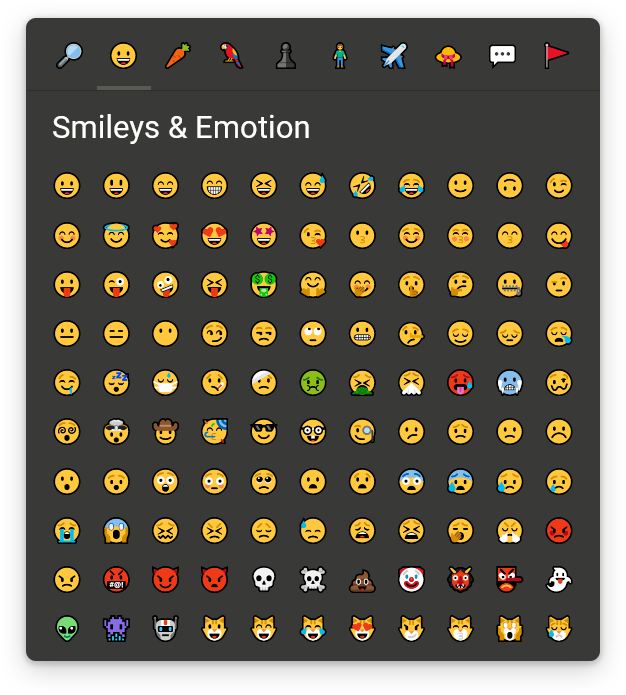
Here is an example for a dark theme :
```css
unicode-emoji-picker {
--fill-color: #393938;
--text-color: #fffffc;
--box-shadow: 0 8px 30px 0 rgba(0, 0, 0, 0.35);
--filters-border-color: #30302a;
--filter-fill-color-hover: #454540;
--content-scrollbar-thumb-fill-color: #50504a;
--content-scrollbar-thumb-fill-color-hover: #76766f;
--filter-active-marker-border-color: #595955;
--title-bar-fill-color: rgba(57, 57, 55, 0.96);
--search-input-border-color: #50504a;
--search-input-border-color-hover: #eee;
--emoji-border-color-hover: #595955;
--variations-backdrop-fill-color: rgba(57, 57, 55, 0.8);
--emoji-variation-marker-border-color: #50504a;
--emoji-variation-marker-border-color-hover: #76766f;
}
```
## Translation
You can translate the labels (or change them to whatever you want) using the `setTranslation()` method after the custom `` element has been defined :
```javascript
const emojiPicker = document.querySelector('unicode-emoji-picker');
window.customElements.whenDefined('unicode-emoji-picker').then(() => {
emojiPicker.setTranslation({
'search': {
emoji: '🔎',
title: 'Search an Emoji',
inputPlaceholder: 'Search an Emoji...',
},
'face-emotion': {
emoji: '😀️',
title: 'Smileys & Emotion',
},
'food-drink': {
emoji: '🥕️',
title: 'Food & Drink',
},
'animals-nature': {
emoji: '🦜️',
title: 'Nature & Animals',
},
'activities-events': {
emoji: '♟️',
title: 'Activities & Events',
},
'person-people': {
emoji: '🧍',
title: 'People',
},
'travel-places': {
emoji: '✈️',
title: 'Travel & Places',
},
'objects': {
emoji: '👒',
title: 'Clothing & Objects',
},
'symbols': {
emoji: '💬️',
title: 'Symbols',
},
'flags': {
emoji: '🚩',
title: 'Flags',
},
});
});
```
Unfortunately, you can't translate emojis' description & keywords yet.
## Browser compatibility
Firefox, Chromium-based browsers (Chrome, Edge, Opera, ...) & WebKit-based browsers (Safari, ...)