[](https://travis-ci.org/bruderstein/unexpected-react-shallow)
[](https://coveralls.io/github/bruderstein/unexpected-react-shallow?branch=master)
# unexpected-react-shallow
A port of the excellent [unexpected-dom](https://github.com/munter/unexpected-dom) to support
[React](http://reactjs.org) [shallow renderer](https://facebook.github.io/react/docs/test-utils.html#shallow-rendering).
Diffing of props and content, including detailed diffing of object props.
```js
var renderer = TestUtils.createRenderer();
renderer.render();
expect(renderer, 'to have rendered',
Some simple content
);
```
And you receive a beautiful error message
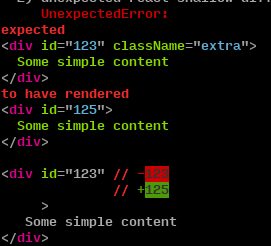
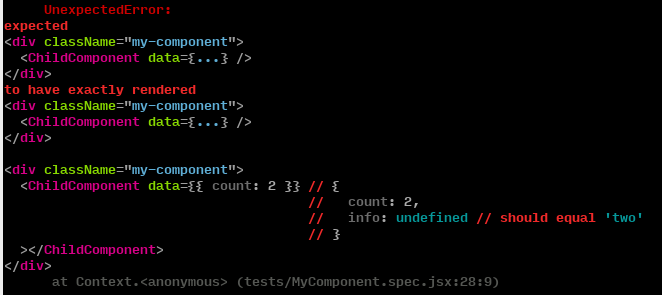
Object props are also diffed, when they don't match
# Status
Although this project itself is well tested, it is still in early development, and there may well be issues.
Use with caution. If you find any case that does not work as expected, please report it via the issues.
# Setup
```js
var unexpected = require('unexpected');
var unexpectedReactShallow = require('unexpected-react-shallow');
var expect = unexpected.clone()
.installPlugin(unexpectedReactShallow);
```
# Assertions
## `to have rendered`
```js
expect(shallowRenderer, 'to have rendered', reactElement);
```
`reactElement` in this case is a ReactElement, normally created by using JSX
For example
```js
expect(shallowRenderer, 'to have rendered', );
```
The same thing works for `shallowRenderer.getRenderOutput()`.
Extra props that are rendered are ignored (see `to have exactly rendered below`), as
are extra children.
Using the following simple component:
```js
var Component = React.createClass({
render: function () {
return (
one
two
three
);
}
});
```
You can make the following assertions:
## `to have [exactly] rendered [with all children]`
```js
// Extra props and children from the render are ignored
expect(renderer, 'to have rendered', );
// The span "two" is missing here, but it is ignored.
expect(renderer, 'to have rendered',
one
three
);
// The following assertion will fail, as 'four' does not exist
expect(renderer, 'to have rendered',
one
four
);
```
If you want to check for an exact render, use `'to have exactly rendered'`.
Alternatively, if you don't care about extra props, but want to check that there are no extra child nodes, use `'to have rendered with all children'`
Note that `exactly` implies `with all children`, so you using both options is not necessary.
```js
// The span "two" is missing here, as is `className="parent"`
// The missing span will cause an assertion error, but the extra prop will be ignored
// due to `to have rendered with all children` being used
expect(renderer, 'to have rendered with all children',
one
three
);
```
```js
// The span "two" is missing here, as is `className="parent"`
// This will cause an assertion error,
// due to `to have exactly rendered` being used
expect(renderer, 'to have exactly rendered',
one
three
);
```
## `to contain`
It's possible to check for a part of the subtree, without
testing the entire returned tree. This allows you to test specific elements, without
writing brittle tests that break when the structure changes.
```js
// This will pass, as `two` can be found in the renderers output
expect(renderer, 'to contain', two);
```
Notice that the extra `className="middle"` in the `two` is ignored,
in a similar way to the `to have rendered` assertion.
You can override this behaviour by using `'to contain exactly'`, and `'to contain with all children'`
```js
// This will fail, as `two` cannot be found in the renderers output, due to
// the missing `className="middle"` prop
expect(renderer, 'to contain exactly', two);
```
The same thing applies to children for `'to contain'` as for `'to have rendered'`.
# Strings
String content is split up by React when you have embedded variables.
For example:
```js
{
render: function() {
return (
Click on {this.props.clickCount} times
);
}
}
```
This actually produces 3 "child" elements of the div, `Click on `, the `clickCount` and the ` times`
To make this simpler, `unexpected-react-shallow` concatenates these values so you can simply test the
previous example as follows:
```js
expect(renderer, 'to have rendered',
Clicked on 3 times
);
```
If you use the `exactly` variants of the assertions, you will need to split up your assertion in the same way
e.g.
```js
expect(renderer, 'to have exactly rendered',
Clicked on {3} times
);
```
# Contributing
We welcome pull requests, bug reports, and extra test cases. If you find something that doesn't work
as you believe it should, raise an issue!
# Thanks
Special thanks to all of the [unexpected](http://github.com/unexpectedjs) team. The quality failure
messages and diffs have made a huge difference to the way I test, and how quickly issues are resolved.
A huge thanks to @Munter, who wrote [unexpected-dom](http://github.com/munter/unexpected-dom), which enables
testing DOM elements easily - it's perfect for more involved tests if you're using React and something
like [jsdom](https://github.com/tmpvar/jsdom). A lot (most!) of the code for `unexpected-react-shallow` was
taken from `unexpected-dom`.
# License
MIT