[](https://travis-ci.org/TheDiveO/ThirdFlow)
# ThirdFlow Plugin Development Support Plugin

The _Third Flow_ plugin brings to you another way to develop customizations for
TiddlyWiki 5. It is not enforcing a specific development flow, it simply tries
to help you. Otherwise, it tries to stay out of your way. You can develop some
parts of your plugin inside the browser, and other parts in your favorite code
editor -- get the best of all worlds.
* You can **develop your plugin directly from within your browser**. A server-based
TiddlyWiki instance running on Node.js ensures that all your source tiddlers are
neatly stored in a clean and hierarchically organized folder structure.
`$ npm run develop` is your friend.
* **Source code management is done as usual** using your favorite source code
management tool, such as `git`. As the Third Flow plugin neatly structures your
tiddler source files, you'll get a well-organized repository structure at no
price.
* For **packaging your plugin** you finally simply run a shell script which
packs the plugin tiddler and saves it to disk. Additionally, you may opt to
create an additional demonstration TiddlyWiki to teach your future plugin users
how to use your AWESOME plugin. `npm run release` is all you need.
Of course, the _Third Flow_ plugin is developed using the same process it
supports. We actually _eat_ our own dog food.
## In Simple Pictures
Enough words for now, let's follow the old proverb that «_a single figure lies
more than a thousands words_»...
### Development Phase
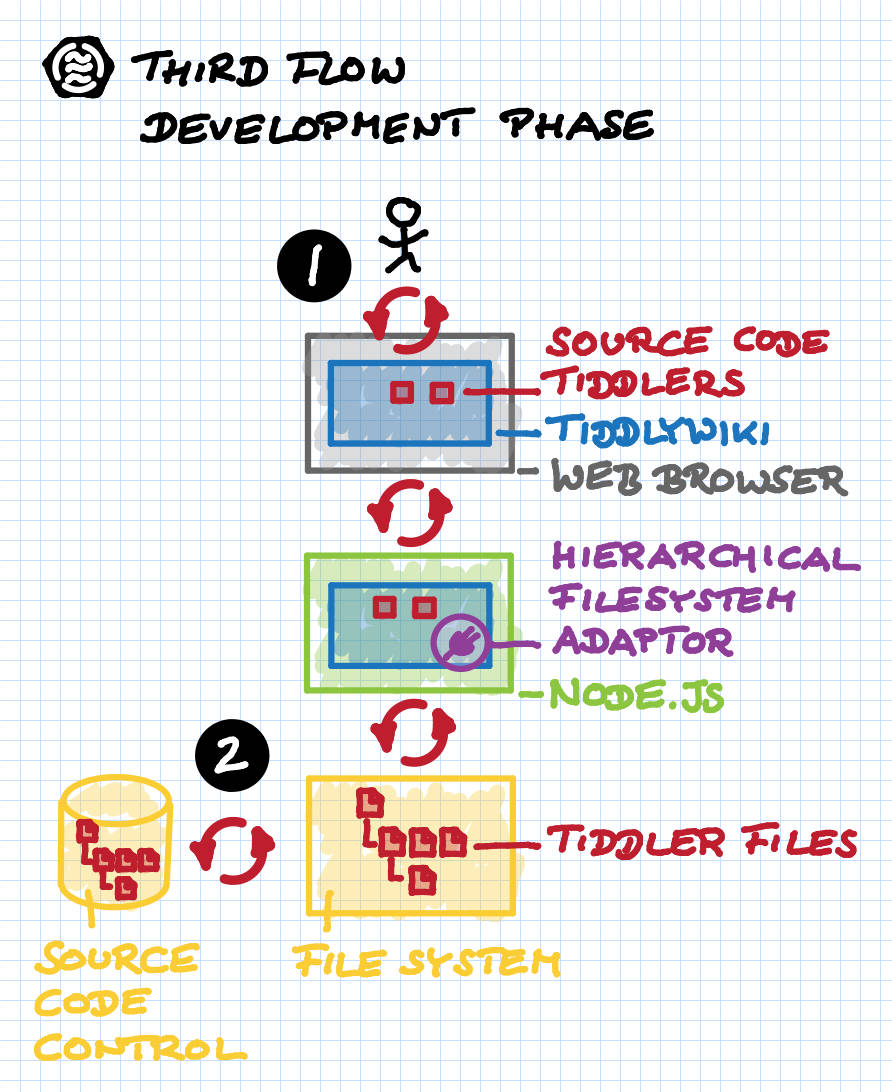 (1) Development:
* You simply develop (parts of) your plugin inside the TiddlyWiki 5
environment that you are already familiar with.
* Edit the tiddlers belonging to your plugin directly inside a TiddlyWiki,
and get live, immediate feedback...
* ...inside a standard TiddlyWiki 5...
* ...inside a standard HMTL5 web browser. _Turtles_, anyone?
* Your TiddlyWiki synchronizes with a computer-local TiddlyWiki 5 server,
running on top of Node.js. This TiddlyWiki server is running in "development"
mode.
* Inside this server is a special sync plugin HierarchicalFilesystemAdaptor
that...
* ...stores your tiddlers persistently inside a _hierarchical_ folder
structure on your disk.
(2) Source Code Control:
* Use your favorite source code control system (and cloud service) to manage
your plugin tiddlers conveniently. For example, `git` and GitHub.
### Release Phase
(1) Development:
* You simply develop (parts of) your plugin inside the TiddlyWiki 5
environment that you are already familiar with.
* Edit the tiddlers belonging to your plugin directly inside a TiddlyWiki,
and get live, immediate feedback...
* ...inside a standard TiddlyWiki 5...
* ...inside a standard HMTL5 web browser. _Turtles_, anyone?
* Your TiddlyWiki synchronizes with a computer-local TiddlyWiki 5 server,
running on top of Node.js. This TiddlyWiki server is running in "development"
mode.
* Inside this server is a special sync plugin HierarchicalFilesystemAdaptor
that...
* ...stores your tiddlers persistently inside a _hierarchical_ folder
structure on your disk.
(2) Source Code Control:
* Use your favorite source code control system (and cloud service) to manage
your plugin tiddlers conveniently. For example, `git` and GitHub.
### Release Phase
 (3) Release:
* You can easily release your plugin as a single plugin .tid file for easy
import, and you can also release it as part of a demonstration TiddlyWiki,
too. Oh, you can also release multiple separate plugins simultaneously.
* The export runs as a TiddlyWiki server command...
* ...inside a Node.js environment.
* Your plugin tiddlers get loaded as usual from the file system. This time
it's all in _read-only_ mode, because we don't want to change tiddlers. We
only want to export.
* Plugin export is controlled using a templated tiddler renderer.
* Demo TiddlyWiki export is done using a special save template.
## In-TW Development Aid
### Plugin Sources View
While working on the source tiddlers of a plugin from within a web browser, the
ThirdFlow plugin lends you a helping hand.
(3) Release:
* You can easily release your plugin as a single plugin .tid file for easy
import, and you can also release it as part of a demonstration TiddlyWiki,
too. Oh, you can also release multiple separate plugins simultaneously.
* The export runs as a TiddlyWiki server command...
* ...inside a Node.js environment.
* Your plugin tiddlers get loaded as usual from the file system. This time
it's all in _read-only_ mode, because we don't want to change tiddlers. We
only want to export.
* Plugin export is controlled using a templated tiddler renderer.
* Demo TiddlyWiki export is done using a special save template.
## In-TW Development Aid
### Plugin Sources View
While working on the source tiddlers of a plugin from within a web browser, the
ThirdFlow plugin lends you a helping hand.
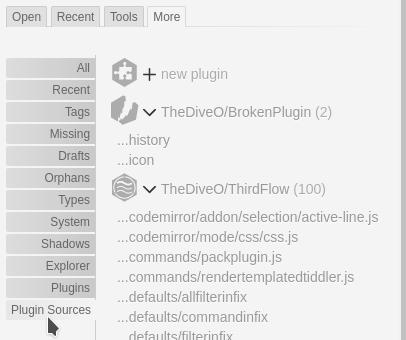 For instance, there's a new tab called "Plugin Sources". It lives inside the
sidebar's "More" tab, and it shows you all your plugin source tiddlers neatly
listed in order. But more importantly, this additional view is much more
concise than the existing "System" and "Shadows" views. The latters are fine
when you need to see _everything_. But they are unwieldy while focusing on your
_own_ plugin(s)s. That's exactly what the additional "Plugin Sources" view is
about.
### Creating New Plugins
Creating a new plugin is now also now easier than before. Simply go to the
"Plugin Sources" tab in the sidebar. Then click on "+ new plugin", which you'll
find right at the top of the view.
For instance, there's a new tab called "Plugin Sources". It lives inside the
sidebar's "More" tab, and it shows you all your plugin source tiddlers neatly
listed in order. But more importantly, this additional view is much more
concise than the existing "System" and "Shadows" views. The latters are fine
when you need to see _everything_. But they are unwieldy while focusing on your
_own_ plugin(s)s. That's exactly what the additional "Plugin Sources" view is
about.
### Creating New Plugins
Creating a new plugin is now also now easier than before. Simply go to the
"Plugin Sources" tab in the sidebar. Then click on "+ new plugin", which you'll
find right at the top of the view.
 With the new plugin tiddler being shown for editing, simply fill in the fields.
Make sure to replace _PublisherName_ and _PluginName_ with something more
sensible. You should notice how the Plugin Meta Data fields update accordingly.
With the new plugin tiddler being shown for editing, simply fill in the fields.
Make sure to replace _PublisherName_ and _PluginName_ with something more
sensible. You should notice how the Plugin Meta Data fields update accordingly.
 And then you're done. Well, for the plugin itself. Now you can start populating
your new plugin with cool new tiddlers.
### Standard Boilerplate
First, you should add the standard boilerplate tiddlers `readme`, `license`
and `history`. You may notice that there's already an action for this appearing
for your still empty plugin.
And then you're done. Well, for the plugin itself. Now you can start populating
your new plugin with cool new tiddlers.
### Standard Boilerplate
First, you should add the standard boilerplate tiddlers `readme`, `license`
and `history`. You may notice that there's already an action for this appearing
for your still empty plugin.
 Simply click on it and you get the boilerplate tiddlers opened in the right
places, ready to be edited.
### Add Good Stuff
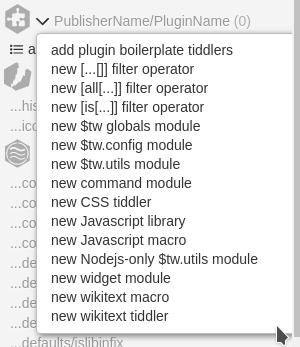
To speed up your plugin development, ThirdFlow offers to create certain types
of tiddlers in well-known places inside your plugin, giving you an easy start
by filling in template code.
Simply click on it and you get the boilerplate tiddlers opened in the right
places, ready to be edited.
### Add Good Stuff
To speed up your plugin development, ThirdFlow offers to create certain types
of tiddlers in well-known places inside your plugin, giving you an easy start
by filling in template code.
 ### Generate Release Files
When you're ready to release, first configure what to release. That's easy,
simply go to the Control Pane and open its "ThirdFlow" tab. Then click on its
"Release" sub-tab.
### Generate Release Files
When you're ready to release, first configure what to release. That's easy,
simply go to the Control Pane and open its "ThirdFlow" tab. Then click on its
"Release" sub-tab.
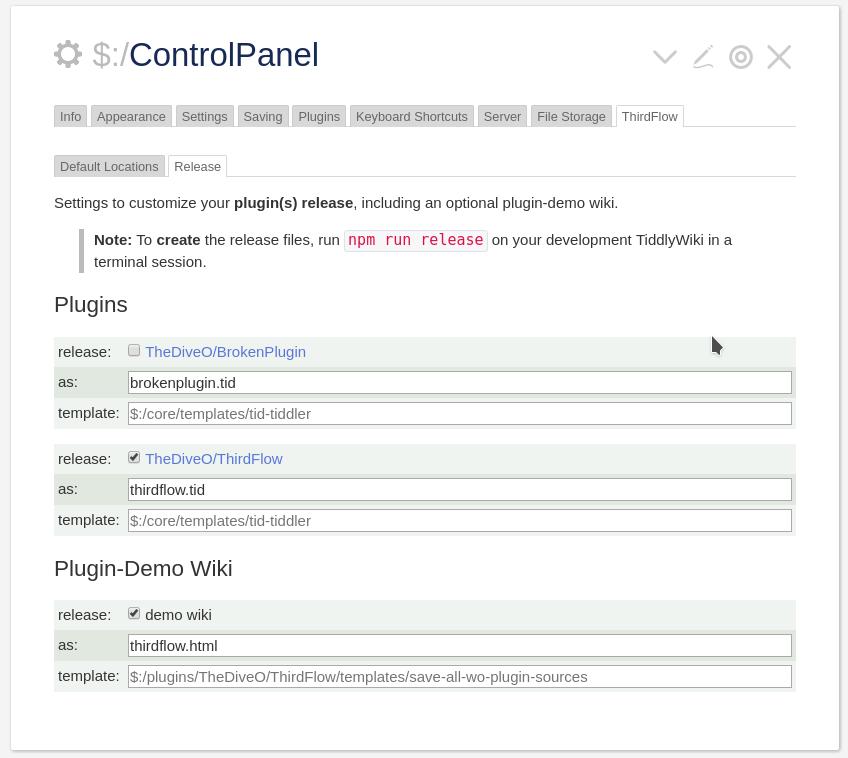 Check the plugin you want to release and set their filenames. Optionally,
check the "demo wiki" and also set its filename.
Then switch to a terminal session and simply run `npm run release` to generate
your release files inside the `editions/release/output/` folder.
# Installation/Setup For Plugin Development
The easiest way to get started with your own plugin development is to clone the
dedicated skeleton repository on GitHub, and then use that:
```bash
$ git clone https://github.com/TheDiveO/TiddlyWikiPluginSkeleton
$ cd TiddlyWikiPluginSkeleton
$ npm install
$ npm run develop
```
Navigate your browser to [localhost:8080](http://localhost:8080) and start
developing your plugin. You'll now be greeted with the shiny new "Plugin
Kickstarter" tiddler. Fill in the fields and follow its instructions by clicking
through the few steps to create a new plugin.
> **NOTE:** you can change the default port on which the development server
> can be reached to a different port by either specifying a different port as
> an argument:
>
> ```bash
> $ npm run develop --tw5-thirdflow:port=9999
> ```
>
> ...or by constantly changing the configuration value:
>
> ```bash
> $ npm config set tw5-thirdflow:port 9999
> ```
>
> Use `npm config delete tw5-thirdflow:port` to restore the default setting.
Also make sure to visit the ThirdFlow tab in the Control Panel, and its Release
tab. Enable the creation of release file and set their filenames. And then,
simply run:
```bash
$ npm run release
```
The release files are to be found inside `editions/release/output`.
# Hacking ThirdFlow Itself
First clone **this repository**, then change into it, and finally run `npm install`
inside it to get the whole shebang set up correctly.
```bash
$ git clone https://github.com/TheDiveO/ThirdFlow.git
$ cd ThirdFlow
$ npm install
```
Then run the development server for ThirdFlow itself:
```bash
$ npm run develop
```
...and open [localhost:8080](http://localhost:8080).
As mentioned above, you can change the port on which your develop server can be reached, either temporarily:
```bash
$ npm run develop --tw5-thirdflow:port=9999
```
...or permanently.
```bash
$ npm config set tw5-thirdflow:port 9999
```
Use `npm config delete tw5-thirdflow:port` to restore the default setting.
# License
The Third Flow plugin is covered by the following licenses:
* The **Third Flow plugin** is licensed under the [MIT license](http://opensource.org/licenses/MIT).
* The **hierarchical file system adapter** is licensed under the
[TiddlyWiki 5 license](https://raw.githubusercontent.com/Jermolene/TiddlyWiki5/master/licenses/copyright.md)
(links to GitHub TW5 repository). It bases on filesystemadaptor.js and brings
in storing tiddlers into hierarchical folder structures according to their
titles.
* **Other content** of this TiddlyWiki which is not part of the plugin or
TiddlyWiki 5 is covered by the
[CC BY 3.0](http://creativecommons.org/licenses/by/3.0/) license.
## Author
[TheDiveO on GitHub](https://github.com/TheDiveO)
Check the plugin you want to release and set their filenames. Optionally,
check the "demo wiki" and also set its filename.
Then switch to a terminal session and simply run `npm run release` to generate
your release files inside the `editions/release/output/` folder.
# Installation/Setup For Plugin Development
The easiest way to get started with your own plugin development is to clone the
dedicated skeleton repository on GitHub, and then use that:
```bash
$ git clone https://github.com/TheDiveO/TiddlyWikiPluginSkeleton
$ cd TiddlyWikiPluginSkeleton
$ npm install
$ npm run develop
```
Navigate your browser to [localhost:8080](http://localhost:8080) and start
developing your plugin. You'll now be greeted with the shiny new "Plugin
Kickstarter" tiddler. Fill in the fields and follow its instructions by clicking
through the few steps to create a new plugin.
> **NOTE:** you can change the default port on which the development server
> can be reached to a different port by either specifying a different port as
> an argument:
>
> ```bash
> $ npm run develop --tw5-thirdflow:port=9999
> ```
>
> ...or by constantly changing the configuration value:
>
> ```bash
> $ npm config set tw5-thirdflow:port 9999
> ```
>
> Use `npm config delete tw5-thirdflow:port` to restore the default setting.
Also make sure to visit the ThirdFlow tab in the Control Panel, and its Release
tab. Enable the creation of release file and set their filenames. And then,
simply run:
```bash
$ npm run release
```
The release files are to be found inside `editions/release/output`.
# Hacking ThirdFlow Itself
First clone **this repository**, then change into it, and finally run `npm install`
inside it to get the whole shebang set up correctly.
```bash
$ git clone https://github.com/TheDiveO/ThirdFlow.git
$ cd ThirdFlow
$ npm install
```
Then run the development server for ThirdFlow itself:
```bash
$ npm run develop
```
...and open [localhost:8080](http://localhost:8080).
As mentioned above, you can change the port on which your develop server can be reached, either temporarily:
```bash
$ npm run develop --tw5-thirdflow:port=9999
```
...or permanently.
```bash
$ npm config set tw5-thirdflow:port 9999
```
Use `npm config delete tw5-thirdflow:port` to restore the default setting.
# License
The Third Flow plugin is covered by the following licenses:
* The **Third Flow plugin** is licensed under the [MIT license](http://opensource.org/licenses/MIT).
* The **hierarchical file system adapter** is licensed under the
[TiddlyWiki 5 license](https://raw.githubusercontent.com/Jermolene/TiddlyWiki5/master/licenses/copyright.md)
(links to GitHub TW5 repository). It bases on filesystemadaptor.js and brings
in storing tiddlers into hierarchical folder structures according to their
titles.
* **Other content** of this TiddlyWiki which is not part of the plugin or
TiddlyWiki 5 is covered by the
[CC BY 3.0](http://creativecommons.org/licenses/by/3.0/) license.
## Author
[TheDiveO on GitHub](https://github.com/TheDiveO)