[](https://github.com/ts-graphviz/ts-graphviz/actions/workflows/main.yaml)
[](https://github.com/ts-graphviz/ts-graphviz/actions/workflows/codeql-analysis.yml)
[](https://github.com/ts-graphviz/ts-graphviz/blob/main/LICENSE)
[](#contributors-)
[](https://www.bestpractices.dev/projects/8396)
[](https://scorecard.dev/viewer/?uri=github.com/ts-graphviz/ts-graphviz)
[](https://tidelift.com/subscription/pkg/npm-ts-graphviz?utm_source=npm-ts-graphviz&utm_medium=readme)
[](https://badge.fury.io/js/ts-graphviz)

[](https://github.com/denoland/deno)
[](https://npmtrends.com/ts-graphviz)
# ts-graphviz
[Graphviz](https://graphviz.gitlab.io/) library for TypeScript.
🔗
[](https://github.com/ts-graphviz/ts-graphviz)
[](https://www.npmjs.com/package/ts-graphviz)
[](https://ts-graphviz.github.io/ts-graphviz/)
[](https://deepwiki.com/ts-graphviz/ts-graphviz)
[](https://github.com/sponsors/ts-graphviz)
[](https://opencollective.com/ts-graphviz)
[](https://biomejs.dev/)
[](https://vitest.dev/)
[](https://rollupjs.org/)
---
## Key Features ✨
`ts-graphviz` package provides models and ASTs for the Graphviz DOT language fully integrated with TypeScript.
- **TypeScript-friendly API**
- It provides models in the DOT language. TypeScript type definitions are also provided for attributes and even attribute types.
- **Freedom from programming paradigms**
- Designed to be object-oriented, it provides APIs that can be adapted to both imperative and declarative APIs. You can choose the paradigm that best fits your project.
- **Suitable for any use cases**
- Both a high-layer API to provide models and a low-layer API to handle ASTs are provided to address any use cases.
- **Modular and Extensible**
- The library is split into multiple packages, each serving a specific purpose. This modular design allows users to pick and choose the functionality they need, resulting in improved maintainability and flexibility.
- **Cross Platform**
- It supports both Node.js and Deno and Browser.
- **Customizable**
- It provides a way to extend the library's type system to customize graph visualization solutions to meet specific needs.
## Installation 💽
### Node.js
This package can then be installed using a package manager.
```bash
# npm
$ npm install -S ts-graphviz
# or yarn
$ yarn add ts-graphviz
# or pnpm
$ pnpm add ts-graphviz
```
> **Note** Want to try before installing? Check out [Runkit](https://npm.runkit.com/ts-graphviz) to see how it works.
### Deno 🦕
[Deno v1.28 and above supports npm](https://deno.land/manual/node/npm_specifiers).
You can install and use the package by specifying the following:
```ts
import { toDot } from 'npm:ts-graphviz';
```
## Usage 📑
This section provides an overview of the package.
For more detailed API specifications, please refer to the comments in the TypeScript type definitions and the [document](https://ts-graphviz.github.io/ts-graphviz/) automatically generated based on them.
### `ts-graphviz` Module 🚩
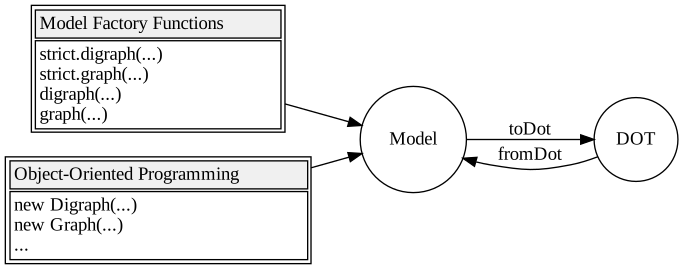
This module provides **Model**, an interface for working with the DOT language in JavaScript/TypeScript.
#### Object-Oriented ❤️
**Model** is designed to be object-oriented and provides classes `Digraph`, `Graph`, `Subgraph`, `Node`, and `Edge`.
Provides a `toDot` function to convert **Model** to **DOT** (DOT language string).
```typescript
import { attribute as _, Digraph, Subgraph, Node, Edge, toDot } from 'ts-graphviz';
const G = new Digraph();
const A = new Subgraph('A');
const node1 = new Node('node1', {
[_.color]: 'red'
});
const node2 = new Node('node2', {
[_.color]: 'blue'
});
const edge = new Edge([node1, node2], {
[_.label]: 'Edge Label',
[_.color]: 'pink'
});
G.addSubgraph(A);
A.addNode(node1);
A.addNode(node2);
A.addEdge(edge);
const dot = toDot(G);
// digraph {
// subgraph "A" {
// "node1" [
// color = "red",
// ];
// "node2" [
// color = "blue",
// ];
// "node1" -> "node2" [
// label = "Edge Label",
// color = "pink",
// ];
// }
// }
```
Advanced Usage
##### Custom Class 🤖
You can also add your own implementation by inheriting from the class.
```typescript
import { Digraph, Node, Edge, EdgeTargetTuple, attribute as _, toDot } from 'ts-graphviz';
class MyCustomDigraph extends Digraph {
constructor() {
super('G', {
[_.label]: 'This is Custom Digraph',
});
}
}
class MyCustomNode extends Node {
constructor(id: string) {
super(`node_${id}`, {
[_.label]: `This is Custom Node ${id}`,
});
}
}
class MyCustomEdge extends Edge {
constructor(targets: EdgeTargetTuple) {
super(targets, {
[_.label]: 'This is Custom Edge',
});
}
}
const digraph = new MyCustomDigraph();
const node1 = new MyCustomNode('A');
const node2 = new MyCustomNode('B');
const edge = new MyCustomEdge([node1, node2]);
digraph.addNode(node1);
digraph.addNode(node2);
digraph.addEdge(edge);
const dot = toDot(digraph);
// digraph "G" {
// label = "This is Custom Digraph";
// "node_A" [
// label = "This is Custom Node A";
// ];
// "node_B" [
// label = "This is Custom Node B";
// ];
// "node_A" -> "node_B" [
// label = "This is Custom Edge";
// ];
// }
```
##### Models Context API ( `with` method) 🧅
You can also use the _Models Context API_ to create custom classes for objects generated inside of Graph.
The `with` methods of `Digraph`, `Graph`, and `Subgraph`, which are implementations of `GraphBaseModel`, are provided to predefine custom models.
```typescript
const g = new Digraph();
g.with({
Node: MyCustomNode,
Edge: MyCustomEdge,
});
const a = g.createNode('A'); // MyCustomNode
const b = g.createNode('B'); // MyCustomNode
g.createEdge([a, b]); // MyCustomEdge
const dot = toDot(g);
// digraph {
// "node_A" [
// label = "This is Custom Node A";
// ];
// "node_B" [
// label = "This is Custom Node B";
// ];
// "node_A" -> "node_B" [
// label = "This is Custom Edge";
// ];
// }
```
##### `fromDot` function ⏪
> The status of this function is ! [beta](https://img.shields.io/badge/-beta-orange).
The main scenario for using this library is to use the `toDot` function, but it also supports conversions in the reverse direction.
By converting **DOT** to **Model**, a portion of the code can be written in the DOT language.
```typescript
const G = fromDot(
`digraph {
node_A [
label = "This is a Label of Node A";
];
}`,
);
G.edge(['node_A', 'node_B']);
const dot = toDot(G)
// digraph {
// "node_A" [
// label = "This is a Label of Node A";
// ];
// "node_A" -> "node_B";
// }
```
#### Declarative API 😎
When creating `Graph` or `Digraph`, you can use _Model Factory_ to provide a notation more similar to the **DOT** language.
**Model** also has a declarative API, so you can consistently choose a declarative paradigm.
```typescript
import { attribute as _, digraph, toDot } from 'ts-graphviz';
const G = digraph('G', (g) => {
const a = g.node('aa');
const b = g.node('bb');
const c = g.node('cc');
g.edge([a, b, c], {
[_.color]: 'red'
});
g.subgraph('A', (A) => {
const Aa = A.node('Aaa', {
[_.color]: 'pink'
});
const Ab = A.node('Abb', {
[_.color]: 'violet'
});
const Ac = A.node('Acc');
A.edge([Aa.port('a'), Ab, Ac, 'E'], {
[_.color]: 'red'
});
});
});
const dot = toDot(G);
// digraph "G" {
// "aa";
// "bb";
// "cc";
// subgraph "A" {
// "Aaa" [
// color = "pink",
// ];
// "Abb" [
// color = "violet",
// ];
// "Acc";
// "Aaa":"a" -> "Abb" -> "Acc" -> "E" [
// color = "red",
// ];
// }
// "aa" -> "bb" -> "cc" [
// color = "red",
// ];
// }
```
> **Note** Of course, we also provide an API for creating strict mode graphs.
>
> ```typescript
> import { strict, toDot } from 'ts-graphviz';
>
> const G = strict.graph(...);
> const dot = toDot(G);
> // strict graph {
> // }
> ```
Advanced Usage
##### Models Context API ( `withContext` function ) 💈
The `withContext` function returns a _Model Factory_ function.
This _Model Factory_ provides a means to replace `RootGraphModel` with a custom class, such as `Digraph` or `Graph`.
This API provides a way to integrate declarative APIs and custom classes.
```typescript
const { digraph } = withContext({
Digraph: MyCustomDigraph,
Node: MyCustomNode,
Edge: MyCustomEdge,
});
const G = digraph((g) => {
const a = g.node('A'); // MyCustomNode
const b = g.node('B'); // MyCustomNode
g.edge([a, b]); // MyCustomEdge
});
const dot = toDot(g);
// digraph "G" {
// label = "This is Custom Digraph";
// "node_A" [
// label = "This is Custom Node A";
// ];
// "node_B" [
// label = "This is Custom Node B";
// ];
// "node_A" -> "node_B" [
// label = "This is Custom Edge";
// ];
// }
```
### `@ts-graphviz/adapter` Module 🔌
> This module status is .
Provides an interface to run Graphviz dot commands.
[Graphviz](https://graphviz.gitlab.io/) must be installed so that the dot command can be executed.
Execute the dot command to output a DOT language string to a stream or file.
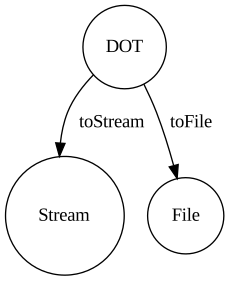
This module provides the following functions.
- The `toStream` function converts **DOT** to **Stream**.
```ts
import { toStream } from 'ts-graphviz/adapter';
const dot = `
digraph example {
node1 [
label = "My Node",
]
}
`;
const stream = await toStream(dot, { format: 'svg' });
// Node.js
stream.pipe(process.stdout);
// Deno
await stream.pipeTo(Deno.stdout.writable);
```
- Writes **DOT** to a file at the specified path `toFile` function
```ts
import { toFile } from 'ts-graphviz/adapter';
const dot = `
digraph example {
node1 [
label = "My Node",
]
}
`;
await toFile(dot, './result.svg', { format: 'svg' });
```
> **Note** Designed to work with Node.js and Deno, Stream is runtime native.
### `@ts-graphviz/ast` Module 🔢
> This module status is .
An API is provided to handle ASTs for advanced use.
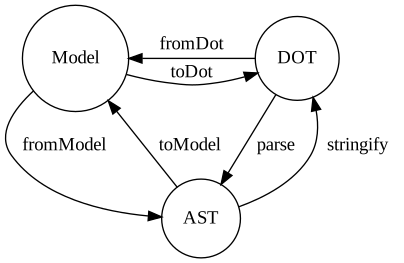
The following functions are provided as described in the state transition diagram.
- The `fromModel` function converts **Model** to **AST**.
- The `toModel` function converts **AST** to **Model**.
- The `stringify` function converts **AST** to **DOT**.
- The `parse` function to convert from **DOT** to **AST**.
> **Note** As you can see from the above figure, the `toDot` function provided by the `ts-graphviz` package is a composite of `fromModel` and `stringify`. The `fromDot` function is a composite of `parse` and `toModel`.
Detailed usage is TODO.
Please refer to the TypeScript type definition.
The parse function and AST
```typescript
import { parse } from '@ts-graphviz/ast';
const ast = parse(`
digraph example {
node1 [
label = "My Node",
]
}
`);
// {
// type: 'Dot',
// location: {
// start: { offset: 3, line: 2, column: 3 },
// end: { offset: 68, line: 7, column: 1 }
// },
// children: [
// {
// id: {
// value: 'example',
// quoted: false,
// type: 'Literal',
// location: {
// start: { offset: 11, line: 2, column: 11 },
// end: { offset: 18, line: 2, column: 18 }
// },
// children: []
// },
// directed: true,
// strict: false,
// type: 'Graph',
// location: {
// start: { offset: 3, line: 2, column: 3 },
// end: { offset: 67, line: 6, column: 4 }
// },
// children: [
// {
// id: {
// value: 'node1',
// quoted: false,
// type: 'Literal',
// location: {
// start: { offset: 25, line: 3, column: 5 },
// end: { offset: 30, line: 3, column: 10 }
// },
// children: []
// },
// type: 'Node',
// location: {
// start: { offset: 25, line: 3, column: 5 },
// end: { offset: 63, line: 5, column: 6 }
// },
// children: [
// {
// key: {
// value: 'label',
// quoted: false,
// type: 'Literal',
// location: {
// start: { offset: 39, line: 4, column: 7 },
// end: { offset: 44, line: 4, column: 12 }
// },
// children: []
// },
// value: {
// value: 'My Node',
// quoted: true,
// type: 'Literal',
// location: {
// start: { offset: 47, line: 4, column: 15 },
// end: { offset: 56, line: 4, column: 24 }
// },
// children: []
// },
// location: {
// start: { offset: 39, line: 4, column: 7 },
// end: { offset: 57, line: 4, column: 25 }
// },
// type: 'Attribute',
// children: []
// }
// ]
// }
// ]
// }
// ]
// }
```
### Extending the Type System 🧰
> The status of this feature is .
With ts-graphviz, you can extend the library's type system to customize graph visualization solutions to meet specific needs.
> **Note** To allow for customization, types are named with the `$` symbol.
>
> If you want to extend a type definition in cases not listed below, check the source code to see if you can extend it with `$...`.
>
> If not, please create an issue or pull request.
#### Use Case: Specifying Custom Graph Layout and Output Formats
```ts
import { $keywords } from '@ts-graphviz/common';
import { toFile } from '@ts-graphviz/adapter';
// 1. Declare the '@ts-graphviz/adapter' module.
declare module '@ts-graphviz/adapter' {
export namespace Layout {
// 2. Define the $values interface in the Layout namespace.
// 3. Inherit from $keywords<'my-custom-algorithm'> and specify the name of the new layout engine in <...>.
export interface $values extends $keywords<'my-custom-algorithm'> {}
}
export namespace Format {
// 4. Define the $values interface in the Format namespace.
// 5. Inherit from $keywords<'mp4'> and specify the name of the new output format in <...>.
export interface $values extends $keywords<'mp4'> {}
}
}
toFile('digraph { a -> b }', '/path/to/file', {
layout: 'my-custom-algorithm',
format: 'mp4',
});
```
#### Use Case: Adding Custom Attributes
```ts
import { $keywords } from '@ts-graphviz/common';
import { digraph, toDot, attribute as _ } from 'ts-graphviz';
// 1. Declare the '@ts-graphviz/common' module.
declare module '@ts-graphviz/common' {
export namespace GraphAttributeKey {
// 2. Define the $values interface in the GraphAttributeKey namespace.
// 3. Inherit from $keywords<'hoge'> and specify the name of the new attribute in <...>.
export interface $values extends $keywords<'hoge'> {}
}
export namespace Attribute {
// 4. Define the $keys interface in the Attribute namespace.
// 5. Inherit from $keywords<'hoge'> and specify the name of the new attribute in <...>.
export interface $keys extends $keywords<'hoge'> {}
// 6. Define the $types interface in the Attribute namespace.
// 7. Specify the new attribute in the key and define its corresponding value in the value.
export interface $types {
hoge: string;
}
}
}
console.log(
toDot(
digraph((g) => {
g.set(_.hoge, 'fuga');
}),
),
);
```
## Deep dive 🏊♂️
### Architecture 🏛
See [ARCHITECTURE.md](https://github.com/ts-graphviz/ts-graphviz/blob/main/ARCHITECTURE.md) for more details.
### Security 🛡️
See [SECURITY.md](https://github.com/ts-graphviz/ts-graphviz/blob/main/SECURITY.md) for more details.
## Who's using `ts-graphviz` 📜
- [Apollo GraphQL](https://github.com/apollographql)
- [AWS](https://github.com/aws)
- [IBM (StrongLoop)](https://strongloop.com)
- [The University of Tokyo](https://github.com/csg-tokyo)
- [Transmute](https://github.com/transmute-industries)
> **Note** Let us know that you're using `ts-graphviz` on [GitHub Discussions](https://github.com/ts-graphviz/ts-graphviz/discussions/736) 🙏
## Related Projects 💫
Related projects can be found at [**ts-graphviz** GitHub Organization](https://github.com/ts-graphviz).
The TypeScript/JavaScript ecosystem provides a variety of OSS with the goal of making Graphviz more connected and easier to use.
## Contributors 👥
Thanks goes to these wonderful people ([emoji key](https://allcontributors.org/docs/en/emoji-key)):
This project follows the [all-contributors](https://github.com/all-contributors/all-contributors)
specification. Contributions of any kind welcome!
## How to Contribute 💪
The easiest way to contribute is to use the library and star [repository](https://github.com/ts-graphviz/ts-graphviz).
### Questions 💭
Feel free to ask questions on [GitHub Discussions](https://github.com/ts-graphviz/ts-graphviz/discussions).
### Report bugs / request additional features 💡
Please register at [GitHub Issues](https://github.com/ts-graphviz/ts-graphviz/issues/new/choose).
### Development / Bug Fixes 🧑💻
See [CONTRIBUTING.md](https://github.com/ts-graphviz/ts-graphviz/blob/main/CONTRIBUTING.md).
### Financial Support 💸
Support this project by becoming a sponsor. Your logo will show up here with a link to your website. [Become a sponsor](https://opencollective.com/ts-graphviz)

Thank you to all our backers! 🙏 [Become a backer](https://opencollective.com/ts-graphviz)

Please support ts-graphviz on [Open Collective](https://opencollective.com/ts-graphviz) or [GitHub Sponsors](https://github.com/sponsors/ts-graphviz).
> **Note** Even just a dollar is enough motivation to develop 😊
## Changelog 📜
See [CHANGELOG.md](https://github.com/ts-graphviz/ts-graphviz/blob/main/packages/ts-graphviz/CHANGELOG.md) for more details.
## ts-graphviz for Enterprise 🏢
Available as part of the Tidelift Subscription.
The maintainers of ts-graphviz and thousands of other packages are working with Tidelift to deliver commercial support and maintenance for the open-source dependencies you use to build your applications.
Save time, reduce risk, and improve code health, while paying the maintainers of the exact dependencies you use.
[Learn more](https://tidelift.com/subscription/pkg/npm-ts-graphviz?utm_source=npm-ts-graphviz&utm_medium=referral&utm_campaign=enterprise&utm_term=repo).
## License ⚖️
This software is released under the MIT License, see [LICENSE](https://github.com/ts-graphviz/ts-graphviz/blob/main/LICENSE).


