[English](README.md) | [한국어](README.ko.md)

Claude Code, Codex, Antigravity를 위한 CLI-first 멀티 모델 오케스트레이션
작업 라우팅, 에이전트 조율, 로컬/원격 팀 실행, Codex/Antigravity/Claude 실행 경로를
감사 가능한 경로로 묶는 단일 진입점입니다.


 deprecated 호환 alias 11개는 전면 API가 아닙니다


빠른 시작 ·
현재 표면 ·
권장 워크플로우 ·
아키텍처 ·
운영 ·
보안
---
## triflux란?
triflux는 **Claude Code plugin + npm CLI**입니다. Claude, Codex, Antigravity를
오가며 AI 코딩 작업을 라우팅합니다. 임의 셸 명령이나 오래된 skill alias가
제어 표면이 되지 않도록 현재 진입점을 좁혔습니다.
현재 설계는 예전 README보다 단순합니다.
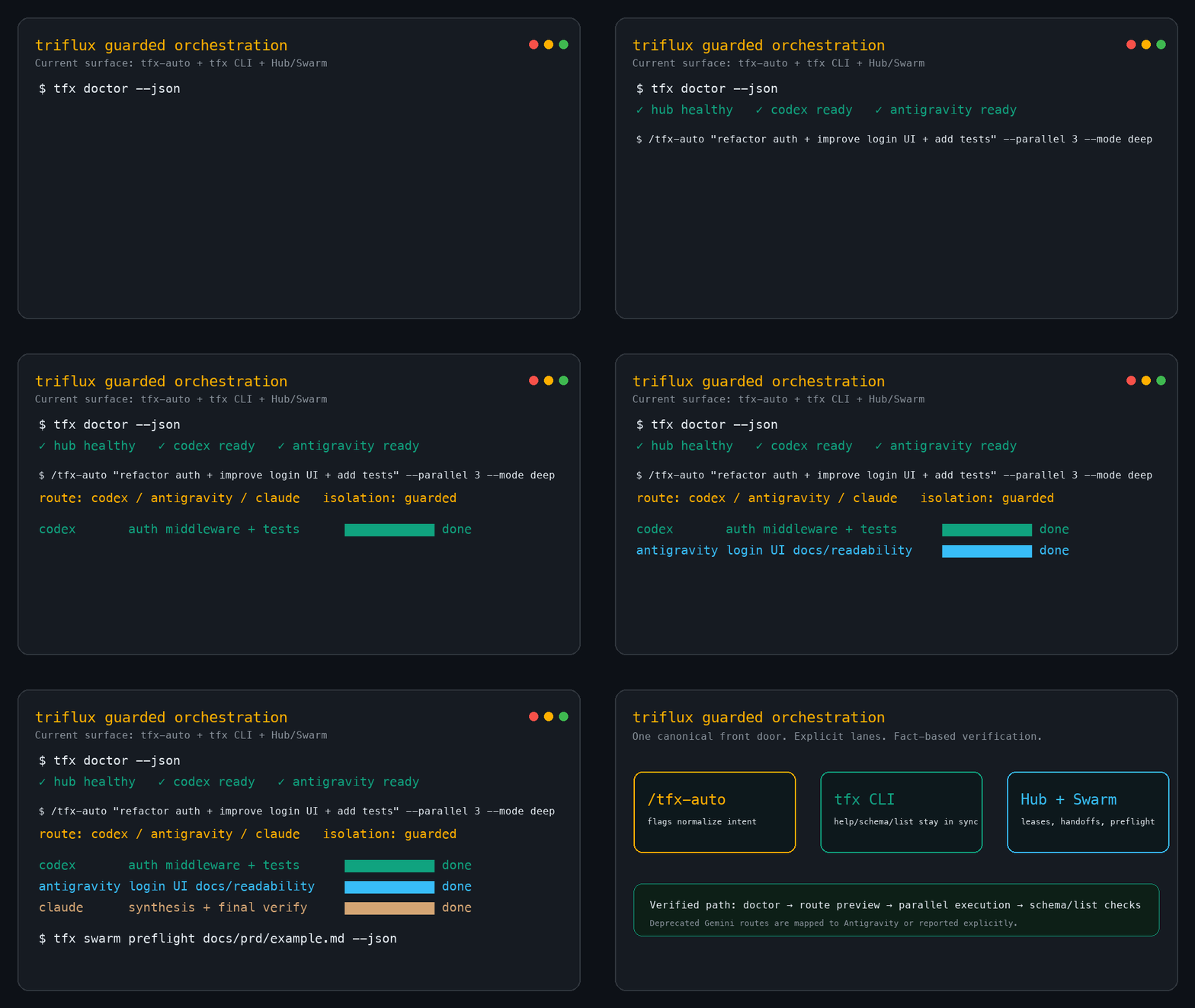
- **`/tfx-auto`가 Claude Code skill의 표준 front door입니다.** quick/deep/consensus/parallel/retry 동작은 플래그로 표현합니다.
- **`tfx`는 셸 CLI입니다.** setup, doctor, Hub, MCP, team/swarm, handoff 같은 운영 작업을 담당합니다.
- **호환 alias는 남아 있지만 전면 API가 아닙니다.** 마이그레이션 표는 [`docs/legacy-skill-aliases.md`](https://github.com/tellang/triflux/blob/main/docs/legacy-skill-aliases.md)로 분리했습니다.
- **호스트 로컬 Codex harness는 패키지 범위 밖입니다.** 예를 들어 `~/.codex/skills/tfx-harness`는 특정 머신에서 워크플로우를 추천할 수 있지만, 이 저장소/npm/Claude plugin에 포함되지 않습니다.
---
## 빠른 시작
### 1. 설치
Claude Code plugin:
```text
/plugin marketplace add tellang/triflux
/plugin install triflux@tellang
```
npm:
```bash
npm install -g triflux
```
터미널에서 setup/doctor를 실행합니다.
```bash
tfx setup
tfx doctor
```
자동화에서는 `tfx doctor --json`을 사용하세요.
### 2. 현재 권장 front door 사용
Claude Code slash skill:
```text
/tfx-auto "이 변경 리뷰해줘" --mode consensus
/tfx-auto "인증 플로우 구현하고 테스트까지" --mode deep --retry ralph
/tfx-auto "이 PRD를 격리 shard로 나눠 실행" --parallel swarm --mode consensus --isolation worktree
/tfx-remote spawn ryzen5-7600 "보안 리뷰 실행"
/tfx-doctor
```
셸 CLI:
```bash
tfx list
tfx hub ensure
tfx mcp list
tfx handoff --target remote --output .omx/handoff.md
tfx swarm preflight docs/prd/example.md --json
tfx codex-team "auth 리팩터링 + 테스트 추가"
```
> deep, consensus, team, swarm 경로는 관련 CLI와 터미널 multiplexer가 필요합니다.
> 먼저 `tfx doctor`를 실행하면 Codex/Antigravity/Claude, psmux/tmux, Hub, MCP,
> profile, stale skill 문제를 한 번에 확인할 수 있습니다.
---
## 현재 표면
### 셸 명령
`tfx` CLI의 주요 명령은 다음과 같습니다.
| 명령 | 용도 |
| --- | --- |
| `tfx setup` | scripts, HUD, hooks, MCP, profile 동기화. `--dry-run` 지원. |
| `tfx doctor` | 설치 상태 진단/복구. `--fix`, `--reset`, `--diagnose`, `--json` 지원. |
| `tfx auto` | `tfx-auto` 라우팅 결정을 미리 확인. `--cli`, `--mode`, `--parallel`, `--json` 지원. |
| `tfx mcp` | MCP registry 대상을 `list`, `sync`, `add`, `remove`. |
| `tfx hub` | 로컬 MCP 메시지 버스 시작/중지/보장/상태 확인. |
| `tfx list` | 설치된 package skill과 user skill 목록. |
| `tfx handoff` | 현재 컨텍스트를 로컬/원격 이어받기 프롬프트로 직렬화. |
| `tfx schema` | CLI와 Hub delegator schema 출력. |
| `tfx hooks` | hook orchestrator를 scan/diff/apply/restore/status로 관리. |
| `tfx tray` | tray/HUD 상태 프로세스 실행. `--attach`는 foreground 디버깅용. |
| `tfx multi` | tmux/psmux + Hub 기반 로컬 multi-agent team 실행. |
| `tfx swarm` | PRD 기반 worktree 격리 swarm의 plan/preflight/run/list. |
| `tfx synapse` | swarm registry와 lease 상태 확인. |
| `tfx review` | Codex 기반 git diff review 실행. |
| `tfx codex-team` | Codex lead team mode용 편의 wrapper. |
| `tfx notion-read` | MCP client로 Notion 페이지를 Markdown으로 변환. |
| `tfx why` | 특정 경로의 마지막 커밋 intent trailer 조회. |
| `tfx update` | 최신 stable/dev 패키지로 업데이트. |
| `tfx monitor` | 터미널 TUI monitor 실행. |
| `tfx version` | 버전 정보 출력. |
| `tfx-profile` | Codex profile 관리용 편의 binary. |
정확한 인자 계약은 `tfx schema `로 확인합니다.
### Claude Code skill
패키지에는 **34개 skill 파일**이 들어 있습니다. 크게 나누면 다음과 같습니다.
- **표준 진입점**: `tfx-auto`, `tfx-remote`, `tfx-doctor`, `tfx-setup`,
`tfx-profile`, `tfx-hub`, `tfx-hooks`, `tfx-ship`, `tfx-wt`.
- **작업 helper**: `tfx-plan`, `tfx-review`, `tfx-qa`, `tfx-research`,
`tfx-analysis`, `tfx-find`, `tfx-index`, `tfx-interview`, `tfx-prune`,
`tfx-forge`, `merge-worktree`, `star-prompt`.
- **deprecated 호환 alias**: 11개 legacy 이름은 전환용 shim입니다. 새 문서와 새 프롬프트에서는 위 표준 진입점을 우선 사용하세요.
### 표준 플래그 맵
대부분의 옛 skill 이름은 `tfx-auto` 플래그로 표현할 수 있습니다.
| 의도 | 표준 형태 |
| --- | --- |
| 빠른 단일 lane 작업 | `/tfx-auto "작업" --mode quick` |
| 더 깊은 계획/실행/검증 루프 | `/tfx-auto "작업" --mode deep` |
| 지속 retry 루프 | `/tfx-auto "작업" --retry ralph` |
| consensus 리뷰 | `/tfx-auto "작업" --mode consensus` |
| debate 또는 panel 보고 | `/tfx-auto "작업" --mode consensus --shape debate|panel` |
| 로컬 병렬 작업 | `/tfx-auto "작업" --parallel N --mode deep` 또는 shell `tfx multi ...` |
| PRD/worktree swarm | `/tfx-auto "작업" --parallel swarm --mode consensus --isolation worktree` 또는 shell `tfx swarm ...` |
| CLI lane 강제 | `/tfx-auto "작업" --cli codex|antigravity|claude` |
### 제어 표면의 경계
triflux를 디버그하거나 확장할 때는 아래 경계를 분리해서 봐야 합니다.
| 표면 | 기준 위치 | npm/plugin 포함 여부 |
| --- | --- | --- |
| 공개 CLI/runtime | `bin/`, `scripts/`, `hub/`, `hooks/`, `skills/` | 포함 |
| publish mirror | `packages/triflux/` | 포함. root runtime 파일과 일치해야 함 |
| Claude plugin metadata | `.claude-plugin/` | 포함. npm package 내용을 가리킴 |
| Codex-local harness 실험 | `~/.codex/skills/*` | 미포함 |
| legacy alias | `skills//` + `docs/legacy-skill-aliases.md` | 포함되지만 deprecated 상태 |
로컬 Codex harness가 workflow를 추천해도 이는 해당 머신의 routing 조언일 뿐입니다.
패키지의 계약은 위의 CLI, Claude skill, hook, Hub 표면입니다.
---
## 권장 워크플로우
### 직접 구현/리뷰
```text
/tfx-auto "실패하는 auth 테스트 고쳐줘" --risk-tier medium
/tfx-auto "SQL과 trust-boundary 중심으로 PR 리뷰" --mode consensus
```
검증 강도를 명시하려면 `--risk-tier low|medium|high`, 모드를 이미 알고 있으면
`--mode quick|deep|consensus`를 사용합니다.
### 끝까지 완료 루프
```text
/tfx-auto "마이그레이션 끝내고 검증까지" --mode deep --retry ralph --max-iterations 10
```
`--retry ralph`는 retry state machine과 stuck detector를 사용합니다. 루프 상한이
필요하면 `--max-iterations`를 지정하세요.
### consensus/debate/panel 출력
```text
/tfx-auto "Postgres LISTEN/NOTIFY vs Redis Streams" --mode consensus --shape debate
/tfx-auto "마이그레이션 전략 리뷰" --mode consensus --shape panel
```
참여 lane은 설정된 Claude/Codex/Antigravity입니다. 어떤 lane이 없으면 결과에 partial/degraded 상태가 드러나야 합니다.
### 로컬 팀 또는 PRD swarm
```text
# 로컬 team mode
tfx multi "auth 리팩터링 + UI 수정 + 테스트 추가"
# worktree 격리 PRD swarm
tfx swarm preflight docs/prd/my-feature.md --json
tfx swarm run docs/prd/my-feature.md
```
swarm은 격리 worktree와 file lease를 사용합니다. 큰 PRD는 실행 전에 preflight로 host,
CLI profile, lease 충돌을 먼저 확인하세요.
### 원격 세션
```text
/tfx-remote setup
/tfx-remote spawn ryzen5-7600 "보안 리뷰 실행"
/tfx-remote list
/tfx-remote attach
/tfx-remote send "수정 계속 진행"
```
`tfx-remote`는 setup/spawn/list/attach/send/resume/probe/kill 흐름을 하나로 묶은 Claude skill 표면입니다.
### 컨텍스트 저장/이어받기
```bash
tfx handoff --target remote --decision "README는 canonical 중심, alias는 docs로 분리" --output .omx/handoff.md
```
세션을 끝내거나 다른 host/agent가 이어받아야 할 때 사용합니다.
---
## 아키텍처
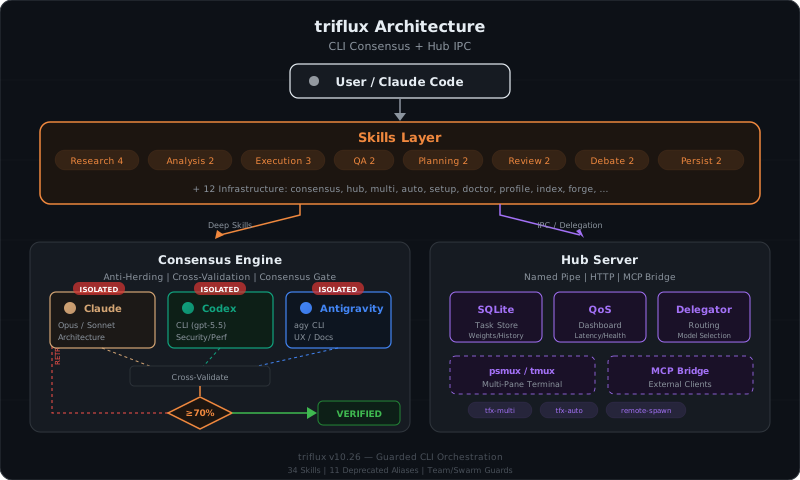
```mermaid
graph TD
User([User / Claude Code / shell]) --> Skills[Claude skills]
User --> CLI[tfx CLI]
Skills --> Auto["/tfx-auto"]
Skills --> Remote["/tfx-remote"]
CLI --> Hub[triflux Hub]
CLI --> Team[tfx multi / swarm]
Auto --> Route[tfx-route.sh + guards]
Team --> Hub
Remote --> Hub
Route --> Codex[Codex CLI]
Route --> Antigravity[Antigravity agy CLI]
Route --> Claude[Claude Code]
Hub --> MCP[MCP registry + bridge]
Hub --> Store[(SQLite or memory store)]
Hub --> Dashboard[HUD / monitor]
```
일반적인 라우팅 경로는 다음과 같습니다.
1. Claude Code prompt 또는 명시적 skill 호출.
2. keyword/routing hook이 context를 추가하거나 skill을 고릅니다.
3. `tfx-auto`가 intent를 mode, retry, parallelism, risk tier, 대상 CLI lane으로 정규화합니다.
4. `tfx-route.sh`, Hub worker, 또는 `tfx` CLI가 실제 Codex/Antigravity/Claude 기반 작업을 실행합니다.
5. Hub가 team message, lease, retry, handoff, status surface를 기록합니다.
### Hub
Hub는 team, remote session, MCP tool, status surface를 위한 로컬 메시지 버스입니다.
localhost에 bind하며 pipe/HTTP transport를 사용합니다.
```bash
tfx hub ensure
tfx hub status --json
tfx hub stop
```
macOS에서 test나 Hub 시작이 `node` localhost port를 열면 방화벽 팝업이 뜰 수 있습니다.
문서 작업에는 필요 없고, 실제 Hub/team/MCP workflow가 필요할 때만 환경 정책에 맞게 허용하세요.
### Guard
triflux는 위험한 실행을 관리된 경로 뒤에 둡니다.
- CLI 호출은 `tfx-route.sh`, Hub worker, `tfx` CLI를 통과해야 합니다.
- 직접 `codex exec` / `gemini -y` 경로는 설치된 workflow에서 guard됩니다.
- psmux/Windows Terminal 흐름은 임의 `wt.exe`/`psmux send-keys`가 아니라 관리 API와 규칙을 사용합니다.
### Profile과 모델 라우팅
Codex profile은 `tfx-profile`로 관리하고, Antigravity 및 legacy Gemini 호환 상태는 `tfx setup`/`tfx doctor`로 점검합니다. 이미 profile이
소유한 model/effort 값을 launcher script에 중복 하드코딩하지 마세요.
---
## 운영
### 진단
```bash
tfx doctor
tfx doctor --json
tfx doctor --fix
tfx doctor --diagnose
```
`doctor`는 CLI, profile, hook, skill, Hub, MCP registry, route script sync,
stale team, 로컬 설정 drift를 확인합니다.
### MCP registry
```bash
tfx mcp list
tfx mcp sync
tfx mcp add context7 --url https://mcp.context7.com/mcp
tfx mcp remove context7
```
registry가 관리 대상 MCP 설정의 source of truth입니다. Drift 디버깅이 아니라면
Codex/Antigravity/Claude MCP 파일을 직접 수정하지 마세요.
### State snapshot
Hub 시작 시 `~/.codex/`, `~/.gemini/` 일부 상태를 ignored `references/*-snapshots/`
폴더에 best-effort daily snapshot으로 저장할 수 있습니다. 수동 helper:
```bash
npm run snapshot:codex
npm run snapshot:gemini
npm run snapshot:all
```
### Release/mirror check
패키지 내용에 영향이 있는 저장소 변경은 ship 전에 release gate를 통과시킵니다.
```bash
npm run lint:skills
npm run gen:skill-manifest
npm run release:check-sync
npm run release:check-mirror
npm run lint
```
`packages/triflux`는 일부 runtime folder의 npm publish mirror입니다. mirror 대상 파일을
수정했다면 동기화 상태를 확인하세요.
---
## 플랫폼 지원
| 플랫폼 | Multiplexer | 참고 |
| --- | --- | --- |
| macOS | tmux | 지원. 일부 흐름은 `gtimeout` 같은 timeout provider 필요. |
| Linux | tmux | 지원. |
| Windows | psmux + Windows Terminal | 관리된 psmux/WT 경로로 지원. psmux 기본 shell은 PowerShell. |
agent/launcher가 따라야 하는 더 엄격한 Windows/psmux 규칙은 `AGENTS.md`와
`.claude/rules/tfx-psmux.md`를 보세요.
---
## 보안과 Guard
| 계층 | 보호 |
| --- | --- |
| Hub token auth | 설정된 경우 Hub API에 로컬 bearer token 적용. |
| Localhost binding | Hub 기본 bind는 `127.0.0.1`. |
| MCP registry guard | 지원하지 않거나 stale한 MCP record를 관리형 HTTP entry로 교체. |
| Headless guard | 비관리 Codex/Antigravity headless 실행 경로와 deprecated Gemini route 차단. |
| Safety guard | psmux/SSH/WT 셸 민감 흐름 sanitizing. |
| Consensus reporting | deep/consensus workflow는 degraded/disputed 결과를 명시해야 함. |
---
## 개발
```bash
npm ci
npm test
npm run lint
npm run release:check-sync
npm run release:check-mirror
```
기여자 메모:
- deprecated alias 세부사항은 main README에 다시 늘어놓지 말고 [`docs/legacy-skill-aliases.md`](https://github.com/tellang/triflux/blob/main/docs/legacy-skill-aliases.md)를 갱신하세요.
- Codex-local 실험은 패키지 경계를 의도적으로 바꾸는 경우가 아니라면 `~/.codex/skills` 아래에 둡니다.
- docs-only 변경은 보통 `npm run lint`, release sync check 같은 targeted check로 충분합니다. full integration test는 Hub 서버와 localhost listener를 띄울 수 있습니다.
---
MIT License · Made by tellang