# TreeTables plug-in for jQuery
[](https://travis-ci.com/reside-ic/TreeTables?branch=master)
[](https://codecov.io/github/reside-ic/TreeTables?branch=master)
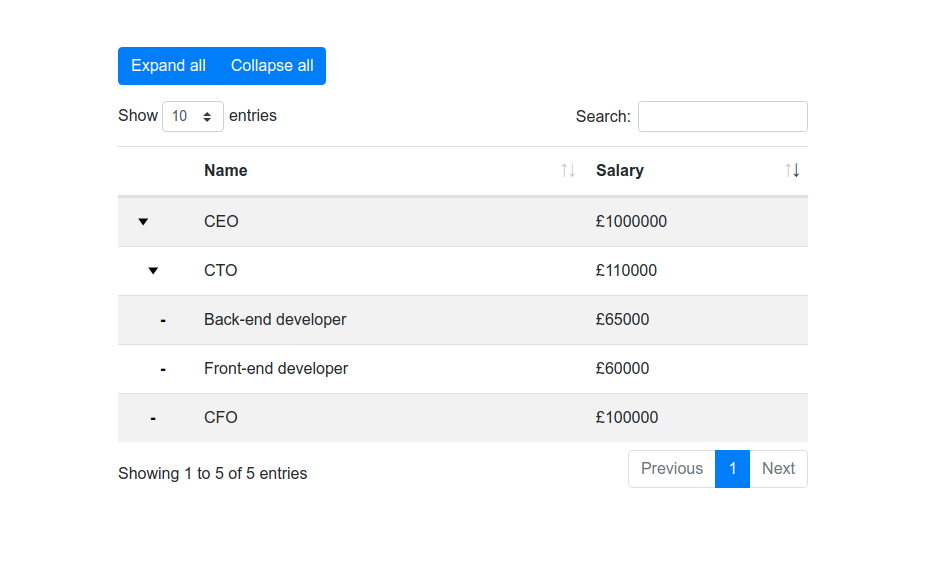
TreeTables is a jQuery plugin that enhances the functionality of the
popular [DataTables](https://github.com/DataTables/DataTables) plugin.
DataTables does not support tree data by default, so this plugin adds
that support.
Please note that TreeTables does *not* support server-side processing.
## Installation options
1. Download:
First download the base DataTables scripts here: https://datatables.net/download/
Then also download this repo and include the following scripts on your page:
```
```
And the following css in your document head:
```
```
See [examples](examples/README.md) for styling with Bootstrap
2. npm: `npm install treetables`
## Basic Usage
```
const organisationData = [
{tt_key: 1, tt_parent: 0, name: "CEO"},
{tt_key: 2, tt_parent: 1, name: "CTO"},
{tt_key: 3, tt_parent: 2, name: "developer"},
{tt_key: 4, tt_parent: 1, name: "CFO"}
];
$('#my-table').treeTable({
"data": myData,
"columns": [
{
"data": "name"
}
]
});
```
Data provided to the table must include the following fields:
* tt_key: number - a unique row identifier. Must be 1-indexed.
* tt_parent: number - the key of this row's parent row
## Options
TreeTable options are most DataTable options plus:
* collapsed: bool - whether to start with all child rows collapsed
```
$('#my-table').treeTable({
"data": myData,
"collapsed": true,
"columns": [
{
"data": "name"
}
]
});
```
Please note that the TreeTable plugin adds a left-hand column to the table.
This means that **user provided columns are 1-indexed instead of 0-indexed**.
E.g., this table will be initially sorted by name:
```
$('#my-table').treeTable({
"data": myData,
"columns": [
{
"data": "name"
},
{
"data": "salary"
}
],
"order": [[ 1, 'asc' ]]
});
```
## API
The DataTables API will be attached to the table element in the usual way,
accessible by ```$('#my-table').DataTable()```
Please note that as with the options, columns are 1-indexed. E.g. to re-sort the
above table by salary:
$('#my-table').DataTable()
.order([ 2, 'asc' ])
.draw();
Additionally the TreeTable plugin exposes API methods for collapsing and
exanding rows via ``` $('#myTable').data('treeTable')```
To expand all rows:
$('#myTable').data('treeTable')
.expandAllRows()
.redraw();
To collapse all rows:
$('#myTable').data('treeTable')
.collapseAllRows()
.redraw();
## Ajax data sources
TreeTables has minimal support for ajax data sources. The `ajax` option can be used as per the
[DataTables documentation](https://datatables.net/reference/option/ajax), but it does *not* support server-side processing,
and it does *not* support the ajax related API methods: `ajax.json()`, `ajax.reload()`, `ajax.url()`
## Examples
See [examples/README.md](examples/README.md)
### Thanks
This plugin was inspired by a [jsfiddle](http://jsfiddle.net/hcke44hy/8)
posted by a user called Mytko in the datatables forum:
https://datatables.net/forums/discussion/25045/treetable-in-datatables
 [](https://travis-ci.com/reside-ic/TreeTables?branch=master)
[](https://codecov.io/github/reside-ic/TreeTables?branch=master)
TreeTables is a jQuery plugin that enhances the functionality of the
popular [DataTables](https://github.com/DataTables/DataTables) plugin.
DataTables does not support tree data by default, so this plugin adds
that support.
Please note that TreeTables does *not* support server-side processing.

## Installation options
1. Download:
First download the base DataTables scripts here: https://datatables.net/download/
Then also download this repo and include the following scripts on your page:
```
```
And the following css in your document head:
```
```
See [examples](examples/README.md) for styling with Bootstrap
2. npm: `npm install treetables`
## Basic Usage
```
const organisationData = [
{tt_key: 1, tt_parent: 0, name: "CEO"},
{tt_key: 2, tt_parent: 1, name: "CTO"},
{tt_key: 3, tt_parent: 2, name: "developer"},
{tt_key: 4, tt_parent: 1, name: "CFO"}
];
$('#my-table').treeTable({
"data": myData,
"columns": [
{
"data": "name"
}
]
});
```
Data provided to the table must include the following fields:
* tt_key: number - a unique row identifier. Must be 1-indexed.
* tt_parent: number - the key of this row's parent row
## Options
TreeTable options are most DataTable options plus:
* collapsed: bool - whether to start with all child rows collapsed
```
$('#my-table').treeTable({
"data": myData,
"collapsed": true,
"columns": [
{
"data": "name"
}
]
});
```
Please note that the TreeTable plugin adds a left-hand column to the table.
This means that **user provided columns are 1-indexed instead of 0-indexed**.
E.g., this table will be initially sorted by name:
```
$('#my-table').treeTable({
"data": myData,
"columns": [
{
"data": "name"
},
{
"data": "salary"
}
],
"order": [[ 1, 'asc' ]]
});
```
## API
The DataTables API will be attached to the table element in the usual way,
accessible by ```$('#my-table').DataTable()```
Please note that as with the options, columns are 1-indexed. E.g. to re-sort the
above table by salary:
$('#my-table').DataTable()
.order([ 2, 'asc' ])
.draw();
Additionally the TreeTable plugin exposes API methods for collapsing and
exanding rows via ``` $('#myTable').data('treeTable')```
To expand all rows:
$('#myTable').data('treeTable')
.expandAllRows()
.redraw();
To collapse all rows:
$('#myTable').data('treeTable')
.collapseAllRows()
.redraw();
## Ajax data sources
TreeTables has minimal support for ajax data sources. The `ajax` option can be used as per the
[DataTables documentation](https://datatables.net/reference/option/ajax), but it does *not* support server-side processing,
and it does *not* support the ajax related API methods: `ajax.json()`, `ajax.reload()`, `ajax.url()`
## Examples
See [examples/README.md](examples/README.md)
### Thanks
This plugin was inspired by a [jsfiddle](http://jsfiddle.net/hcke44hy/8)
posted by a user called Mytko in the datatables forum:
https://datatables.net/forums/discussion/25045/treetable-in-datatables
[](https://travis-ci.com/reside-ic/TreeTables?branch=master)
[](https://codecov.io/github/reside-ic/TreeTables?branch=master)
TreeTables is a jQuery plugin that enhances the functionality of the
popular [DataTables](https://github.com/DataTables/DataTables) plugin.
DataTables does not support tree data by default, so this plugin adds
that support.
Please note that TreeTables does *not* support server-side processing.

## Installation options
1. Download:
First download the base DataTables scripts here: https://datatables.net/download/
Then also download this repo and include the following scripts on your page:
```
```
And the following css in your document head:
```
```
See [examples](examples/README.md) for styling with Bootstrap
2. npm: `npm install treetables`
## Basic Usage
```
const organisationData = [
{tt_key: 1, tt_parent: 0, name: "CEO"},
{tt_key: 2, tt_parent: 1, name: "CTO"},
{tt_key: 3, tt_parent: 2, name: "developer"},
{tt_key: 4, tt_parent: 1, name: "CFO"}
];
$('#my-table').treeTable({
"data": myData,
"columns": [
{
"data": "name"
}
]
});
```
Data provided to the table must include the following fields:
* tt_key: number - a unique row identifier. Must be 1-indexed.
* tt_parent: number - the key of this row's parent row
## Options
TreeTable options are most DataTable options plus:
* collapsed: bool - whether to start with all child rows collapsed
```
$('#my-table').treeTable({
"data": myData,
"collapsed": true,
"columns": [
{
"data": "name"
}
]
});
```
Please note that the TreeTable plugin adds a left-hand column to the table.
This means that **user provided columns are 1-indexed instead of 0-indexed**.
E.g., this table will be initially sorted by name:
```
$('#my-table').treeTable({
"data": myData,
"columns": [
{
"data": "name"
},
{
"data": "salary"
}
],
"order": [[ 1, 'asc' ]]
});
```
## API
The DataTables API will be attached to the table element in the usual way,
accessible by ```$('#my-table').DataTable()```
Please note that as with the options, columns are 1-indexed. E.g. to re-sort the
above table by salary:
$('#my-table').DataTable()
.order([ 2, 'asc' ])
.draw();
Additionally the TreeTable plugin exposes API methods for collapsing and
exanding rows via ``` $('#myTable').data('treeTable')```
To expand all rows:
$('#myTable').data('treeTable')
.expandAllRows()
.redraw();
To collapse all rows:
$('#myTable').data('treeTable')
.collapseAllRows()
.redraw();
## Ajax data sources
TreeTables has minimal support for ajax data sources. The `ajax` option can be used as per the
[DataTables documentation](https://datatables.net/reference/option/ajax), but it does *not* support server-side processing,
and it does *not* support the ajax related API methods: `ajax.json()`, `ajax.reload()`, `ajax.url()`
## Examples
See [examples/README.md](examples/README.md)
### Thanks
This plugin was inspired by a [jsfiddle](http://jsfiddle.net/hcke44hy/8)
posted by a user called Mytko in the datatables forum:
https://datatables.net/forums/discussion/25045/treetable-in-datatables