```
______ ___ __
/\__ _\ /\_ \ /\ \
\/_/\ \/ ___ ___ ___\//\ \ \ \ \____ __ _ __
\ \ \ / __`\ / __`\ / __`\\ \ \ \ \ '__`\ /'__`\ /\`'__\
\ \ \/\ \L\ \/\ \L\ \/\ \L\ \\_\ \_\ \ \L\ \/\ \L\.\_\ \ \/
\ \_\ \____/\ \____/\ \____//\____\\ \_,__/\ \__/.\_\\ \_\
\/_/\/___/ \/___/ \/___/ \/____/ \/___/ \/__/\/_/ \/_/
```
  [](https://www.npmjs.com/package/tooolbar)  [](https://www.jsdelivr.com/package/npm/tooolbar)
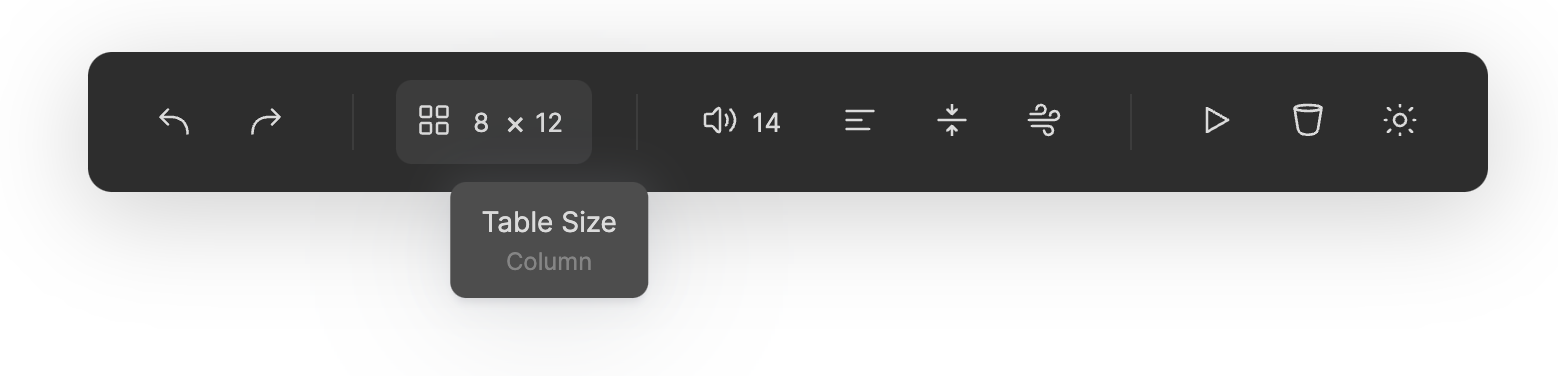
Interactive toolbar rendered from **LINES OF JSON**. Lightweight yet powerful, you can build a toolbar in literally seconds with this **7KB** (GZipped) package.
## Features
- **Lightweight**, with absolute **ZERO** dependency, `Tooolbar` bundles to 20KB unzipped and only **7KB** gzipped 😍.
- **Easy to use**, generate a nice-looking toolbar using **a simple json** 😱.
- **Cool Components**, check out [IconCounter](#icon-counter), [IconScroller](#icon-scroller), [IconSwitcher](#icon-switcher) and others 🤩.
- **Extensibility**, build a full-featured custom component in [~50 lines of code](https://unpkg.com/tooolbar@0.1.2/demo/icon-switcher.js).
## Get Started
### npm
```bash
npm install tooolbar
```
### yarn
```bash
yarn add tooolbar
```
### CDN
```html
```
## Document
### Basic Usage
 [Code](https://github.com/John-Theo/Tooolbar/tree/main/examples/basic) / [Preview](https://unpkg.com/tooolbar@0.1.2/examples/basic/index.html)
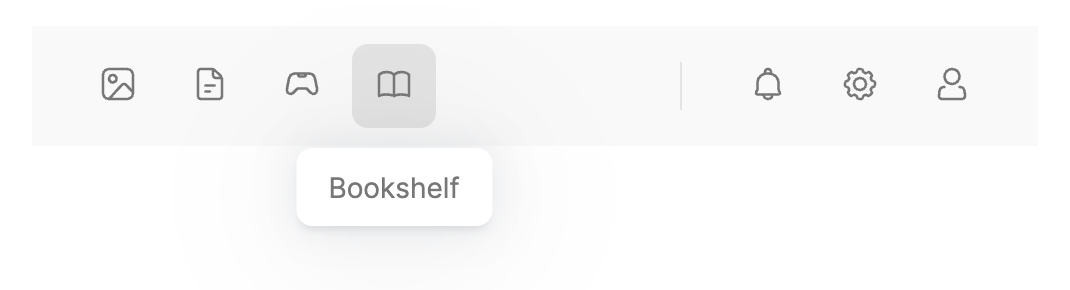
```javascript
const bar = new Bar({ iconBaseUrl: "assets/icon" })
.bindTo(container)
.load([
{ id: "image", type: 'ib', icon: "image", label: "Gallery" },
{ id: "file", type: 'ib', icon: "file", label: "Documents" },
{ id: "game-controller", type: 'ib', icon: "game-controller", label: "Games" },
{ id: "book", type: 'ib', icon: "book", label: "Bookshelf" },
{ type: '-', width: "100px" },
{type: '|', height: "40%"},
{ id: "bell", type: 'ib', icon: "bell", label: "Notifications" },
{ id: "gear", type: 'ib', icon: "gear", label: "Settings" },
{ id: "person", type: 'ib', icon: "person", label: "Account" }
]);
```
### Custom Theme
[Code](https://github.com/John-Theo/Tooolbar/tree/main/examples/basic) / [Preview](https://unpkg.com/tooolbar@0.1.2/examples/basic/index.html)
```javascript
const bar = new Bar({ iconBaseUrl: "assets/icon" })
.bindTo(container)
.load([
{ id: "image", type: 'ib', icon: "image", label: "Gallery" },
{ id: "file", type: 'ib', icon: "file", label: "Documents" },
{ id: "game-controller", type: 'ib', icon: "game-controller", label: "Games" },
{ id: "book", type: 'ib', icon: "book", label: "Bookshelf" },
{ type: '-', width: "100px" },
{type: '|', height: "40%"},
{ id: "bell", type: 'ib', icon: "bell", label: "Notifications" },
{ id: "gear", type: 'ib', icon: "gear", label: "Settings" },
{ id: "person", type: 'ib', icon: "person", label: "Account" }
]);
```
### Custom Theme
 [Code](https://github.com/John-Theo/Tooolbar/tree/main/examples/custom_theme) / [Preview](https://unpkg.com/tooolbar@0.1.2/examples/custom_theme/index.html)
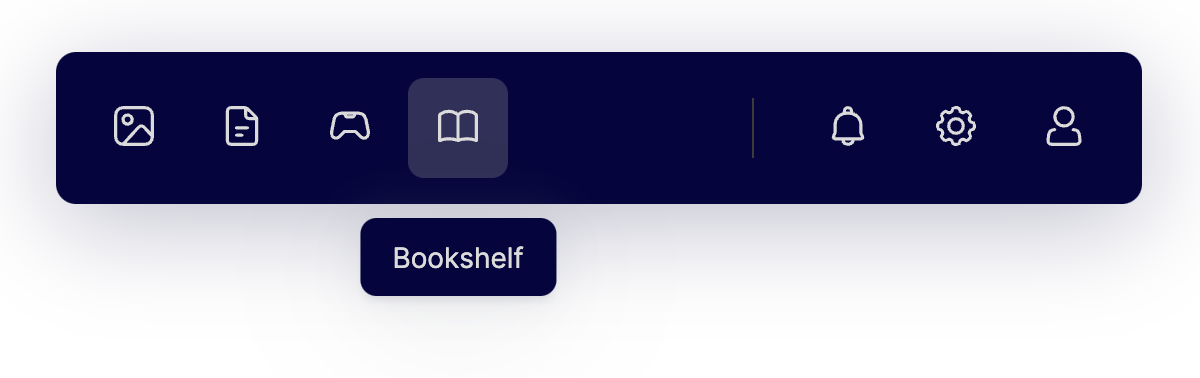
```javascript
Bar.registerTheme("ocean", {
color: {
text: {
normal: "#dbdbdb",
markup: "#858585",
},
bar: {
background: "#05043e",
outline: "#3c3c3c",
},
tip: {
background: "#05043e",
},
tool: {
active: "#30305a",
hover: "#30305a",
}
},
size: {
bar: {
padding: 12,
},
tool: {
button: 40,
icon: 22,
radius: 8,
},
tip: {
offset: 20,
}
}
})
const bar = new Bar({ iconBaseUrl: "../../assets/icon" })
.bindTo(container)
.load(config);
bar.theme = 'ocean';
```
> Style reference: https://codepen.io/havardob/details/qBjbQya
### Custom Component
[Code](https://github.com/John-Theo/Tooolbar/tree/main/examples/custom_theme) / [Preview](https://unpkg.com/tooolbar@0.1.2/examples/custom_theme/index.html)
```javascript
Bar.registerTheme("ocean", {
color: {
text: {
normal: "#dbdbdb",
markup: "#858585",
},
bar: {
background: "#05043e",
outline: "#3c3c3c",
},
tip: {
background: "#05043e",
},
tool: {
active: "#30305a",
hover: "#30305a",
}
},
size: {
bar: {
padding: 12,
},
tool: {
button: 40,
icon: 22,
radius: 8,
},
tip: {
offset: 20,
}
}
})
const bar = new Bar({ iconBaseUrl: "../../assets/icon" })
.bindTo(container)
.load(config);
bar.theme = 'ocean';
```
> Style reference: https://codepen.io/havardob/details/qBjbQya
### Custom Component
 [Code](https://github.com/John-Theo/Tooolbar/tree/main/examples/custom_component) / [Preview](https://unpkg.com/tooolbar@0.1.2/examples/custom_component/index.html)
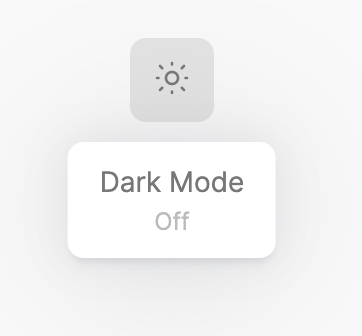
```javascript
const bar = new Bar({ iconBaseUrl: "assets/icon" })
.bindTo(container)
.load([
{
id: "dark", type: 'iw', icons: [
{ "key": "on", "icon": "moon", "label": "On" },
{ "key": "off", "icon": "sun", "label": "Off" }
], label: "Dark Mode", current: "off"
},
]);
bar.get('dark').addEventListener('click', (e) => {
bar.theme = (bar.theme === 'light') ?'dark':'light'
})
```
## Components
[Code](https://github.com/John-Theo/Tooolbar/tree/main/examples/custom_component) / [Preview](https://unpkg.com/tooolbar@0.1.2/examples/custom_component/index.html)
```javascript
const bar = new Bar({ iconBaseUrl: "assets/icon" })
.bindTo(container)
.load([
{
id: "dark", type: 'iw', icons: [
{ "key": "on", "icon": "moon", "label": "On" },
{ "key": "off", "icon": "sun", "label": "Off" }
], label: "Dark Mode", current: "off"
},
]);
bar.get('dark').addEventListener('click', (e) => {
bar.theme = (bar.theme === 'light') ?'dark':'light'
})
```
## Components
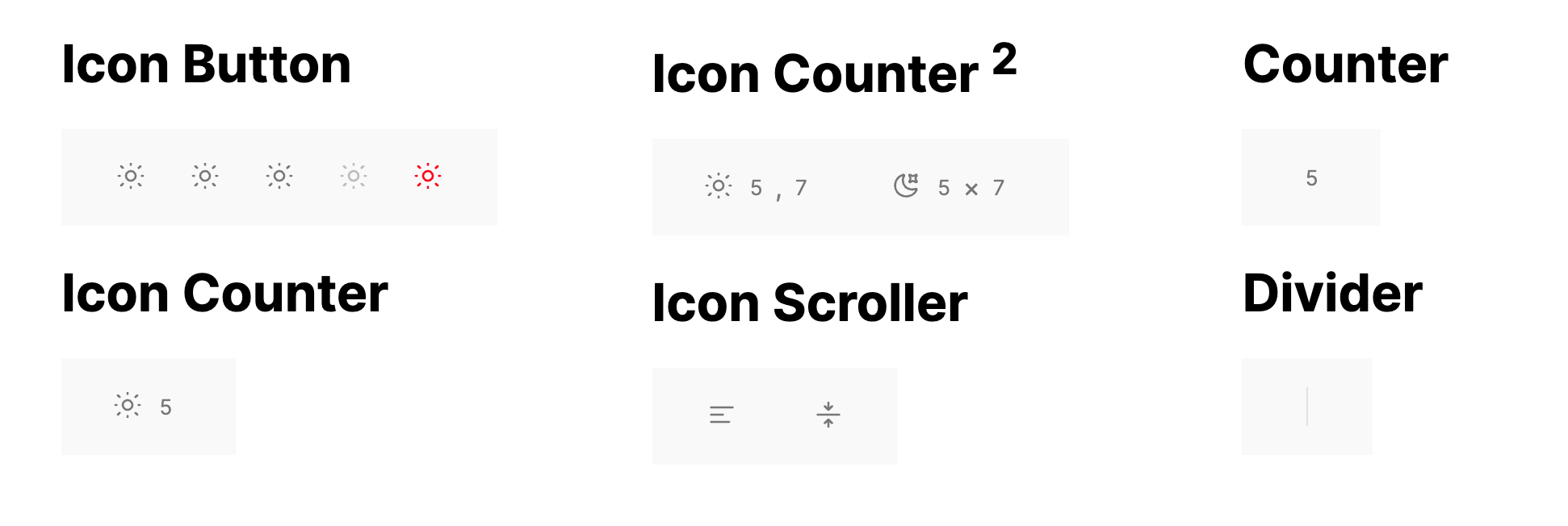 [Code](https://github.com/John-Theo/Tooolbar/tree/main/examples/components) / [Preview](https://unpkg.com/tooolbar@0.1.2/examples/components/index.html)
### \
Every component can/should be passed in these parameters:
```ts
id: string // Unique identifier
type: string // Alias of component
tag: string = "li" // Default tag name
class: string = "" // Class names appended to tool class
label: string = ""
sublabel: string = ""
disabled: boolean = false
```
### Divider
A vertical line.
`type` aliases: '|', 'd', 'divider', 'Divider'
**Props**
```ts
height: string | number = "40%"
margin: string | number = 20
```
### Spacer
A horizontal empty space.
`type` aliases: '-', 's', 'spacer', 'Spacer'
**Props**
```ts
width: string | number = 20
```
### Icon Button
A button with an icon in the center.
`type` aliases: 'ib', 'icon-button', 'IconButton'
**Props**
```ts
icon: string
```
**Events**
- click
### Icon Counter
Icon + Counter.
`type` aliases: 'ic', 'icon-counter', 'IconCounter'
**Props**
```ts
icon: string
min: number
max: number
value: number
```
**Events**
- input
- change
### Icon Counter 2
Icon + 2 Counters.
`type` aliases: 'ic2', 'icon-counter2', 'IconCounter2'
**Props**
```ts
icon: string
label: string
min1: number
max1: number
value1: number
label1: string
min2: number
max2: number
value2: number
label1: string
```
**Events**
- input
- change
### Icon Scroller
Scroll to switch icon.
`type` aliases: 'is', 'icon-scroller', 'IconScroller'
**Props**
```ts
icon: {key: string, icon: string, label: string}[]
current: string // Current key
circle: boolean = false
```
**Events**
- input
- change
### IconSwitcher
Click to change state.
`type` aliases: 'iw', 'icon-switcher', 'IconSwitcher'
**Props**
```ts
icon: {key: string, icon: string, label: string}[]
current: string // Current key
```
**Events**
- change
## Event handling
**Listen events on one tool**
```js
bar.get('save').addEventListener('click', (e) => {
console.log(e.detail);
})
```
**Listen events on all tools**
```js
bar.addEventListener("input", callback);
```
## Demo
Check out a working demo [here](https://unpkg.com/tooolbar@0.1.2/demo/index.html).
#### Things you can do
- Click or **scroll** on the button on the top.
- See **events** been captured in the left bottom section.
- Edit the configuration json and click the "**Run**" button to see how it renders to buttons.
- And MOST importantly, DO click the "**Dark Mode**" button on top right 😎.
## Use your SVG icons
> **NOTE:** SVG file downloaded from vector icon websites (or exported from vector graphing software) **CANNOT** be directly used in this project.
Check out [this gist](https://gist.github.com/John-Theo/ce178ae4e69047e91d9eda94a7230460) for why and how.
## Features on the way
- Tooltip positioning
- Tool id uniqueness check
- Generate from HTML tags
- Integrate common icon packs
- Text Buttons and input box
- React & Vuejs wrapper
## Change log
- **`0.1`** Sep 7, 2021. First commit!
## Dev preparation
Download [Akar Icon](https://github.com/artcoholic/akar-icons-app/tree/main/src/svg) svgs into `assets/icon_ori`.
Run `python normalize_svg.py ./assets/icon_ori -o ./assets/icon`.
```bash
yarn install
yarn run dev
# Open 'demo/index.html' in Live Server
# (vscode: ritwickdey.liveserver)
```
## Acknowledgements
- [@awmleer](https://github.com/awmleer) for answering a critical question in the project.
- [Akar Icons](https://github.com/artcoholic/akar-icons-app) for perfect icons used in the [demo](https://unpkg.com/tooolbar@0.1.2/demo/index.html).
- [Online Ascii Tools](https://onlineasciitools.com/convert-text-to-ascii-art) for generating cool logo for the project.
## Author
John Theo ([@John-Theo](https://github.com/John-Theo))
## License
MIT License, Copyright © 2021-present John Theo.
[Code](https://github.com/John-Theo/Tooolbar/tree/main/examples/components) / [Preview](https://unpkg.com/tooolbar@0.1.2/examples/components/index.html)
### \
Every component can/should be passed in these parameters:
```ts
id: string // Unique identifier
type: string // Alias of component
tag: string = "li" // Default tag name
class: string = "" // Class names appended to tool class
label: string = ""
sublabel: string = ""
disabled: boolean = false
```
### Divider
A vertical line.
`type` aliases: '|', 'd', 'divider', 'Divider'
**Props**
```ts
height: string | number = "40%"
margin: string | number = 20
```
### Spacer
A horizontal empty space.
`type` aliases: '-', 's', 'spacer', 'Spacer'
**Props**
```ts
width: string | number = 20
```
### Icon Button
A button with an icon in the center.
`type` aliases: 'ib', 'icon-button', 'IconButton'
**Props**
```ts
icon: string
```
**Events**
- click
### Icon Counter
Icon + Counter.
`type` aliases: 'ic', 'icon-counter', 'IconCounter'
**Props**
```ts
icon: string
min: number
max: number
value: number
```
**Events**
- input
- change
### Icon Counter 2
Icon + 2 Counters.
`type` aliases: 'ic2', 'icon-counter2', 'IconCounter2'
**Props**
```ts
icon: string
label: string
min1: number
max1: number
value1: number
label1: string
min2: number
max2: number
value2: number
label1: string
```
**Events**
- input
- change
### Icon Scroller
Scroll to switch icon.
`type` aliases: 'is', 'icon-scroller', 'IconScroller'
**Props**
```ts
icon: {key: string, icon: string, label: string}[]
current: string // Current key
circle: boolean = false
```
**Events**
- input
- change
### IconSwitcher
Click to change state.
`type` aliases: 'iw', 'icon-switcher', 'IconSwitcher'
**Props**
```ts
icon: {key: string, icon: string, label: string}[]
current: string // Current key
```
**Events**
- change
## Event handling
**Listen events on one tool**
```js
bar.get('save').addEventListener('click', (e) => {
console.log(e.detail);
})
```
**Listen events on all tools**
```js
bar.addEventListener("input", callback);
```
## Demo
Check out a working demo [here](https://unpkg.com/tooolbar@0.1.2/demo/index.html).
#### Things you can do
- Click or **scroll** on the button on the top.
- See **events** been captured in the left bottom section.
- Edit the configuration json and click the "**Run**" button to see how it renders to buttons.
- And MOST importantly, DO click the "**Dark Mode**" button on top right 😎.
## Use your SVG icons
> **NOTE:** SVG file downloaded from vector icon websites (or exported from vector graphing software) **CANNOT** be directly used in this project.
Check out [this gist](https://gist.github.com/John-Theo/ce178ae4e69047e91d9eda94a7230460) for why and how.
## Features on the way
- Tooltip positioning
- Tool id uniqueness check
- Generate from HTML tags
- Integrate common icon packs
- Text Buttons and input box
- React & Vuejs wrapper
## Change log
- **`0.1`** Sep 7, 2021. First commit!
## Dev preparation
Download [Akar Icon](https://github.com/artcoholic/akar-icons-app/tree/main/src/svg) svgs into `assets/icon_ori`.
Run `python normalize_svg.py ./assets/icon_ori -o ./assets/icon`.
```bash
yarn install
yarn run dev
# Open 'demo/index.html' in Live Server
# (vscode: ritwickdey.liveserver)
```
## Acknowledgements
- [@awmleer](https://github.com/awmleer) for answering a critical question in the project.
- [Akar Icons](https://github.com/artcoholic/akar-icons-app) for perfect icons used in the [demo](https://unpkg.com/tooolbar@0.1.2/demo/index.html).
- [Online Ascii Tools](https://onlineasciitools.com/convert-text-to-ascii-art) for generating cool logo for the project.
## Author
John Theo ([@John-Theo](https://github.com/John-Theo))
## License
MIT License, Copyright © 2021-present John Theo.