# [Timeline Studio](https://chatman-media.github.io/timeline-studio/)
[English](README.md) | [Italiano](README.it.md) | [Español](README.es.md) | [Français](README.fr.md) | [Deutsch](README.de.md) | [Русский](README.ru.md) | [中文](README.zh.md) | [Português](README.pt.md) | [한국어](README.ko.md) | [Türkçe](README.tr.md) | [ไทย](README.th.md) | [العربية](README.ar.md) | [فارسی](README.fa.md) | [हिन्दी](README.hi.md)
[](https://www.npmjs.com/package/timeline-studio)
[](https://github.com/chatman-media/timeline-studio/actions/workflows/build.yml)
[](https://github.com/chatman-media/timeline-studio/actions/workflows/test-coverage.yml)
[](https://codecov.io/gh/chatman-media/timeline-studio)
[](https://github.com/chatman-media/timeline-studio/commits/main)
[](https://github.com/chatman-media/timeline-studio/graphs/commit-activity)
[](https://www.npmjs.com/package/timeline-studio)
[](https://github.com/chatman-media/timeline-studio/stargazers)
[](./docs/en/README.md)
[](https://t.me/timelinestudio)
[](https://discord.gg/uvSBCw6e)
## 🎬 プロジェクト概要
**Timeline Studio** - AI駆動のビデオエディターで、あなたのビデオ、音楽、お気に入りのエフェクトを、すべてのプラットフォームで公開できる数十のクリップに変換します!
### 🚀 無限の可能性を想像してください
**ビデオ、写真、音楽を一度アップロード** → 以下を取得:
- 📱 **TikTok** - トレンドエフェクト付きの縦型ショートムービー
- 📺 **YouTube** - フル映画、短いクリップ、Shorts
- 📸 **Instagram** - 異なる長さのReels、Stories、投稿
- ✈️ **Telegram** - チャンネルとチャット用に最適化されたバージョン
AIアシスタントが各プラットフォームに適した数のバージョンを作成します!🤖
### 💡 仕組み
> *"アジア旅行のビデオをすべてのソーシャルメディア用に作成して" - 数分以内に準備が整ったオプションがあります:TikTok用のダイナミックなショート、YouTube用の雰囲気のあるvlog、Instagram用の鮮やかなStories。AIが最高の瞬間を選び、音楽と同期し、各プラットフォームに適応させます。*
### ⚡ これがすべてを変える理由
- **10倍の時間節約** - 各ビデオの手動調整が不要
- **AIがトレンドを理解** - 各ソーシャルネットワークで何が機能するかを知っている
- **プロ品質** - 大手スタジオと同じツールを使用
- **すべてローカルで動作** - あなたのコンテンツはプライベートのまま


### プロジェクトステータス(2025年6月)
**全体的な完成度:58%** ⬆️(APIキー管理100%完成と新たな14計画モジュールで再計算)
- **完了**:13モジュール(100%準備完了)
- **開発中**:7モジュール(45-90%準備完了)
- **計画済み**:4モジュール(30-80%準備完了)
- **新計画**:14モジュール(0%準備完了)- [詳細はplanned/](docs-ru/08-roadmap/planned/)
### 主要な成果:
- ✅ **コアアーキテクチャ** - タイムライン、ビデオコンパイラー、メディア管理(100%)
- ✅ **APIキー管理** - AES-256-GCM暗号化による安全な保存(100%)
- ✅ **認識** - YOLO v11オブジェクト・顔認識(100%)
- ✅ **エクスポート** - YouTube/TikTok/VimeoのOAuth統合(100%)
- 🚧 **エフェクト/フィルター/トランジション** - 豊富なライブラリを開発中(75-80%)
- 🚧 **タイムラインAI** - 41のClaudeツールで自動化(90%)
### 現在のタスク:
- 🔄 **OAuthコールバック処理** - ソーシャルネットワーク統合の完成
- ⏳ **HTTP API検証** - リアルタイム接続テスト
- ⏳ **.envからのインポート** - 既存キーの移行
### 次のステップ:
1. **ソーシャルネットワーク統合** - 完全なOAuthフローの実装
2. **高度なエフェクト** - Filmoraスタイルライブラリの完成
3. **タイムラインAI** - インテリジェントなビデオ作成自動化
## 主な機能
- 🎬 マルチトラックタイムラインによるプロフェッショナルなビデオ編集
- 🖥️ クロスプラットフォーム(Windows、macOS、Linux)
- 🚀 GPU加速ビデオ処理(NVENC、QuickSync、VideoToolbox)
- 🤖 AI駆動のオブジェクト/顔認識(YOLO v11 - ORT修正済み)
- 🎨 30種類以上のトランジション、視覚効果、フィルター
- 📝 12種類のスタイルとアニメーションを備えた高度な字幕システム
- 🎵 エフェクト付きマルチトラックオーディオ編集
- 📤 ソーシャルメディアOAuth統合付きMP4/MOV/WebMエクスポート
- 🔐 YouTube/TikTok/Vimeo/Telegram OAuth対応、安全なトークン保存
- 📱 最適化されたエクスポート用デバイスプリセット(iPhone、iPad、Android)
- 🌐 国際化サポート(13言語)
- 💾 スマートキャッシングと統一プレビューシステム
- 🎨 Tailwind CSS v4、shadcn-uiを使用したモダンなUI
- 📚 2400以上のテスト(98.8%成功率)による完全なドキュメント
## はじめに
### クイックセットアップ
```bash
# クローンしてインストール
git clone https://github.com/chatman-media/timeline-studio.git
cd timeline-studio
bun install
# 開発モードを実行
bun run tauri dev
```
### 要件
- Node.js v18+、Rust、Bun、FFmpeg
📚 **[完全なインストールガイド →](docs-ru/01-getting-started/README.md)**
🪟 **[Windowsセットアップ →](docs-ru/06-deployment/platforms/windows-build.md)**
## ドキュメント
### 📚 メインドキュメント
- 📚 [ドキュメント概要](docs-ru/README.md) - 完全なドキュメントマップ
- 🚀 [はじめに](docs-ru/01-getting-started/README.md) - インストールと最初のステップ
- 🏗️ [アーキテクチャガイド](docs-ru/02-architecture/README.md) - システムアーキテクチャ
- 🎯 [機能ガイド](docs-ru/03-features/README.md) - 機能概要とステータス
- 📡 [APIリファレンス](docs-ru/04-api-reference/README.md) - Tauriコマンドリファレンス
- 🧪 [開発ガイド](docs-ru/05-development/README.md) - テストと開発
- 🚀 [デプロイメントガイド](docs-ru/06-deployment/README.md) - ビルドとデプロイメント
- 📋 [ユーザーガイド](docs-ru/07-guides/README.md) - パフォーマンスとベストプラクティス
- 🛣️ [ロードマップ](docs-ru/08-roadmap/README.md) - 開発ロードマップ
- 🔐 [OAuth設定](docs-ru/09-oauth-setup/oauth-setup-guide.md) - ソーシャルメディア統合
### 📋 プロジェクトドキュメント
- **`src/features/README.md`** - 優先順位とステータスを含むすべての機能の概要
- **言語版**: 上記のセレクターから11言語で利用可能
## 開発
### クイックスタート
```bash
# 開発モード
bun run tauri dev
# テスト実行
bun run test && bun run test:rust
# コード品質チェック
bun run check:all
```
### 基本コマンド
| コマンド | 説明 |
|---------|------|
| `bun run tauri dev` | 完全なアプリケーションを開発モードで起動 |
| `bun run dev` | フロントエンドのみ起動 |
| `bun run build` | プロダクション用ビルド |
| `bun run test` | フロントエンドテスト実行 |
| `bun run test:rust` | バックエンドテスト実行 |
| `bun run lint` | コード品質チェック |
| `bun run fix:all` | コード問題の自動修正 |
📚 **[完全な開発ガイド →](docs-ru/05-development/README.md)**
### テストカバレッジ状態
✅ **フロントエンドテスト**:3,604成功
✅ **バックエンドテスト**:554成功(+18新規!)
📊 **合計**:4,158テスト成功
- `bun run test:coverage:report` - テストカバレッジレポートを生成・送信
- `bun run test:rust` - Rustバックエンドテストを実行
- `bun run test:rust:watch` - ウォッチモードでRustテストを実行
- `bun run test:coverage:rust` - カバレッジ付きでRustテストを実行
- `bun run test:coverage:rust:report` - Rustカバレッジレポートを生成・送信
- `bun run test:ui` - UIインターフェースでテストを実行
- `bun run test:e2e` - PlaywrightでEnd-to-Endテストを実行
- `bun run test:e2e:ui` - Playwright UIでE2Eテストを実行
- `bun run test:e2e:basic` - 基本的なメディアインポートE2Eテストを実行
- `bun run test:e2e:real` - 実際のメディアファイルでE2Eテストを実行
- `bun run test:e2e:integration` - 統合E2Eテストを実行(INTEGRATION_TEST=trueが必要)
- `bun run playwright:install` - Playwrightブラウザをインストール
### テスト
プロジェクトはユニットテストにVitestを使用しています。テストは各機能の__tests__ディレクトリ内にあり、モックは__mocks__内にあります。
#### 🧪 テストカバレッジステータス:
```bash
⨯ bun run test
Test Files 258 passed | 1 skipped (259)
Tests 3604 passed | 60 skipped (3664)
Start at 20:08:23
Duration 26.48s (transform 5.42s, setup 53.03s, collect 25.72s, tests 32.83s, environment 67.99s, prepare 16.45s)
⨯ bun run test:rust
test result: ok. 366 passed; 0 failed; 2 ignored; 0 measured; 0 filtered out; finished in 12.38s
```
```bash
# クライアントテストを実行
bun run test
# Rustテストを実行
bun run test:rust
# カバレッジレポート付きでテストを実行
bun run test:coverage
# 特定の機能のテストを実行
bun run test src/features/effects
```
## CI/CDとコード品質
### 自動化プロセス
- ✅ **リンティング**: ESLint、Stylelint、Clippy
- ✅ **テスト**: フロントエンド(Vitest)、バックエンド(Rust)、E2E(Playwright)
- ✅ **カバレッジ**: Codecov統合
- ✅ **ビルド**: クロスプラットフォームビルド
📚 **[詳細なCI/CDガイド →](docs-ru/06-deployment/README.md)**
🔧 **[リンティングとフォーマッティング →](docs-ru/05-development/linting-and-formatting.md)**
## ドキュメントとリソース
- 📚 [**APIドキュメント**](https://chatman-media.github.io/timeline-studio/api-docs/) - 自動生成されたTypeScriptドキュメント
- 🚀 [**ウェブサイト**](https://chatman-media.github.io/timeline-studio/) - プロジェクトショーケース
- 📖 [**完全なドキュメント**](docs-ru/README.md) - ロシア語での完全ガイド
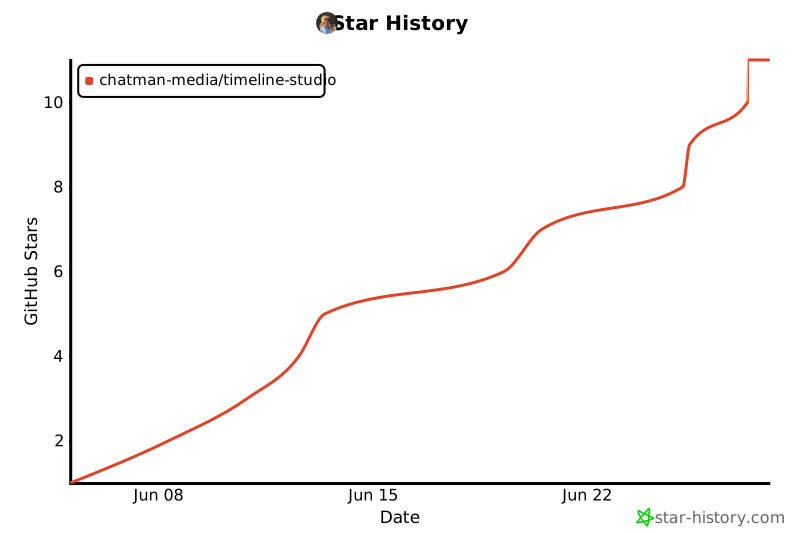
## Star History
 ## ライセンス
MITライセンスにCommons Clause付き - 個人利用は無料、商用利用には合意が必要。
📄 **[完全なライセンス詳細 →](docs-ru/10-legal/license.md)** | 📧 **商用ライセンス**: ak.chatman.media@gmail.com
## ライセンス
MITライセンスにCommons Clause付き - 個人利用は無料、商用利用には合意が必要。
📄 **[完全なライセンス詳細 →](docs-ru/10-legal/license.md)** | 📧 **商用ライセンス**: ak.chatman.media@gmail.com