 
## Installation
```bash
npm i tiktok-signature
```
---
##  ## Usage
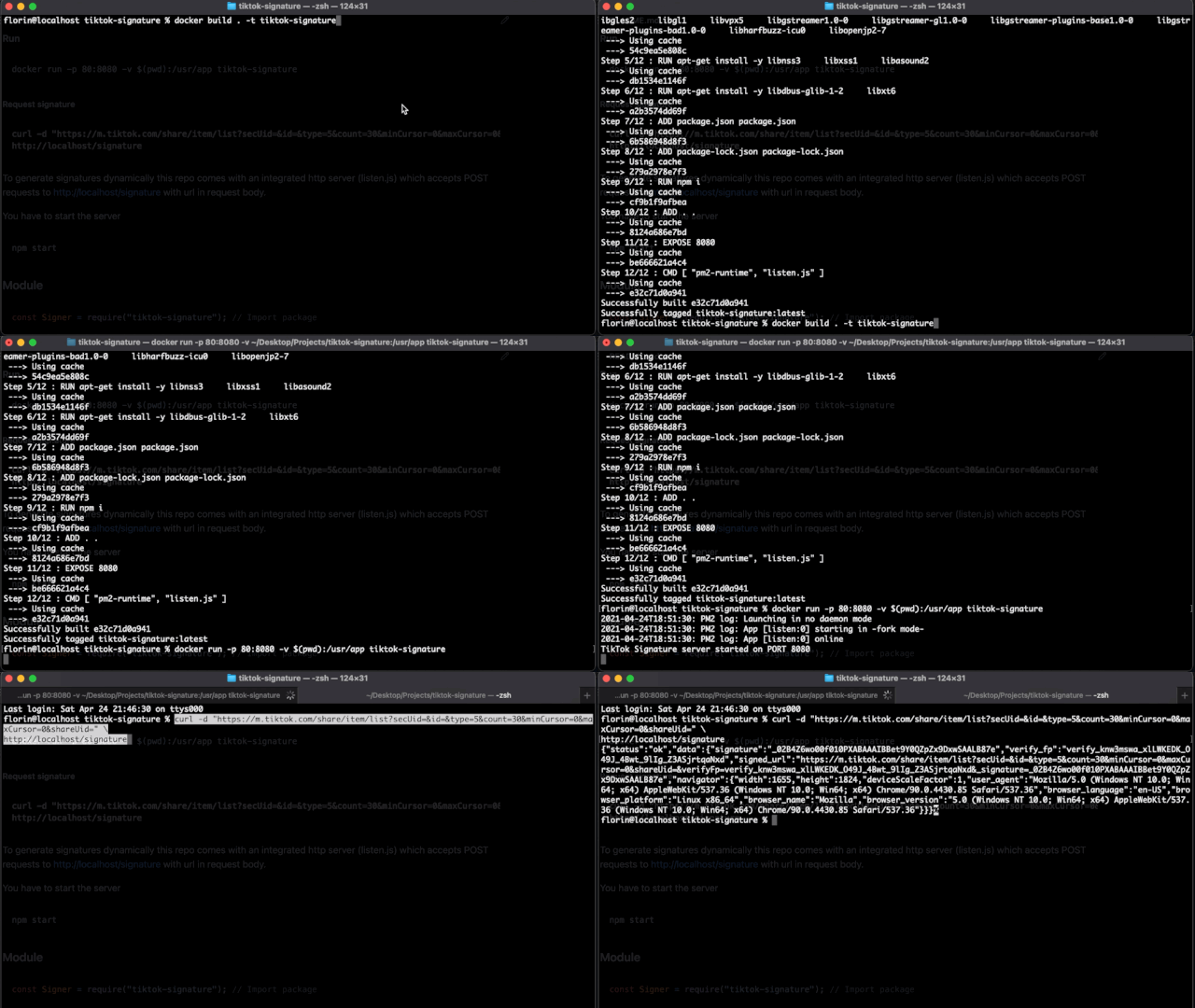
### Generating signatures on high performance level
#### Build
```sh
docker build . -t tiktok-signature
```
#### Run
```sh
docker run -p 8080:8080 tiktok-signature
```
#### Or use Docker Compose
```sh
docker-compose up -d
```
## Example
##### Request signature
```
curl -X POST \
-H "Content-type: application/json" \
-d 'https://m.tiktok.com/share/item/list?secUid=&id=&type=5&count=30&minCursor=0&maxCursor=0&shareUid=' \
http://localhost:8080/signature
```
To generate signatures dynamically this repo comes with an integrated http server (listen.js) which accepts POST requests to http://localhost/signature with url in request body.
You have to start the server
```js
npm start
```
### Module (ES Module)
```js
import Signer from "tiktok-signature"; // Import package
const signer = new Signer(); // Create new signer
await signer.init(); // Create page with. Returns promise
const signature = await signer.sign("tiktok url"); // Get sign for your url. Returns promise
const navigator = await signer.navigator(); // Retrieve navigator data used when signature was generated
console.log(signature);
console.log(navigator);
await signer.close(); // Close browser. Returns promise
```
You can pass your desired User-Agent on class creation.
```js
new Signer("Mozilla"); // Set User-Agent to Mozilla
```
### CLI
Install dependencies
```bash
npm install
```
Now you can generate the token using
```bash
node browser.js "https://m.tiktok.com/api/post/item_list/?aid=1988&count=30&secUid=MS4wLjABAAAAOUoQXeHglWcq4ca3MwlckxqAe-RIKQ1zlH9NkQkbLAT_h1_6SDc4zyPdAcVdTWZF&cursor=0"
```
The response token should look like this
```json
{
"status": "ok",
"data": {
"signature": "_02B4Z6wo00f01DBbvBwAAIBCcuSZt1Pua8AwS7iAAGyZ6e",
"verify_fp": "verify_knvz9j2k_miXwiqOy_msam_42g2_BYoa_e4EAbuQnDwqI",
"signed_url": "https://m.tiktok.com/api/post/item_list/?aid=1988&count=30&secUid=MS4wLjABAAAAOUoQXeHglWcq4ca3MwlckxqAe-RIKQ1zlH9NkQkbLAT_h1_6SDc4zyPdAcVdTWZF&cursor=0&verifyFp=verify_knvz9j2k_miXwiqOy_msam_42g2_BYoa_e4EAbuQnDwqI&_signature=_02B4Z6wo00f01DBbvBwAAIBCcuSZt1Pua8AwS7iAAGyZ6e&X-Bogus=1BLhm+0j/AG2Dlsz3v4u4w==",
"x-tt-params": "1BLhm+0j/AG2Dlsz3v4u4w==",
"x-bogus": "1BLhm+0j/AG2Dlsz3v4u4w==",
"navigator": {
"width": 884,
"height": 1244,
"deviceScaleFactor": 3,
"user_agent": "Mozilla/5.0 (Windows NT 10.0; Win64; x64) AppleWebKit/537.36 (Windows NT 10.0; Win64; x64) Chrome/90.0.4430.85 Safari/537.36",
"browser_language": "en-US",
"browser_platform": "MacIntel",
"browser_name": "Mozilla",
"browser_version": "5.0 (Windows NT 10.0; Win64; x64) AppleWebKit/537.36 (Windows NT 10.0; Win64; x64) Chrome/90.0.4430.85 Safari/537.36"
}
}
}
```
## Testing
You can test it using trending.py file included in this repo.
```bash
pip install Naked
python examples/trending.py
```
---
**NOTE**
It's very important that the userAgent be the same when generate and when request for response.
Keeping a process too much time opened can increase memory usage, to avoid this uncomment the following lines in `listen.js`.
```js
// setTimeout(function () {
// server.close(() => {
// console.log("Server shutdown completed.");
// process.exit(1);
// });
// }, 1 * 60 * 60 * 1000);
```
---
##
## Contributing
Bug reports and pull requests are welcome on GitHub at https://github.com/carcabot/tiktok-signature.
1. Fork it ()
2. Create your feature branch (`git checkout -b my-new-feature`)
3. Commit your changes (`git commit -am 'Add some new feature'`)
4. Push to the branch (`git push origin my-new-feature`)
5. Create a new Pull Request
## License
The lib is available as open source under the terms of the [MIT License](https://opensource.org/licenses/MIT).
## Usage

### Generating signatures on high performance level
#### Build
```sh
docker build . -t tiktok-signature
```
#### Run
```sh
docker run -p 8080:8080 tiktok-signature
```
#### Or use Docker Compose
```sh
docker-compose up -d
```
## Example
##### Request signature
```
curl -X POST \
-H "Content-type: application/json" \
-d 'https://m.tiktok.com/share/item/list?secUid=&id=&type=5&count=30&minCursor=0&maxCursor=0&shareUid=' \
http://localhost:8080/signature
```
To generate signatures dynamically this repo comes with an integrated http server (listen.js) which accepts POST requests to http://localhost/signature with url in request body.
You have to start the server
```js
npm start
```
### Module (ES Module)
```js
import Signer from "tiktok-signature"; // Import package
const signer = new Signer(); // Create new signer
await signer.init(); // Create page with. Returns promise
const signature = await signer.sign("tiktok url"); // Get sign for your url. Returns promise
const navigator = await signer.navigator(); // Retrieve navigator data used when signature was generated
console.log(signature);
console.log(navigator);
await signer.close(); // Close browser. Returns promise
```
You can pass your desired User-Agent on class creation.
```js
new Signer("Mozilla"); // Set User-Agent to Mozilla
```
### CLI
Install dependencies
```bash
npm install
```
Now you can generate the token using
```bash
node browser.js "https://m.tiktok.com/api/post/item_list/?aid=1988&count=30&secUid=MS4wLjABAAAAOUoQXeHglWcq4ca3MwlckxqAe-RIKQ1zlH9NkQkbLAT_h1_6SDc4zyPdAcVdTWZF&cursor=0"
```
The response token should look like this
```json
{
"status": "ok",
"data": {
"signature": "_02B4Z6wo00f01DBbvBwAAIBCcuSZt1Pua8AwS7iAAGyZ6e",
"verify_fp": "verify_knvz9j2k_miXwiqOy_msam_42g2_BYoa_e4EAbuQnDwqI",
"signed_url": "https://m.tiktok.com/api/post/item_list/?aid=1988&count=30&secUid=MS4wLjABAAAAOUoQXeHglWcq4ca3MwlckxqAe-RIKQ1zlH9NkQkbLAT_h1_6SDc4zyPdAcVdTWZF&cursor=0&verifyFp=verify_knvz9j2k_miXwiqOy_msam_42g2_BYoa_e4EAbuQnDwqI&_signature=_02B4Z6wo00f01DBbvBwAAIBCcuSZt1Pua8AwS7iAAGyZ6e&X-Bogus=1BLhm+0j/AG2Dlsz3v4u4w==",
"x-tt-params": "1BLhm+0j/AG2Dlsz3v4u4w==",
"x-bogus": "1BLhm+0j/AG2Dlsz3v4u4w==",
"navigator": {
"width": 884,
"height": 1244,
"deviceScaleFactor": 3,
"user_agent": "Mozilla/5.0 (Windows NT 10.0; Win64; x64) AppleWebKit/537.36 (Windows NT 10.0; Win64; x64) Chrome/90.0.4430.85 Safari/537.36",
"browser_language": "en-US",
"browser_platform": "MacIntel",
"browser_name": "Mozilla",
"browser_version": "5.0 (Windows NT 10.0; Win64; x64) AppleWebKit/537.36 (Windows NT 10.0; Win64; x64) Chrome/90.0.4430.85 Safari/537.36"
}
}
}
```
## Testing
You can test it using trending.py file included in this repo.
```bash
pip install Naked
python examples/trending.py
```
---
**NOTE**
It's very important that the userAgent be the same when generate and when request for response.
Keeping a process too much time opened can increase memory usage, to avoid this uncomment the following lines in `listen.js`.
```js
// setTimeout(function () {
// server.close(() => {
// console.log("Server shutdown completed.");
// process.exit(1);
// });
// }, 1 * 60 * 60 * 1000);
```
---
##
## Contributing
Bug reports and pull requests are welcome on GitHub at https://github.com/carcabot/tiktok-signature.
1. Fork it ()
2. Create your feature branch (`git checkout -b my-new-feature`)
3. Commit your changes (`git commit -am 'Add some new feature'`)
4. Push to the branch (`git push origin my-new-feature`)
5. Create a new Pull Request
## License
The lib is available as open source under the terms of the [MIT License](https://opensource.org/licenses/MIT).