<div align="center">
<h1> 太记 </h1>
<p>可定制性极强的个人知识管理系统，使用 Git 作为备份管理器和博客平台</p>

[![License: MPL 2.0](https://img.shields.io/badge/License-MPL%202.0-brightgreen.svg)](LICENSE)
[![GitHub Actions Build Status](https://github.com/tiddly-gittly/TidGi-Desktop/actions/workflows/release.yml/badge.svg)](https://github.com/tiddly-gittly/TidGi-Desktop/actions)
[![Lin Onetwo!](https://img.shields.io/github/followers/linonetwo)](https://github.com/linonetwo)

</div>

|                                                                       [最新版下载按钮](https://github.com/tiddly-gittly/TidGi-Desktop/releases/latest)                                                                       |
| :--------------------------------------------------------------------------------------------------------------------------------------------------------------------------------------------------------------------------: |
| [![GitHub Releases](https://img.shields.io/github/downloads/tiddly-gittly/TidGi-Desktop/latest/total?label=Download%20Latest%20Release&style=for-the-badge)](https://github.com/tiddly-gittly/TidGi-Desktop/releases/latest) |

## 产品截图及试用

### 试用

- [在线网页版博客 Demo](https://tiddly-gittly.github.io/Tiddlywiki-NodeJS-Github-Template/)
- [太微官网](https://tiddlywiki.com/)

### 截图

![Screenshot of main-window](../images/main-window-hide-bar.png)

<details>

|                   加载 NodeJS 版维基                    |
| :-----------------------------------------------------: |
| ![Screenshot of main-window](../images/main-window.png) |

|                        新建本地维基                         |                          下载云端维基                           |
| :---------------------------------------------------------: | :-------------------------------------------------------------: |
| ![Screenshot of add-workspace](../images/add-workspace.png) | ![Screenshot of clone-workspace](../images/clone-workspace.png) |

|                                                                 多语言翻译和设置界面                                                                 |
| :--------------------------------------------------------------------------------------------------------------------------------------------------: |
|                                                ![Screenshot of preference](../images/preference.png)                                                 |
|                                                                    交互式代码执行                                                                    |
| ![Screen recording of zx-script in tiddlywiki](https://user-images.githubusercontent.com/3746270/133831500-ae91164c-7948-4de4-9a81-7017ed3b65c9.gif) |
|                                                                      社区插件源                                                                      |
|                                        ![Screenshot of add-workspace](../images/community-plugin-library.png)                                        |

</details>

<details>
<summary>Mac 使用者点击这里展开操作方法，我费劲办法也申请不到苹果开发者账号，所以你得手动信任这个应用 ◀</summary>

首先你得把应用拖入「应用程序」文件夹才能使用！不然会弹一个报错框。

点击「取消」 ↓

![step00001](https://user-images.githubusercontent.com/3746270/87882506-eb1ddd80-ca32-11ea-942f-1f530767db02.png)

![step00002](https://user-images.githubusercontent.com/3746270/87882509-ece7a100-ca32-11ea-8d29-a4977201090d.png)

![step00003](https://user-images.githubusercontent.com/3746270/87882510-ed803780-ca32-11ea-8996-0f3c7060131a.png)

点击「打开」 ↓

![step00004](https://user-images.githubusercontent.com/3746270/87882512-ee18ce00-ca32-11ea-8225-045ffc0a8b86.png)

点击「允许」 ↓

![step00005](https://user-images.githubusercontent.com/3746270/87882514-eeb16480-ca32-11ea-9afd-cae6f2bea2db.png)

</details>

## 相关介绍

[用 TiddlyWiki 替代 Notion 和 EverNote 作为个人知识管理系统(Chinese)](https://zhuanlan.zhihu.com/p/140473235)

[墨屉-先进的间隔重复和渐进阅读解决方案](https://live.bilibili.com/23806126)

## 关于「太记-桌面版」

「太记」是一个跨平台的笔记软件、时间和任务管理工具、碎片化知识管理工具，此乃其桌面版。「太记」基于强大的 [NodeJS 版「太微（TiddlyWiki）」](https://github.com/Jermolene/TiddlyWiki5#installing-tiddlywiki-on-nodejs) 构建，并带上了大量来自[太微社区（TiddlyWiki community）](https://groups.google.com/forum/#!forum/tiddlywiki)的插件。

「太记」来自 TiddlyWiki 的译名「太微」，以及曾用名 TiddlyGit 首字母的谐音（后来我们又根据中文谐音把英文名改成了 TidGi）。当然你也可以直接叫它 [TGNote](https://github.com/tiddly-gittly/TGNote)，镰锤 ☭ 笔记。

为什么把 TiddlyWiki 翻译成「太微」？因为受到 @pimgeek 的启发：TiddlyWiki 可以干很多细致轻量的工作，但也从不限制用法，可以无限组合叠加。故以其首字母音译为「太微」，TiddlyWiki 可以称为「太微笔记」「太微万能抽屉」「太微卡片盒」……

> 太微垣，三垣之一，按《步天歌》，太微垣為三垣的上垣。
> 太微垣又名天庭，是政府的意思，也是貴族及大臣們居住的地方。

## 下载

<a href="https://repology.org/project/tidgi/versions">
  <img src="https://repology.org/badge/vertical-allrepos/tidgi.svg" alt="Packaging status">
</a>

> Win 和 Mac 的普通用户直接下载 App

|                                                                       [最新版下载按钮](https://github.com/tiddly-gittly/TidGi-Desktop/releases/latest)                                                                       |
| :--------------------------------------------------------------------------------------------------------------------------------------------------------------------------------------------------------------------------: |
| [![GitHub Releases](https://img.shields.io/github/downloads/tiddly-gittly/TidGi-Desktop/latest/total?label=Download%20Latest%20Release&style=for-the-badge)](https://github.com/tiddly-gittly/TidGi-Desktop/releases/latest) |

> For arch user

```bash
yay tidgi
```

> Mac 命令行用户

```bash
brew install TidGi # Not tested
```

## 移动端应用

See [Tiddloid](https://github.com/donmor/Tiddloid) for Android App developed by donmor.

## 数据隐私保护

你可以选择你的 WIKI 工作区的存储服务提供商：

1. 「Github」是一个无限存储空间、可以用 GH-Pages 部署博客的平台。
1. 「本地」模式会创建一个本地仓库来备份你的 WIKI，你可以用 [GithubDesktop](https://github.com/desktop/desktop) 来手动同步内容到云端。
1. 「Gitlab」和「码云」还待支持，不过架子已经搭好了。

## 与竞品的差异

### 与 [TiddlyDesktop](https://github.com/Jermolene/TiddlyDesktop) 的差别？

1. 太微的 NodeJS 版本有无缝的自动保存体验，这是利用 SyncAdaptor 技术（而不是 Saver ）带来的的优势，太记对 NodeJS wiki 有更好的支持，而 TD 主要支持 HTML 版单文件 WIKI，各有优势。
1. 使用 NodeJS wiki 时，我们可以有分离的 tiddler 文件，这些文件可以手工修改，也可以由其他程序修改（例如装了 [VSCode-TW5-Syntax](https://github.com/joshuafontany/VSCode-TW5-Syntax) 的 VSCode)，而且方便细粒度备份回滚
1. 尽管 TiddlyDesktop 也可以加载由 nodejs 版太微生成的 wiki 文件夹，但太记还可以轻松地将该文件夹自动备份到 Github 上。
1. 通过使用 Electron 技术，我们可以在太微中使用 `fs` 、 `git` 和许多其他 nodejs 的扩展接口，这大大扩展了插件可使用的能力。这种可扩展性也是我选择太微作为我日常知识管理工具的原因，太记进一步强化了它。

## 为什么使用 Github 存储

因为 Github 是最好的免费民用级[存储即服务（BaaS）](https://www.alibabacloud.com/blog/backend-as-a-service-baas-for-efficient-software-development_519851)之一。

1. 它的存储基本上是免费的，允许我们存储无限的图像和 PDF 文件，这些文件可以有永久的 URI 供公众下载。
1. 它有 GraphQL API，允许我们以程序化的方式更新我们的 wiki。
1. 它有免费的[CI](https://github.com/features/actions)来自动部署我们的太微博客。
1. 它提供了无限数量的代码仓库，分为公共的和私有的，这使我们能够将私有内容存储到我们的太微中仅在本地查看，然后只把公开部分部署成博客。

## 参与开发

阅读[开发指引文档（英文）](../Development.md)

## 鸣谢

The desktop app shell is based on [https://github.com/atomery/singlebox](atomery/singlebox) and [atomery/webcatalog](https://github.com/atomery/webcatalog), they provide lots of utils around website-generated-app, much powerful than generating app from website simply using Chrome. Also the independent developer @quanglam2807 behind these great tools helps me a lot when I develop TidGi.

Current Icon is download from [iconsdb](https://www.iconsdb.com/custom-color/github-11-icon.html) under Creative Commons Attribution-NoDerivs 3.0 , if you are a designer, please feel free to contribute your ICON if you have a better idea.

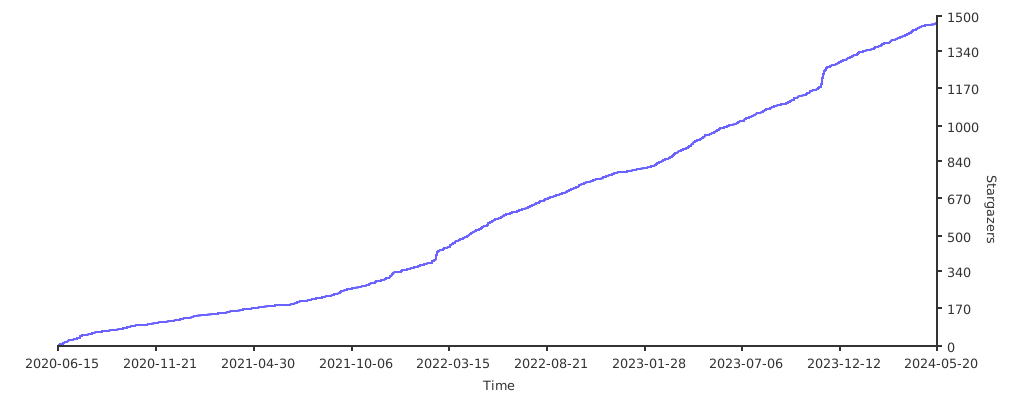
### 点个星星 ⭐️ 吧

Please give a star if you like it!

[![Stargazers over time](https://starchart.cc/tiddly-gittly/TidGi-Desktop.svg)](https://starchart.cc/tiddly-gittly/TidGi-Desktop)