[](https://badge.fury.io/js/three-text-geometry)
[](https://github.com/gumob/three-text-geometry/actions/workflows/main.yaml)
[](https://github.com/gumob/three-text-geometry/actions/workflows/develop.yaml)
[](https://github.com/gumob/three-text-geometry/actions/workflows/github-code-scanning/codeql)
[](https://codecov.io/gh/gumob/three-text-geometry)
[](https://opensource.org/licenses/MIT)
# three-text-geometry
 The port of the JavaScript versions of [three-bmfont-text](https://github.com/Jam3/three-bmfont-text), [layout-bmfont-text](https://github.com/Jam3/layout-bmfont-text), [load-bmfont](https://github.com/Jam3/load-bmfont), and [word-wrapper](https://github.com/mattdesl/word-wrapper) to Pure Typescript, this library enables fast text rendering with Three.js and bitmap font.
The difference in rendering speed is noticeable when animations are enabled, and it runs 10x faster than canvas texture based text rendering.
**v4.0** introduces WebGPU support with TSL (Three Shading Language) based node materials that work with both `WebGLRenderer` and `WebGPURenderer`.
## Requirements
- Three.js 0.172.0 or later
- React 19 or later
- React Three Fiber 9 or later
- Node.js 22 or later
## Installation
### NPM
```
$ npm install three-text-geometry three react @react-three/fiber
```
### PNPM
```
$ pnpm add three-text-geometry three react @react-three/fiber
```
### Yarn
```
$ yarn add three-text-geometry three react @react-three/fiber
```
> **Note:** `three`, `react`, and `@react-three/fiber` are peer dependencies and must be installed alongside `three-text-geometry`.
## Usage
For detailed information, read the [documentation](https://gumob.github.io/three-text-geometry/) and check the [demo](https://github.com/gumob/three-text-geometry/tree/develop/demo).
[`TextGeometry`](https://gumob.github.io/three-text-geometry/classes/TextGeometry.html) supports word wrapping, text aligning, letter spacing, kerning. See [the list](#option-list) for all available options.
### React Three Fiber
three-text-geometry provides first-class support for [React Three Fiber](https://github.com/pmndrs/react-three-fiber).
#### Setup
`TextGeometry` is automatically registered with the R3F catalog when the library is imported. No manual setup is required.
```TypeScript
import 'three-text-geometry'
// is now available
```
**Factory pattern (R3F v9)**
Alternatively, use R3F v9's `extend` to create a component directly.
```TypeScript
import { extend } from '@react-three/fiber'
import TextGeometry from 'three-text-geometry'
const TextGeometryEl = extend(TextGeometry)
// Now you can use
```
#### Example
The `useFont` hook loads a BMFont file and its texture asynchronously. Combined with ``, you can render bitmap text in just a few lines.
```TypeScript
import * as THREE from 'three'
import { Canvas } from '@react-three/fiber'
import { TextAlign, useFont } from 'three-text-geometry'
function TextMesh() {
const { font, texture, isLoading } = useFont(
'https://example.com/font.json',
'https://example.com/font.png'
)
if (isLoading || !font || !texture) return null
return (
)
}
function App() {
return (
)
}
```
#### Type definitions
Importing `three-text-geometry` automatically augments R3F's `ThreeElements` interface, enabling type completions for `` in TypeScript projects.
```TypeScript
import 'three-text-geometry' // Adds textGeometry to ThreeElements
```
### Vanilla Three.js
You can also use `TextGeometry` directly without React Three Fiber.
```TypeScript
import * as THREE from 'three'
import TextGeometry, { BMFont, BMFontJsonParser, TextAlign } from 'three-text-geometry'
// Load font and texture
const res = await fetch('https://example.com/font.json')
const font: BMFont = new BMFontJsonParser().parse(await res.json())
const texture = await new THREE.TextureLoader().loadAsync('https://example.com/font.png')
// Create geometry and mesh
const geometry = new TextGeometry('Hello World', {
font,
align: TextAlign.Left,
width: 800,
flipY: texture.flipY,
})
const material = new THREE.MeshBasicMaterial({
map: texture,
side: THREE.DoubleSide,
transparent: true,
})
const mesh = new THREE.Mesh(geometry, material)
.rotateY(Math.PI)
.rotateZ(Math.PI)
scene.add(mesh)
```
### Materials
three-text-geometry provides TSL-based node materials for text rendering. These materials work with both `WebGLRenderer` and `WebGPURenderer`.
#### BasicTextNodeMaterial
Samples a font texture and multiplies by color and opacity. Suitable for standard bitmap fonts.
```TypeScript
import { BasicTextNodeMaterial } from 'three-text-geometry'
const material = new BasicTextNodeMaterial({
map: texture,
color: new THREE.Color(0xffffff),
opacity: 1,
})
```
#### SDFTextNodeMaterial
For SDF (Signed Distance Field) fonts. Uses screen-space derivatives for anti-aliased edges.
```TypeScript
import { SDFTextNodeMaterial } from 'three-text-geometry'
const material = new SDFTextNodeMaterial({
map: texture,
color: new THREE.Color(0xffffff),
})
```
#### MSDFTextNodeMaterial
For MSDF (Multi-channel Signed Distance Field) fonts. Computes a median from RGB channels for high-quality rendering.
```TypeScript
import { MSDFTextNodeMaterial } from 'three-text-geometry'
const material = new MSDFTextNodeMaterial({
map: texture,
color: new THREE.Color(0xffffff),
negate: true, // Invert RGB channels (default: true)
})
```
#### MultiPageTextNodeMaterial
For multi-texture fonts. Selects the correct texture atlas per vertex using a page attribute. Requires `multipage: true` in `TextGeometryOption`.
```TypeScript
import { MultiPageTextNodeMaterial } from 'three-text-geometry'
const material = new MultiPageTextNodeMaterial({
textures: [texture0, texture1, texture2],
color: new THREE.Color(0xffffff),
})
const geometry = new TextGeometry('Hello', {
font,
multipage: true,
})
```
### Migration from v3
v4 removes the legacy GLSL shader modules. If you were using `MultiPageShaderMaterial` or the GLSL shader sources from `three-text-geometry/shaders`, migrate to the new TSL-based node materials:
| v3 (Removed) | v4 (Replacement) |
| --- | --- |
| `shaders/basic` | `BasicTextNodeMaterial` |
| `shaders/sdf` | `SDFTextNodeMaterial` |
| `shaders/msdf` | `MSDFTextNodeMaterial` |
| `MultiPageShaderMaterial` | `MultiPageTextNodeMaterial` |
### How to run the demo
The demo is built with React Three Fiber. Clone the repository and run:
```
git clone https://github.com/gumob/three-text-geometry.git
cd three-text-geometry/demo
corepack enable
pnpm install
pnpm dev
```
### Screen coordinate system and Three.js coordinate system
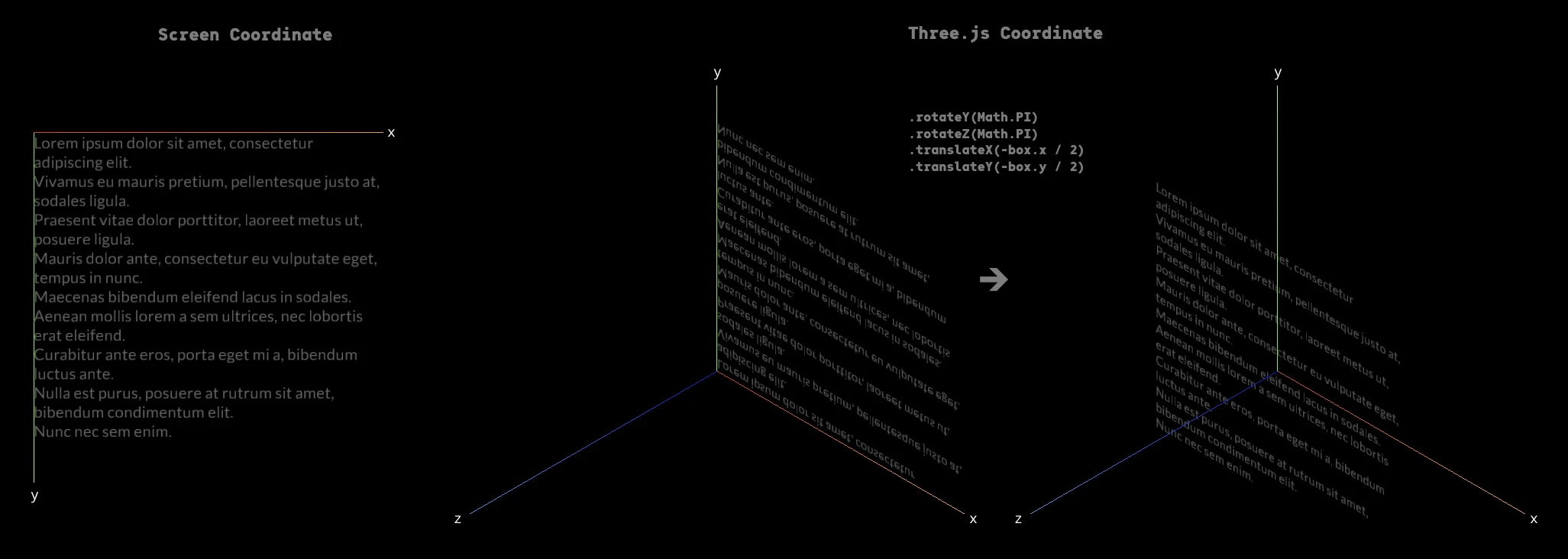
TextGeometry places text based on the screen coordinate system.
Therefore, when [`THREE.Mesh`](https://threejs.org/docs/#api/en/objects/Mesh) is added to the scene, the text will be placed inverted when viewed from the positive direction of the Z axis.
To make the text visible from the positive z-axis, you need apply transformation.
#### BMFontParser interface supports JSON, XML, ACII, and Binary fromat
Parse font data in JSON format
```TypeScript
import { BMFontJsonParser } from 'three-text-geometry'
const font: BMFont = new BMFontJsonParser().parse(/** `string` or `object` data JSON format */)
```
Parse font data in XML format
```TypeScript
import { BMFontXMLParser } from 'three-text-geometry'
const font: BMFont = new BMFontXMLParser().parse(/** `string` data in XML format */)
```
Parse font data in ASCII format
```TypeScript
import { BMFontAsciiParser } from 'three-text-geometry'
const font: BMFont = new BMFontAsciiParser().parse(/** `string` data in ASCII format */)
```
Parse font data in Binary format
```TypeScript
import { BMFontBinaryParser } from 'three-text-geometry'
const font: BMFont = new BMFontBinaryParser().parse(/** `string` data in ASCII Binary */)
```
### The value list of `TextGeometryOption`
| key | type | description | default | required |
| ----------------- | :-----------------------------------------------------------------------------------: | ------------------------------------------------------------------------------------------------------------------------------------------------------------------------------------------------------------------------------------------------------------------------------------------------------------------------------------------------------------------------------------------------------------------- | :-------------------------------------------------------------------------------------------------------------: | :------: |
| **font** | [`BMFont`](https://gumob.github.io/three-text-geometry/interfaces/BMFont.html) | The BMFont definition which holds chars, kernings, etc | undefined | ✔ |
| **width** | `number` | The desired width of the text box, causes word-wrapping and clipping in [`WordWrapMode`](https://gumob.github.io/three-text-geometry/enums/WordWrapMode.html) mode. Leave as undefined to remove word-wrapping (default behaviour) | undefined | |
| **mode** | [`WordWrapMode`](https://gumob.github.io/three-text-geometry/enums/WordWrapMode.html) | A mode for word-wrapper; can be [`WordWrapMode.Pre`](https://gumob.github.io/three-text-geometry/enums/WordWrapMode.html#Pre) (maintain spacing), or [`WordWrapMode.NoWrap`](https://gumob.github.io/three-text-geometry/enums/WordWrapMode.html#NoWrap) (collapse whitespace but only break on newline characters), otherwise assumes normal word-wrap behaviour (collapse whitespace, break at width or newlines) | undefined | |
| **align** | [`TextAlign`](https://gumob.github.io/three-text-geometry/enums/TextAlign.html) | This can be [`TextAlign.left`](https://gumob.github.io/three-text-geometry/enums/TextAlign.html#Left), [`TextAlign.center`](https://gumob.github.io/three-text-geometry/enums/TextAlign.html#Center) or [`TextAlign.right`](https://gumob.github.io/three-text-geometry/enums/TextAlign.html#Right) | [`TextAlign.left`](https://gumob.github.io/three-text-geometry/enums/TextAlign.html#Left) | |
| **letterSpacing** | `number` | The letter spacing in pixels | 0 | |
| **lineHeight** | `number` | The line height in pixels | [`font.common.lineHeight`](https://gumob.github.io/three-text-geometry/interfaces/BMFontCommon.html#lineHeight) | |
| **tabSize** | `number` | The number of spaces to use in a single tab | 4 | |
| **start** | `number` | The starting index into the text to layout | 0 | |
| **end** | `number` | The ending index (exclusive) into the text to layout | [`text.length`](https://gumob.github.io/three-text-geometry/classes/TextGeometry.html#constructor) | |
| **flipY** | `boolean` | Whether the texture will be Y-flipped | true | |
| **multipage** | `boolean` | Whether to construct this geometry with an extra buffer containing page IDs. This is necessary for multi-texture fonts | false | |
## Generate Bitmap Font
The following tools can be used to convert fonts to a bitmap font:
- [msdf-bmfont-web](https://msdf-bmfont.donmccurdy.com/) (Online Tool)
- [msdf-bmfont-xml](https://github.com/soimy/msdf-bmfont-xml) (Commandline Tool)
- [Hiero](https://github.com/libgdx/libgdx/wiki/Hiero) (Desktop App, Windows Only)
Read the [Three.js documentation](https://threejs.org/docs/index.html#manual/en/introduction/Creating-text) about a bitmap font.
### Using msdf-bmfont-xml
Install [msdf-bmfont-xml](https://github.com/soimy/msdf-bmfont-xml)
```
$ npm install msdf-bmfont-xml -g
```
Generate a bitmap font
```
$ msdf-bmfont \
--output-type json \
--filename 'OdudoMono-Regular-128' \
--font-size 128 \
--texture-size 1024,1024 \
--field-type 'sdf' \
'OdudoMono-Regular.otf'
```
## Copyright
Punycode is released under MIT license, which means you can modify it, redistribute it or use it however you like.