#  Theo
[![Build Status][travis-image]][travis-url]
[![NPM version][npm-image]][npm-url]
Theo is an abstraction for transforming and formatting [Design Tokens](#overview).
> ### Looking for the gulp plugin?
>
> As of Theo v6, the gulp plugin is distributed as a separate package: [gulp-theo](https://www.npmjs.com/package/gulp-theo).
## Example
```yaml
# buttons.yml
props:
button_background:
value: "{!primary_color}"
imports:
- ./aliases.yml
global:
type: color
category: buttons
```
```yaml
# aliases.yml
aliases:
primary_color:
value: "#0070d2"
```
```js
const theo = require("theo");
theo
.convert({
transform: {
type: "web",
file: "buttons.yml"
},
format: {
type: "scss"
}
})
.then(scss => {
// $button-background: rgb(0, 112, 210);
})
.catch(error => console.log(`Something went wrong: ${error}`));
```
## Transforms
Theo is divided into two primary features: transforms and formats.
Transforms are a named group of value transforms. Theo ships with several predefined transforms.
| Name | Value Transforms |
| --------- | --------------------------------------------------------------- |
| `raw` | `[]` |
| `web` | `['color/rgb']` |
| `ios` | `['color/rgb', 'relative/pixelValue', 'percentage/float']` |
| `android` | `['color/hex8argb', 'relative/pixelValue', 'percentage/float']` |
### Value Transforms
Value transforms are used to conditionaly transform the value of a property. Below are the value transforms that ship with Theo along with the predicate that triggers them.
| Name | Predicate | Description |
| --------------------- | ----------------------- | ----------------------------------------------------------------- |
| `color/rgb` | `prop.type === 'color'` | Convert to rgb |
| `color/hex` | `prop.type === 'color'` | Convert to hex |
| `color/hex8rgba` | `prop.type === 'color'` | Convert to hex8rgba |
| `color/hex8argb` | `prop.type === 'color'` | Convert to hex8argb |
| `percentage/float` | `/%/.test(prop.value)` | Convert a percentage to a decimal percentage |
| `relative/pixel` | `isRelativeSpacing` | Convert a r/em value to a pixel value |
| `relative/pixelValue` | `isRelativeSpacing` | Convert a r/em value to a pixel value (excluding the `px` suffix) |
### Custom Transforms / Value Transforms
```javascript
/*
{
CUSTOM_EASING: {
type: 'easing',
value: [1,2,3,4]
}
}
*/
theo.registerValueTransform(
// Name to be used with registerTransform()
"easing/web",
// Determine if the value transform
// should be run on the specified prop
prop => prop.get("type") === "easing",
// Return the new value
prop => {
const [x1, y1, x2, y2] = prop.get("value").toArray();
return `cubic-bezier(${x1}, ${y1}, ${x2}, ${y2})`;
}
);
// Override the default "web" transform
theo.registerTransform("web", ["color/rgb", "easing/web"]);
```
## Formats
Theo ships with the following predefined formats.
### custom-properties.css
```css
:root {
/* If prop has 'comment' key, that value will go here. */
--prop-name: PROP_VALUE;
}
```
### cssmodules.css
```css
/* If prop has 'comment' key, that value will go here. */
@value prop-name: PROP_VALUE;
```
### scss
```sass
// If prop has 'comment' key, that value will go here.
$prop-name: PROP_VALUE;
```
### sass
```sass
// If prop has 'comment' key, that value will go here.
$prop-name: PROP_VALUE
```
### less
```less
// If prop has 'comment' key, that value will go here.
@prop-name: PROP_VALUE;
```
### styl
```styl
// If prop has 'comment' key, that value will go here.
$prop-name = PROP_VALUE
```
### map.scss
```sass
$file-name-map: (
// If prop has 'comment' key, that value will go here.
"prop-name": (PROP_VALUE),
);
```
### map.variables.scss
```sass
$file-name-map: (
// If prop has 'comment' key, that value will go here.
"prop-name": ($prop-name)
);
```
### list.scss
```sass
$file-name-list: (
// If prop has 'comment' key, that value will go here.
"prop-name"
);
```
### module.js
```js
// If prop has 'comment' key, that value will go here.
export const propName = "PROP_VALUE";
```
### common.js
```js
module.exports = {
// If prop has 'comment' key, that value will go here.
propName: "PROP_VALUE"
};
```
### html
Theo
[![Build Status][travis-image]][travis-url]
[![NPM version][npm-image]][npm-url]
Theo is an abstraction for transforming and formatting [Design Tokens](#overview).
> ### Looking for the gulp plugin?
>
> As of Theo v6, the gulp plugin is distributed as a separate package: [gulp-theo](https://www.npmjs.com/package/gulp-theo).
## Example
```yaml
# buttons.yml
props:
button_background:
value: "{!primary_color}"
imports:
- ./aliases.yml
global:
type: color
category: buttons
```
```yaml
# aliases.yml
aliases:
primary_color:
value: "#0070d2"
```
```js
const theo = require("theo");
theo
.convert({
transform: {
type: "web",
file: "buttons.yml"
},
format: {
type: "scss"
}
})
.then(scss => {
// $button-background: rgb(0, 112, 210);
})
.catch(error => console.log(`Something went wrong: ${error}`));
```
## Transforms
Theo is divided into two primary features: transforms and formats.
Transforms are a named group of value transforms. Theo ships with several predefined transforms.
| Name | Value Transforms |
| --------- | --------------------------------------------------------------- |
| `raw` | `[]` |
| `web` | `['color/rgb']` |
| `ios` | `['color/rgb', 'relative/pixelValue', 'percentage/float']` |
| `android` | `['color/hex8argb', 'relative/pixelValue', 'percentage/float']` |
### Value Transforms
Value transforms are used to conditionaly transform the value of a property. Below are the value transforms that ship with Theo along with the predicate that triggers them.
| Name | Predicate | Description |
| --------------------- | ----------------------- | ----------------------------------------------------------------- |
| `color/rgb` | `prop.type === 'color'` | Convert to rgb |
| `color/hex` | `prop.type === 'color'` | Convert to hex |
| `color/hex8rgba` | `prop.type === 'color'` | Convert to hex8rgba |
| `color/hex8argb` | `prop.type === 'color'` | Convert to hex8argb |
| `percentage/float` | `/%/.test(prop.value)` | Convert a percentage to a decimal percentage |
| `relative/pixel` | `isRelativeSpacing` | Convert a r/em value to a pixel value |
| `relative/pixelValue` | `isRelativeSpacing` | Convert a r/em value to a pixel value (excluding the `px` suffix) |
### Custom Transforms / Value Transforms
```javascript
/*
{
CUSTOM_EASING: {
type: 'easing',
value: [1,2,3,4]
}
}
*/
theo.registerValueTransform(
// Name to be used with registerTransform()
"easing/web",
// Determine if the value transform
// should be run on the specified prop
prop => prop.get("type") === "easing",
// Return the new value
prop => {
const [x1, y1, x2, y2] = prop.get("value").toArray();
return `cubic-bezier(${x1}, ${y1}, ${x2}, ${y2})`;
}
);
// Override the default "web" transform
theo.registerTransform("web", ["color/rgb", "easing/web"]);
```
## Formats
Theo ships with the following predefined formats.
### custom-properties.css
```css
:root {
/* If prop has 'comment' key, that value will go here. */
--prop-name: PROP_VALUE;
}
```
### cssmodules.css
```css
/* If prop has 'comment' key, that value will go here. */
@value prop-name: PROP_VALUE;
```
### scss
```sass
// If prop has 'comment' key, that value will go here.
$prop-name: PROP_VALUE;
```
### sass
```sass
// If prop has 'comment' key, that value will go here.
$prop-name: PROP_VALUE
```
### less
```less
// If prop has 'comment' key, that value will go here.
@prop-name: PROP_VALUE;
```
### styl
```styl
// If prop has 'comment' key, that value will go here.
$prop-name = PROP_VALUE
```
### map.scss
```sass
$file-name-map: (
// If prop has 'comment' key, that value will go here.
"prop-name": (PROP_VALUE),
);
```
### map.variables.scss
```sass
$file-name-map: (
// If prop has 'comment' key, that value will go here.
"prop-name": ($prop-name)
);
```
### list.scss
```sass
$file-name-list: (
// If prop has 'comment' key, that value will go here.
"prop-name"
);
```
### module.js
```js
// If prop has 'comment' key, that value will go here.
export const propName = "PROP_VALUE";
```
### common.js
```js
module.exports = {
// If prop has 'comment' key, that value will go here.
propName: "PROP_VALUE"
};
```
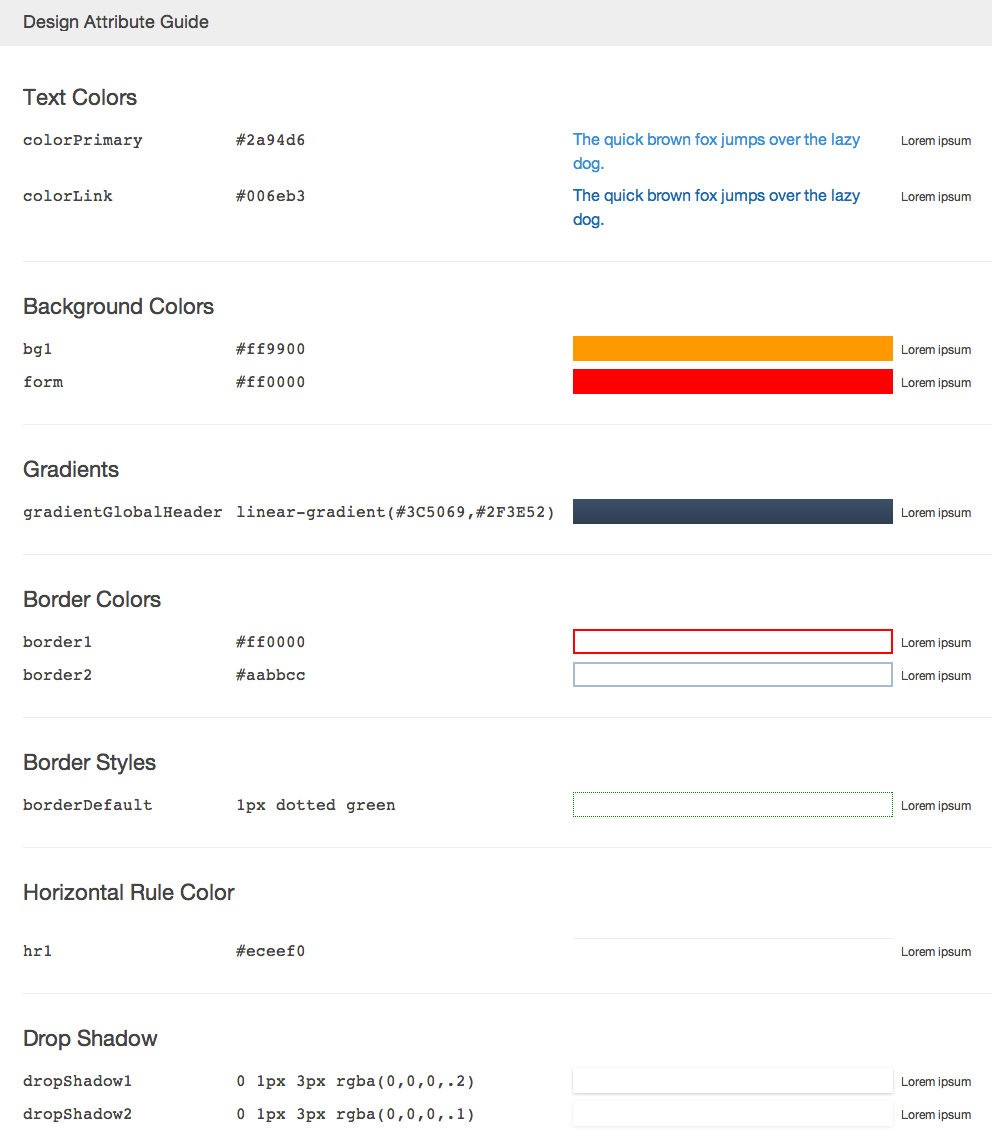
### html
 ```js
// When passing "format" options to theo.convert(), this format can be
// passed with an additional options object.
let formatOptions = {
type: "html",
options: {
transformPropName: name => name.toUpperCase()
}
};
```
#### Configurable options
| Option | Type | Default | Description |
| ------------------- | ---------- | -------------------------------------------------------- | ------------------------------ |
| `transformPropName` | `function` | [`lodash/camelCase`](https://lodash.com/docs/#camelCase) | Converts `name` to camel case. |
#### Supported categories
Tokens are grouped by category then categories are conditionally rendered under a human-friendly display name. Tokens with `category` values not in this list will still be converted and included in the generated output for all other formats.
| Category | Friendly Name |
| --------------------- | ---------------------- |
| `spacing` | Spacing |
| `sizing` | Sizing |
| `font` | Fonts |
| `font-style` | Font Styles |
| `font-weight` | Font Weights |
| `font-size` | Font Sizes |
| `line-height` | Line Heights |
| `font-family` | Font Families |
| `border-style` | Border Styles |
| `border-color` | Border Colors |
| `radius` | Radius |
| `border-radius` | Border Radii |
| `hr-color` | Horizontal Rule Colors |
| `background-color` | Background Colors |
| `gradient` | Gradients |
| `background-gradient` | Background Gradients |
| `drop-shadow` | Drop Shadows |
| `box-shadow` | Box Shadows |
| `inner-shadow` | Inner Drop Shadows |
| `text-color` | Text Colors |
| `text-shadow` | Text Shadows |
| `time` | Time |
| `media-query` | Media Queries |
### json
```json
{
"PROP_NAME": "PROP_VALUE"
}
```
### raw.json
```json5
{
props: {
PROP_NAME: {
value: "PROP_VALUE",
type: "PROP_TYPE",
category: "PROP_CATEGORY"
}
}
}
```
### ios.json
```json5
{
properties: [
{
name: "propName",
value: "PROP_VALUE",
type: "PROP_TYPE",
category: "PROP_CATEGORY"
}
]
}
```
### android.xml
```xml
PROP_VALUE
PROP_VALUE
PROP_VALUE
PROP_VALUE
PROP_VALUE
```
### aura.tokens
```xml
```
### Custom Format (Handlebars)
```js
const theo = require("theo");
theo.registerFormat(
"array.js",
`
// Source: {{stem meta.file}}
module.exports = [
{{#each props as |prop|}}
{{#if prop.comment}}{{{commoncomment prop.comment}}}{{/if}}
['{{camelcase prop.name}}', '{{prop.value}}'],
{{/each}}
]
`
);
```
A plethora of [handlebars helpers](https://github.com/helpers/handlebars-helpers#helpers),
such as `camelcase` and `stem`, are available and will assist in formatting strings in templates.
### Custom Format (function)
You may also register a format using a function:
```js
const camelCase = require("lodash/camelCase");
const path = require("path");
const theo = require("theo");
theo.registerFormat("array.js", result => {
// "result" is an Immutable.Map
// https://facebook.github.io/immutable-js/
return `
module.exports = [
// Source: ${path.basename(result.getIn(["meta", "file"]))}
${result
.get("props")
.map(
prop => `
['${camelCase(prop.get("name"))}', '${prop.get("value")}'],
`
)
.toJS()}
]
`;
});
```
## API
```js
type ConvertOptions = {
transform: TransformOptions,
format: FormatOptions,
/*
This option configures theo to resolve aliases. It is set (true) by default and
currently CANNOT be disabled.
*/
resolveAliases?: boolean,
// This option configures theo to resolve aliases in metadata. This is off (false) by default.
resolveMetaAliases?: boolean
}
type TransformOptions = {
// If no "type" is specified, values will not be transformed
type?: string,
// Path to a token file
// or just a filename if using the "data" option
file: string,
// Pass in a data string instead of reading from a file
data?: string
}
type FormatOptions = {
type: string,
// Available to the format function/template
options?: object
}
type Prop = Immutable.Map
type Result = Immutable.Map
theo.convert(options: ConvertOptions): Promise
theo.convertSync(options: ConvertOptions): string
theo.registerFormat(
name: string,
// Either a handlebars template string
// or a function that returns a string
format: string | (result: Result) => string
): void
theo.registerValueTransform(
// Referenced in "registerTransform"
name: string,
// Indicate if the transform should run for the provided prop
predicate: (prop: Prop) => boolean,
// Return the new "value"
transform: (prop: Prop) => any
): void
theo.registerTransform(
name: string,
// An array of registered value transforms
valueTransforms: Array
): void
```
## CLI
Please refer to the [documentation of the CLI](https://github.com/salesforce-ux/theo/blob/master/CLI.md)
## Design Tokens
Theo consumes **Design Token** files which are a central location to store
design related information such as colors, fonts, widths, animations, etc. These raw
values can then be transformed and formatted to meet the needs of any platform.
Let's say you have a web, native iOS, and native Android application that
would like to share information such as background colors.
The web might like to consume the colors as **hsla** values
formatted as Sass variables in an **.scss** file.
iOS might like **rgba** values formatted as **.json**.
Finally, Android might like **8 Digit Hex (AARRGGBB)** values formatted as **.xml**.
Instead of hard coding this information in each platform/format, Theo
can consume the centralized **Design Tokens** and output files for
each platform.
### Spec
A _Design Token_ file is written in either
[JSON](http://json.org/) ([JSON5](http://json5.org/) supported)
or [YAML](http://yaml.org/) and should conform to the following spec:
```json5
{
// Required
// A map of property names and value objects
props: {
color_brand: {
// Required
// Can be any valid JSON value
value: "#ff0000",
// Required
// Describe the type of value
// [color|number|...]
type: "color",
// Required
// Describe the category of this property
// Often used for style guide generation
category: "background",
// Optional
// This value will be included during transform
// but excluded during formatting
meta: {
// This value might be needed for some special transform
foo: "bar"
}
}
},
// Optional
// Alternatively, you can define props as an array
// Useful for maintaining source order in output tokens
props: [
{
// Required
name: "color_brand"
// All other properties same as above
}
],
// Optional
// This object will be merged into each property
// Values defined on a property level will take precedence
global: {
category: "some-category",
meta: {
foo: "baz"
}
},
// Optional
// Share values across multiple props
// Aliases are resolved like: {!sky}
aliases: {
sky: "blue",
grass: {
value: "green",
yourMetadata: "How grass looks"
}
},
// Optional
// Array of design token files to be imported
// "aliases" will be imported as well
// "aliases" will already be resolved
// "global" will already be merged into each prop
// Imports resolve according to the Node.js module resolution algorithm:
// https://nodejs.org/api/modules.html#modules_all_together
imports: [
// Absolute file path
"/home/me/file.json",
// Relative file path: resolves from the directory of the file where the import occurs
"./some/dir/file.json",
// Module path
"some-node-module"
]
}
```
[npm-url]: https://npmjs.org/package/theo
[npm-image]: http://img.shields.io/npm/v/theo.svg
[travis-url]: https://travis-ci.org/salesforce-ux/theo
[travis-image]: http://img.shields.io/travis/salesforce-ux/theo.svg
```js
// When passing "format" options to theo.convert(), this format can be
// passed with an additional options object.
let formatOptions = {
type: "html",
options: {
transformPropName: name => name.toUpperCase()
}
};
```
#### Configurable options
| Option | Type | Default | Description |
| ------------------- | ---------- | -------------------------------------------------------- | ------------------------------ |
| `transformPropName` | `function` | [`lodash/camelCase`](https://lodash.com/docs/#camelCase) | Converts `name` to camel case. |
#### Supported categories
Tokens are grouped by category then categories are conditionally rendered under a human-friendly display name. Tokens with `category` values not in this list will still be converted and included in the generated output for all other formats.
| Category | Friendly Name |
| --------------------- | ---------------------- |
| `spacing` | Spacing |
| `sizing` | Sizing |
| `font` | Fonts |
| `font-style` | Font Styles |
| `font-weight` | Font Weights |
| `font-size` | Font Sizes |
| `line-height` | Line Heights |
| `font-family` | Font Families |
| `border-style` | Border Styles |
| `border-color` | Border Colors |
| `radius` | Radius |
| `border-radius` | Border Radii |
| `hr-color` | Horizontal Rule Colors |
| `background-color` | Background Colors |
| `gradient` | Gradients |
| `background-gradient` | Background Gradients |
| `drop-shadow` | Drop Shadows |
| `box-shadow` | Box Shadows |
| `inner-shadow` | Inner Drop Shadows |
| `text-color` | Text Colors |
| `text-shadow` | Text Shadows |
| `time` | Time |
| `media-query` | Media Queries |
### json
```json
{
"PROP_NAME": "PROP_VALUE"
}
```
### raw.json
```json5
{
props: {
PROP_NAME: {
value: "PROP_VALUE",
type: "PROP_TYPE",
category: "PROP_CATEGORY"
}
}
}
```
### ios.json
```json5
{
properties: [
{
name: "propName",
value: "PROP_VALUE",
type: "PROP_TYPE",
category: "PROP_CATEGORY"
}
]
}
```
### android.xml
```xml
PROP_VALUE
PROP_VALUE
PROP_VALUE
PROP_VALUE
PROP_VALUE
```
### aura.tokens
```xml
```
### Custom Format (Handlebars)
```js
const theo = require("theo");
theo.registerFormat(
"array.js",
`
// Source: {{stem meta.file}}
module.exports = [
{{#each props as |prop|}}
{{#if prop.comment}}{{{commoncomment prop.comment}}}{{/if}}
['{{camelcase prop.name}}', '{{prop.value}}'],
{{/each}}
]
`
);
```
A plethora of [handlebars helpers](https://github.com/helpers/handlebars-helpers#helpers),
such as `camelcase` and `stem`, are available and will assist in formatting strings in templates.
### Custom Format (function)
You may also register a format using a function:
```js
const camelCase = require("lodash/camelCase");
const path = require("path");
const theo = require("theo");
theo.registerFormat("array.js", result => {
// "result" is an Immutable.Map
// https://facebook.github.io/immutable-js/
return `
module.exports = [
// Source: ${path.basename(result.getIn(["meta", "file"]))}
${result
.get("props")
.map(
prop => `
['${camelCase(prop.get("name"))}', '${prop.get("value")}'],
`
)
.toJS()}
]
`;
});
```
## API
```js
type ConvertOptions = {
transform: TransformOptions,
format: FormatOptions,
/*
This option configures theo to resolve aliases. It is set (true) by default and
currently CANNOT be disabled.
*/
resolveAliases?: boolean,
// This option configures theo to resolve aliases in metadata. This is off (false) by default.
resolveMetaAliases?: boolean
}
type TransformOptions = {
// If no "type" is specified, values will not be transformed
type?: string,
// Path to a token file
// or just a filename if using the "data" option
file: string,
// Pass in a data string instead of reading from a file
data?: string
}
type FormatOptions = {
type: string,
// Available to the format function/template
options?: object
}
type Prop = Immutable.Map
type Result = Immutable.Map
theo.convert(options: ConvertOptions): Promise
theo.convertSync(options: ConvertOptions): string
theo.registerFormat(
name: string,
// Either a handlebars template string
// or a function that returns a string
format: string | (result: Result) => string
): void
theo.registerValueTransform(
// Referenced in "registerTransform"
name: string,
// Indicate if the transform should run for the provided prop
predicate: (prop: Prop) => boolean,
// Return the new "value"
transform: (prop: Prop) => any
): void
theo.registerTransform(
name: string,
// An array of registered value transforms
valueTransforms: Array
): void
```
## CLI
Please refer to the [documentation of the CLI](https://github.com/salesforce-ux/theo/blob/master/CLI.md)
## Design Tokens
Theo consumes **Design Token** files which are a central location to store
design related information such as colors, fonts, widths, animations, etc. These raw
values can then be transformed and formatted to meet the needs of any platform.
Let's say you have a web, native iOS, and native Android application that
would like to share information such as background colors.
The web might like to consume the colors as **hsla** values
formatted as Sass variables in an **.scss** file.
iOS might like **rgba** values formatted as **.json**.
Finally, Android might like **8 Digit Hex (AARRGGBB)** values formatted as **.xml**.
Instead of hard coding this information in each platform/format, Theo
can consume the centralized **Design Tokens** and output files for
each platform.
### Spec
A _Design Token_ file is written in either
[JSON](http://json.org/) ([JSON5](http://json5.org/) supported)
or [YAML](http://yaml.org/) and should conform to the following spec:
```json5
{
// Required
// A map of property names and value objects
props: {
color_brand: {
// Required
// Can be any valid JSON value
value: "#ff0000",
// Required
// Describe the type of value
// [color|number|...]
type: "color",
// Required
// Describe the category of this property
// Often used for style guide generation
category: "background",
// Optional
// This value will be included during transform
// but excluded during formatting
meta: {
// This value might be needed for some special transform
foo: "bar"
}
}
},
// Optional
// Alternatively, you can define props as an array
// Useful for maintaining source order in output tokens
props: [
{
// Required
name: "color_brand"
// All other properties same as above
}
],
// Optional
// This object will be merged into each property
// Values defined on a property level will take precedence
global: {
category: "some-category",
meta: {
foo: "baz"
}
},
// Optional
// Share values across multiple props
// Aliases are resolved like: {!sky}
aliases: {
sky: "blue",
grass: {
value: "green",
yourMetadata: "How grass looks"
}
},
// Optional
// Array of design token files to be imported
// "aliases" will be imported as well
// "aliases" will already be resolved
// "global" will already be merged into each prop
// Imports resolve according to the Node.js module resolution algorithm:
// https://nodejs.org/api/modules.html#modules_all_together
imports: [
// Absolute file path
"/home/me/file.json",
// Relative file path: resolves from the directory of the file where the import occurs
"./some/dir/file.json",
// Module path
"some-node-module"
]
}
```
[npm-url]: https://npmjs.org/package/theo
[npm-image]: http://img.shields.io/npm/v/theo.svg
[travis-url]: https://travis-ci.org/salesforce-ux/theo
[travis-image]: http://img.shields.io/travis/salesforce-ux/theo.svg