_Tiny, easy and powerful **React state management** library_
[](https://badge.fury.io/js/teaful)
[](https://unpkg.com/teaful)
[](https://github.com/teafuljs/teaful/actions/workflows/test.yml)
[](https://github.com/teafuljs/teaful#maintenance-status)
[](https://www.npmjs.com/package/teaful)
[](https://github.com/teafuljs/teaful/discussions)
[![PRs Welcome][badge-prwelcome]][prwelcome]
[](#contributors-)
[badge-prwelcome]: https://img.shields.io/badge/PRs-welcome-brightgreen.svg?style=flat-square
[prwelcome]: http://makeapullrequest.com
## What advantages does it have? ✨
📦 ・Tiny: Less than 1kb package to manage your state in React and Preact.
🌱 ・Easy: You don't need actions, reducers, selectors, connect, providers, etc. Everything can be done in the simplest and most comfortable way.
🚀 ・Powerful: When a store property is updated, only its components are re-rendered. It's not re-rendering components that use other store properties.
## Guide 🗺
- [1. Installation 🧑🏻💻](#installation-)
- [2. Init your store 👩🏽🎨](#init-your-store-)
- [createStore](#createstore)
- [How to export](#how-to-export)
- [3. Manage the store 🕹](#manage-the-store-)
- [useStore hook](#usestore-hook)
- [setStore helper](#setstore-helper)
- [getStore helper](#getstore-helper)
- [withStore HoC](#withstore-hoc)
- [4. Register events after an update 🚦](#register-events-after-an-update-)
- [5. How to... 🧑🎓](#how-to-)
- [Add a new store property](#add-a-new-store-property)
- [Use more than one store](#use-more-than-one-store)
- [Update several portions avoiding rerenders in the rest](#update-several-portions-avoiding-rerenders-in-the-rest)
- [Define calculated properties](#define-calculated-properties)
- [6. Teaful Devtools 🛠](#teaful-devtools-)
- [7. Addons and extras 🌀](#addons-and-extras-)
- [8. Examples 🖥](#examples-)
- [9. Roadmap 🛣](#roadmap-)
- [10. Contributors ✨](#contributors-)
## Installation 🧑🏻💻
```sh
yarn add teaful
# or
npm install teaful --save
```
## Init your store 👩🏽🎨
Each store has to be created with the `createStore` function. This function returns all the methods that you can use to consume and update the store properties.
### createStore
```js
import createStore from "teaful";
const { useStore } = createStore();
```
Or also with an initial store:
```js
const initialStore = {
cart: { price: 0, items: [] },
};
const { useStore, getStore } = createStore(initialStore);
```
Or also with an event that is executed after every update:
```js
const initialStore = {
cart: { price: 0, items: [] },
};
function onAfterUpdate({ store, prevStore }) {
console.log("This callback is executed after an update");
}
const { useStore } = createStore(initialStore, onAfterUpdate);
```
_Input:_
| name | type | required | description |
| --------------- | ------------- | -------- | -------------------------------------------------------------------------------------------------------- |
| `initialStore` | `object` | `false` | Object with your initial store. |
| `onAfterUpdate` | `function` | `false` | Function that is executed after each property change. More [details](#register-events-after-an-update-). |
_Output:_
| name | type | description | example |
| ----------- | ------- | ------------------------------------------------------------------------------------------------------------------------------------------------------------------------------------------------------- | ------------------------------------------------- |
| `useStore` | `Proxy` | Proxy hook to consume and update store properties inside your components. Each time the value changes, the component is rendered again with the new value. More [info](#usestore-hook). | `const [price, setPrice] = useStore.cart.price()` |
| `getStore` | `Proxy` | Similar to `useStore` but without subscription. You can use it as a helper outside (or inside) components. Note that if the value changes, it does not cause a rerender. More [info](#getstore-helper). | `const [price, setPrice] = getStore.cart.price()` |
| `setStore` | `Proxy` | It's a proxy helper to modify a store property outside (or inside) components. More [info](#setstore-helper). | `setStore.user.name('Aral')` or `setStore.cart.price(price => price + 10)` |
| `withStore` | `Proxy` | HoC with `useStore` inside. Useful for components that are not functional. More [info](#withstore-hoc). | `withStore.cart.price(MyComponent)` |
### How to export
We recommend using this type of export:
```js
// ✅
export const { useStore, getStore, withStore } = createStore({
cart: { price: 0, items: [] },
});
```
This way you can import it with:
```js
// ✅
import { useStore } from '../store'
```
Avoid using a default export with all:
```js
// ❌
export default createStore({ cart: { price: 0, items: [] } });
```
Because then you won't be able to do this:
```js
// ❌ It's not working well with proxies
import { useStore } from '../store'
```
## Manage the store 🕹
### useStore hook
It's recommended to use the `useStore` hook as a proxy to indicate exactly what **portion of the store** you want. This way you only subscribe to this part of the store avoiding unnecessary re-renders.
```js
import createStore from "teaful";
const { useStore } = createStore({
username: "Aral",
count: 0,
age: 31,
cart: {
price: 0,
items: [],
},
});
function Example() {
const [username, setUsername] = useStore.username();
const [cartPrice, setCartPrice] = useStore.cart.price();
return (
<>
);
}
```
However, it's also possible to use the `useStore` hook to use **all the store**.
```js
function Example() {
const [store, setStore] = useStore();
return (
<>
);
}
```
_Input:_
| name | type | description | example |
| --------------------- | ---------- | ---------------------------------------------------------------------------------------------------------------------------------------------------------------------------------------------------------------------------------------------- | ---------------------------------------------------------------------------------------------------------------------------------------------------------------------------------------------------------- |
| Initial value | `any` | This parameter is **not mandatory**. It only makes sense for new store properties that have not been defined before within the `createStore`. If the value has already been initialized inside the `createStore` this parameter has no effect. | `const [price, setPrice] = useStore.cart.price(0)` |
| event after an update | `function` | This parameter is **not mandatory**. Adds an event that is executed every time there is a change inside the indicated store portion. | `const [price, setPrice] = useStore.cart.price(0, onAfterUpdate)`
|
_Output:_
Is an `Array` with **2** items:
| name | type | description | example |
| ------------ | ---------- | --------------------------------------------------------------------------------------- | ----------------------------------------------------------------------------------------------------------------------------------------------------------------------------------------------------------------------------------------------------------------------------------------------------------------------------------------------------------------------- |
| value | `any` | The value of the store portion indicated with the proxy. | A store portion
`const [price] = useStore.cart.price()`
All store:
`const [store] = useStore()`
|
| update value | `function` | Function to update the store property indicated with the proxy. | Updating a store portion:
`const [count, setCount] = useStore.count(0)`
Way 1:
`setCount(count + 1)`
Way 1:
`setCount(c => c + 1)`
-------
Updating all store:
`const [store, updateStore] = useStore()`
Way 1:
`updateStore({ ...store, count: 2 }))`
Way 1:
`updateStore(s => ({ ...s, count: 2 }))`
|
### setStore helper
Useful helper to modify the store from anywhere (outside/inside components).
Example:
```js
const initialStore = { count: 0, name: 'Aral' }
const { setStore } = createStore(initialStore);
const resetStore = () => setStore(initialStore);
const resetCount = () => setStore.count(initialStore.count);
const resetName = () => setStore.name(initialStore.name);
// Component without any re-render (without useStore hook)
function Resets() {
return (
<>
);
}
```
Another example:
```js
const { useStore, setStore } = createStore({
firstName: '',
lastName: ''
});
function ExampleOfForm() {
const [formFields] = useStore()
return Object.entries(formFields).map(([key, value]) => (
{
// Update depending the key attribute
setStore[key](e.target.value)
}}
/>
))
}
```
This second example only causes re-renders in the components that consume the property that has been modified.
In this way:
```js
const [formFields, setFormFields] = useStore()
// ...
setFormFields(s => ({ ...s, [key]: e.target.value })) // ❌
```
This causes a re-render on all components that are consuming any of the form properties, instead of just the one that has been updated. So using the `setStore` proxy helper is more recommended.
### getStore helper
It works exactly like `useStore` but with **some differences**:
- It **does not make a subscription**. So it is no longer a hook and you can use it as a helper wherever you want.
- It's **not possible to register events** that are executed after a change.
```js
getStore.cart.price(0, onAfterPriceChange); // ❌
function onAfterPriceChange({ store, prevStore }) {
// ...
}
```
- If the intention is to register events that last forever, it has to be done within the `createStore`:
```js
const { getStore } = createStore(initialStore, onAfterUpdate); // ✅
function onAfterUpdate({ store, prevStore }) {
// ..
}
```
Very useful to use it:
- **Outside components**: helpers, services, etc.
- **Inside components**: Avoiding rerenders if you want to consume it inside events, when you only use the updater `const [, setCount] = getStore.count()`, etc.
Example:
```js
import { useState } from "react";
const initialStore = { count: 0 }
const { getStore } = createStore(initialStore);
function Example1() {
return (
);
}
function Example2() {
const [newCount, setNewCount] = useState();
function saveIncreasedCount(e) {
e.preventDefault();
const [count, setCount] = getStore.count();
if (newCount > count) setCount(newCount);
else alert("You should increase the value");
}
return (
);
}
```
### withStore HoC
It's a wrapper of the `useStore` for non-functional components. Where you receive the same thing that the `useStore` hook returns inside `this.props.store`.
Example with a store portion:
```js
const { withStore } = createStore();
class Counter extends Component {
render() {
const [count, setCount] = this.props.store;
return (
{count}
);
}
}
// Similar to useStore.counter.count(0)
const CounterWithStore = withStore.counter.count(Counter, 0);
```
Example with all store:
```js
const { withStore } = createStore({ count: 0 });
class Counter extends Component {
render() {
const [store, setStore] = this.props.store;
return (
{store.count}
);
}
}
// Similar to useStore()
const CounterWithStore = withStore(Counter);
```
The **only difference** with the `useStore` is that instead of having 2 parameters (initialValue, onAfterUpdate), it has 3 where the **first one is mandatory** and the other 2 are not (**Component**, **initialValue**, **onAfterUpdate**).
## Register events after an update 🚦
It is possible to register an event after each update. This can be useful for validating properties, storing error messages, optimistic updates...
There are 2 ways to register:
- **Permanent** events: Inside `createStore`. This event will always be executed for each change made within the store.
```js
export const { useStore, getStore } = createStore(
initialStore,
onAfterUpdate
);
function onAfterUpdate({ store, prevStore }) {
// Add an error msg
if (store.count > 99 && !store.errorMsg) {
const [, setErrorMsg] = getStore.errorMsg();
setErrorMsg("The count value should be lower than 100");
return;
}
// Remove error msg
if (store.count <= 99 && store.errorMsg) {
const [, setErrorMsg] = getStore.errorMsg();
setErrorMsg();
}
}
```
- **Temporal** events: Inside `useStore` / `withStore`. These events will be executed for each change in the store (or indicated portion) **only during the life of the component**, when the component is unmounted the event is removed.
```js
function Count() {
const [count, setCount] = useStore.count(0, onAfterUpdate);
const [errorMsg, setErrorMsg] = useStore.errorMsg();
// The event lasts as long as this component lives
function onAfterUpdate({ store, prevStore }) {
// Add an error msg
if (store.count > 99 && !store.errorMsg) {
setErrorMsg("The count value should be lower than 100");
return;
}
// Remove error msg
if (store.count >= 99 && store.errorMsg) {
setErrorMsg();
}
}
return (
<>
{errorMsg &&
{errorMsg}
}
{count}
);
}
```
## How to... 🧑🎓
### Add a new store property
You can use `useStore` / `getStore` / `withStore` even if the property does not exist inside the store, and create it on the fly.
```js
const { useStore } = createStore({ username: "Aral" });
function CreateProperty() {
const [price, setPrice] = useStore.cart.price(0); // 0 as initial value
return
Price: {price}
;
}
function OtherComponent() {
// store now is { username: 'Aral', cart: { price: 0 } }
const [store] = useStore();
console.log(store.cart.price); // 0
// ...
}
```
It's **not mandatory to indicate the initial value**, you can create the property in a following step with the updater.
```js
const { useStore } = createStore({ username: "Aral" });
function CreateProperty() {
const [cart, setCart] = useStore.cart();
useEffect(() => {
initCart();
}, []);
async function initCart() {
const newCart = await fetch("/api/cart");
setCart(newCart);
}
if (!cart) return null;
return
Price: {cart.price}
;
}
```
### Use more than one store
You can have as many stores as you want. The only thing you have to do is to use as many `createStore` as stores you want.
store.js
```js
import createStore from "teaful";
export const { useStore: useCart } = createStore({ price: 0, items: [] });
export const { useStore: useCounter } = createStore({ count: 0 });
```
Cart.js
```js
import { useCart } from "./store";
export default function Cart() {
const [price, setPrice] = useCart.price();
// ... rest
}
```
Counter.js
```js
import { useCounter } from "./store";
export default function Counter() {
const [count, setCount] = useCounter.count();
// ... rest
}
```
### Update several portions avoiding rerenders in the rest
If you do this it causes a rerender to all the properties of the store:
```js
// 😡
const [store, setStore] = useStore();
setStore({ ...store, count: 10, username: "" });
```
And if you do the next, you convert the whole store into only 2 properties (`{ count: 10, username: '' }`), and you will remove the rest:
```js
// 🥵
const [store, setStore] = useStore();
setStore({ count: 10, username: "" });
```
If you have to update several properties and you don't want to disturb the rest of the components that are using other store properties you can create a helper with `getStore`.
```js
export const { useStore, setStore } = createStore(initialStore);
export function setFragmentedStore(fields) {
Object.entries(fields).forEach(([key, value]) => {
setStore[key](value);
});
}
```
And use it wherever you want:
```js
// 🤩
import { setFragmentedStore } from "./store";
// ...
setFragmentedStore({ count: 10, username: "" });
```
### Define calculated properties
It's possible to use the `setStore` together with the function that is executed after each update to have store properties calculated from others.
In this example the cart price value will always be a value calculated according to the array of items:
```js
export const { useStore, setStore } = createStore(
{
cart: {
price: 0,
items: [],
},
},
onAfterUpdate
);
function onAfterUpdate({ store }) {
const { items, price } = store.cart;
const calculatedPrice = items.length * 3;
// Price always will be items.length * 3
if (price !== calculatedPrice) {
setStore.cart.price(calculatedPrice);
}
}
```
It's an anti-pattern? Not in Teaful 😊. As only the fragments of the store are updated and not the whole store, it is the same as updating both properties (`cart.items` and `cart.price`) instead of just `cart.items`. The anti-pattern comes when it causes unnecessary rerenders, but this is not the case. Only the components that use `cart.items` and `cart.price` are rerendered and not the others.
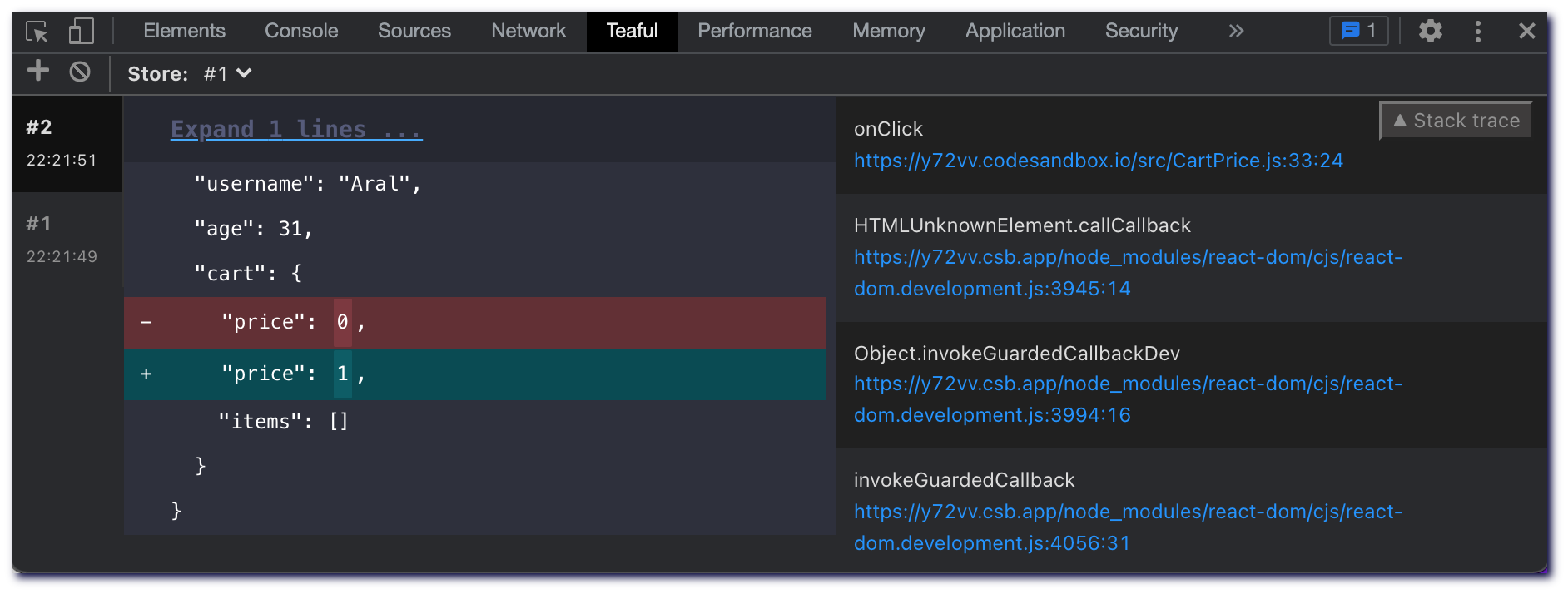
## Teaful Devtools 🛠
To debug your stores, you can use [Teaful DevTools](https://github.com/teafuljs/teaful-devtools).
## Addons and extras 🌀
To facilitate the creation of libraries that extend Teaful (such as [`teaful-devtools`](https://github.com/teafuljs/teaful-devtools)), we allow the possibility to add an extra that:
- Have access to everything returned by each `createStore` consumed: `getStore`, `useStore`, `withStore`.
- Return an object with new elements to be returned by each `createStore`. It's optional, if nothing is returned it will continue to return the usual. If, for example, you return `{ getCustomThing }` will do an assign with what is currently returned by the `createStore`.
- Ability to **subscribe**, **unsubscribe** and **notify** in each `createStore`.
For that, use the `createStore.ext` function.
teaful-yourlib:
```js
import createStore from 'teaful'
createStore.ext(({ getStore, }, subscription) => {
// s = subscribe (minified by Teaful)
// "." -> all store
// ".cart" -> only inside cart
// ".cart.price" -> only inside cart.price
// n = notify (minified by Teaful)
// u = unsubscribe (minified by Teaful)
subscription.s(".", ({ store, prevStore }) => {
// This will be executed in any store (".") change.
});
// optional
return { getCustomThing: () => console.log('example') }
})
```
Then, your library should be imported at the top:
```js
import 'teaful-yourlib'
import { render } from 'preact';
import App from './components/App';
render(, document.getElementById('root'));
```
## Examples 🖥
We will expand the examples over time. For now you can use this Codesandbox:
- [Example of store - CodeSandbox](https://codesandbox.io/s/teaful-example-4p5dv?file=/src/store.js)
- [Counter with ESM](https://github.com/teafuljs/teaful/tree/master/examples/counter-with-esm)
- [Todo list](https://github.com/teafuljs/teaful/tree/master/examples/todo-list)
- [Example with an API list](https://github.com/teafuljs/teaful/blob/master/examples/api-list/README.md)
## Roadmap 🛣
**For 1.0**:
- [x] React support
- [x] Teaful DevTools
- [x] TypeScript types support
- [x] Migrate full Teaful project to TypeScript
- [ ] React Native support
- [ ] Vanilla JavaScript support
- [ ] Create a documentation website
- [ ] Add more examples: with Next.js, Remix, Preact, React Native...
**Optional for 1.0 (else +1.0):**
- [ ] Svelte support
- [ ] Vue support
- [ ] Solid support
_If you think that there is something that should be preindicated by version 1.0 please report it as an issue or discussion 🙏_
## Contributors ✨
Thanks goes to these wonderful people ([emoji key](https://allcontributors.org/docs/en/emoji-key)):


 ## Addons and extras 🌀
To facilitate the creation of libraries that extend Teaful (such as [`teaful-devtools`](https://github.com/teafuljs/teaful-devtools)), we allow the possibility to add an extra that:
- Have access to everything returned by each `createStore` consumed: `getStore`, `useStore`, `withStore`.
- Return an object with new elements to be returned by each `createStore`. It's optional, if nothing is returned it will continue to return the usual. If, for example, you return `{ getCustomThing }` will do an assign with what is currently returned by the `createStore`.
- Ability to **subscribe**, **unsubscribe** and **notify** in each `createStore`.
For that, use the `createStore.ext` function.
teaful-yourlib:
```js
import createStore from 'teaful'
createStore.ext(({ getStore, }, subscription) => {
// s = subscribe (minified by Teaful)
// "." -> all store
// ".cart" -> only inside cart
// ".cart.price" -> only inside cart.price
// n = notify (minified by Teaful)
// u = unsubscribe (minified by Teaful)
subscription.s(".", ({ store, prevStore }) => {
// This will be executed in any store (".") change.
});
// optional
return { getCustomThing: () => console.log('example') }
})
```
Then, your library should be imported at the top:
```js
import 'teaful-yourlib'
import { render } from 'preact';
import App from './components/App';
render(
## Addons and extras 🌀
To facilitate the creation of libraries that extend Teaful (such as [`teaful-devtools`](https://github.com/teafuljs/teaful-devtools)), we allow the possibility to add an extra that:
- Have access to everything returned by each `createStore` consumed: `getStore`, `useStore`, `withStore`.
- Return an object with new elements to be returned by each `createStore`. It's optional, if nothing is returned it will continue to return the usual. If, for example, you return `{ getCustomThing }` will do an assign with what is currently returned by the `createStore`.
- Ability to **subscribe**, **unsubscribe** and **notify** in each `createStore`.
For that, use the `createStore.ext` function.
teaful-yourlib:
```js
import createStore from 'teaful'
createStore.ext(({ getStore, }, subscription) => {
// s = subscribe (minified by Teaful)
// "." -> all store
// ".cart" -> only inside cart
// ".cart.price" -> only inside cart.price
// n = notify (minified by Teaful)
// u = unsubscribe (minified by Teaful)
subscription.s(".", ({ store, prevStore }) => {
// This will be executed in any store (".") change.
});
// optional
return { getCustomThing: () => console.log('example') }
})
```
Then, your library should be imported at the top:
```js
import 'teaful-yourlib'
import { render } from 'preact';
import App from './components/App';
render(


