# SVGuitar - JavaScript Guitar Chord Renderer

[](https://github.com/prettier/prettier)
[](https://coveralls.io/github/omnibrain/svguitar)
[](https://github.com/semantic-release/semantic-release)
[](https://snyk.io/test/github/omnibrain/svguitar)
[](https://github.com/airbnb/javascript)
JavaScript (TypeScript) library to create beautiful SVG guitar chord charts directly in the browser.
To see this library in action check out [chordpic.com](https://chordpic.com), a free online chord diagram creator.
**Demo**: https://omnibrain.github.io/svguitar/ [ [source](https://github.com/omnibrain/svguitar/blob/master/demo/index.html) ]
**TypeScript API Documentation**: https://omnibrain.github.io/svguitar/docs/
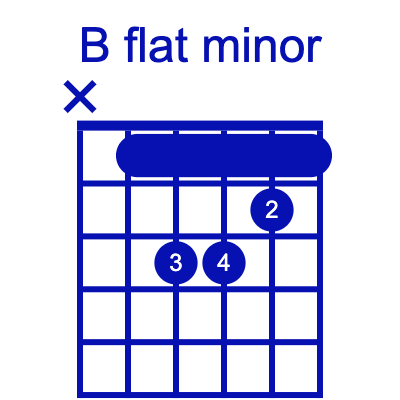
Example chord charts:



### Getting Started
```html
```
Of course, you can also add SVGuitar as a dependency to your project:
```bash
# Add the dependency to your project
npm install --save svguitar
# or
yarn add svguitar
# or
pnpm add svguitar
```
And then import it in your project:
```javascript
import { SVGuitarChord } from 'svguitar'
const chart = new SVGuitarChord('#chart')
// draw the chart
chart
.configure({
/* configuration */
})
.chord({
/* chord */
})
.draw()
```
## Usage
The SVG charts are highly customizable.
For a full API documentation have a look at the [TypeScript documentation](https://omnibrain.github.io/svguitar/docs/).
Chart configuration is completely optional, you don't have to pass any configuration or you can
only override specific settings.
Here's an example of a very customized chart:
```javascript
new SVGuitarChord('#some-selector')
.chord({
// array of [string, fret, text | options]
fingers: [
// finger at string 2, fret 2, with text '2'
[2, 2, '2'],
// finger at string 3, fret 3, with text '4', colored red and has class 'red'
[3, 3, { text: '4', color: '#F00', className: 'red' }],
// finger at string 4, fret 3, with text '3', triangle shaped
[4, 3, { text: '3', shape: 'triangle' }],
// an 'x' above string 6 denotes it isn't played
[6, 'x'],
],
// optional: barres for barre chords
barres: [
{
fromString: 5,
toString: 1,
fret: 1,
text: '1',
color: '#0F0',
textColor: '#F00',
className: 'my-barre-chord',
style: 'rectangle' // use 'arc' for an arc
},
],
// title of the chart (optional)
title: 'F# minor',
// position (defaults to 1)
position: 9,
})
.configure({
// Customizations (all optional, defaults shown)
/**
* Orientation of the chord diagram. Chose between 'vertical' or 'horizontal'
*/
orientation: 'vertical',
/**
* Select between 'normal' and 'handdrawn'
*/
style: 'normal',
/**
* The number of strings
*/
strings: 6,
/**
* The number of frets
*/
frets: 4,
/**
* Default position if no positon is provided (first fret is 1)
*/
position: 1,
/**
* These are the labels under the strings. Can be any string.
*/
tuning: ['E', 'A', 'D', 'G', 'B', 'E'],
/**
* The position of the fret label (eg. "3fr")
*/
fretLabelPosition: 'right',
/**
* The font size of the fret label
*/
fretLabelFontSize: 38,
/**
* The font size of the string labels
*/
tuningsFontSize: 28,
/**
* Size of a finger or barre relative to the string spacing
*/
fingerSize: 0.65,
/**
* Color of a finger or barre
*/
fingerColor: '#000',
/**
* The color of text inside fingers and barres
*/
fingerTextColor: '#FFF',
/**
* The size of text inside fingers and barres
*/
fingerTextSize: 22,
/**
* stroke color of a finger or barre. Defaults to the finger color if not set
*/
fingerStrokeColor: '#000000',
/**
* stroke width of a finger or barre
*/
fingerStrokeWidth: 0,
/**
* style of barre chords. Can be either 'rectangle' (default) or 'arc'.
*/
barreChordStyle: 'rectangle',
/**
* stroke color of a barre chord. Defaults to the finger color if not set
*/
barreChordStrokeColor: '#000000',
/**
* stroke width of a barre chord
*/
barreChordStrokeWidth: 0,
/**
* Height of a fret, relative to the space between two strings
*/
fretSize: 1.5,
/**
* The minimum side padding (from the guitar to the edge of the SVG) relative to the whole width.
* This is only applied if it's larger than the letters inside of the padding (eg the starting fret)
*/
sidePadding: 0.2,
/**
* The font family used for all letters and numbers
*/
fontFamily: 'Arial, "Helvetica Neue", Helvetica, sans-serif',
/**
* Default title of the chart if no title is provided
*/
title: 'F# minor',
/**
* Font size of the title. This is only the initial font size. If the title doesn't fit, the title
* is automatically scaled so that it fits.
*/
titleFontSize: 48,
/**
* Space between the title and the chart
*/
titleBottomMargin: 0,
/**
* Global color of the whole chart. Can be overridden with more specifig color settings such as
* @link titleColor or @link stringColor etc.
*/
color: '#000000',
/**
* The background color of the chord diagram. By default the background is transparent. To set the background to transparent either set this to 'none' or undefined
*/
backgroundColor: 'none',
/**
* Barre chord rectangle border radius relative to the fingerSize (eg. 1 means completely round endges, 0 means not rounded at all)
*/
barreChordRadius: 0.25,
/**
* Size of the Xs and Os above empty strings relative to the space between two strings
*/
emptyStringIndicatorSize: 0.6,
/**
* Global stroke width
*/
strokeWidth: 2,
/**
* The width of the nut (only used if position is 1)
*/
nutWidth: 10,
/**
* If this is set to `true`, the starting fret (eg. 3fr) will not be shown. If the position is 1 the
* nut will have the same width as all other frets.
*/
noPosition: false,
/**
* The color of the title (overrides color)
*/
titleColor: '#000000',
/**
* The color of the strings (overrides color)
*/
stringColor: '#000000',
/**
* The color of the fret position (overrides color)
*/
fretLabelColor: '#000000',
/**
* The color of the tunings (overrides color)
*/
tuningsColor: '#000000',
/**
* The color of the frets (overrides color)
*/
fretColor: '#000000',
/**
* When set to true the distance between the chord diagram and the top of the SVG stayes the same,
* no matter if a title is defined or not.
*/
fixedDiagramPosition: false,
/**
* Text of the watermark (text on the bottom of the chart)
*/
watermark: 'some watermark',
/**
* Font size of the watermark
*/
watermarkFontSize: 12,
/**
* Color of the watermark (overrides color)
*/
watermarkColor: '#000000',
/**
* Font-family of the watermark (overrides fontFamily)
*/
watermarkFontFamily: 'Arial, "Helvetica Neue", Helvetica, sans-serif',
/**
* The title of the SVG. This is not visible in the SVG, but can be used for accessibility.
*/
svgTitle: 'Guitar chord diagram of F# minor',
/**
* The fret markers. See type docs for more options.
*/
fretMarkers: [
2, 4, 6, 8, {
fret: 11,
double: true,
},
],
/**
* Flag to show or disable all fret markers globally. This is just for convenience.
* The fret markers can also be removed by not setting the fretMarkers property.
*/
showFretMarkers: true,
/**
* The shape of the fret markets. Applies to all fret markets unless overridden
* on specific fret markers. Defaults to circles.
*/
fretMarkerShape: 'circle',
/**
* The size of a fret marker. This is relative to the space between two strings, so
* a value of 1 means a fret marker spans from one string to another.
*/
fretMarkerSize: 0.4,
/**
* The color of the fret markers.
*/
fretMarkerColor: 'rgba(0, 0, 0, 0.2)',
/**
* The stroke color of the fret markers. By default, the fret markets have no border.
*/
fretMarkerStrokeColor: '#000000',
/**
* The stroke width of the fret markers. By default, the fret markets have no border.
*/
fretMarkerStrokeWidth: 0,
/**
* The distance between the double fret markers, relative to the width
* of the whole neck. E.g. 0.5 means the distance between the fret markers
* is equivalent to 0.5 times the width of the whole neck.
*/
doubleFretMarkerDistance: 0.4
})
.draw()
```
## Contribute
Pull Requests are very welcome!
## Projects using SVGuitar
Here are some projects that use `svguitar`:
- [ChordPic - Easily Create Guitar Chord Charts](https://chordpic.com)
- [muted.io - Magical Music Theory Tools to Learn Music Online for Free](https://muted.io/)
- [Chordpress Wordpress Plugin - ChordPro Text Formatter](https://wordpress.org/plugins/chordpress/)
- [Harmonote - Find chords for your favorite songs](https://harmonote.com/)
- [Guide Tones Practice - A technique to learn Jazz chords quickly](https://www.onlinemusictools.com/guide-tones/)
- [Lyric Writing Assistant](https://reprahkcin.github.io/lyric-writing-assistant/)
Are you using SVGuitar? Create an issue to get your project listed here! Or simply create a pull request with your project added.