

<p><img src="https://raw.githubusercontent.com/PawanKolhe/color-calendar/master/screenshots/logo.png" alt="logo" width="20%" /></p>
<p>
    <h1>Color Calendar</h1>
</p>
<p>
    <a href="https://www.npmjs.com/package/color-calendar">
        <img src="https://img.shields.io/npm/v/color-calendar?style=flat-square" alt="npm version" />
    </a>
    <a href="https://www.npmjs.com/package/color-calendar">
        <img src="https://img.shields.io/npm/dw/color-calendar?style=flat-square" alt="npm downloads" />
    </a>
    <img src="https://img.shields.io/bundlephobia/min/color-calendar?style=flat-square" alt="size" />
    <a href="https://www.jsdelivr.com/package/npm/color-calendar">
        <img src="https://data.jsdelivr.com/v1/package/npm/color-calendar/badge" alt="jsdelivr" />
    </a>
    <img src="https://hitcounter.pythonanywhere.com/count/tag.svg?url=https%3A%2F%2Fgithub.com%2FPawanKolhe%2Fcolor-calendar" alt="Hits">
    <img src="https://img.shields.io/npm/l/color-calendar?style=flat-square" alt="license" />
</p>

[![CircleCI](https://circleci.com/gh/PawanKolhe/color-calendar.svg?style=svg)](https://circleci.com/gh/PawanKolhe/color-calendar)

<p>
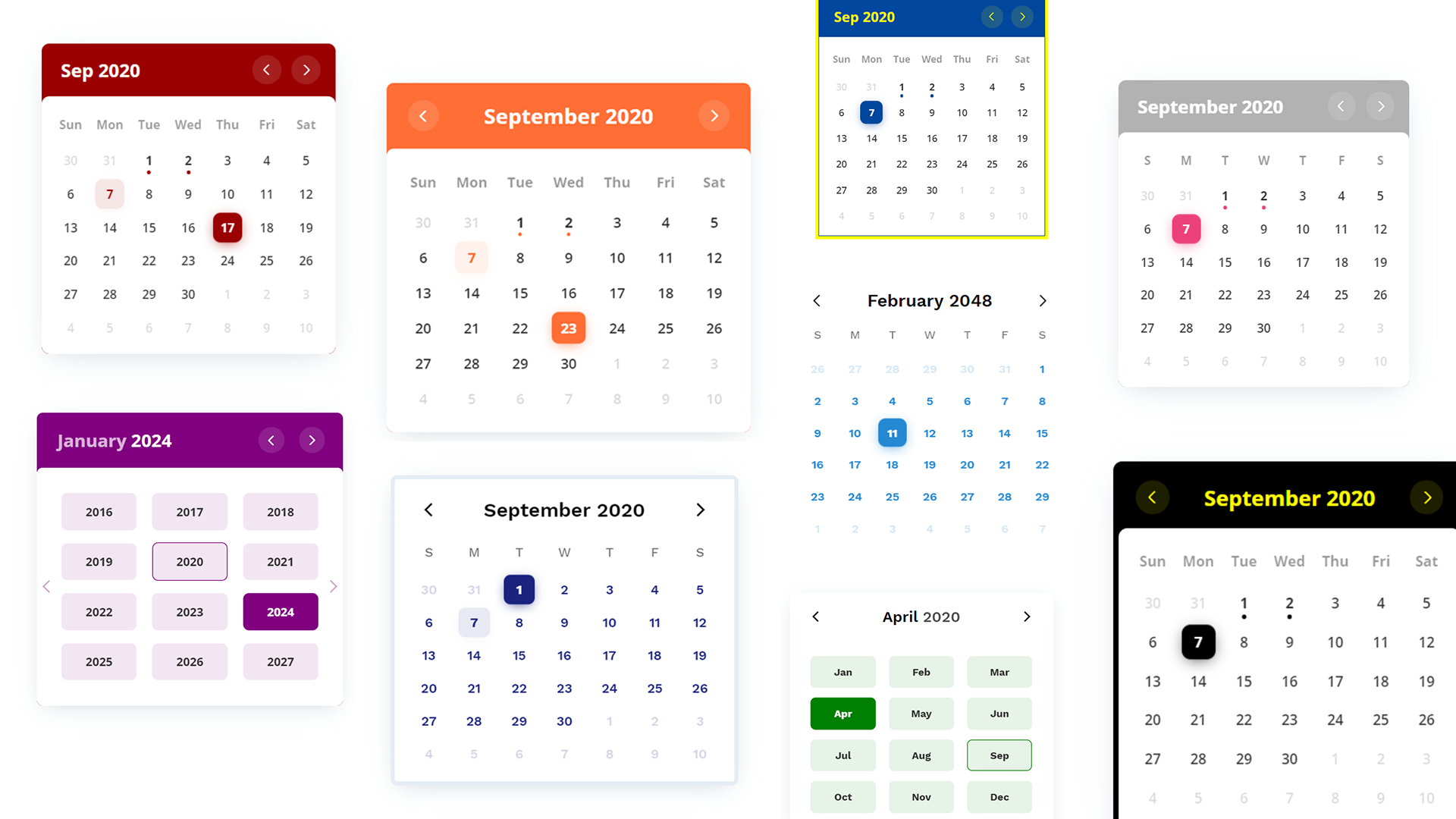
    A customizable events calendar component library. Checkout <a href="https://online-tech-confs.herokuapp.com/">Demo 1</a>, <a href="https://v84yk.csb.app/">Demo 2</a> and <a href="https://codesandbox.io/s/color-calendar-bnwdu">Demo 3.</a>
</p>

<!-- # Color Calendar
![npm](https://img.shields.io/npm/v/color-calendar?style=flat-square)
![npm](https://img.shields.io/npm/dw/color-calendar?style=flat-square)
![npm bundle size](https://img.shields.io/bundlephobia/min/color-calendar?style=flat-square)
[![](https://data.jsdelivr.com/v1/package/npm/color-calendar/badge)](https://www.jsdelivr.com/package/npm/color-calendar)
![HitCount](http://hits.dwyl.com/PawanKolhe/color-calendar.svg)
![NPM](https://img.shields.io/npm/l/color-calendar?style=flat-square) -->

![Color Calendar](https://raw.githubusercontent.com/PawanKolhe/color-calendar/master/screenshots/poster_calendar.png)

- [Features](#features)
- [Getting Started](#getting-started)
  - [CDN](#cdn)
  - [NPM](#npm)
- [Usage](#usage)
  - [Basic](#usage-basic)
  - [React](#usage-react)
  - [Vue](#usage-vue)
- [Options](#options)
- [Events](#events)
- [Methods](#methods)
- [Types](#types)
- [Themes](#themes)
- [Bug Reporting](#bug)
- [Feature Request](#feature-request)
- [Release Notes](#release-notes)
- [License](#license)

<a id="features"></a>

## 🚀 Features

- Zero dependencies
- Add events to calendar
- Perform some action on calendar date change
- Month and year picker built-in
- Themes available
- Fully customizable using CSS variables, passing options parameters while creating calendar, or overriding CSS.
- [Request more features](#feature-request)...

<a id="getting-started"></a>

## 📦 Getting Started

### CDN

#### JavaScript

```html
<script src="https://cdn.jsdelivr.net/npm/color-calendar/dist/bundle.js">
```

Also available on [unpkg](https://unpkg.com/browse/color-calendar/dist/).

#### CSS

Pick a css file according to the theme you want.

```html
<link
  rel="stylesheet"
  href="https://cdn.jsdelivr.net/npm/color-calendar/dist/css/theme-basic.css"
/>
<!-- or -->
<link
  rel="stylesheet"
  href="https://cdn.jsdelivr.net/npm/color-calendar/dist/css/theme-glass.css"
/>
```

#### Fonts

Get fonts from [Google Fonts](https://fonts.google.com/)

```html
<link
  href="https://fonts.googleapis.com/css2?family=Open+Sans:wght@400;600;700&display=swap"
  rel="stylesheet"
/>
```

Check what fonts the [theme](#themes) needs or pass your own fonts in [options](#options-fonts).

### NPM

> _You might need to use a module bundler such as webpack, rollup, parcel, etc._

#### Installation

```bash
npm i color-calendar
```

#### Import

```javascript
import Calendar from "color-calendar";
```

#### CSS

```javascript
import "color-calendar/dist/css/theme-<THEME-NAME>.css";
```

Then add fonts.

<a id="usage"></a>

## 🔨 Usage

<a id="usage-basic"></a>

### Basic

#### JavaScript

```javascript
new Calendar();
```

_Or_ you can pass in **options**.

```javascript
new Calendar({
  id: "#color-calendar",
  calendarSize: "small",
});
```

#### HTML

```html
<div id="color-calendar"></div>
```

[Example](https://codesandbox.io/s/color-calendar-bnwdu)

<a id="usage-react"></a>

### React

[Example](https://codesandbox.io/s/color-calendar-react-y0cyf?file=/src/CalendarComponent.jsx)

<a id="usage-vue"></a>

### Vue

[Example](https://codesandbox.io/s/color-calendar-vue-byo6e?file=/src/components/ColorCalendar.vue)

<a id="options"></a>

## ⚙️ Options

### `id`

Type: `String`  
Default: `#color-calendar`

Selector referencing HTMLElement where the calendar instance will bind to.

### `calendarSize`

Type: `String`  
Default: `large`  
Options: `small` | `large`

Size of calendar UI.

### `layoutModifiers`

Type: [`LayoutModifier`](#type-layout-modifier)[]  
Default: `[]`  
Example: `['month-left-align']`

Modifiers to alter the layout of the calendar.

### `eventsData`

Type: [`EventData`](#type-event-data)[]  
Default: `null`

```javascript
[
    {
        start: '2020-08-17T06:00:00',
        end: '2020-08-18T20:30:00',
        name: 'Blockchain 101'
      ...
    },
    ...
]
```

Array of objects containing events information.

> Note: Properties `start` and `end` are _required_ for each event in the [ISO 8601](https://en.wikipedia.org/wiki/ISO_8601) date and time format. You can _optionally_ choose to add other properties.

### `theme`

Type: `String`  
Default: `basic`  
Options: `basic` | `glass`

Choose from available themes.

### `primaryColor`

Type: `String`  
Default: _based on theme_  
Example: `#1a237e`

Main color accent of calendar. _Pick a color in rgb, hex or hsl format._

### `headerColor`

Type: `String`  
Default: _based on theme_  
Example: `rgb(0, 102, 0)`

Color of header text.

### `headerBackgroundColor`

Type: `String`  
Default: _based on theme_  
Example: `black`

Background color of header. _Only works on some themes._

### `weekdaysColor`

Type: `String`  
Default: _based on theme_

Color of weekdays text. _Only works on some themes._

### `weekdayDisplayType`

Type: `String`  
Default: `short`  
Options: [WeekdayDisplayType](#type-weekday-display-type) (`short` | `long-lower` | `long-upper`)

Select how weekdays will be displayed. E.g. M, Mon, or MON.

### `monthDisplayType`

Type: `String`  
Default: `long`  
Options: [MonthDisplayType](#type-month-display-type) (`short` | `long`)

Select how month will be displayed in header. E.g. Feb, February.

### `startWeekday`

Type: `Number`  
Default: `0`  
Options: `0` | `1` | `2` | `3` | `4` | `5` | `6`

Starting weekday. Mapping: 0 (Sun), 1 (Mon), 2 (Tues), 3 (Wed), 4 (Thurs), 5 (Fri), 6 (Sat)

<a id="options-fonts"></a>

### `fontFamilyHeader`

Type: `String`  
Default: _based on theme_  
Example value: `'Open Sans', sans-serif`

Font of calendar header text.

### `fontFamilyWeekdays`

Type: `String`  
Default: _based on theme_

Font of calendar weekdays text.

### `fontFamilyBody`

Type: `String`  
Default: _based on theme_

Font of calendar days as well as month and year picker text.

### `dropShadow`

Type: `String`  
Default: _based on theme_

Set CSS of calendar drop shadow.

### `border`

Type: `String`  
Default: _based on theme_  
Example value: `5px solid black`

Set CSS style of border.

### `borderRadius`

Type: `String`  
Default: `0.5rem`

Set CSS border radius of calendar.

### `disableMonthYearPickers`

Type: `Boolean`  
Default: `false`

If month and year picker should be disabled.

### `disableDayClick`

Type: `Boolean`  
Default: `false`

If day click should be disabled.

### `disableMonthArrowClick`

Type: `Boolean`  
Default: `false`

If month arrows should be disabled.

### `customMonthValues`

Type: `String[]`  
Default: `undefined`

Set custom display values for Month.

### `customWeekdayValues`

Type: `String[]`  
Default: `undefined`

Set custom display values for Weekdays.

```javascript
["Lun", "Mar", "Mer", "Jeu", "Ven", "Sam", "Dim"];
```

<a id="events"></a>

## 🖱 Events

### `dateChanged`

Type: `Function`  
Props:

- `currentDate`
  - Type: `Date`
  - Currently selected date
- `filteredDateEvents`
  - Type: [`EventData`](#type-event-data)[]
  - All events on that particular date

```typescript
const options = {
    ...
    dateChanged: (currentDate?: Date, filteredDateEvents?: EventData[]) => {
        // do something
    };
    ...
}
```

Emitted when the selected date is changed.

### `selectedDateClicked`

Type: `Function`  
Props:

- `currentDate`
  - Type: `Date`
  - Currently selected date
- `filteredMonthEvents`
  - Type: [`EventData`](#type-event-data)[]
  - All events on that particular month

Emitted when the selected date is clicked.

### `monthChanged`

Type: `Function`  
Props:

- `currentDate`
  - Type: `Date`
  - Currently selected date
- `filteredMonthEvents`
  - Type: [`EventData`](#type-event-data)[]
  - All events on that particular month

Emitted when the current month is changed.

<a id="methods"></a>

## 🔧 Methods

### `reset()`

Reset calendar to today's date.

```javascript
// Example
let myCal = new Calendar();
myCal.reset();
```

### `setDate()`

Props:
| Props | Type | Required | Description |
|-------|------|----------|--------------------|
| date | Date | required | New date to be set |

Set new selected date.

```javascript
// Example
myCal.setDate(new Date());
```

### `getSelectedDate()`

Return:

- Type: `Date`
- Description: `Currently selected date`

Get currently selected date.

### `getEventsData()`

Return:

- Type: [EventData](#type-event-data)[]
- Description: `All events`

Get events array.

### `setEventsData()`

Props:
| Props | Type | Required | Description |
|--------|------------|----------|------------------|
| events | [EventData](#type-event-data)[] | required | Events to be set |

Return:

- Type: `Number`
- Description: `Number of events set`

Set a new events array.

### `addEventsData()`

Props:
| Props | Type | Required | Description |
|--------|------------|----------|--------------------|
| events | [EventData](#type-event-data)[] | required | Events to be added |

Return:

- Type: `Number`
- Description: `Number of events added`

Add events of the events array.

### `setWeekdayDisplayType()`

Props:
| Props | Type | Required | Description |
|--------|------------|----------|--------------------|
| weekdayDisplayType | [WeekdayDisplayType](#type-weekday-display-type) | required | New weekday type |

Set weekdays display type.

```javascript
// Example
myCal.setWeekdayDisplayType("short");
```

### `setMonthDisplayType()`

Props:
| Props | Type | Required | Description |
|--------|------------|----------|--------------------|
| monthDisplayType | [MonthDisplayType](#type-month-display-type) | required | New month display type |

Set month display type.

<a id="types"></a>

## 💎 Types

<a id="type-event-data"></a>

### `EventData`

```javascript
{
    start: string,    // ISO 8601 date and time format
    end: string,      // ISO 8601 date and time format
    [key: string]: any,
}
```

<a id="type-weekday-display-type"></a>

### `WeekdayDisplayType`

`"short"` | `"long-lower"` | `"long-upper"`

```markdown
// "short"
M T W ...

// "long-lower"
Mon Tue Wed ...

// "long-upper"
MON TUE WED ...
```

<a id="type-month-display-type"></a>

### `MonthDisplayType`

`"short"` | `"long"`

```markdown
// "short"
Jan Feb Mar ...

// "long"
January February March ...
```

<a id="type-layout-modifier"></a>

### `LayoutModifier`

`"month-align-left"`

<a id="themes"></a>

## 🎨 Themes

Currently 2 themes available. More on the way.

### `basic`

<img src="https://raw.githubusercontent.com/PawanKolhe/color-calendar/master/screenshots/theme-basic.PNG" alt="Basic Theme" width="400" />

#### CSS Custom Properties

`--cal-color-primary`: #000000;  
`--cal-font-family-header`: "Work Sans", sans-serif;  
`--cal-font-family-weekdays`: "Work Sans", sans-serif;  
`--cal-font-family-body`: "Work Sans", sans-serif;  
`--cal-drop-shadow`: 0 7px 30px -10px rgba(150, 170, 180, 0.5);  
`--cal-border`: none;  
`--cal-border-radius`: 0.5rem;  
`--cal-header-color`: black;  
`--cal-weekdays-color`: black;

### `glass`

<img src="https://raw.githubusercontent.com/PawanKolhe/color-calendar/master/screenshots/theme-glass.PNG" alt="Glass Theme" width="400" />

#### CSS Custom Properties

`--cal-color-primary`: #EC407A;  
`--cal-font-family-header`: 'Open Sans', sans-serif;  
`--cal-font-family-weekdays`: 'Open Sans', sans-serif;  
`--cal-font-family-body`: 'Open Sans', sans-serif;  
`--cal-drop-shadow`: 0 7px 30px -10px rgba(150, 170, 180, 0.5);  
`--cal-border`: none;  
`--cal-border-radius`: 0.5rem;  
`--cal-header-color`: white;  
`--cal-header-background-color`: rgba(0, 0, 0, 0.3);

<a id="bug"></a>

## 🐛 Bug Reporting

Feel free to [open an issue](https://github.com/PawanKolhe/color-calendar/issues) on GitHub if you find any bug.

<a id="feature-request"></a>

## ⭐ Feature Request

- Feel free to [Open an issue](https://github.com/PawanKolhe/color-calendar/issues) on GitHub to request any additional features you might need for your use case.
- Connect with me on [LinkedIn](https://www.linkedin.com/in/kolhepawan/). I'd love ❤️️ to hear where you are using this library.

<a id="release-notes"></a>

## 📋 Release Notes

Check [here](https://github.com/PawanKolhe/color-calendar/releases) for release notes.

<a id="license"></a>

## 📜 License

This software is open source, licensed under the [MIT License](https://github.com/PawanKolhe/color-calendar/blob/master/LICENSE).