# Structured-Filter · [](https://github.com/evoluteur/structured-filter/blob/master/LICENSE.md) [](https://www.npmjs.com/package/structured-filter)
Structured-Filter is a generic Web UI for building structured search or filter queries.
With it you can build structured search conditions like
Firstname starts with 'A' and Birthday after 1/1/1980 and State in (CA, NY, FL)... It is a full jQuery UI widget, supporting various configurations and themes.
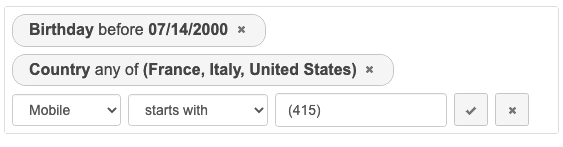
Check the **[demo](http://evoluteur.github.io/structured-filter/index.html)** for live examples.
### Table of Contents
1. [Installation](#Installation)
2. [Usage](#Usage)
3. [Model](#Model)
4. [Options](#Options)
5. [Methods](#Methods)
6. [Events](#Events)
7. [Theming](#Theming)
8. [License](#License)
## Installation
You can [download](https://github.com/evoluteur/structured-filter/archive/master.zip) or fork structured-filter on [GitHub](https://github.com/evoluteur/structured-filter).
```bash
# To get the latest stable version, use git from the command line.
git clone https://github.com/evoluteur/structured-filter
```
or install the [npm package](https://www.npmjs.com/package/structured-filter):
```bash
# To get the latest stable version, use npm from the command line.
npm install structured-filter
```
or install with **Bower**:
```bash
# To get the latest stable version, use Bower from the command line.
bower install structured-filter
# To get the most recent, latest committed-to-master version use:
bower install structured-filter#master
```
Notes:
- If you use a version of jQuery-UI smaller than 1.12.1, you must use Structured-Filter version 1.1.0.
- For React, use [Structured-Filter-React](https://github.com/evoluteur/structured-filter-react).
## Usage
First, load [jQuery](https://jquery.com/), [jQuery UI](https://jqueryui.com/), and the plugin:
```html
```
The widget requires a jQuery UI theme to be present, as well as its own included base CSS file ([structured-filter.css](http://github.com/evoluteur/structured-filter/raw/master/css/structured-filter.css)). Here we use the "base" theme as an example:
```html
```
Now, let's attach it to an existing `
` tag:
```html
```
This will change the `
` into the widget.
## Model
The widget is configured with a list of fields to use in the search conditions.
### Fields
Each field must have an ID, a type, and a label.
- id - unique identifier for the field.
- label - displayed field name.
- type - data type. Possible types of field: text, number, boolean, date, time, list.
Fields of type "list" must also have a "list" property for the values (array of objects with id and label).
Example:
```javascript
fields = [
{id:"lastname", type:"text", label:"Lastname"},
{id:"firstname", type:"text", label:"Firstname"},
{id:"active", type:"boolean", label:"Is active"},
{id:"age", type:"number", label:"Age"},
{id:"bday", type:"date", label:"Birthday"},
{id:"category", type:"list", label:"Category",
list:[
{id:"1", label:"Family"},
{id:"2", label:"Friends"},
...
]
}
];
```
Note: To change the behavior of a "list" field, use the type "list-options" and "list-dropdown" instead of "list".
### Conditions
Queries are expressed as a set of conditions.
Each condition is defined by:
- a field
- an operator
- one or several values
For each field the possible operators are determined by it's type.
###  boolean
- Yes (1)
- No (0)

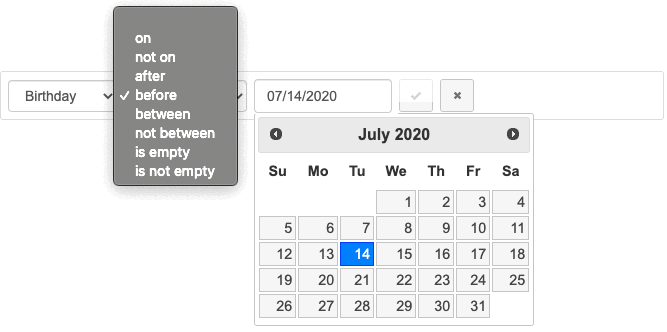
###  date
- on (eq)
- not on (ne)
- after (gt)
- before (lt)
- between (bw)
- not between (nbw)
- is empty (null)
- is not empty (nn)
###  list
- any of (in)
- equal (eq)

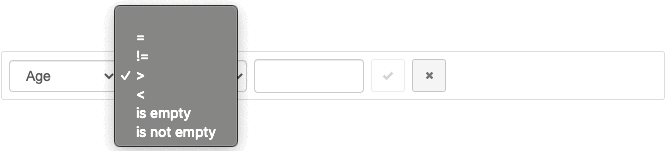
###  number
- = (eq)
- != (ne)
- > (gt)
- < (lt)
- is empty (null)
- is not empty (nn)
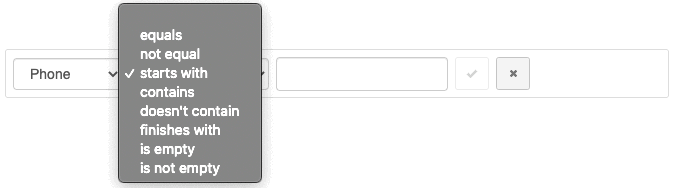
###  text
- equals (eq)
- not equal (ne)
- starts with (sw)
- contains (ct)
- doesn't contain (nct)
- finishes with (fw)
- is empty (null)
- is not empty (nn)
###  time
- at (eq)
- not at (ne)
- after (gt)
- before (lt)
- between (bw)
- not between (nbw)
- is empty (null)
- is not empty (nn)
## Options
structured-filter provides several options to customize its behaviour:
### buttonLabels (Boolean)
The labels of buttons used to manipulate filters. This options applies to the 3 buttons, "New filter", "Add filter"/"Update filter" and "Cancel" which use icons if the option is set to false.
```javascript
$("#myFilter").structFilter({
buttonLabels: true
});
```
Defaults to *false*.
### dateFormat (String)
The format for parsed and displayed dates. This attribute is one of the regionalisation attributes.
Common formats are: Default - "mm/dd/yy", ISO 8601 - "yy-mm-dd", Short - "d M, y", Medium - "d MM, y", Full - "DD, d MM, yy". For a full list of the possible formats see the [jQuery formatDate function](http://docs.jquery.com/UI/Datepicker/formatDate).
```javascript
$("#myFilter").structFilter({
dateFormat: "d M, y"
});
```
Defaults to *"mm/dd/yy"*.
### disableOperators (Boolean)
This option disables operators from conditions. This changes the structure of conditions from "field-operator-value" to "field-value" which simplifies the backend implementation of filtering.
```javascript
$("#myFilter").structFilter({
disableOperators: true
});
```
Defaults to *"false"*.
### fields (Array of Fields)
The list of fields (as an array of objects with id, label and type) to participate in the query definition.
Possible types are: text, boolean, number, date, time, and list.
```javascript
$("#myFilter").structFilter({
fields: [
{id:"lastname", type:"text", label:"Lastname"},
{id:"firstname", type:"text", label:"Firstname"},
{id:"active", type:"boolean", label:"Is active"},
{id:"age", type:"number", label:"Age"},
{id:"bday", type:"date", label:"Birthday"},
{id:"category", type:"list", label:"Category",
list:[
{id:"1", label:"Family"},
{id:"2", label:"Friends"},
{id:"3", label:"Business"},
{id:"4", label:"Acquaintances"},
{id:"5", label:"Other"}
]
}
]
});
```
Defaults to *[ ]*.
### highlight (Boolean)
A highlight animation performed on the last added or modified filter.
```javascript
$("#myFilter").structFilter({
highlight: false
});
```
Defaults to *true*.
### submitButton (Boolean)
Shows or hides the "Submit" button.
```javascript
$("#myFilter").structFilter({
submitButton: true
});
```
Defaults to *false*.
### submitReady (Boolean)
Provides hidden fields with the conditions' values to be submitted with the form (as an alternative to an AJAX call).
```javascript
$("#myFilter").structFilter({
submitReady: true
});
```
Defaults to *false*.
## Methods
### addCondition(data)
Adds a new filter condition.
```javascript
$("#myFilter").structFilter("addCondition", {
field:{
label: "Lastname",
value: "lastname"
},
operator:{
label: "starts with",
value: "sw"
},
value:{
label: "\"a\"",
value: "a"
}
});
```
### clear()
Removes all search filters.
```javascript
$("#myFilter").structFilter("clear");
```
### length()
Gets the number of filters.
```javascript
$("#myFilter").structFilter("length");
```
### removeCondition(index)
Removes the condition of the specified index.
```javascript
$("#myFilter").structFilter("removeCondition", 0);
```
### val([data])
Gets or sets the filter definition (as an array of filters).
```javascript
$("#myFilter").structFilter("val");
$("#myFilter").structFilter("val", data);
```
Sample value:
```javascript
[
{
field:{
label: "Lastname",
value: "Lastname"
},
operator:{
label: "starts with",
value: "sw"
},
value:{
label: "\"jo\"",
value: "jo"
}
}
]
```
### valText()
Gets the filter definition (as a readable text string).
```javascript
$("#myFilter").structFilter("valText");
```
Sample value:
Lastname starts with "jo"
### valUrl()
Gets the filter definition (as a URL string).
```javascript
$("#myFilter").structFilter("valUrl");
```
Sample value:
filters=1&field-0=Lastname&operator-0=sw&value-0=jo&label=Lastname%20starts%20with%20%22jo%22%0A
## Events
### change.search
This event is triggered when the list of search conditions is modified.
```javascript
$("#myFilter").on("change.search", function(event){
// do something
});
```
### submit.search
This event is triggered when the submit button is clicked.
```javascript
$("#myFilter").on("submit.search", function(event){
// do something
});
```
## Theming
structured-filter is as easily themeable as any jQuery UI widget, using one of the [jQuery UI themes](http://jqueryui.com/themeroller/#themeGallery) or your own custom theme made with [Themeroller](http://jqueryui.com/themeroller/).
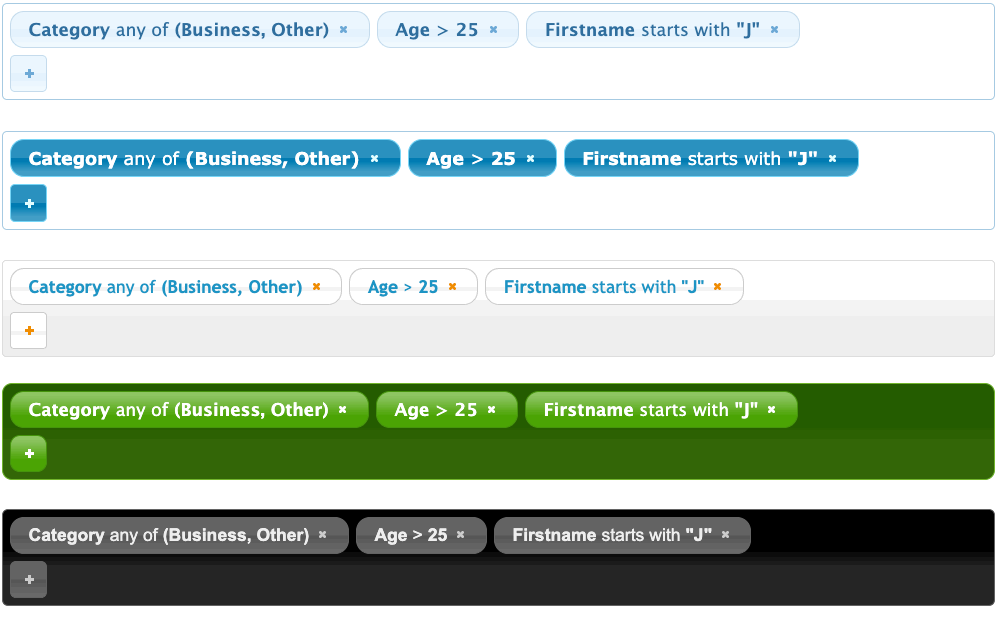
CSS for themes can be accessed from Google Hosted Libraries.
Dark theme ("ui-darkness"):
```html
```
A version of structured-filter for [Bootstrap](http://getbootstrap.com/) and [Backbone.js](http://backbonejs.org/) is available as part of [Evolutility-UI-jQuery](http://evoluteur.github.io/evolutility-ui-jquery/index.html)
set of [generic views](http://evoluteur.github.io/evolutility-ui-jquery/doc/views.html) for CRUD (Create, Read, Update, Delete) and more.
A re-write for React in under construction at [Structured-Filter-React](https://github.com/evoluteur/structured-filter-react).
## License
Structured-Filter is released under the [MIT license](https://github.com/evoluteur/structured-filter/blob/master/LICENSE.md#structured-filter).
Copyright (c) 2022 [Olivier Giulieri](https://evoluteur.github.io/).