<div align="center">
  <h1>Strapi v3 - Navigation plugin</h1>
  <p>Create consumable navigation with a simple and straightforward visual builder</p>
  <a href="https://www.npmjs.org/package/strapi-plugin-navigation">
    <img alt="GitHub package.json version" src="https://img.shields.io/github/package-json/v/VirtusLab-Open-Source/strapi-plugin-navigation/strapi-v3?label=npm&logo=npm">
  </a>
  <a href="https://www.npmjs.org/package/strapi-plugin-navigation">
    <img src="https://img.shields.io/npm/dm/strapi-plugin-navigation.svg" alt="Monthly download on NPM" />
  </a>
  <a href="https://circleci.com/gh/VirtusLab/strapi-plugin-navigation">
    <img src="https://circleci.com/gh/VirtusLab-Open-Source/strapi-plugin-navigation.svg?style=shield" alt="CircleCI" />
  </a>
  <a href="https://codecov.io/gh/VirtusLab/strapi-plugin-navigation">
    <img src="https://codecov.io/gh/VirtusLab/strapi-plugin-navigation/coverage.svg?branch=master" alt="codecov.io" />
  </a>
</div>

---

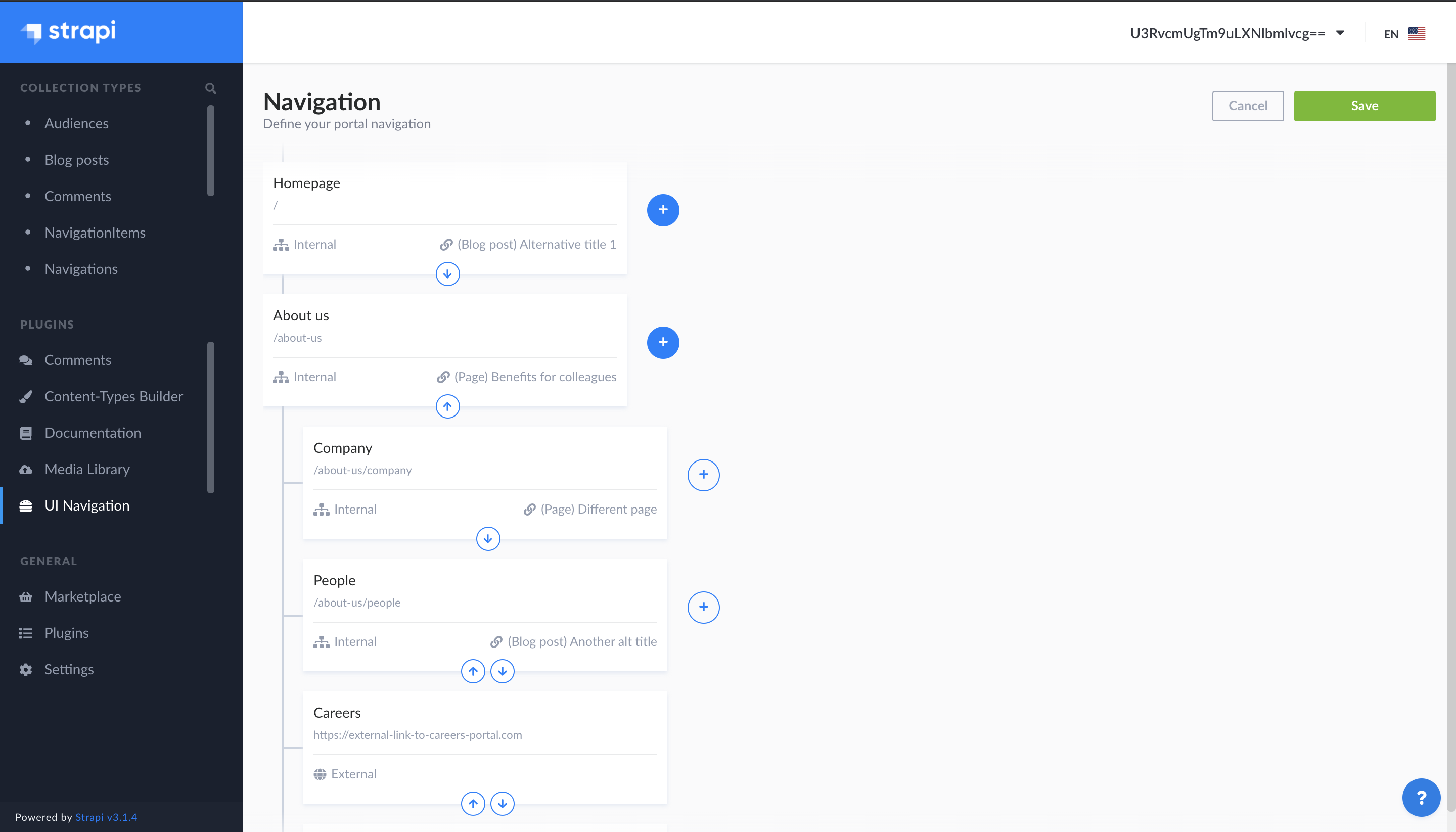
A plugin for [Strapi Headless CMS](https://github.com/strapi/strapi) that provides navigation / menu builder feature with their possibility to control the audience and different output structure renderers:

- Flat
- Tree (nested)
- RFR (ready for handling by Redux First Router)

<img src="public/assets/preview.png" alt="UI preview" />

### ⚙️ Versions

- **Strapi v4** - [v2.x](https://github.com/VirtusLab-Open-Source/strapi-plugin-navigation)
- **Strapi v3** - (current) - [v1.x](https://github.com/VirtusLab-Open-Source/strapi-plugin-navigation/tree/strapi-v3)

### ⏳ Installation

(Use **yarn** to install this plugin within your Strapi project (recommended). [Install yarn with these docs](https://yarnpkg.com/lang/en/docs/install/).)

```bash
yarn add strapi-plugin-navigation@latest-v3
```

After successful installation you've to build a fresh package that includes  plugin UI. To archive that simply use:

```bash
yarn build
yarn develop
```

or just run Strapi in the development mode with `--watch-admin` option:

```bash
yarn develop --watch-admin
```

The **UI Navigation** plugin should appear in the **Plugins** section of Strapi sidebar after you run app again.


Enjoy 🎉

### 🖐 Requirements

Complete installation requirements are exact same as for Strapi itself and can be found in the documentation under <a href="https://strapi.io/documentation/v3.x/installation/cli.html#step-1-make-sure-requirements-are-met">Installation Requirements</a>.

**Supported Strapi versions**:

- Strapi v3.6.8 (recently tested)
- Strapi v3.x

(This plugin may work with the older Strapi versions, but these are not tested nor officially supported at this time.)

**We recommend always using the latest version of Strapi to start your new projects**.

## Features

- **Navigation Public API:** Simple and ready for use API endpoint for getting the navigation structure you've created
- **Visual builder:** Elegant and easy to use visual builder
- **Any Content Type relation:** Navigation can by linked to any of your Content Types by default. Simply, you're controlling it and also limiting available content types by configuration props
- **Customizable:** Possibility to customize the options like: available Content Types, Maximum level for "attach to menu", Additional fields (audience)
- **[Audit log](https://github.com/VirtusLab/strapi-molecules/tree/master/packages/strapi-plugin-audit-log):** integration with Strapi Molecules Audit Log plugin that provides changes track record


## Content Type model relation to Navigation Item

We can define in `config/plugins.js`
```js
  navigation: {
    ...
    relatedContentTypes: [
      'application::pages.pages'
    ],
    ...
  },
```

## Configuration
To setup the plugin properly we recommend to put following snippet as part of `config/plugins.js` or `config/<env>/plugins.js` file. If you've got already configurations for other plugins stores by this way, use just the `navigation` part within exising `plugins` item.

```js
    ...
      navigation: {
        additionalFields: ['audience'],
        allowedLevels: 2,
        contentTypesNameFields: {
          'blog_posts': ['altTitle'],
          'pages': ['title'],
        },
        gql: { ... }
      },
    ...
```

### Properties
- `additionalFields` - Additional fields: 'audience', more in the future
- `allowedLevels` - Maximum level for which your're able to mark item as "Menu attached"
- `contentTypesNameFields` - Definition of content type title fields like `'content_type_name': ['field_name_1', 'field_name_2']`, if not set titles are pulled from fields like `['title', 'subject', 'name']`
- `gql` - If you're using GraphQL that's the right place to put all necessary settings. More **[ here ](#gql-configuration)**

## GQL Configuration
To properly configure GQL to work with navigation you should provide `gql` prop which should contain union types which will be used for define GQL response format for your data while fetching:

```gql
master: Int
items: [NavigationItem]
related: NavigationRelated
```

as follows:   

```js
gql: {
    navigationItemRelated: 'union NavigationRelated = <your GQL related entities>',
},
```

for example:   

```js
gql: {
        navigationItemRelated: 'union NavigationRelated = Pages | UploadFile',
},
```
where `Pages` and `UploadFile` are your types to the **Content Types** you're referring by navigation items relations. 


## Public API Navigation Item model

### Flat
```
{
    "id": 1,
    "title": "News",
    "type": "INTERNAL",
    "path": "news",
    "externalPath": null,
    "uiRouterKey": "News",
    "menuAttached": false,
    "parent": 8, // Parent Navigation Item 'id', null in case of root level
    "master": 1, // Navigation 'id'
    "created_at": "2020-09-29T13:29:19.086Z",
    "updated_at": "2020-09-29T13:29:19.128Z",
    "related": [ <Content Type model > ],
    "audience": []
}
```

### Tree
```
{
    "title": "News",
    "menuAttached": true,
    "path": "/news",
    "type": "INTERNAL",
    "uiRouterKey": "news",
    "slug": "benefits",
    "external": false,
    "related": {
        <Content Type model >
    },
    "items": [
        {
            "title": "External url",
            "menuAttached": true,
            "path": "http://example.com",
            "type": "EXTERNAL",
            "uiRouterKey": "generic",
            "external": true
        },
        < Tree Navigation Item models >
    ]
}
```

### RFR
```
{
    "id": "News",
    "title": "News",
    "templateName": "pages:1",
    "related": {
        "contentType": "page",
        "collectionName": "pages",
        "id": 1
    },
    "path": "/news",
    "slug": "news",
    "parent": null, // Parent Navigation Item 'id', null in case of root level
    "menuAttached": true
}
```

## Public API specification

### Render

`GET <host>/navigation/render/<idOrSlug>?type=<type>`

Return a rendered navigation structure depends on passed type (`tree`, `rfr` or nothing to render as `flat/raw`).

*Note: The ID of navigation by default is `1`, that's for future extensions and multi-navigation feature.*

**Example URL**: `https://localhost:1337/navigation/render/1`

**Example response body**

```
[
    {
        "id": 1,
        "title": "News",
        "type": "INTERNAL",
        "path": "news",
        "externalPath": null,
        "uiRouterKey": "News",
        "menuAttached": false,
        "parent": null,
        "master": 1,
        "created_at": "2020-09-29T13:29:19.086Z",
        "updated_at": "2020-09-29T13:29:19.128Z",
        "related": [{
            "__contentType": "Page",
            "id": 1,
            "title": "News",
            ...
        }]
    },
    ...
]
```

**Example URL**: `https://localhost:1337/navigation/render/1?type=tree`

**Example response body**

```
[
    {
        "title": "News",
        "menuAttached": true,
        "path": "/news",
        "type": "INTERNAL",
        "uiRouterKey": "news",
        "slug": "benefits",
        "external": false,
        "related": {
            "__contentType": "Page",
            "id": 1,
            "title": "News",
            ...
        },
        "items": [
            {
                "title": "External url",
                "menuAttached": true,
                "path": "http://example.com",
                "type": "EXTERNAL",
                "uiRouterKey": "generic",
                "external": true
            },
            ...
        ]
    },
    ...
]
```

**Example URL**: `https://localhost:1337/navigation/render/1?type=rfr`

**Example response body**

```
{
    "pages": {
        "News": {
            "id": "News",
            "title": "News",
            "templateName": "pages:1",
            "related": {
                "contentType": "page",
                "collectionName": "pages",
                "id": 1
            },
            "path": "/news",
            "slug": "news",
            "parent": null,
            "menuAttached": true
        },
        "Community": {
            "id": "Community",
            "title": "Community",
            "templateName": "pages:2",
            "related": {
                "contentType": "page",
                "collectionName": "pages",
                "id": 2
            },
            "path": "/community",
            "slug": "community",
            "parent": null,
            "menuAttached": true
        },
        "Highlights": {
            "id": "Highlights",
            "title": "Highlights",
            "templateName": "pages:3",
            "related": {
                "contentType": "page",
                "collectionName": "pages",
                "id": 3
            },
            "path": "/community/highlights",
            "slug": "community-highlights",
            "parent": "Community",
            "menuAttached": false
        },
        ...
    },
    "nav": {
        "root": [
            {
                "label": "News",
                "type": "internal",
                "page": "News"
            },
            {
                "label": "Community",
                "type": "internal",
                "page": "Community"
            },
            {
                "label": "External url",
                "type": "external",
                "url": "http://example.com"
            },
            ...
        ],
        "Community": [
            {
                "label": "Highlights",
                "type": "internal",
                "page": "Highlights"
            },
            ...
        ],
        ...
    }
}
```

### Template name

Depending on a content type `templateName` will be resolved differently

For collection types it will be read from content type's attribute name `template` holding a component which definition has option named `templateName`.

For single types a global name of this content type will be used as a template name or it can be set manually with an option named `templateName`.

## Audit log
If you would like to use the [Strapi Molecules Audit Log](https://github.com/VirtusLab/strapi-molecules/tree/master/packages/strapi-plugin-audit-log) plugin you've to first install and then add in you `config/middleware.js` following section enable it:
```js
{
    'audit-log': {
          enabled: true,
          exclude: [],
          map: [
            {
              pluginName: 'navigation',
              serviceName: 'navigation',
              Class: Navigation,
            },
          ]
        }
}
```
As a last step you've to provide the Navigation class to let Audit Log use it. To not provide external & hard dependencies we've added the example of class code in the `examples/audit-log-integration.js` .

## Examples

Live example of plugin usage can be found in the [VirtusLab Strapi Examples](https://github.com/VirtusLab/strapi-examples/tree/master/strapi-plugin-navigation) repository.

## Q&A

### Content Types

**Q:** I've recognized **Navigation Item** and **Navigation** collection types in the Collections sidebar section, but they are not working properly. What should I do?

**A:** As an authors of the plugin we're not supporting any editing of mentioned content types via built-in Strapi Content Manager. Plugin delivers highly customized & extended functionality which might be covered only by dedicated editor UI accessible via **Plugins Section > UI Navigation**. Only issues that has been recognized there, are in the scope of support we've providing.

## Contributing

Feel free to fork and make a Pull Request to this plugin project. All the input is warmly welcome!

## Community support

For general help using Strapi, please refer to [the official Strapi documentation](https://strapi.io/documentation/). For additional help, you can use one of these channels to ask a question:

- [Slack](http://slack.strapi.io) We're present on official Strapi slack workspace. Look for @cyp3r and DM.
- [Slack - VirtusLab Open Source](https://virtuslab-oss.slack.com) We're present on a public channel #strapi-molecules
- [GitHub](https://github.com/VirtusLab/strapi-plugin-navigation/issues) (Bug reports, Contributions, Questions and Discussions)
- [E-mail](mailto:strapi@virtuslab.com) - we will respond back as soon as possible

## License

[MIT License](LICENSE.md) Copyright (c) [VirtusLab Sp. z o.o.](https://virtuslab.com/) &amp; [Strapi Solutions](https://strapi.io/).