Strapi ChatGPT
Integrate ChatGPT into your Strapi application. You get both a UI to interact with ChatGPT and an API end-points to integrate into your applications.



# ChatGPT plugin for Strapi
[OpenAI](https://openai.com/) ChatGPT is an AI chatbot auto-generative system created by Open AI for online customer care. It is a pre-trained generative chat, which makes use of (NLP) Natural Language Processing.
[Strapi](https://strapi.io/) is the leading open-source headless Content Management System. It’s 100% JavaScript, fully customizable and developer-first.
## Overview: Start using ChatGPT in your Strapi application
With this plugin, you can add ChatGPT-powered chatbots and other natural language processing functionality to your Strapi application with ease. The plugin provides a simple interface for configuring and deploying your ChatGPT models, as well as tools
Setting up the plugin is super easy and can be completed within 2 minutes.
1. Enter your OpenAI API credentials.
1. Optionally, select the model you want to use.
Thats it! You can now use ChatGPT in your Strapi application.
## ✨ Features
1. **Easy to use**: The plugin is easy to use and can be set up within 10 minutes.
1. **Customizable**: You can customize the model's parameters to suit your needs.
1. **Open Source**: The plugin is open source and can be found on [GitHub]()
## 🖐 Requirements
1. [Node.js](https://nodejs.org/en/) version 14 or higher.
1. [Strapi](https://strapi.io/) version v4.x or higher.
> The ChatGPT plugin is designed for **Strapi v4.x**. It won't work with Strapi v3.x.
## ⏳ Installation
### 1. Install the plugin
```bash
npm install strapi-chatgpt
```
### 2. Enable the plugin
Goto `/config/plugins.js` Add the following code snippet.
```js
module.exports = ({ env }) => ({
// ...
"strapi-chatgpt": {
enabled: true,
},
});
```
### 3. Build and start the Admin UI
Afterwards, you would need to build a fresh package that includes the ChatGPT plugin. For it, please execute the commands below:
```bash
npm run build
npm run develop
```
The ChatGPT plugin should appear in the Plugins section of the Strapi sidebar after you run the app again.
Now you are ready to integrate ChatGPT on your Strapi website 🎉
## 🔧 Configuration
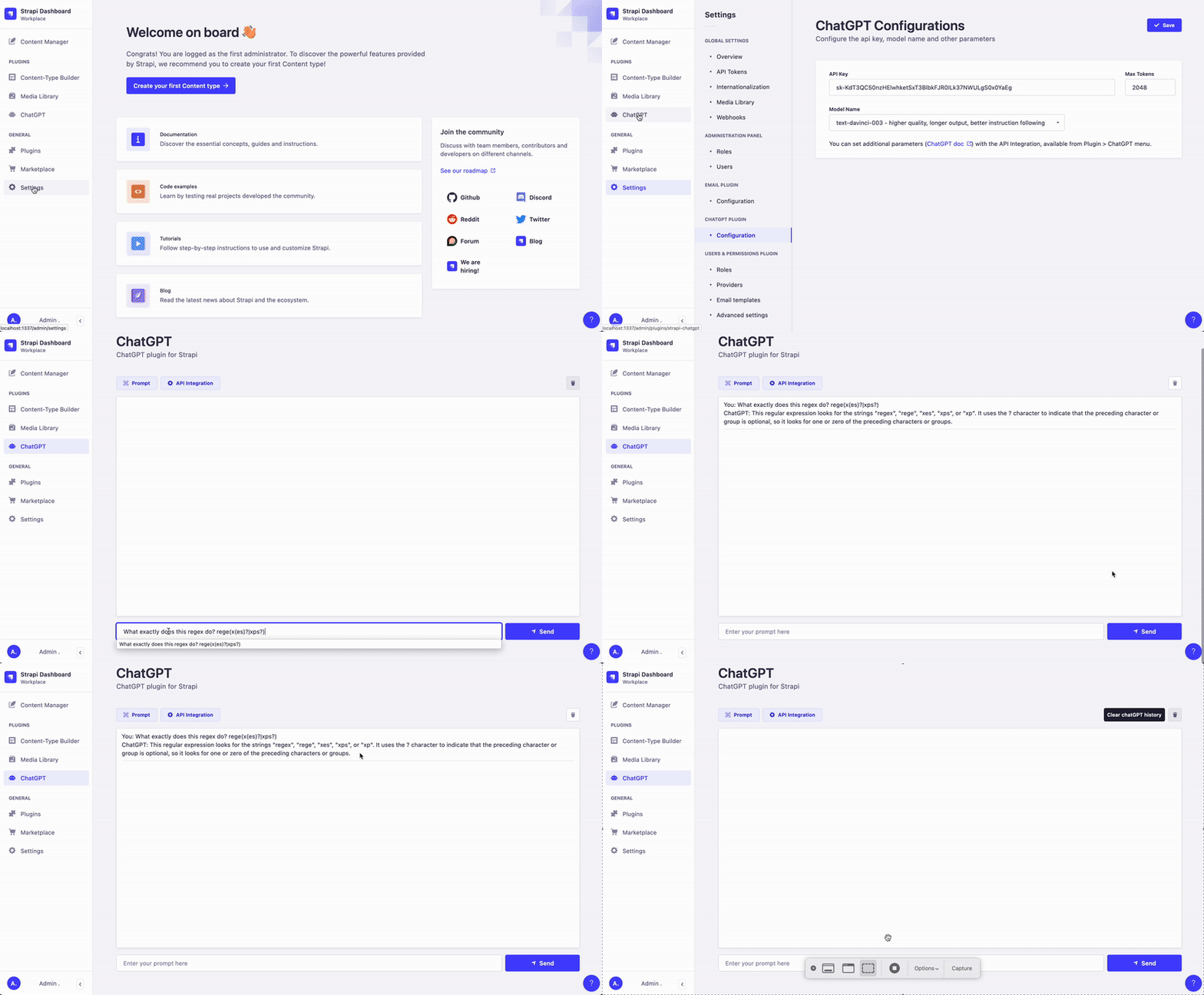
You can easily configure the ChatGPT plugin in the Strapi admin panel.
- Goto `Settings` -> `ChatGPT -> Configuration` in the sidebar.
- On the configiration page, Enter All the fields.
- Click on Save to save the configuration.
## 📖 Testing the plugin
- Click ChatGPT plugin in plugin section of the sidebar.
- Click on Integration to get sample code integration code.
- Copy the code and paste it in your terminal.
## 📝 License
[MIT License](LICENSE.md)
Copyright © 2022 [AsyncWeb](https://higheredlab.com/)
