[](https://www.npmjs.com/package/sprestlib) [](https://github.com/ellerbrock/open-source-badge/) [](https://opensource.org/licenses/mit-license.php) [](https://github.com/gitbrent/sprestlib) [](https://snyk.io/test/npm/sprestlib)
# SpRestLib
## SharePoint REST Web Services JavaScript Library
Provides a concise, promise-based API that simplifies asynchronous REST interaction with SharePoint. Easily read/write List
items, execute REST calls, interact with files and folders, gather site properties, and query user information. Enables rapid development of SharePoint Apps/Add-ins using the JavaScript SharePoint App Model.
### Library Features
* Simple - Most SharePoint web service calls are a few lines of code
* Modern - Lightweight, pure JavaScript solution with no other dependencies
* Elegant - Utilizes the new [ES6 Promise](http://www.datchley.name/es6-promises/) architecture for asynchronous operations
* Robust - Built for [SharePoint 2013 API](https://msdn.microsoft.com/en-us/library/office/jj860569.aspx) and [OData v3](http://www.odata.org/documentation/odata-version-3-0/)
### SharePoint Interfaces
* List Methods - Create, read, update, and delete (CRUD) List/Library items, including support for paging/next
* User Methods - Get User information: Basic (ID, Email, LoginName, etc.) and UserProfile (Manager, 100+ Properties)
* Site Methods - Get Site information (Lists, Groups, Users, Roles, Subsites and Permissions)
* File Methods - Get files, file properties/permissions, delete/recycle files
* Folder Methods - Get folder contents, folder properties/permissions, create/delete/recycle folders
* REST Methods - Execute REST API calls against any available [SharePoint REST API](https://msdn.microsoft.com/en-us/library/office/dn268594.aspx) endpoint
* Form Population - Populate form elements using data-bind declarative binding system like Knockout or AngluarJS
### Supported Environments
* SharePoint 2013 (SP2013), SharePoint 2016 (SP2016), Office 365 SharePoint Online (SPO)
**************************************************************************************************
# Method Overview
## REST API
* `sprLib.rest(options)` - Returns the results of a given REST call to any [SharePoint REST API](https://msdn.microsoft.com/en-us/library/office/dn268594.aspx)
## List/Library
* `sprLib.list(listName).items(options)` - Returns an array of `SP.ListItem` objects using a variety of query options
* `sprLib.list(listName).create(item)` - Create a new list item using JSON data
* `sprLib.list(listName).update(item)` - Update an existing item using JSON data
* `sprLib.list(listName).delete(item)` - Delete an existing item using JSON data (permanently delete)
* `sprLib.list(listName).recycle(item)` - Recycle an existing item using JSON data (move to Recycle Bin)
* `sprLib.list(listName).cols()` - Returns an array of column properties (datatype, default values, etc.)
* `sprLib.list(listName).info()` - Returns `SP.List` properties (last modified, number of items, etc.)
* `sprLib.list(listName).perms()` - Returns an array of the list's Member Role assignments
## File
* `sprLib.file(fileName).get()` - Returns a file (binary/text) as a blob which can be saved
* `sprLib.file(fileName).info()` - Returns `SP.File` properties (Created, GUID, HasUniquePerms, etc.)
* `sprLib.file(fileName).perms()` - Returns an array of the file's Member Role assignments
* `sprLib.file(fileName).checkin()` - Check in a file (supports optional comments/checkin types)
* `sprLib.file(fileName).checkout()` - Check out a file
* `sprLib.file(fileName).delete()` - Permanently deletes a file (bypasses recycle bin)
* `sprLib.file(fileName).recycle()` - Moves file to the site Recycle Bin
## Folder
* `sprLib.folder(folderName).files()` - Returns an array of file objects contained in the folder
* `sprLib.folder(folderName).folders()` - Returns an array of folder objects contained in the folder
* `sprLib.folder(folderName).info()` - Returns `SP.Folder` properties (Created, GUID, HasUniquePerms, etc.)
* `sprLib.folder(folderName).perms()` - Returns an array of the folder's Member Role assignments
* `sprLib.folder(folderName).add()` - Creates a new folder under the parent folder
* `sprLib.folder(folderName).delete()` - Permanently deletes a folder (bypasses recycle bin)
* `sprLib.folder(folderName).recycle()` - Moves folder to the site Recycle Bin
## Site Collection/Subsite
* `sprLib.site(siteUrl).groups()` - Returns an array of the site's Groups and Members
* `sprLib.site(siteUrl).info()` - Returns `SP.Web` site properties (ID, Owner, Language, Logo, etc.)
* `sprLib.site(siteUrl).lists()` - Returns an array of the site's Lists/Libraries
* `sprLib.site(siteUrl).perms()` - Returns an array of the site's Member/Roles objects
* `sprLib.site(siteUrl).roles()` - Returns an array of the site's Roles
* `sprLib.site(siteUrl).subsites()` - Returns an array of the site's Subsites
* `sprLib.site(siteUrl).users()` - Returns an array of the site's Users and their base permissions
## User Groups/Info/Profile
* `sprLib.user(options).groups()` - Returns `SP.Group` group properties (Id, Owner, Title, etc.)
* `sprLib.user(options).info()` - Returns `SP.User` user properties (Id, Email, Login, Title, etc.)
* `sprLib.user(options).profile()` - Returns `SP.UserProfile.PersonProperties` (DirectReports, PictureUrl, etc.)
## Utility Methods
* `sprLib.renewSecurityToken()` - Refreshes the SharePoint page security digest token (`__REQUESTDIGEST`)
## SpRestLib-UI :: Form Population
* `data-sprlib{options}` - Populates the parent tag using the options provided
**************************************************************************************************
- [Library Demo](#library-demo)
- [Demo via Browser Console](#demo-via-browser-console)
- [Demo via Page Webpart](#demo-via-page-webpart)
- [Installation](#installation)
- [CDN](#cdn)
- [Download](#download)
- [npm](#npm)
- [yarn](#yarn)
- [Method Reference](#method-reference)
- [REST API Methods](#rest-api-methods)
- [List/Library Methods (`SP.List`)](#listlibrary-methods-splist)
- [File Methods (`SP.File`)](#file-methods-spfile)
- [Folder Methods (`SP.Folder`)](#folder-methods-spfolder)
- [Site Methods (`SP.Web`)](#site-methods-spweb)
- [User Methods (`SP.User`)](#user-methods-spuser)
- [Utility Methods](#utility-methods)
- [Form Binding (SpRestLib UI)](#form-binding-sprestlib-ui)
- [Library Features and Notes](#library-features-and-notes)
- [Async Operations via Promises](#async-operations-via-promises)
- [SharePoint Authentication Notes](#sharepoint-authentication-notes)
- [Integration with Other Libraries](#integration-with-other-libraries)
- [Connect to SharePoint Online/Office.com with Node.js](#connect-to-sharepoint-onlineofficecom-with-nodejs)
- [Issues / Suggestions](#issues--suggestions)
- [Authentication](#authentication)
- [Bugs](#bugs)
- [Supported SharePoint Versions](#supported-sharepoint-versions)
- [Backwards Compatibility](#backwards-compatibility)
- [Special Thanks](#special-thanks)
- [License](#license)
**************************************************************************************************
# Library Demo
## Demo via Browser Console
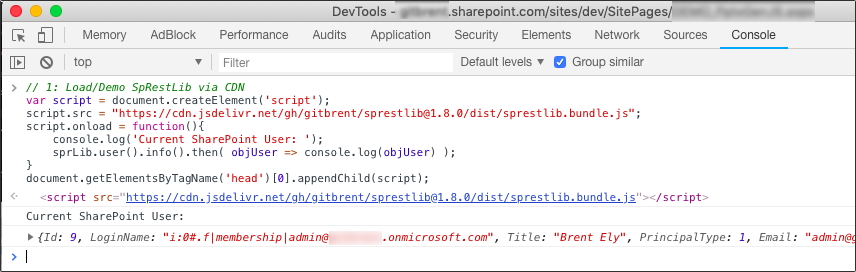
It's really easy to test drive SpRestLib!
Just open your browser's Developer Tools window anywhere on your SharePoint site,
then run the following code snippet which will load the SpRestLib bundle script dynamically:
```javascript
// Load/Demo SpRestLib via CDN
var script = document.createElement('script');
script.src = "https://cdn.jsdelivr.net/gh/gitbrent/sprestlib@1.9.0/dist/sprestlib.bundle.js";
script.onload = function(){
// Demo library method - show current user info
console.log('Current SharePoint User: ');
sprLib.user().info().then( objUser => console.log(objUser) );
}
document.getElementsByTagName('head')[0].appendChild(script);
```
## Demo via Page Webpart
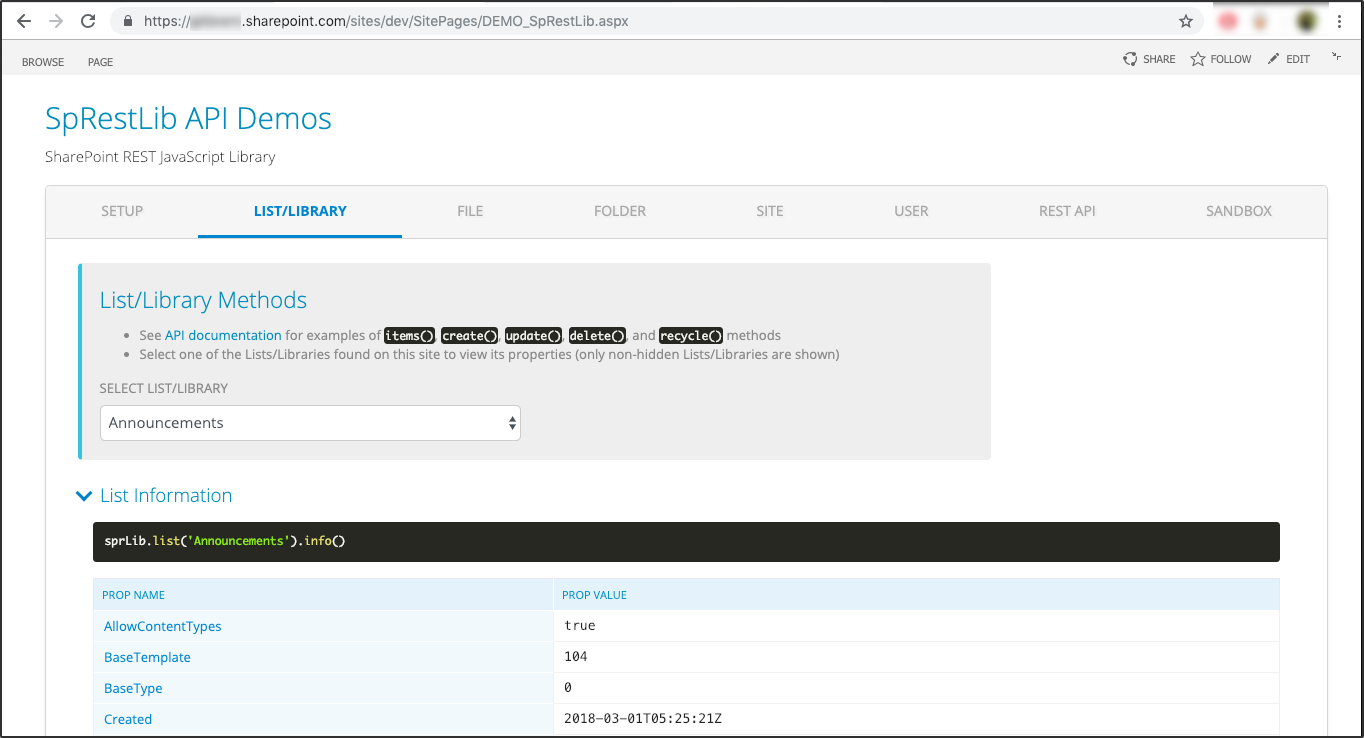
Upload the `example/sprestlib-demo.html` file to SiteAssets on your SharePoint site and add it into a Webpart for a live
demo of all available methods.
**************************************************************************************************
# Installation
## CDN
```javascript
// Use bundle for IE11 support
```
## Download
```javascript
// Use bundle for IE11 support
```
## npm
```javascript
npm install sprestlib
var sprLib = require("sprestlib");
```
## yarn
```javascript
yarn install sprestlib
```
**************************************************************************************************
# Method Reference
## REST API Methods
[REST API Methods](https://gitbrent.github.io/SpRestLib/docs/api-rest.html)
## List/Library Methods (`SP.List`)
[List/Library Methods](https://gitbrent.github.io/SpRestLib/docs/api-list.html)
## File Methods (`SP.File`)
[File Methods](https://gitbrent.github.io/SpRestLib/docs/api-file.html)
## Folder Methods (`SP.Folder`)
[Folder Methods](https://gitbrent.github.io/SpRestLib/docs/api-folder.html)
## Site Methods (`SP.Web`)
[Site Methods](https://gitbrent.github.io/SpRestLib/docs/api-site.html)
## User Methods (`SP.User`)
[User Methods](https://gitbrent.github.io/SpRestLib/docs/api-user.html)
## Utility Methods
[Utility Methods](https://gitbrent.github.io/SpRestLib/docs/feat-utilities.html)
## Form Binding (SpRestLib UI)
[Form Binding](https://gitbrent.github.io/SpRestLib/docs/ui-form-binding.html)
**************************************************************************************************
# Library Features and Notes
## Async Operations via Promises
[JavaScript Async Promises](https://gitbrent.github.io/SpRestLib/docs/feat-promises.html)
## SharePoint Authentication Notes
[SharePoint Authentication Notes](https://gitbrent.github.io/SpRestLib/docs/sp-auth-notes.html)
## Integration with Other Libraries
Using SpRestLib with React, Angular, SharePoint Electron, etc.
[Integration with Other Libraries](https://gitbrent.github.io/SpRestLib/docs/feat-integration.html)
## Connect to SharePoint Online/Office.com with Node.js
* SpRestLib can be utilized via Node.js to perform powerful operations, generate reports, etc.
* See the `example` directory for a complete, working demo of connecting to SharePoint Online.
**************************************************************************************************
# Issues / Suggestions
## Authentication
See [SharePoint Authentication Notes](https://gitbrent.github.io/SpRestLib/docs/sp-auth-notes.html) for issues with authentication.
## Bugs
Please file issues or suggestions on the [issues page on GitHub](https://github.com/gitbrent/SpRestLib/issues/new), or even better, [submit a pull request](https://github.com/gitbrent/SpRestLib/pulls). Feedback is always welcome!
When reporting issues, please include a code snippet or a link demonstrating the problem.
**************************************************************************************************
# Supported SharePoint Versions
## Backwards Compatibility
*Does SpRestLib support SharePoint 2010 or 2007?*
Unfortunately, older versions cannot be supported. The SharePoint 2007/2010 API utilized SOAP web services with XML (`_vti_bin/lists.asmx` endpoints) while the current API uses a completely new (`_api/web/lists()` endpoint) backed by REST services.
**************************************************************************************************
# Special Thanks
* [Marc D Anderson](http://sympmarc.com/) - SpRestLib is built in the spirit of the late, great `SPServices` library
* Microsoft - for the SharePoint.com developer account
* Everyone who submitted an Issue or Pull Request
**************************************************************************************************
# License
Copyright © 2016-2018 [Brent Ely](https://github.com/gitbrent/SpRestLib)
[MIT](https://github.com/gitbrent/SpRestLib/blob/master/LICENSE)