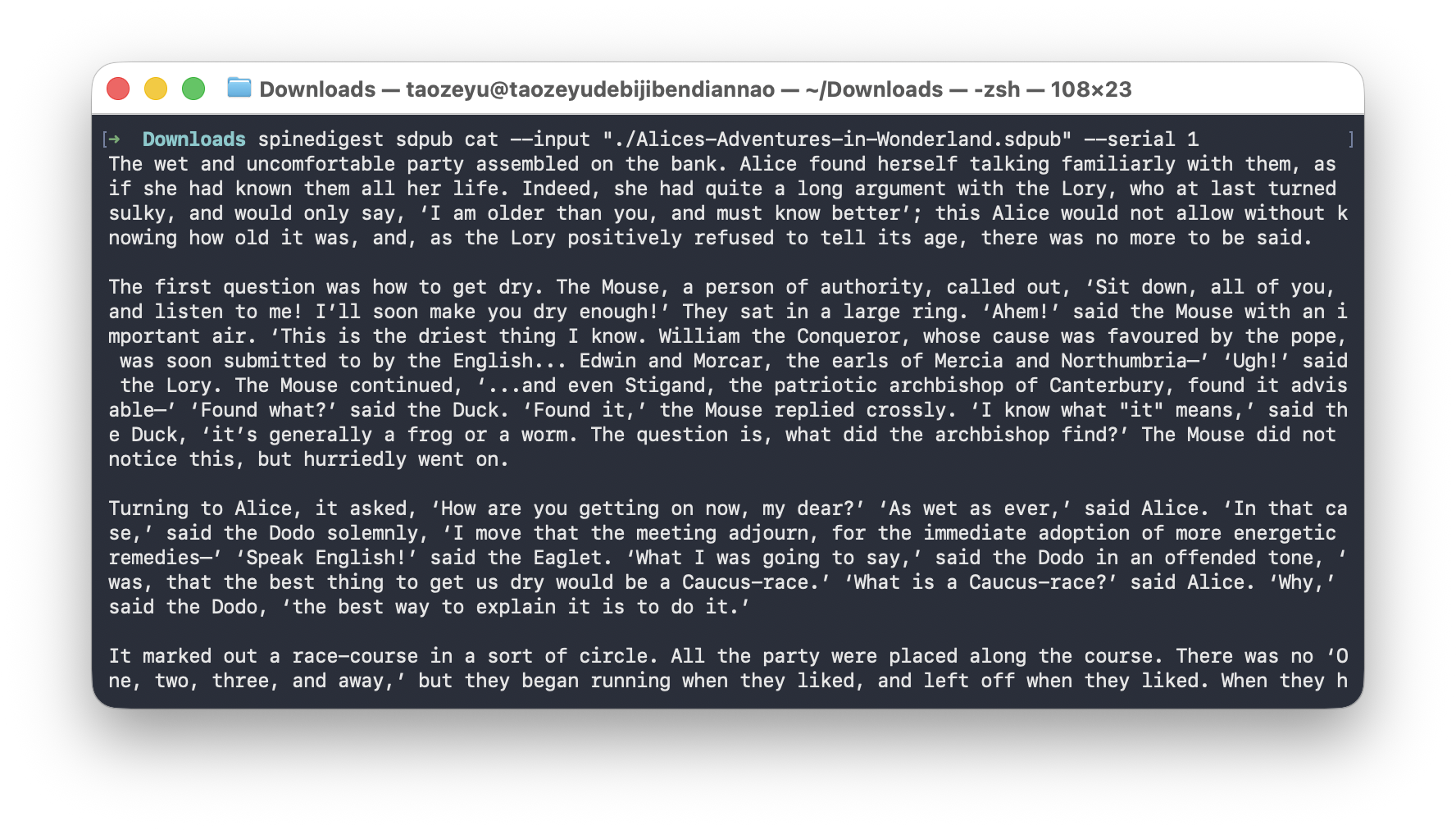
**SpineDigest is a knowledge-base CLI optimized for AI agents.** It imports EPUB, Markdown, and plain text into `.sdpub`, can use LLMs to extract knowledge graphs and summaries, then exposes the archive as a searchable, browsable, readable, source-backed, graph-navigable, context-packable [LLM Wiki](https://gist.github.com/karpathy/442a6bf555914893e9891c11519de94f).
It is not a one-shot book-to-summary converter. Summaries, EPUB, Markdown, and JSON output are projections of the `.sdpub` knowledge archive. The primary object is `.sdpub` itself: a portable knowledge archive that can be built, maintained, searched, and reused.
There are three main ways to explore a `.sdpub` archive:
- **Search mode:** use `find` to discover keyword-related objects and `grep` to check exact continuous text.
- **Structure mode:** use `chapter tree --json` for the table-of-contents hierarchy, `list` for chapter and knowledge-node collections, then `page` to open a page and follow related nodes, source fragments, and links.
- **Reading mode:** use `read` for continuous reading of chapters, knowledge nodes, or source fragments.
Together, these modes let long documents behave like navigable knowledge bases: start with structure, locate relevant content, then return to source text and knowledge nodes for deeper reading.
## Install
Requirements:
- Node `>=22.12.0`
- For LLM-backed graph or summary jobs: a supported LLM provider plus credentials
- For `.sdpub` search, reading, navigation, and export: no LLM access required
Try it without a global install:
```bash
npx spinedigest --help
```
Global install:
```bash
npm install -g spinedigest
```
To explore the CLI surface first, start with:
```bash
spinedigest --help
spinedigest help overview
spinedigest help ai
```
## Quick Start
SpineDigest's primary object is `.sdpub`: a CLI-managed knowledge-base archive, not a one-off export result.
Create a knowledge base from source material:
```bash
spinedigest create ./book.sdpub ./book.epub
cat ./article.md | spinedigest create ./article.sdpub --input-format markdown
```
Inspect and estimate before expensive work:
```bash
spinedigest status ./book.sdpub
spinedigest index ./book.sdpub
spinedigest estimate ./book.sdpub --stage summary
```
Build derived knowledge when you intend to spend LLM time:
```bash
spinedigest queue add ./book.sdpub --chapter 12 --to graph --accept-cost
spinedigest queue watch --jsonl
```
Search, browse, and read through the knowledge-base interface:
```bash
spinedigest list ./book.sdpub --type chapter
spinedigest page ./book.sdpub --chapter 12
spinedigest find ./book.sdpub "RAG" --type node
spinedigest grep ./book.sdpub "exact source phrase" --type fragment
spinedigest page ./book.sdpub --node 84
spinedigest read ./book.sdpub --chapter 12
spinedigest links ./book.sdpub --node 84
spinedigest related ./book.sdpub --node 84
spinedigest pack ./book.sdpub --node 84 --budget 5000
```
Output a projection only when you need a portable view. For example, read one chapter into Markdown text, or export the full archive as an EPUB:
```bash
spinedigest read ./book.sdpub --chapter 12 > ./chapter-12.md
spinedigest export ./book.sdpub --output-format epub --output ./digest.epub
```
Cost rule:
```text
Create is cheap.
Estimate before queueing graph or summary jobs.
Queue graph or summary jobs only when the cost and wait time are acceptable.
Search, read, navigate, pack, and export are cheap after build.
```
Full flag reference: [CLI Reference](./docs/en/cli.md).
## Why We Built This
Knowledge bases are useful for long documents because they turn material into a structure you can re-enter: inspect the table of contents, find concepts, and return to evidence instead of stuffing everything into one context window. The problem is that knowledge bases usually require people to define page boundaries, concept relationships, and source references. Books are the most familiar long documents; if we can Wiki-ify a book, EPUB, Markdown, and plain text can enter the same knowledge-base workflow.
That is why SpineDigest started with the problem of whole books. People often say an LLM cannot really read a whole book because the context window is not long enough. But human short-term memory holds only 7 +/- 2 items ([Miller's Law](https://en.wikipedia.org/wiki/The_Magical_Number_Seven,_Plus_or_Minus_Two)), far less than any modern LLM context window. Humans still read whole books, move back and forth with questions, build structures in their heads, and answer from those structures.
The bottleneck is not just window size. It is how working memory is organized.
If you put a whole book directly into context, what you get is a very long text stream. It can be summarized on the fly, searched by keyword, or sliced into excerpts, but it is hard to answer stable structural questions: which concepts belong together, where a claim came from, how two chapters relate, and which source passages support a knowledge point. Longer context does not make those problems disappear. It makes structure more necessary.
SpineDigest's goal is to turn long documents into external working memory.
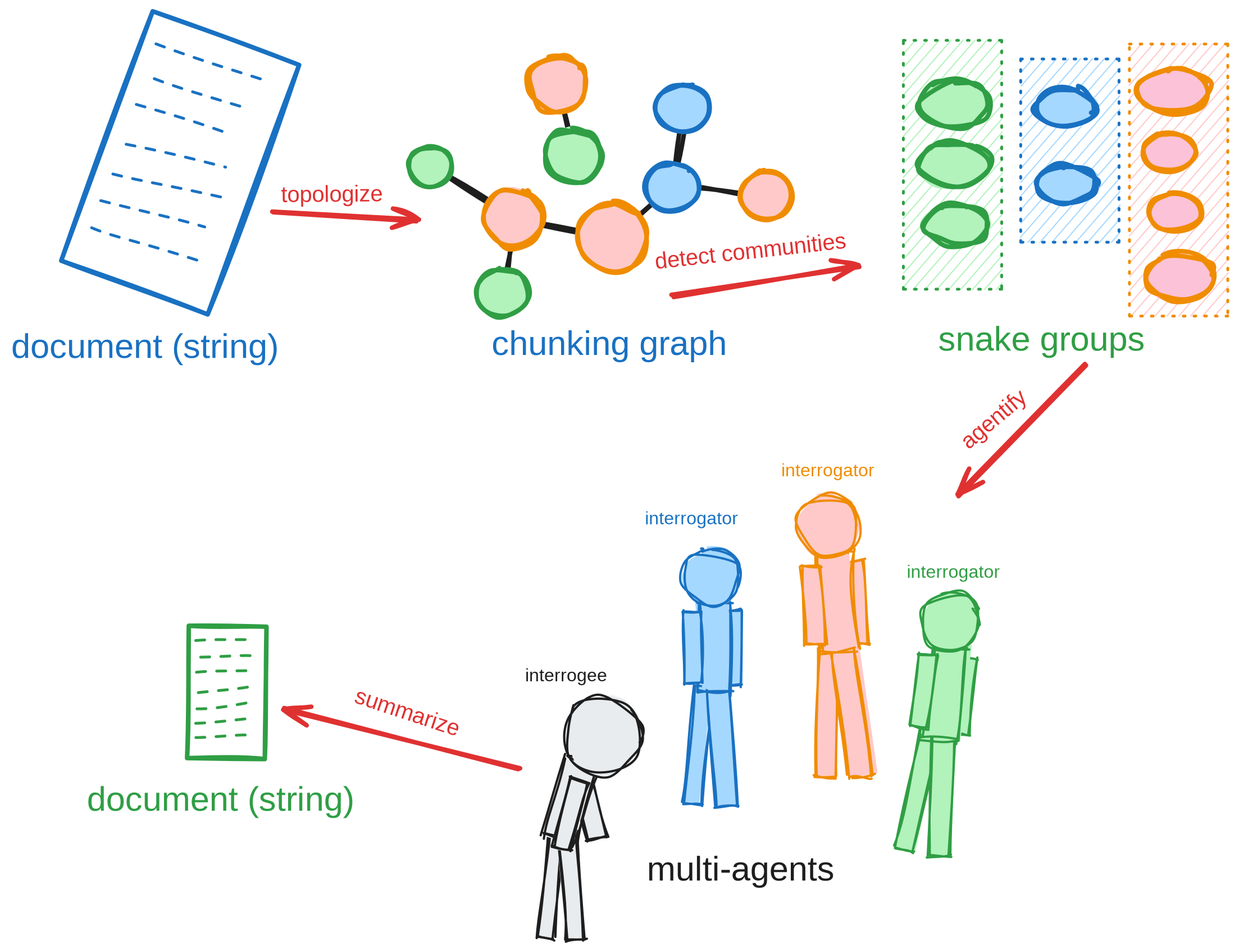
First, an LLM reads the source text section by section, simulating how human attention is drawn to important ideas. It extracts a set of [chunks](). A chunk is not the final summary; it is an attention landing point, an independent knowledge unit that can be cited, traced, and recombined later.
Next, a classical algorithm takes over. I build a knowledge graph with chunks as nodes, connect them by conceptual relevance, then use graph traversal and community detection to cluster semantically related chunks. Each cluster is serialized in original reading order into what I call a snake: a knowledge chain that moves through the source text and links dispersed but related ideas.
Finally, the LLM returns to work on that structure. The old use case compressed those structures into a summary; the more important use now is to save them into `.sdpub`. Later, you can use it like a Wiki: open chapter pages, inspect `nodeGroups`, enter nodes, trace source fragments, check links and backlinks, and pack an evidence-bounded context before answering.
**Every professor holds a snake.**
Picture a dissertation defense. The respondent stands at the front. The professors sit around the table. Each professor holds one knowledge chain and keeps reminding the respondent: this has evidence, that has a relationship, and this concept should not be mixed with that one. In the old story, the endpoint was a fairer summary. Now, the endpoint is a reference room you can enter again and again. You do not need to remember the whole book at once; you can call the relevant professors back, follow their chains to the evidence, and then compose your answer.
Your intent still runs through the whole process. During build, the prompt influences which knowledge units receive attention. During retrieval, the task decides whether to inspect structure first, search keywords first, or read source fragments first. The same `.sdpub` can serve different questions: a timeline today, a concept map tomorrow, a writing context pack later. The knowledge base is not a one-shot answer. It is an interface for repeated reading, locating, and reuse.
## The `.sdpub` Format
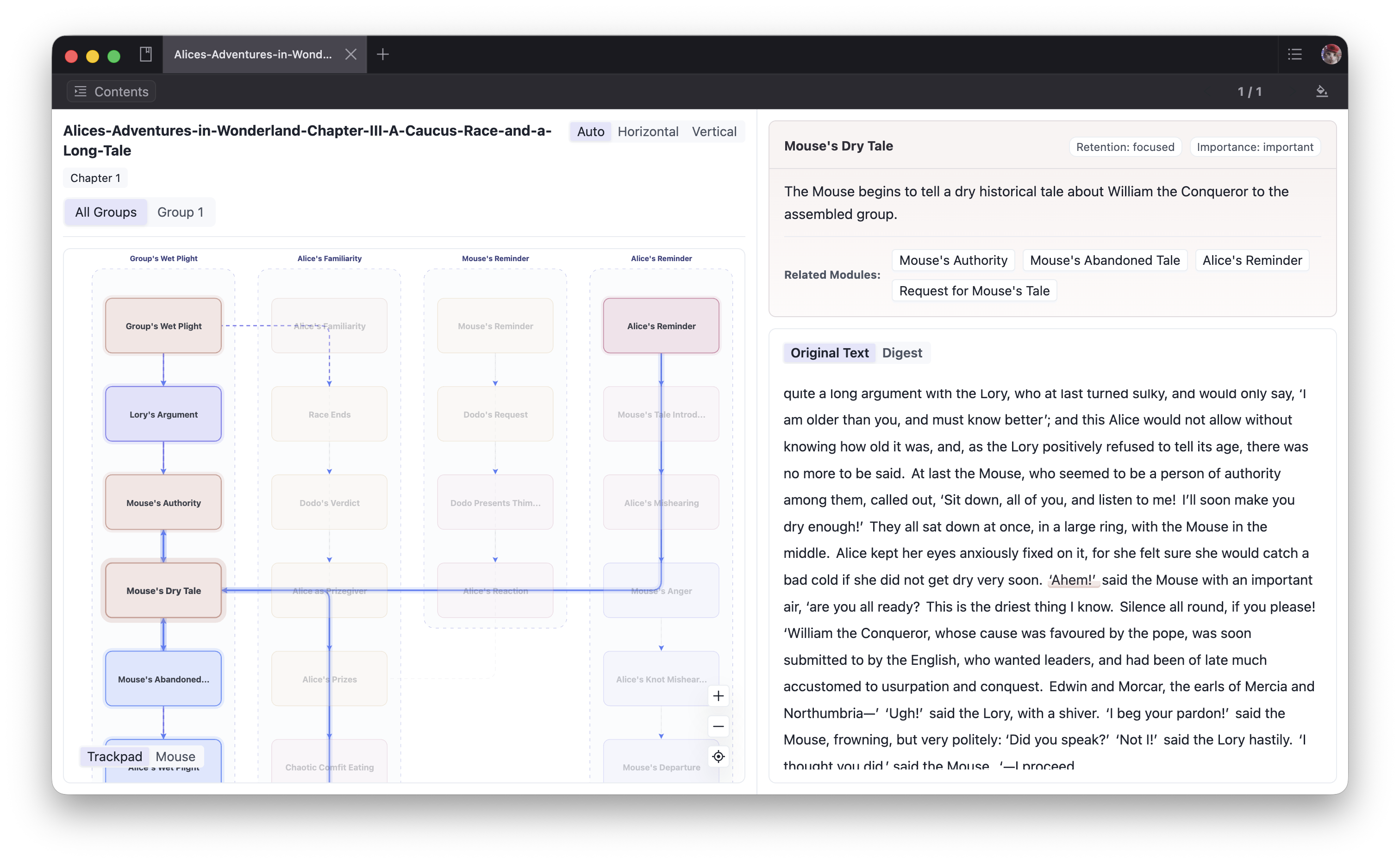
`.sdpub` is the core SpineDigest knowledge-base archive. It holds source-derived chapter pages, graph nodes, evidence pointers, summaries, and metadata, then exposes them through the CLI as an LLM Wiki.
With that archive on hand, you can search and navigate the knowledge structure directly:
```bash
spinedigest index ./book.sdpub
spinedigest list ./book.sdpub --type chapter
spinedigest list ./book.sdpub --type node --chapter 12
spinedigest find ./book.sdpub "central argument" --type node
spinedigest page ./book.sdpub --chapter 12
spinedigest read ./book.sdpub --chapter 12
```
Markdown, EPUB, txt, and JSON-style outputs are projections of the archive. They are useful for portability and reading, but they do not replace the `.sdpub` object when graph links and source fragments matter.
To open a `.sdpub` file, use **[Inkora](http://inkora.oomol.com/download/sdpub)**. It is a free app built specifically for `.sdpub`, with chapter topology and knowledge graph views.
For the internal layout and parser guidance, see the [format spec](./docs/sdpub.md).
## Direct Transform
If you only need a one-shot digest or format conversion, use `transform`. It does not leave a reusable `.sdpub` knowledge base unless you explicitly choose `--output-format sdpub`.
```bash
cat chapter.txt | spinedigest transform --input-format txt --output-format markdown
spinedigest transform --input book.epub --output digest.md --output-format markdown
```
This mode is for pure conversion tasks. If the material will later be searched, navigated, traced to evidence, or built further, create a `.sdpub` archive first.
## Library Usage
SpineDigest also exposes a programmatic API for embedding lower-level import, build, and export flows in your own Node or TypeScript code. The CLI is still the most complete knowledge-base interface. See [Library Usage](./docs/en/library.md) for non-CLI integration.
## Related Projects
- [PDF Craft](https://github.com/oomol-lab/pdf-craft): If your source material is a scanned PDF, PDF Craft can convert it into EPUB or Markdown before you import it into a SpineDigest knowledge base.
- [EPUB Translator](https://github.com/oomol-lab/epub-translator): If your goal is bilingual reading rather than building a knowledge base, EPUB Translator turns an EPUB into a bilingual edition while preserving the original layout.
## For AI Agents
SpineDigest's CLI-first design exposes `.sdpub` as a managed LLM Wiki archive.
- **Treat `.sdpub` as the primary object.** Use archive commands before unpacking or inspecting internals.
- **Choose an exploration mode first.** For synthesis and structural understanding, start with `list/page`; use `find/grep` for candidate discovery and exact wording; use `read` for continuous prose after selecting the relevant object.
- **Use help as the discovery surface.** Start with `spinedigest --help` as the root page, then follow `spinedigest help overview`, `spinedigest help ai`, topic pages, or command-specific `--help` before guessing behavior.
- **Prefer `--json`.** Use it when composing with tools.
- **Estimate before queueing jobs.** Do not queue broad graph or summary work without `spinedigest estimate`.
- **Check exit codes.** Success returns `0`; failure returns non-zero with a plain-text error on `stderr`.
- **Do not inspect `database.db` routinely.** Use `list`, `page`, `read`, and graph navigation commands instead.
Useful help entry points:
```bash
spinedigest help overview
spinedigest help ai
spinedigest help task
spinedigest help config
spinedigest help env
spinedigest help config-file
spinedigest help command
```
Full agent guidance: [AI Agent Guide](./docs/en/ai-agents.md).


