 Speech To Element is an all purpose [npm](https://www.npmjs.com/package/speech-to-element) library that can transcribe speech into text right out of the box! Try it out in the [official website](https://speechtoelement.com).
### :zap: Services
- [Web Speech API](https://developer.mozilla.org/en-US/docs/Web/API/Web_Speech_API/Using_the_Web_Speech_API)
- [Azure Cognitive Speech Services API](https://learn.microsoft.com/en-us/azure/ai-services/speech-service/speech-to-text)
https://github.com/OvidijusParsiunas/speech-to-element/assets/18709577/e2e618f8-b61c-4877-804b-26eeefbb0afa
### :computer: How to use
[NPM](https://www.npmjs.com/package/speech-to-element):
```
npm install speech-to-element
```
```
import SpeechToElement from 'speech-to-element';
const targetElement = document.getElementById('target-element');
SpeechToElement.toggle('webspeech', {element: targetElement});
```
[CDN](https://cdn.jsdelivr.net/gh/ovidijusparsiunas/speech-to-element@master/component/bundle/index.min.js):
```
```
```
const targetElement = document.getElementById('target-element');
window.SpeechToElement.toggle('webspeech', {element: targetElement});
```
When using Azure, you will also need to install its speech [SDK](https://www.npmjs.com/package/microsoft-cognitiveservices-speech-sdk). Read more in the [Azure SDK](#floppy_disk-azure-sdk) section.
Speech To Element is an all purpose [npm](https://www.npmjs.com/package/speech-to-element) library that can transcribe speech into text right out of the box! Try it out in the [official website](https://speechtoelement.com).
### :zap: Services
- [Web Speech API](https://developer.mozilla.org/en-US/docs/Web/API/Web_Speech_API/Using_the_Web_Speech_API)
- [Azure Cognitive Speech Services API](https://learn.microsoft.com/en-us/azure/ai-services/speech-service/speech-to-text)
https://github.com/OvidijusParsiunas/speech-to-element/assets/18709577/e2e618f8-b61c-4877-804b-26eeefbb0afa
### :computer: How to use
[NPM](https://www.npmjs.com/package/speech-to-element):
```
npm install speech-to-element
```
```
import SpeechToElement from 'speech-to-element';
const targetElement = document.getElementById('target-element');
SpeechToElement.toggle('webspeech', {element: targetElement});
```
[CDN](https://cdn.jsdelivr.net/gh/ovidijusparsiunas/speech-to-element@master/component/bundle/index.min.js):
```
```
```
const targetElement = document.getElementById('target-element');
window.SpeechToElement.toggle('webspeech', {element: targetElement});
```
When using Azure, you will also need to install its speech [SDK](https://www.npmjs.com/package/microsoft-cognitiveservices-speech-sdk). Read more in the [Azure SDK](#floppy_disk-azure-sdk) section.
Make sure to checkout the [examples](https://github.com/OvidijusParsiunas/speech-to-element/tree/main/examples) directory to browse templates for [React](https://github.com/OvidijusParsiunas/speech-to-element/tree/main/examples/ui), [Next.js](https://github.com/OvidijusParsiunas/speech-to-element/tree/main/examples/nextjs) and more.
## :construction_worker: Local setup
```
# Install node dependencies:
$ npm install
# Serve the component locally (from index.html):
$ npm run start
# Build the component into a module (dist/index.js):
$ npm run build:module
```
### :beginner: API
#### Methods
Used to control Speech To Element transcription:
| Name | Description |
| :------------------------------------------------------------------------------------- | :-------------------------------------------------------------------------------------------------------------------- |
| startWebSpeech({[`Options`](#options) & [`WebSpeechOptions`](#webspeechoptions)}) | Start [Web Speech API](https://developer.mozilla.org/en-US/docs/Web/API/Web_Speech_API/Using_the_Web_Speech_API) |
| startAzure({[`Options`](#options) & [`AzureOptions`](#azureoptions)}) | Start [Azure API](https://learn.microsoft.com/en-us/azure/ai-services/speech-service/speech-to-text) |
| toggle("webspeech", {[`Options`](#options) & [`WebSpeechOptions`](#webspeechoptions)}) | Start/Stop [Web Speech API](https://developer.mozilla.org/en-US/docs/Web/API/Web_Speech_API/Using_the_Web_Speech_API) |
| toggle("azure", {[`Options`](#options) & [`AzureOptions`](#azureoptions)}) | Start/Stop [Azure API](https://learn.microsoft.com/en-us/azure/ai-services/speech-service/speech-to-text) |
| stop() | Stops all speech services |
| endCommandMode() | Ends the [`command`](#commands) mode |
Examples:
```
SpeechToElement.startWebSpeech({element: targetElement, displayInterimResults: false});
SpeechToElement.startAzure({element: targetElement, region: 'westus', token: 'token'});
SpeechToElement.toggle('webspeech', {element: targetElement, language: 'en-US'});
SpeechToElement.toggle('azure', {element: targetElement, region: 'eastus', subscriptionKey: 'key'});
SpeechToElement.stop();
SpeechToElement.endCommandMode();
```
#### Object Types
##### Options:
Generic options for the speech to element functionality:
| Name | Type | Description |
| :------------------------- | :------------------------------------------------------------------------ | :--------------------------------------------------------------------------------------------------------------------------------------------------------------- |
| element | `Element \| Element[]` | Transcription target element. By defining multiple inside an array the user can switch between them in the same session by clicking on them. |
| autoScroll | `boolean` | Controls if element will automatically scroll to the new text. |
| displayInterimResults | `boolean` | Controls if interim result are displayed. |
| textColor | [`TextColor`](#textcolor) | Object defining the result text colors. |
| translations | `{[key: string]: string}` | Case-sensitive one-to-one map of words that will automatically be translated to others. |
| commands | [`Commands`](#commands) | Set the phrases that will trigger various chat functionality. |
| onStart | `() => void` | Triggered when speech recording has started. |
| onStop | `() => void` | Triggered when speech recording has stopped. |
| onResult | `( text: string, isFinal: boolean ) => void` | Triggered when a new result is transcribed and inserted into element. |
| onPreResult | `( text: string, isFinal: boolean )` => [PreResult](#preresult) \| `void` | Triggered before result text insertion. This function can be used to control the speech service based on what was spoken via the [PreResult](#preresult) object. |
| onCommandMode
Trigger | `(isStart: boolean) => void` | Triggered when command mode is initiated and stopped. |
| onPauseTrigger | `(isStart: boolean) => void` | Triggered when the pause command is initiated and stopped via resume command. |
| onError | `(message: string) => void` | Triggered when an error has occurred. |
Examples:
```
SpeechToElement.toggle('webspeech', {element: targetElement, translations: {hi: 'bye', Hi: 'Bye'}});
SpeechToElement.toggle('webspeech', {onResult: (text) => console.log(text)});
```
##### TextColor:
Object used to set the color for transcription result text (does not work for `input` and `textarea` elements):
| Name | Type | Description |
| :------ | :------- | :------------------- |
| interim | `string` | Temporary text color |
| final | `string` | Final text color |
Example:
```
SpeechToElement.toggle('webspeech', {
element: targetElement, textColor: {interim: 'grey', final: 'black'}
});
```
##### Commands:
https://github.com/OvidijusParsiunas/speech-to-element/assets/18709577/cca6bc40-ceb7-4d48-92e4-31c5f66366eb
Object used to set the phrases of commands that will control transcription and input functionality:
| Name | Type | Description |
| :------------ | :------------------------------------ | :-------------------------------------------------------------------------------------------------------------------------------------------------------- |
| stop | `string` | Stop the speech service |
| pause | `string` | Temporarily stops the transcription and re-enables it after the phrase for `resume` is spoken. |
| resume | `string` | Re-enables transcription after it has been stopped by the `pause` or `commandMode` commands. |
| reset | `string` | Remove the transcribed text (since the last element cursor move) |
| removeAllText | `string` | Remove all element text |
| commandMode | `string` | Activate the command mode which will stop the transcription and wait for a command to be executed. Use the phrase for `resume` to leave the command mode. |
| settings | [`CommandSettings`](#commandsettings) | Controls how command mode is used. |
Example:
```
SpeechToElement.toggle('webspeech', {
element: targetElement,
commands: {
pause: 'pause',
resume: 'resume',
removeAllText: 'remove text',
commandMode: 'command'
}
});
```
##### CommandSettings:
Object used to configure how the command phrases are interpreted:
| Name | Type | Description |
| :------------ | :-------- | :--------------------------------------------------------------------------------------------------------------------------------------------------------------------------------------------------------------------------------------------------------------------------------------------------------- |
| substrings | `boolean` | Toggles whether command phrases can be part of spoken words or if they are whole words. E.g. when this is set to _true_ and your command phrase is _"stop"_ - when you say "stopping" the command will be executed. However if it is set to _false_ - the command will only be executed if you say "stop". |
| caseSensitive | `boolean` | Toggles if command phrases are case sensitive. E.g. if this is set to _true_ and your command phrase is _"stop"_ - when the service recognizes your speech as "Stop" it will not execute your command. On the other hand if it is set to _false_ it will execute. |
Example:
```
SpeechToElement.toggle('webspeech', {
element: targetElement,
commands: {
removeAllText: 'remove text',
settings: {
substrings: true,
caseSensitive: false
}}
});
```
##### PreResult:
Result object for the `onPreResult` function. This can be used to control the speech service and facilitate custom commands for your application:
| Name | Type | Description |
| :------------ | :-------- | :---------------------------------------------------------------------------------------------------------------- |
| stop | `boolean` | Stops the speech service |
| restart | `boolean` | Restarts the speech service |
| removeNewText | `boolean` | Toggles whether the newly spoken (interim) text is removed when either of the above properties are set to `true`. |
Example for a creating a custom command:
```
SpeechToElement.toggle('webspeech', {
element: targetElement,
onPreResult: (text) => {
if (text.toLowerCase().includes('custom command')) {
SpeechToElement.endCommandMode();
your custom code here
return {restart: true, removeNewText: true};
}}
});
```
##### WebSpeechOptions:
Custom options for the [Web Speech API](https://developer.mozilla.org/en-US/docs/Web/API/Web_Speech_API/Using_the_Web_Speech_API):
| Name | Type | Description |
| :------- | :------- | :--------------------------------------------------------------------------------------------------------------------------------------------------------------------------------------- |
| language | `string` | This is the recognition language. See the following [`QA`](https://stackoverflow.com/questions/23733537/what-are-the-supported-languages-for-web-speech-api-in-html5) for the full list. |
Example:
```
SpeechToElement.toggle('webspeech', {element: targetElement, language: 'en-GB'});
```
##### AzureOptions:
Options for the [Azure Cognitive Speech Services API](https://learn.microsoft.com/en-us/azure/ai-services/speech-service/speech-to-text). This object REQUIRES `region` and either `retrieveToken` or `subscriptionKey` or `token` properties to be defined with it:
| Name | Type | Description |
| :----------------- | :------------------------------ | :----------------------------------------------------------------------------------------------------------------------------------------------------------------------------------------------------------------------------------------------------------------------------------------------------------------------------------------------------- |
| region | `string` | Location/region of your Azure speech resource. |
| retrieveToken | `() => Promise` | Function used to retrieve a new token for your Azure speech resource. It is the recommended property to use as it can retrieve the token from a secure server that will hide your credentials. Check out the [starter server templates](https://github.com/OvidijusParsiunas/speech-to-element/tree/main/examples) to start a local server in seconds. |
| subscriptionKey | `string` | Subscription key for your Azure speech resource. |
| token | `string` | Temporary token for the Azure speech resource. |
| language | `string` | BCP-47 string value to denote the recognition language. You can find the full list [here](https://docs.microsoft.com/azure/cognitive-services/speech-service/supported-languages). |
| autoLanguage | [`AutoLanguage`](#AutoLanguage) | Automatically identify the spoken language based on a provided list. |
| endpointId | `endpointId` | Endpoint ID of a customized speech model. |
| deviceId | `deviceId` | ID of specific media device. More info [here](https://learn.microsoft.com/en-us/azure/ai-services/speech-service/how-to-select-audio-input-devices#audio-device-ids-in-javascript). |
| stopAfterSilenceMs | `number` | Milliseconds of silence required for the speech service to automatically stop. Default is 25000ms (25 seconds). |
Examples:
```
SpeechToElement.toggle('azure', {
element: targetElement,
region: 'eastus',
token: 'token',
language: 'ja-JP'
});
SpeechToElement.toggle('azure', {
element: targetElement,
region: 'southeastasia',
retrieveToken: async () => {
return fetch('http://localhost:8080/token')
.then((res) => res.text())
.then((token) => token)
.catch((error) => console.error('error'));
}
});
```
##### AutoLanguage:
Object used to configure automatic [language identification](https://learn.microsoft.com/en-us/azure/ai-services/speech-service/language-identification) based on a list of candidate `languages`:
| Name | Type | Description |
| :-------- | :-------------------------- | :--------------------------------------------------------------------------------------------------------------------------------------------------------------------------------------------------------------------------------------------------------------------------------------------------------------------------------------------------------- |
| languages | `string[]` | An array of candidate languages that that will be present in the audio. See available languages [here](https://learn.microsoft.com/en-us/azure/ai-services/speech-service/language-support?tabs=language-identification). Need at least 1 language. When using `AtStart`, the maximum number of languages is 4, when using `Continuous` the maximum is 10. |
| type | `'AtStart' \| 'Continuous'` | Optional property that defines if the language can be identified in the first 5 seconds and does not change via `AtStart`, or if there can be multiple languages throughout the speech via `Continuous`. `AtStart` set by default. |
Example server templates for the `retrieveToken` property:
| Express | Nest | Flask | Spring | Go | Next |
| ---------------------------------------------------------------------------------------------------------------------------------------------------------------------------------------------------------------------------------------------- | ------------------------------------------------------------------------------------------------------------------------------------------------------------------------------------------------------------------------------------------ | -------------------------------------------------------------------------------------------------------------------------------------------------------------------------------------------------------------------------------------------- | ---------------------------------------------------------------------------------------------------------------------------------------------------------------------------------------------------------------------------------------------------- | ------------------------------------------------------------------------------------------------------------------------------------------------------------------------------------------------------------------------------- | ------------------------------------------------------------------------------------------------------------------------------------------------------------------------------------------------------------------------------------- |
|  |
|  |
|  |
|  |
|  |
|  |
|
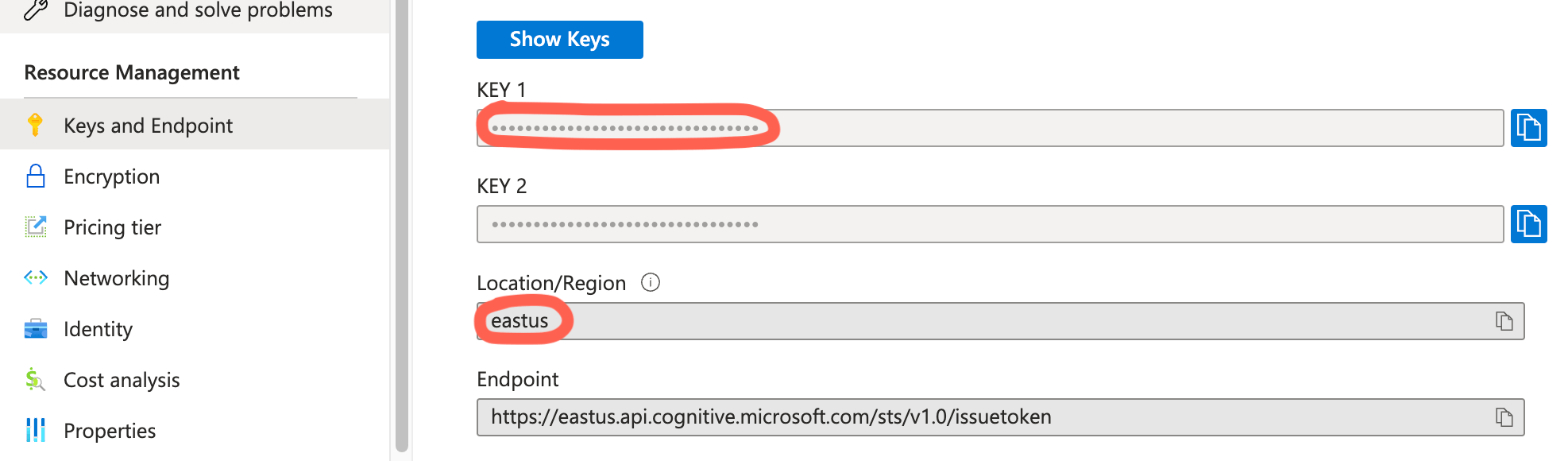
Location of `subscriptionKey` and `region` details in Azure Portal:
### :floppy_disk: Azure SDK
To use the [Azure Cognitive Speech Services API](https://learn.microsoft.com/en-us/azure/ai-services/speech-service/speech-to-text), you will need to add the official [Azure Speech SDK](https://www.npmjs.com/package/microsoft-cognitiveservices-speech-sdk) into your project and assign it to the `window.SpeechSDK` variable. Here are some simple ways you can achieve this:
- Import from a dependancy:
If you are using a dependancy manager, import and assign it to window.SpeechSDK:
```
import * as sdk from 'microsoft-cognitiveservices-speech-sdk';
window.SpeechSDK = sdk;
```
- Dynamic import from a dependancy
If you are using a dependancy manager, dynamically import and assign it to window.SpeechSDK:
```
import('microsoft-cognitiveservices-speech-sdk').then((module) => {
window.SpeechSDK = module;
});
```
- Script from a CDN
You can add a script tag to your markup or create one via javascript. The window.SpeechSDK property will be populated automatically:
```
const script = document.createElement("script");
script.src = "https://cdnjs.cloudflare.com/ajax/libs/highlight.js/11.8.0/highlight.min.js";
document.body.appendChild(script);
```
If your project is using `TypeScript`, add this to the file where the module is used:
```
import * as sdk from 'microsoft-cognitiveservices-speech-sdk';
declare global {
interface Window {
SpeechSDK: typeof sdk;
}
}
```
Examples:
Example React project that uses a package bundler. It should work similarly for other UI frameworks:
[Click for Live Example](https://stackblitz.com/edit/stackblitz-starters-ujkq7j?file=src%2FApp.tsx)
VanillaJS approach with no bundler (this can also be used as fallback if above doesn't work):
[Click for Live Example](https://codesandbox.io/s/speech-to-element-azure-vanillajs-gvj9v4?file=/index.html)
## :star: Example Product
[Deep Chat](https://deepchat.dev/) - an AI oriented chat component that is using Speech To Element to power its Speech To Text capabilities.
## :heart: Contributions
Open source is built by the community for the community. All contributions to this project are welcome!
Additionally, if you have any suggestions for enhancements, ideas on how to take the project further or have discovered a bug, do not hesitate to create a new issue ticket and we will look into it as soon as possible!