# Spectacle (themed by ETS)
> The gentleman at REST
[](https://circleci.com/gh/sourcey/spectacle)
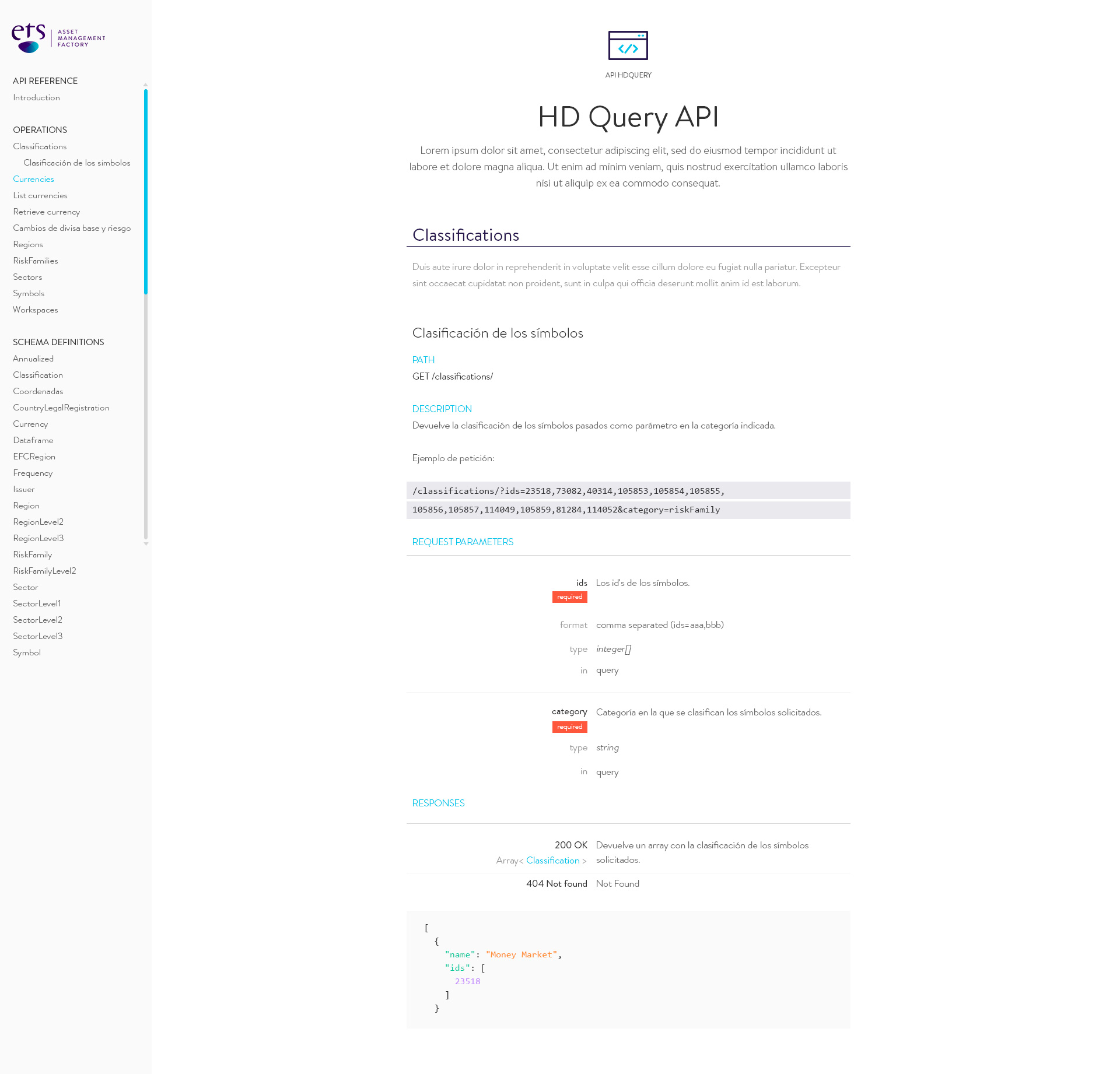
Spectacle generates beautiful static HTML5 documentation from [OpenAPI](https://openapis.org)/[Swagger](http://swagger.io) 2.0 API specifications.
The goal of Spectacle is help you "save time and look good" by providing an extensible platform for auto generating your REST API docs. The default layout is a three column single page, similar to those
employed by [Stripe](https://stripe.com/docs/api) and [Intercom](https://developers.intercom.com/reference).
See a demo of Spectacle in action here: [http://cheesestore.github.io](http://cheesestore.github.io)
---
---
## Features
* **OpenAPI/Swagger 2.0 support**: Support for the latest OpenAPI/Swagger specification.
* **Highly configurable**: Easily configurable Handlebars templates and SCSS styles so you can add your own design and flavour without going bald. See [Custom Builds](#custom-builds)
* **Markdown support**: Render markdown written in any of your API descriptions.
* **Clean responsive design**: Responsive HTML5 and CSS3 layout built with [Foundation 6](http://foundation.zurb.com/sites.html) that looks great on all devices and screen sizes.
* **Embed into your existing website**: An embedded option so that generate partial docs without a HTML `` for convenient integration into your existing website.
* **Live preview developer mode**: Development mode that starts a local HTTP server with a file watcher and live reload so you can preview live changes in your browser as you update your spec.
## Usage
Simply install Spectacle from `npm` like so:
```bash
npm install -g spectacle-docs-etsfactory
```
Next pass your `swagger.json` document use the CLI to generate your documentation.
```bash
spectacle -d your_swagger_api.json
# Or use the cheese.json example to test it out
# spectacle -d -l test/fixtures/cheese.png test/fixtures/cheese.json
```
Your generated documentation will be located in the `public` directory by default. You can either copy the generated HTML to your web server, or view your docs by pointing your browser to [http://localhost:4400/](http://localhost:4400/).
### Docker
A basic Docker script is included that allows Spectacle to be run from the inside, not outside. It's useful, for instance, in a Gitlab CI pipeline. Thanks @alexeiaguiar.
How to use it: `docker run -it sourcey/spectacle /bin/sh`
## Configuration Options
The basic CLI options are detailed below:
```bash
$ spectacle -h
Usage: spectacle spactacle [options]
Options:
-h, --help output usage information
-V, --version output the version number
-C, --disable-css omit CSS generation (default: false)
-J, --disable-js omit JavaScript generation (default: false)
-e, --embeddable omit the HTML and generate the documentation content only (default: false)
-d, --development-mode start HTTP server with the file watcher and live reload (default: false)
-s, --start-server start the HTTP server without any development features
-p, --port the port number for the HTTP server to listen on (default: 4400)
-t, --target-dir the target build directory (default: public)
-f, --target-file the target build HTML file (default: index.html)
-a, --app-dir the application source directory (default: app)
-l, --logo-file specify a custom logo file (default: null)
-c, --config-file specify a custom configuration file (default: app/lib/config.js)
```
Most options are self explanatory, but the following options warrant some further explanation:
* **--development-mode** `-d`: This option starts a development server with a file watcher and live reload, and will automatically regenerate your docs when any of your spec or app files change.
* **--start-server** `-s`: This option starts a production server without any development options enabled that serves the contents of your `--target-dir`.
* **--embeddable** `-e`: This option lets you build a minimal version of the documentation without the HTML `` tags, so you can embed Spectacle into your own website template. More info on [custom builds](#custom-builds) here.
* **--app-dir** `-a`: This option overrides the default directory which contains all the Handlebars templates, SCSS, and JavaScript source files. This option is useful for development because you can copy the contents of `app` to a remote location or a separate repo for custom builds.
* **--target-dir** `-t`: This option specifies where the generated documentation HTML files will be output.
## ETS custom script
Default ETS task, equal to `spectacle -l ./logo.png ./spec.yaml -t ./web/`
```bash
npm run ets
```
## Custom Builds
The best option for building your own custom functionality into Spectacle is to [fork Spectacle on GitHub](https://help.github.com/articles/fork-a-repo/), and make your own modifications in source. This way you can keep up to date by merging changes from the `master` branch, and your can also contribute your updates back to `master` by creating a [Pull Request](https://help.github.com/articles/creating-a-pull-request/) if you think they improve Spectacle somehow.
To fork Spectacle go to `https://github.com/sourcey/spectacle`, and press the 'Fork' button. Now you can `git clone git@github.com:/spectacle.git` to make your own changes.
Alternatively, you can just copy the contents of `app` from the main repo which contains all the source files such as templates, stylesheets and JavaScripts. Now just pass the path to your custom `app` path to the CLI like so: `spectacle -a /path/to/your/app your_swagger_api.json`
## Optimizing Your Workflow
Using an API spec to generate your docs has a number of great advantages, such as:
* **Maintain a single source**: Save time by removing the need to maintain a separate API spec and API documentation.
* **No more out-of-date documentation**: Your documentation will always be up-to-date with your API spec.
* **Be a better developer**: Your entire API system will be more stable and robust when built around your spec as a single source of truth.
As developer we're always looking for ways to improve and optimize our workflow, and documentation is just the beginning. With a well written Swagger you can automate and generate many parts of your API system, such as:
* **Inline Code Generators**: Generate your Swagger JSON or YAML from your source code comments.
* **Automate Testing**: Automate testing for all your API endpoints.
* **Code Generation**: Automatically generate client and server code from your spec.
* **Generate Documentation**: Really?
For a list of open source Swagger based libraries in many languages check here: http://swagger.io/open-source-integrations/
## More Information
More info is available on the [Spectacle homepage](http://sourcey.com/spectacle).
Please use the [GitHub issue tracker](https://github.com/sourcey/spectacle/issues) if you have any ideas or bugs to report.
All contributions are welcome.
Good luck and enjoy Spectacle!