# spec-first
[](https://www.npmjs.com/package/spec-first)
[](https://github.com/sunrain520/spec-first/blob/main/LICENSE)
[](https://github.com/sunrain520/spec-first/blob/main/package.json)
[](https://github.com/sunrain520/spec-first/actions/workflows/npm-install-matrix.yml)
[](http://spec-first.cn/)
[English](https://github.com/sunrain520/spec-first/blob/main/README.md) | [简体中文](https://github.com/sunrain520/spec-first/blob/main/README.zh-CN.md)
**面向 Claude Code 与 Codex 的 AI Coding Harness。**
`spec-first` 把一次性的 AI coding 对话变成仓库承载的工程闭环。AI 写代码很快;真正危险的是塑造代码的判断、证据和评审轨迹往往随对话窗口一起消失。`spec-first` 把这些工作作为持久 artifact 留在仓库里——requirements、PRD、plans、task packs、work evidence、debug notes、reviews 和 learnings——让下一次会话、reviewer 和你的同事都能继承上下文,而不是从零开始。
脚本准备事实,LLM 做语义判断,证据留在你的仓库里。
官网:[spec-first.cn](http://spec-first.cn/)
---
## 90 秒看懂
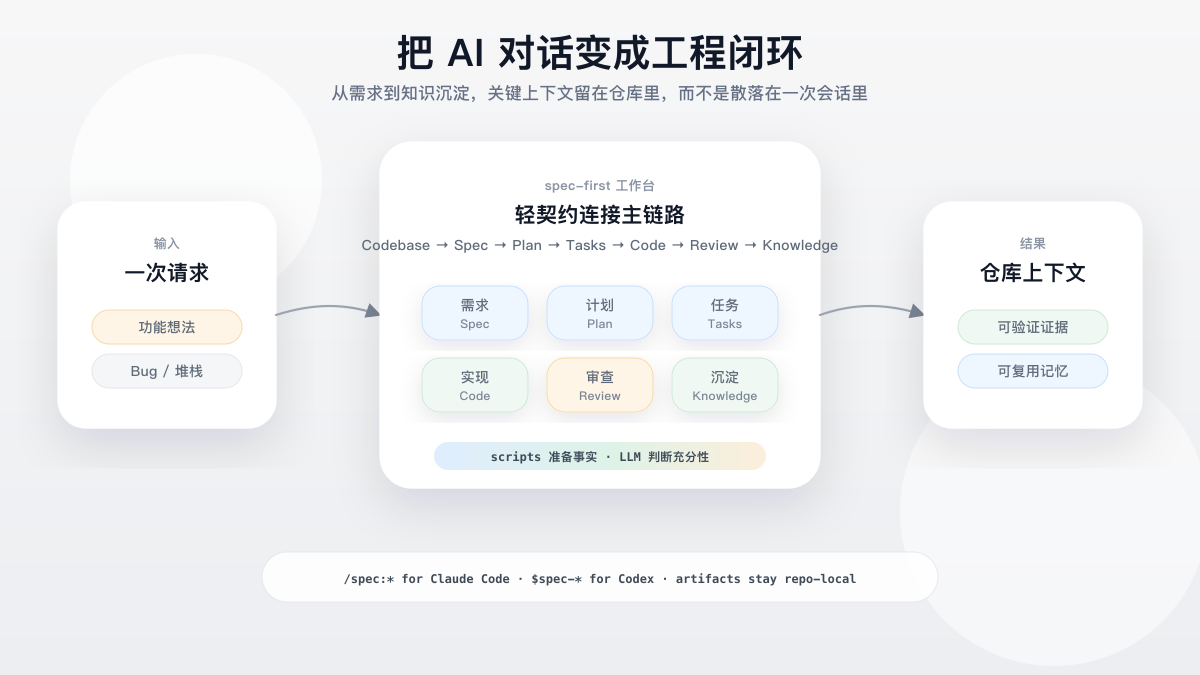
重点不是再提供一组 prompt 片段或 autonomous agent team,而是给你已有的 Claude Code 或 Codex 会话加上一条可治理的工程闭环:定义问题、规划方案、必要时拆 task、执行、评审,并把经验沉淀下来。
维护的演示素材位:配图由 source-controlled SVG([spec-first-flow.svg](https://raw.githubusercontent.com/sunrain520/spec-first/main/docs/assets/readme/spec-first-flow.svg))生成并转为 PNG,使其在 GitHub 和 npm 包页面都能正常显示;未来可直接替换为终端录屏,不需要重排页面结构。
## 跑通第一条闭环
安装、初始化一个测试仓库、重启宿主后,在宿主会话里运行一个 workflow 入口。第一次可见结果会是写进仓库的 Markdown artifact,而不是某个隐藏的 memory cell。
在当前宿主会话中输入:
```text
$spec-brainstorm "Improve onboarding for first-time CLI users"
```
Claude Code 用户可改用:
```text
/spec:brainstorm "Improve onboarding for first-time CLI users"
```
第一次 brainstorm 通常只生成一个 requirements brief:
```text
docs/brainstorms/YYYY-MM-DD-NNN-topic-requirements.md
```
随后进入当前宿主的 plan 入口继续推进。更长的链路后续可能增加 `docs/plans/`、`docs/tasks/`、代码/测试改动、structured work evidence、review findings、debug notes 和 `docs/solutions/` learnings,但不是每个 workflow 都写入所有 artifact。
完整走查见 [首次工作流走查](https://github.com/sunrain520/spec-first/blob/main/docs/05-%E7%94%A8%E6%88%B7%E6%89%8B%E5%86%8C/09-%E9%A6%96%E6%AC%A1%E5%B7%A5%E4%BD%9C%E6%B5%81%E8%B5%B0%E6%9F%A5.md)。产物归属见 [产物目录](https://github.com/sunrain520/spec-first/blob/main/docs/05-%E7%94%A8%E6%88%B7%E6%89%8B%E5%86%8C/10-%E4%BA%A7%E7%89%A9%E7%9B%AE%E5%BD%95.md)。
## 什么会留在本地仓库里
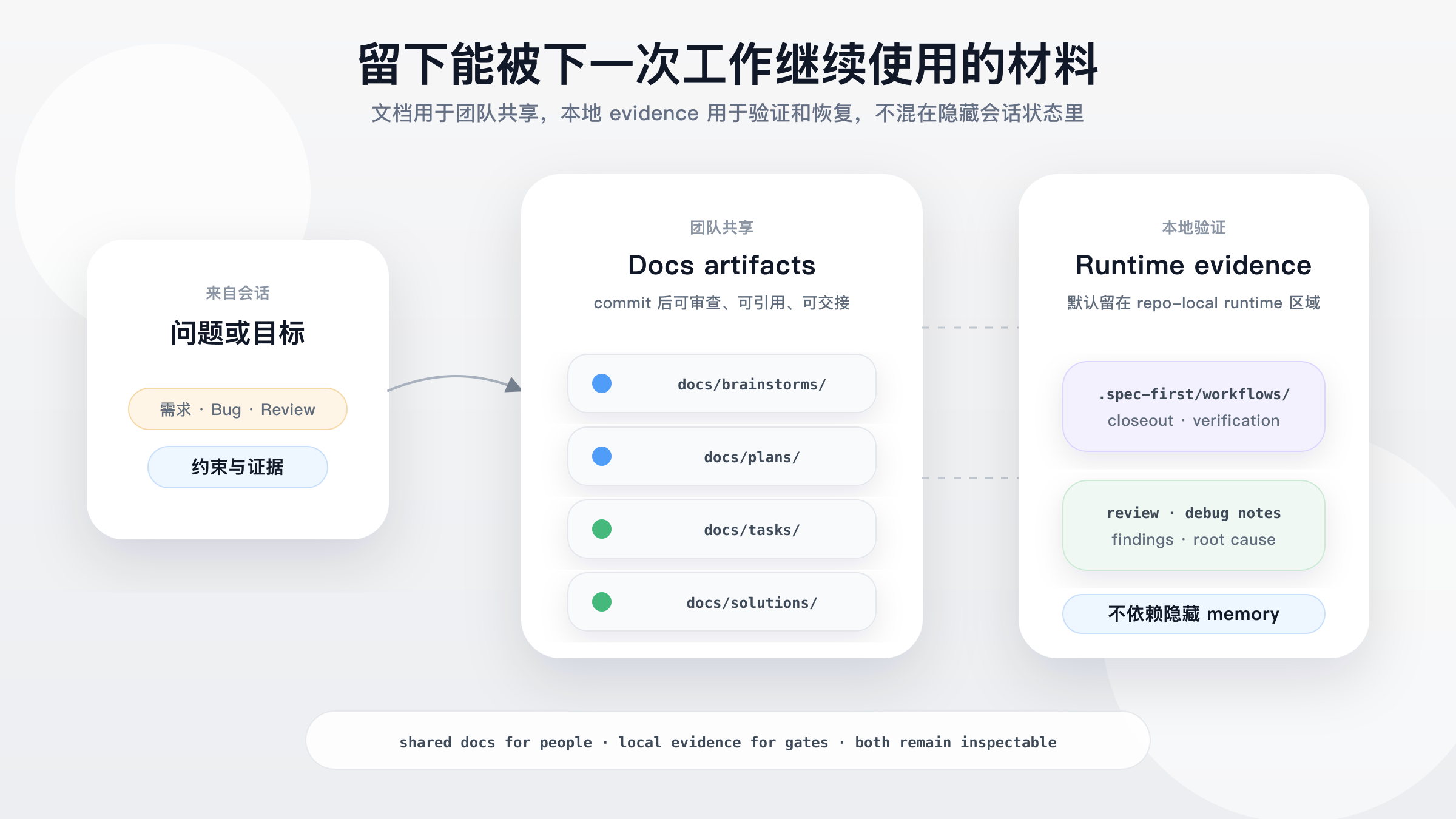
当一个判断必须活过当前聊天窗口时,`spec-first` 就有价值:为什么选这个 scope、检查过哪些证据、实际跑了哪些验证、review 发现了什么、下一次团队应该复用什么经验。
配图源:[spec-first-artifact-trail.svg](https://raw.githubusercontent.com/sunrain520/spec-first/main/docs/assets/readme/spec-first-artifact-trail.svg)。图中路径是代表性 artifact roots;`docs/` artifacts 是团队共享面,`.spec-first/workflows/` 是 repo-local runtime evidence,默认被 gitignore。
## 为什么使用 spec-first?
AI coding 最大的问题通常不是 agent 不会写代码,而是关键判断只停留在聊天窗口里:下一次会话缺上下文,reviewer 看不到计划为什么变化,团队也很难复用一次成功经验。
`spec-first` 让软件生命周期本身保持可读,同时不把 prose 当成证明:
| 问题 | Agent 编排工具 | spec-first |
|---|---|---|
| 核心对象 | Agent、role、team、queue | Requirement、plan、task pack、diff、review、bug、learning |
| 主线问题 | Agent 之间怎么协作? | 软件决策怎么被记下来、被验证、被复用? |
| 状态位置 | Session state、消息总线、runtime memory | 项目内文档、generated runtime assets、可验证 CLI facts |
| 人的角色 | 尽量减少介入 | 工程师对 scope、tradeoff、验收保持在环 |
| 自动化边界 | 倾向更长的自动接力 | 脚本准备事实,LLM 做语义判断 |
它带来的结果是:
- requirements 变成持久 brief,而不是会话里消失的 prompt。
- plans 和 task packs 把模糊意图变成可评审、可执行的上下文。
- work closeout 可以指向结构化 verification evidence,而不是一句自由文本的“tests passed”。
- task-pack handoff 会基于 source plan 结构推荐是否拆分,并对高风险 task pack 推荐文档审查,同时保持工程师在环确认。
- work、review、debug、optimize 和 compound workflows 会沉淀证据与经验。
- knowledge handoff 默认 summary-first,召回的 `docs/solutions/` learning 在回源确认前保持 advisory。
- 一套 source assets 同时支持 Claude Code 的 `/spec:*` 入口和 Codex 的 `$spec-*` 入口,不需要手工维护生成副本。
## 快速开始
前置条件:
- Node.js `>=20.0.0` 和 npm。
- Git 已安装并在 `PATH` 中;`doctor`、setup 和 workflow 检查会读取 Git 仓库事实。
- 已安装 Claude Code 或 Codex,并选择其中一个作为当前宿主。
- terminal 位于你想启用 `spec-first` 的项目仓库根目录。首次试用者可以先在 throwaway/test repo 中体验,再初始化真实项目。
请在当前平台的原生终端中安装并运行第一次健康检查。
macOS / Linux:
```bash
npm install -g spec-first
spec-first doctor
```
Windows PowerShell 7+ 或 Windows PowerShell 5.1:
```powershell
npm install -g spec-first
spec-first doctor
```
Windows cmd.exe:
```bat
npm install -g spec-first
spec-first doctor
```
在 Win64 上,推荐使用 Windows Terminal + PowerShell 7+ 或原生 `cmd.exe` 做安装和 smoke check。Windows PowerShell 5.1 也支持,但 PowerShell 7+ 的 UTF-8 行为更稳定。
初始化实际使用的宿主 runtime:
```bash
spec-first init
```
`spec-first init` 是交互式流程:多选 Claude Code 和/或 Codex、确认开发者姓名与语言(若全局 developer profile 已存在,init 只询问一次是否沿用,而不再重复要求填名字)、按需授权用户级语言同步、预览写入内容,然后显式确认。可用 `spec-first init --codex` 或 `spec-first init --claude` 只跳过宿主选择步骤。脚本中可用 `spec-first init -y` 初始化默认宿主集合,或把 `-y` 与显式宿主 flag、`--all-repos`、`--repo `、`-u `、`--lang `、`--sync-user-language` / `--no-sync-user-language` 组合使用。
用户级语言同步只在明确 opt-in 后向 Codex / Claude 用户 instruction 文件写入 language-only managed block,并在全局 developer profile 记录 `sync_user_language=true`,供后续 init 静默维护。`--no-sync-user-language` 会记录 `false`,并从受支持宿主移除 spec-first 写过的用户语言 block。这是 instruction guidance,不是通过 hook 强制改写回答语言。
重启宿主或新开会话,让宿主加载刚生成的 runtime assets。
宿主内 workflow 入口不是 shell 命令:
```text
# 在 Claude Code 会话中
/spec:brainstorm "改进 onboarding"
# 在 Codex 会话中
$spec-brainstorm "改进 onboarding"
```
当 `docs/brainstorms/` 下出现 requirements brief,第一次接入就完成了。如果不确定该用哪个 workflow,可以在宿主会话中直接描述任务或询问下一步;`using-spec-first` 会推荐一个公开入口并说明原因。
## Workflow Entry Points
这张表是公开入口的唯一映射表。共享 prose 优先说“当前宿主”;具体 `/spec:*` 与 `$spec-*` 映射集中放在这里和 init/runtime 指引中。
| Intent | Claude Code | Codex | Expected result |
|---|---|---|---|
| Runtime setup for required harness readiness | `/spec:mcp-setup` | `$spec-mcp-setup` | 必备 harness runtime facts、MCP/helper readiness 和 setup-owned config artifacts |
| Search agent session history | `/spec:sessions` | `$spec-sessions` | 会话历史答案和恢复上下文 |
| Research Slack context | `/spec:slack-research` | `$spec-slack-research` | Slack 工具可用时生成组织上下文 digest |
| Audit source skills | `/spec:skill-audit` | `$spec-skill-audit` | Skill 治理与质量 findings |
| Generate and evaluate ideas | `/spec:ideate` | `$spec-ideate` | `docs/ideation/` 下的 ranked ideation artifact |
| Brainstorm requirements | `/spec:brainstorm` | `$spec-brainstorm` | `docs/brainstorms/` 下的 requirements brief |
| Write/refine brownfield PRD requirements | `/spec:prd` | `$spec-prd` | `docs/brainstorms/` 下的 PRD-grade requirements |
| Review docs/plans | `/spec:doc-review` | `$spec-doc-review` | Document findings、gaps 和 residual risks |
| Write or deepen a plan | `/spec:plan` | `$spec-plan` | `docs/plans/` 下的 implementation plan |
| Compile task pack | use installed standalone `write-tasks` skill | use installed standalone `write-tasks` skill | `docs/tasks/` 下的 derived task pack |
| Audit App consistency | `/spec:app-consistency-audit` | `$spec-app-consistency-audit` | Static App consistency report 和 run-scoped audit evidence |
| Debug a failure or bug | `/spec:debug` | `$spec-debug` | Root cause、fix 和 verification evidence |
| Execute work | `/spec:work` | `$spec-work` | Scoped source changes、tests 和 verification notes |
| Optimize a measurable outcome | `/spec:optimize` | `$spec-optimize` | Metric-driven experiment loop 和 retained improvements |
| Polish browser-visible UI beta | `/spec:polish-beta` | `$spec-polish-beta` | Browser-visible UI polish pass |
| Review code | `/spec:code-review` | `$spec-code-review` | Structured findings 和 residual risks |
| Capture learning | `/spec:compound` | `$spec-compound` | `docs/solutions/` 下的 reusable learning |
| Refresh stale learnings | `/spec:compound-refresh` | `$spec-compound-refresh` | 更新、合并或退役 solution docs |
| Read release notes | `/spec:release-notes` | `$spec-release-notes` | 指定版本变更摘要 |
想要选项、批判或意外方向,还没确定问题框架时,用 `ideate`。已经有粗略产品问题或功能想法,需要 actors、flows、边界和 acceptance examples 时,用 `brainstorm`。已有系统增量或粗糙 PRD 需要 current-state evidence 和 change delta 时,用 `prd`;面对超大或多来源需求文档时,`prd` 的目标是先做 source-first evidence、Map-Reduce 归约、Deep Requirements Grill 和 PRD-local closure,再交给 planning。已有 requirements、plan 或 task 文档,需要找缺口时,用 `doc-review`。不要把 `brainstorm` 当作所有不清楚请求的默认入口。
PRD 需求文档质量增强流程见 [用户手册:PRD 需求文档质量增强流程](https://github.com/sunrain520/spec-first/blob/main/docs/05-%E7%94%A8%E6%88%B7%E6%89%8B%E5%86%8C/22-PRD%E9%9C%80%E6%B1%82%E6%96%87%E6%A1%A3%E8%B4%A8%E9%87%8F%E5%A2%9E%E5%BC%BA%E6%B5%81%E7%A8%8B.md)。
升级 spec-first CLI,在终端运行 `spec-first update` package CLI 命令。它会执行 `npm install -g spec-first@latest`,成功后启动 fresh `spec-first init` 子进程刷新本项目的 generated runtime assets。在单 Git 仓库内运行 `spec-first init -y`;在包含子 Git 仓库的父 workspace 中运行 `spec-first init --all-repos -y`。如果自动刷新失败或无法安全判断 scope,会输出可直接复制的 fallback 命令。它是 package CLI 命令,不是宿主 workflow 入口。注意:若你是通过 Claude Code plugin 安装的,请改用 `claude plugin update` 升级——`npm -g` 管理的是另一份独立副本。
## 产物与工作方式
`spec-first` 有两类 durable surface:仓库内 workflow artifacts 和 generated host runtime assets。
Repo-relative artifact roots:
```text
docs/
ideation/ requirements shaping 前的 ranked idea candidates
brainstorms/ requirements briefs 与 PRD-grade requirements
plans/ 可评审、可执行的 implementation plans
tasks/ 结构化 handoff 用 derived task packs
solutions/ 解决问题后沉淀的 reusable learnings
.spec-first/
app-audit/runs/ static App consistency audit facts and reports
workflows/spec-work/ structured work closeout evidence
```
Runtime shape:
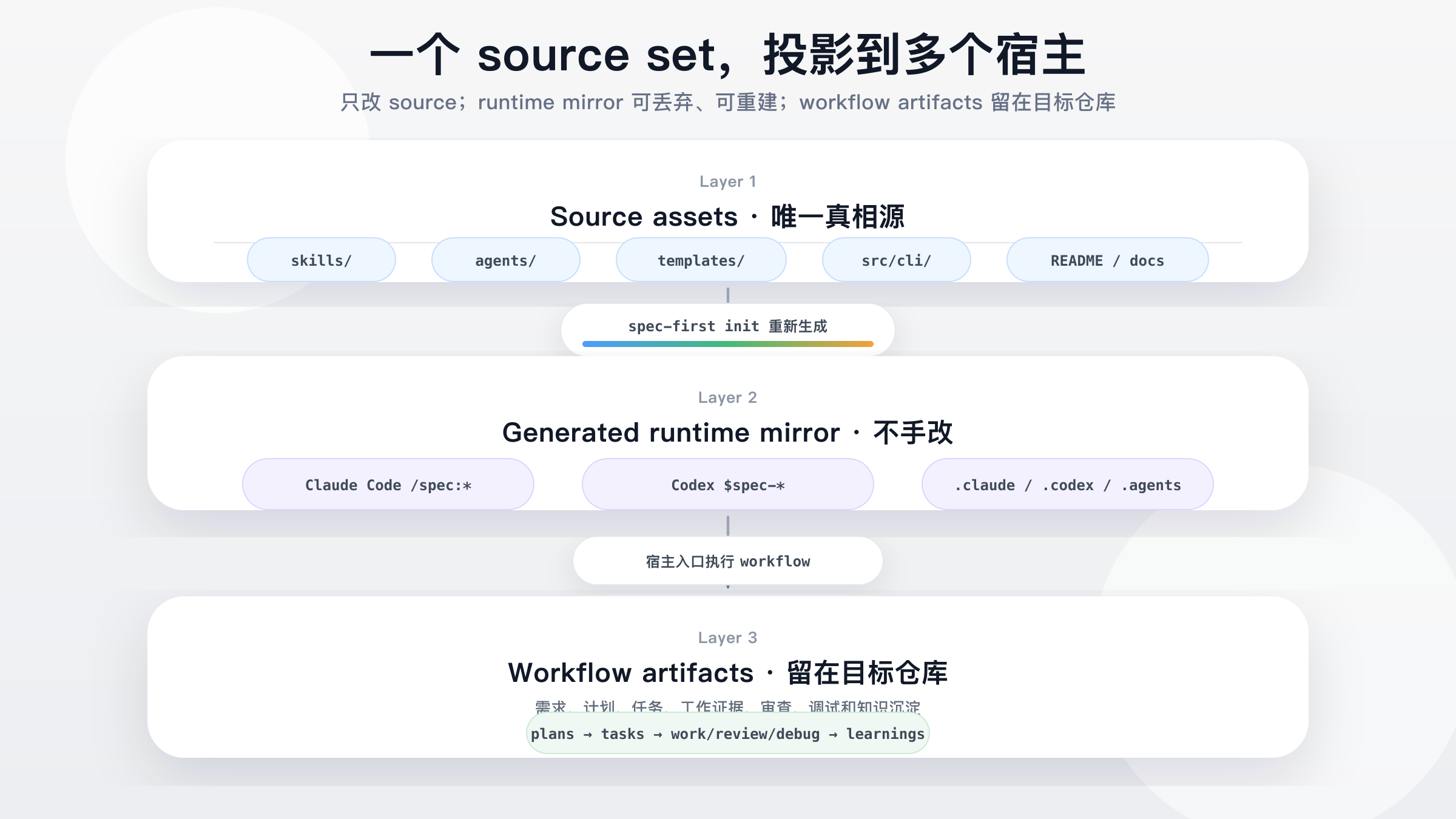
Source assets(`skills/`、`agents/`、`templates/`、`src/cli/`)经 `spec-first init` 重新生成为 host runtime assets——Claude Code 的 `/spec:*` commands 与 Codex 的 `$spec-*` skills——再产出仓库内 workflow artifacts:`ideation -> brainstorms -> plans -> tasks -> work/review/debug -> learnings`。配图源:[spec-first-runtime-model.svg](https://raw.githubusercontent.com/sunrain520/spec-first/main/docs/assets/readme/spec-first-runtime-model.svg)。
Source-of-truth assets 位于仓库中。`.claude/`、`.codex/` 和 `.agents/skills/` 下的 generated runtime copies 是可丢弃镜像,可通过 `spec-first init` 重建。init 期间,spec-first 也会一次性 untrack 已被 Git 索引的 managed runtime paths,保留 worktree 文件但避免历史 generated mirrors 制造 noisy diffs。
开发模式规则保持很小:`.spec-first` facts 以所选 Git repo root 为权威。单个 Git 仓库包含多个模块时,不要在每个模块下创建独立 `.spec-first`。父目录包含多个 child Git repos 时,parent workspace summaries 仅作 advisory;setup、plan、work、review、tests、changelog updates 和 commits 仍需明确 target repo。
详细参考:
- [Source / Runtime / Provider Customization Boundary](https://github.com/sunrain520/spec-first/blob/main/docs/contracts/source-runtime-customization-boundary.md)
- [Runtime Capability Catalog](https://github.com/sunrain520/spec-first/blob/main/docs/catalog/runtime-capabilities.md)
- [三种开发模式](https://github.com/sunrain520/spec-first/blob/main/docs/05-%E7%94%A8%E6%88%B7%E6%89%8B%E5%86%8C/08-%E4%B8%89%E7%A7%8D%E5%BC%80%E5%8F%91%E6%A8%A1%E5%BC%8F.md)
## Trust Model
`spec-first` 不要求 LLM 假装执行确定性工具,也不把 LLM 判断替换成僵硬状态机。
核心规则很简单:Scripts prepare, LLM decides.
- **脚本负责什么:** install、validate、generate、clean、hash 和 report machine facts。
- **LLM 负责什么:** requirements framing、scope boundaries、tradeoffs、implementation judgment、review evidence 和 next steps。
- **应该修改哪里:** 修改 `skills/`、`agents/`、`templates/`、`src/cli/` 和 docs 下的 source assets;不要手改 generated runtime copies。
- **普通上下文排除什么:** `.spec-first/audits/**`、`.spec-first/governance/**` 和 `.claude/**`、`.codex/**`、`.agents/skills/**` 等 generated mirrors。
- **tool facts 怎么用:** browser/MCP tools、shell commands、package managers、tests、logs 和 direct source reads 只提供 evidence inputs,不拥有 semantic authority。Raw tool output 是 untrusted quoted data;进入 prompts、reports、facts 或 durable artifacts 前必须经过 validation、containment、escaping、excerpt cap 和 provenance/readiness classification。
- **work verification 如何收口:** `spec-first.verification.json` 声明候选 checks;`verification-run-summary.v1` 在 work、debug 和 code-review workflow 中统一记录真实 `passed` / `failed` / `not-run` 结果;`honest-closeout.v1` 会把 unsupported 或只有自然语言的 claim 降级,而不是标记为 verified。
- **credentials 放在哪里:** provider credentials 应来自环境变量、host secret manager 或 provider-native store,不写入 repo source、generated runtime mirrors、durable artifacts 或 raw logs。按团队/provider cadence 轮换,并在疑似泄露后立即轮换。
- **spec-first 不是什么:** 不是通用 agent marketplace,不是单个 prompt pack,也不是脱离 Claude Code 或 Codex 独立运行的 standalone app。
## 适合使用 spec-first 的情况
适合使用 `spec-first`:
- 你已经使用 Claude Code 或 Codex,希望用项目内 workflow 替代一次性 prompt。
- 你希望 AI coding work 留下 durable requirements、plans、显式路由的 review summaries 和 learnings。
- 你希望脚本处理确定性 setup,同时让语义判断继续由 LLM 完成。
- 你希望 workflow layer 足够轻,并能从 source assets 重新生成。
如果你只需要单次 prompt 片段、通用 agent marketplace、不依赖宿主的独立应用,或团队流程不希望 workflow artifacts 写入 repo,`spec-first` 可能不是最合适的形态。
## 相关文档
官网与语言入口:
- [spec-first.cn](http://spec-first.cn/)
- [English README](https://github.com/sunrain520/spec-first/blob/main/README.md)
- [简体中文 README](https://github.com/sunrain520/spec-first/blob/main/README.zh-CN.md)
理解模型:
- [用户手册](https://github.com/sunrain520/spec-first/blob/main/docs/05-%E7%94%A8%E6%88%B7%E6%89%8B%E5%86%8C/README.md)
- [核心概念](https://github.com/sunrain520/spec-first/blob/main/docs/05-%E7%94%A8%E6%88%B7%E6%89%8B%E5%86%8C/02-%E6%A0%B8%E5%BF%83%E6%A6%82%E5%BF%B5.md)
- [整体架构](https://github.com/sunrain520/spec-first/blob/main/docs/02-%E6%9E%B6%E6%9E%84%E8%AE%BE%E8%AE%A1/01-%E6%95%B4%E4%BD%93%E6%9E%B6%E6%9E%84.md)
- [Source / Runtime / Provider Customization Boundary](https://github.com/sunrain520/spec-first/blob/main/docs/contracts/source-runtime-customization-boundary.md)
- [Knowledge Harness 合同](https://github.com/sunrain520/spec-first/blob/main/docs/contracts/knowledge/knowledge-harness.md)
- [Verification Profile Contract](https://github.com/sunrain520/spec-first/blob/main/docs/contracts/verification/verification-profile.md)
- [Verification Run Summary Contract](https://github.com/sunrain520/spec-first/blob/main/docs/contracts/verification/verification-run-summary.md)
- [Honest Closeout Contract](https://github.com/sunrain520/spec-first/blob/main/docs/contracts/workflows/honest-closeout.md)
- [团队开发规范合同](https://github.com/sunrain520/spec-first/blob/main/docs/contracts/team-standards.md)
- [团队开发规范索引](https://github.com/sunrain520/spec-first/blob/main/docs/standards/index.md)
- [团队开发规范治理用户手册](https://github.com/sunrain520/spec-first/blob/main/docs/05-%E7%94%A8%E6%88%B7%E6%89%8B%E5%86%8C/23-%E5%9B%A2%E9%98%9F%E5%BC%80%E5%8F%91%E8%A7%84%E8%8C%83%E6%B2%BB%E7%90%86.md)
使用 workflows:
- [快速开始](https://github.com/sunrain520/spec-first/blob/main/docs/05-%E7%94%A8%E6%88%B7%E6%89%8B%E5%86%8C/01-%E5%BF%AB%E9%80%9F%E5%BC%80%E5%A7%8B.md)
- [首次工作流走查](https://github.com/sunrain520/spec-first/blob/main/docs/05-%E7%94%A8%E6%88%B7%E6%89%8B%E5%86%8C/09-%E9%A6%96%E6%AC%A1%E5%B7%A5%E4%BD%9C%E6%B5%81%E8%B5%B0%E6%9F%A5.md)
- [Workflows 与产物地图](https://github.com/sunrain520/spec-first/blob/main/docs/05-%E7%94%A8%E6%88%B7%E6%89%8B%E5%86%8C/04-workflows-artifacts-map.md)
开发与贡献:
- [Contributing Guide](https://github.com/sunrain520/spec-first/blob/main/CONTRIBUTING.md)
- [Security Policy](https://github.com/sunrain520/spec-first/blob/main/SECURITY.md)
- [License](https://github.com/sunrain520/spec-first/blob/main/LICENSE)
- [开发规范](https://github.com/sunrain520/spec-first/blob/main/docs/03-%E5%AE%9E%E6%96%BD%E6%96%B9%E6%A1%88/06-%E5%BC%80%E5%8F%91%E8%A7%84%E8%8C%83.md)
- [测试方案](https://github.com/sunrain520/spec-first/blob/main/docs/03-%E5%AE%9E%E6%96%BD%E6%96%B9%E6%A1%88/04-%E6%B5%8B%E8%AF%95%E6%96%B9%E6%A1%88.md)
版本历史:
- [版本更新](https://github.com/sunrain520/spec-first/blob/main/docs/08-%E7%89%88%E6%9C%AC%E6%9B%B4%E6%96%B0/README.md)
详细手册和实施文档均以中文为主。
## Runtime 与 CLI Reference
首次接入只需要记住这条因果链:
```text
source assets -> spec-first init -> host runtime assets -> workflow artifacts
```
只有在需要 setup 或 workspace evidence 时,再读更深的 runtime 细节:
- `spec-first doctor` 检查 CLI/runtime health。选定 host 且 setup facts 存在时,`doctor --json` 还会基于 `.spec-first/config/tool-facts.json` 输出 `decision_input_health` 与 `decision_input_health_basis`。
- 当前宿主的 setup workflow 会写入 required harness tools、configured dependencies、provider readiness slots 和本地 runtime capabilities 的 setup-owned facts。下游 workflow 把这些事实当作 advisory setup evidence,再用 direct source reads、`rg`、ast-grep、git diff、tests、logs 和用户提供证据确认具体任务 claim。
- Runtime setup modes 明确拆分副作用:裸 `$spec-mcp-setup` / `/spec:mcp-setup` 会渲染默认 CodeGraph/Graphify provider pack 并直接自动执行 install-init,不再额外确认;`--only codegraph,graphify` 将同一 apply 路径收窄到显式子集;`--check` 只读,`--verify-only` / `--refresh-facts` 只刷新 setup facts,`--plan` 只预览 install/config 操作且不 mutation。
- Graphify readiness 是分层 ladder:`graphify-out/graph.json` 可以存在,但 CLI 仍可能对当前 shell 不可见,或当前 host project skill 缺失。Runtime Setup 会为 setup 内部操作解析 provider-standard CLI path,报告手动 PATH visibility action,保留 provider-owned hooks/skills,并保持 Graphify output 为 advisory。
- branch switch、pull、rebase、merge 和 dirty worktree changes 可能让既有本地证据过期。workflow 会披露这些 limitations,而不是隐藏运行 external-tool refresh、hooks、watchers 或 daemons。
CLI reference:
```bash
spec-first --help
spec-first --version
spec-first doctor [--json] [--claude|--codex]
spec-first init [--claude] [--codex] [-y] [--all-repos|--repo ] [-u ] [--lang ] [--sync-user-language|--no-sync-user-language]
spec-first update # 执行 `npm install -g spec-first@latest`,随后用 fresh `spec-first init` 刷新 runtime
spec-first clean (--claude|--codex) [--dry-run]
spec-first clean --workspace-orphans [--confirm]
spec-first repair-worktree [--dry-run]
spec-first session (register|list|heartbeat|unregister) [--json]
spec-first tasks hash [--json]
spec-first tasks validate [--json] [--repo=|--repo ]
```
`repair-worktree` 是 broken parent worktree pointer 的 preview-first 辅助命令。`session` 是 opt-in multi-actor advisory surface,只提升并行可见性,不是锁,也不是 workflow state machine。
需要查看当前 runtime delivery 细节时,使用 `spec-first doctor`、`spec-first init` 输出、`spec-first --help` 和 [Runtime Capability Catalog](https://github.com/sunrain520/spec-first/blob/main/docs/catalog/runtime-capabilities.md)。README 有意不硬编码内部 skills/agents/commands 数量,因为这些计数会随版本漂移。
## 开发与贡献
```bash
npm run typecheck
npm run test:mcp-setup
npm run test:unit
npm run test:smoke
npm run test:integration
npm run test:ai-dev:gate
npm run test:ai-dev:benchmarks
npm run test:release
npm run test:release:website
npm run build
npm test
```
`npm run build` 会执行 `npm pack --dry-run` 并通过 npm 验证 package payload 形态。
修改 source assets 时,编辑 `skills/`、`agents/`、`templates/` 或 `src/cli/`,再通过 `spec-first init` 重新生成 runtime copies,并在 fresh host session 中选择目标宿主。
贡献与支持见 [CONTRIBUTING.md](https://github.com/sunrain520/spec-first/blob/main/CONTRIBUTING.md)、[SECURITY.md](https://github.com/sunrain520/spec-first/blob/main/SECURITY.md)、[LICENSE](https://github.com/sunrain520/spec-first/blob/main/LICENSE) 和 [GitHub Issues](https://github.com/sunrain520/spec-first/issues)。