# spec-first
[](https://www.npmjs.com/package/spec-first)
[](https://github.com/sunrain520/spec-first/blob/main/LICENSE)
[](https://github.com/sunrain520/spec-first/blob/main/package.json)
[](https://github.com/sunrain520/spec-first/actions/workflows/npm-install-matrix.yml)
[](http://spec-first.cn/)
[English](https://github.com/sunrain520/spec-first/blob/main/README.md) | [简体中文](https://github.com/sunrain520/spec-first/blob/main/README.zh-CN.md)
**AI Coding Harness for Claude Code and Codex.**
`spec-first` turns one-off AI coding chats into a repo-backed engineering loop. AI can write code quickly; the risky part is that the decisions, evidence, and review trail often vanish with the chat window. `spec-first` keeps that work as durable artifacts — requirements, PRDs, plans, task packs, work evidence, debugging notes, reviews, and learnings — so the next session, the reviewer, and your teammate inherit context instead of starting cold.
Scripts prepare facts. LLMs make semantic judgments. Evidence stays in your repository.
Official site: [spec-first.cn](http://spec-first.cn/)
---
## See It In 90 Seconds
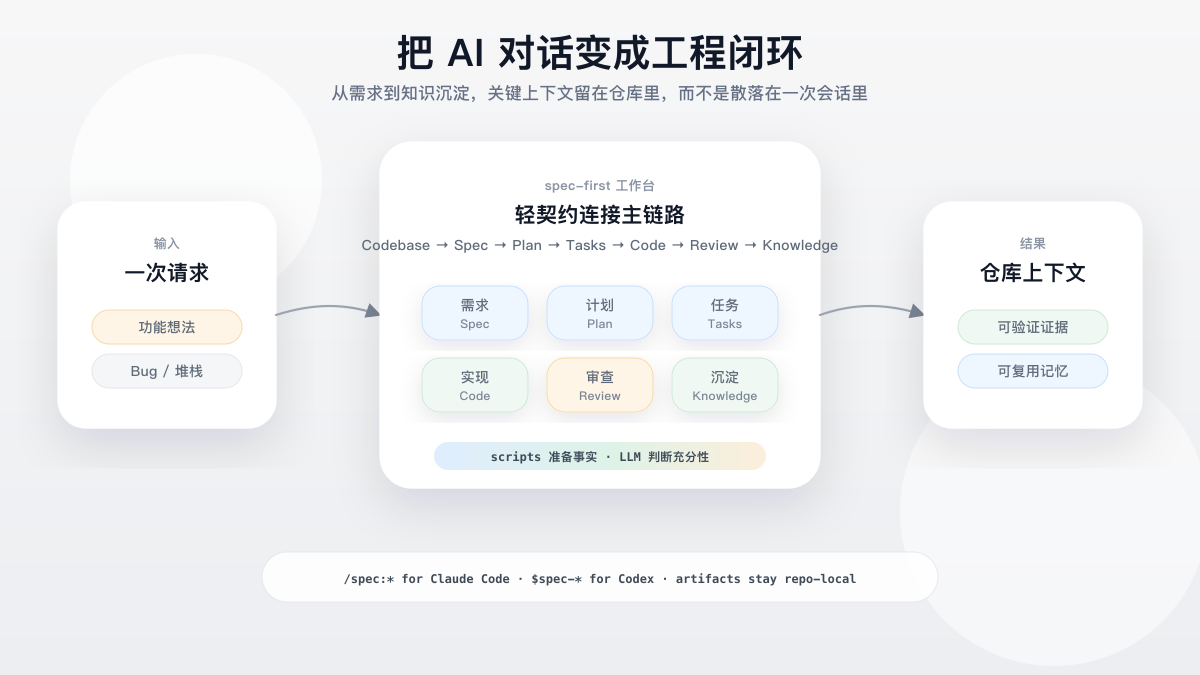
The point is not another prompt snippet or autonomous agent team. `spec-first` gives your existing Claude Code or Codex session a governed loop: define the work, plan it, split it when useful, execute it, review it, and compound the learning.
Maintained demo slot: the diagram is generated from a source-controlled SVG ([spec-first-flow.svg](https://raw.githubusercontent.com/sunrain520/spec-first/main/docs/assets/readme/spec-first-flow.svg)) and rendered to PNG so it shows on both GitHub and the npm package page; a future terminal recording can replace this position without restructuring the page.
## Try The First Loop
Install, initialize a test repository, restart your host, then run one workflow entry from the host session. The first visible result is a Markdown artifact in your repo, not a hidden memory cell.
In your current host session:
```text
$spec-brainstorm "Improve onboarding for first-time CLI users"
```
Claude Code users can run:
```text
/spec:brainstorm "Improve onboarding for first-time CLI users"
```
The first brainstorm run usually creates one requirements brief:
```text
docs/brainstorms/YYYY-MM-DD-NNN-topic-requirements.md
```
From there, continue to the current host's plan entrypoint. A longer chain may add `docs/plans/`, `docs/tasks/`, code/test changes, structured work evidence, review findings, debug notes, and `docs/solutions/` learnings, but not every workflow writes every artifact.
Detailed walkthrough: [Chinese First Workflow Walkthrough](https://github.com/sunrain520/spec-first/blob/main/docs/05-%E7%94%A8%E6%88%B7%E6%89%8B%E5%86%8C/09-%E9%A6%96%E6%AC%A1%E5%B7%A5%E4%BD%9C%E6%B5%81%E8%B5%B0%E6%9F%A5.md). Artifact ownership: [Chinese Artifact Catalog](https://github.com/sunrain520/spec-first/blob/main/docs/05-%E7%94%A8%E6%88%B7%E6%89%8B%E5%86%8C/10-%E4%BA%A7%E7%89%A9%E7%9B%AE%E5%BD%95.md).
## What Stays Repo-Local
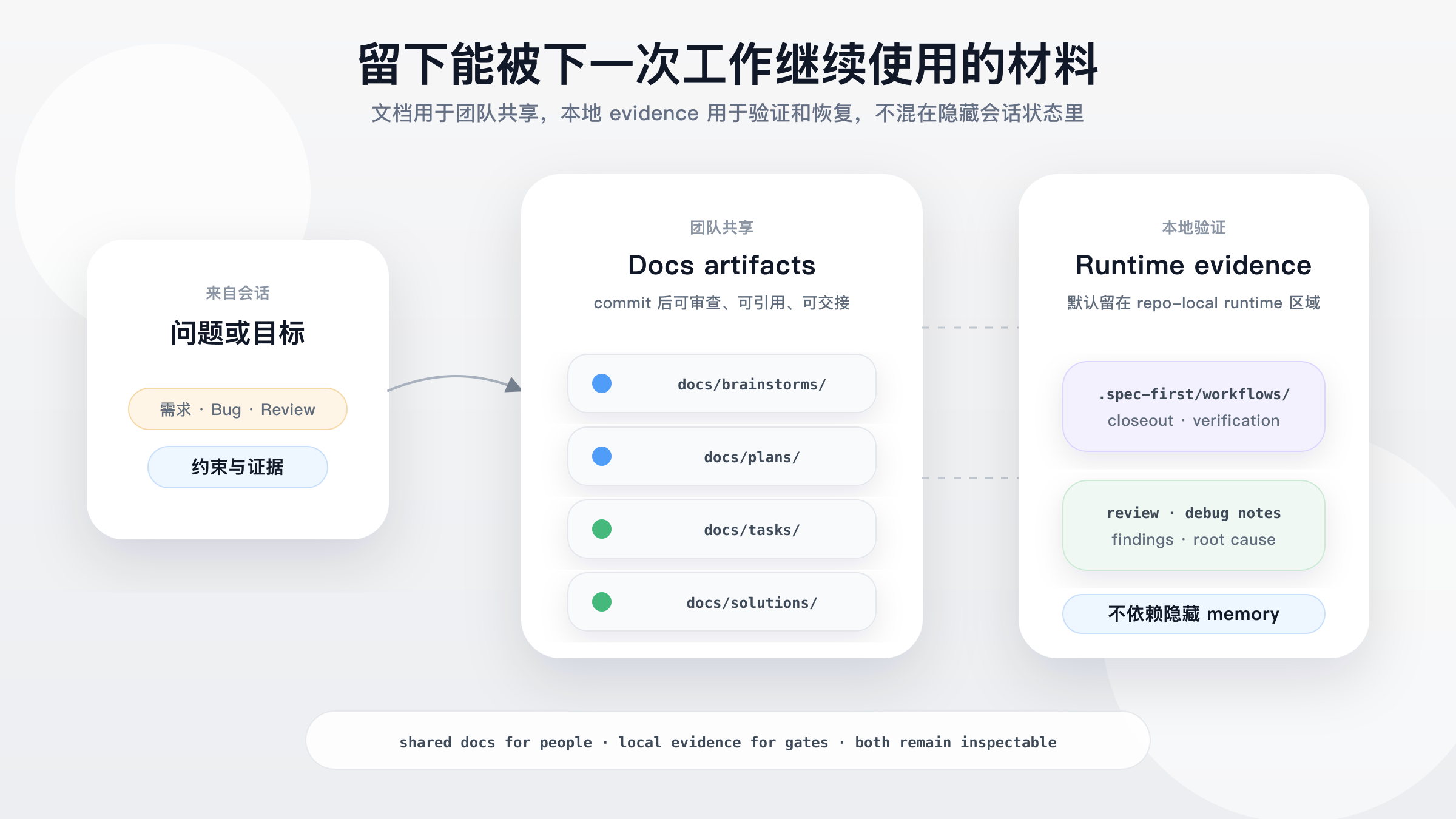
`spec-first` is useful when a decision must survive the current chat: why a scope was chosen, what evidence was checked, which validation actually ran, what review found, and what the team should remember next time.
Diagram source: [spec-first-artifact-trail.svg](https://raw.githubusercontent.com/sunrain520/spec-first/main/docs/assets/readme/spec-first-artifact-trail.svg). The paths shown are representative artifact roots; `docs/` artifacts are the team-sharing surface, while `.spec-first/workflows/` is repo-local runtime evidence and is gitignored by default.
## Why spec-first?
AI coding breaks down when important decisions live only in chat: the next session lacks context, reviewers cannot see why a plan changed, and teams cannot reuse what worked.
`spec-first` keeps the software lifecycle legible without pretending that prose alone is proof:
| Question | Agent orchestration tools | spec-first |
|---|---|---|
| Primary unit | Agent, role, team, queue | Requirement, plan, task pack, diff, review, bug, learning |
| Main problem | How should agents coordinate? | How should software decisions stay durable and reusable? |
| State location | Session state, message bus, runtime memory | Repo-local docs, generated runtime assets, and verifiable CLI facts |
| Human role | Minimize intervention where possible | Keep engineers in the loop for scope, tradeoffs, and acceptance |
| Automation boundary | Often pushes toward autonomous chains | Scripts prepare facts; LLMs make semantic decisions |
What this buys you:
- Requirements become durable briefs instead of disappearing prompts.
- Plans and task packs turn vague intent into reviewable execution context.
- Work closeout can point to structured verification evidence instead of a free-form "tests passed" claim.
- Task-pack handoffs now recommend splitting from source-plan structure and recommend document review for high-risk packs while keeping the engineer in the loop.
- Work, review, debug, optimize, and compound workflows preserve evidence and learning.
- Knowledge handoffs stay summary-first, and recalled `docs/solutions/` learnings remain advisory until reconfirmed from source evidence.
- 团队开发规范可以放在 `docs/contracts/team-standards.md` 与 `docs/standards/**`,由 workflow 按 scope 选择 confirmed 规则;这是 source 文档,不是新的 `$spec-*` public workflow。
- One source asset set supports Claude Code `/spec:*` entries and Codex `$spec-*` entries without hand-maintaining generated runtime copies.
## Quickstart
Prerequisites:
- Node.js `>=20.0.0` and npm.
- Git on `PATH`; `doctor`, setup, and workflow checks read repository facts from Git.
- Claude Code or Codex installed, with one chosen as the current host.
- A terminal opened at the root of the project repo where you want to enable `spec-first`. First-time users can try a throwaway/test repo before initializing a real project.
Install and run the first health check from the native terminal for your platform.
macOS / Linux:
```bash
npm install -g spec-first
spec-first doctor
```
Windows PowerShell 7+ or Windows PowerShell 5.1:
```powershell
npm install -g spec-first
spec-first doctor
```
Windows cmd.exe:
```bat
npm install -g spec-first
spec-first doctor
```
On Win64, prefer native Windows Terminal with PowerShell 7+ or `cmd.exe` for installation and smoke checks. Windows PowerShell 5.1 is supported, but PowerShell 7+ has better UTF-8 behavior.
Initialize the host runtime you actually use:
```bash
spec-first init
```
`spec-first init` is interactive: select Claude Code and/or Codex, then confirm your developer name and language — when a global developer profile already exists, init asks once whether to reuse it instead of re-prompting for the name — optionally authorize user-level language sync, preview the writes, then confirm. Use `spec-first init --codex` or `spec-first init --claude` to skip only the host selection step. Use `spec-first init -y` for scripted defaults, or combine `-y` with explicit host flags, `--all-repos`, `--repo `, `-u `, `--lang `, and `--sync-user-language` / `--no-sync-user-language`.
User-level language sync writes only a language preference block to Codex / Claude user instruction files after explicit opt-in, then records `sync_user_language=true` in the global developer profile for later init runs. `--no-sync-user-language` records `false` and removes spec-first's user-language block from supported hosts. This is instruction guidance, not hook-based language enforcement.
Restart the host or open a new session so it loads the generated runtime assets.
Host-session workflow entries are not shell commands:
```text
# In a Claude Code session
/spec:brainstorm "Improve onboarding"
# In a Codex session
$spec-brainstorm "Improve onboarding"
```
You are done with the first pass when a requirements brief appears under `docs/brainstorms/`. If you are not sure which workflow to use, describe the task or ask what to run next in the host session; `using-spec-first` will recommend one public entrypoint with a reason.
## Workflow Entry Points
Use this single table as the public entrypoint map. Shared prose should say "current host"; concrete `/spec:*` and `$spec-*` mappings belong here and in init/runtime guidance.
| Intent | Claude Code | Codex | Expected result |
|---|---|---|---|
| Runtime setup for required harness readiness | `/spec:mcp-setup` | `$spec-mcp-setup` | Required harness runtime facts, MCP/helper readiness, and setup-owned config artifacts |
| Search agent session history | `/spec:sessions` | `$spec-sessions` | Session history answers and recovery context |
| Research Slack context | `/spec:slack-research` | `$spec-slack-research` | Organizational context digest when Slack tools are available |
| Audit source skills | `/spec:skill-audit` | `$spec-skill-audit` | Skill governance and quality findings |
| Generate and evaluate ideas | `/spec:ideate` | `$spec-ideate` | Ranked ideation artifact under `docs/ideation/` |
| Brainstorm requirements | `/spec:brainstorm` | `$spec-brainstorm` | Requirements brief under `docs/brainstorms/` |
| Write/refine brownfield PRD requirements | `/spec:prd` | `$spec-prd` | PRD-grade requirements under `docs/brainstorms/` |
| Review docs/plans | `/spec:doc-review` | `$spec-doc-review` | Document findings, gaps, and residual risks |
| Write or deepen a plan | `/spec:plan` | `$spec-plan` | Implementation plan under `docs/plans/` |
| Compile task pack | use installed standalone `write-tasks` skill | use installed standalone `write-tasks` skill | Derived task pack under `docs/tasks/` |
| Audit App consistency | `/spec:app-consistency-audit` | `$spec-app-consistency-audit` | Static App consistency report and run-scoped audit evidence |
| Debug a failure or bug | `/spec:debug` | `$spec-debug` | Root cause, fix, and verification evidence |
| Execute work | `/spec:work` | `$spec-work` | Scoped source changes, tests, and verification notes |
| Optimize a measurable outcome | `/spec:optimize` | `$spec-optimize` | Metric-driven experiment loop and retained improvements |
| Polish browser-visible UI beta | `/spec:polish-beta` | `$spec-polish-beta` | Browser-visible UI polish pass |
| Review code | `/spec:code-review` | `$spec-code-review` | Structured findings and residual risks |
| Capture learning | `/spec:compound` | `$spec-compound` | Reusable learning under `docs/solutions/` |
| Refresh stale learnings | `/spec:compound-refresh` | `$spec-compound-refresh` | Updated, merged, or retired solution docs |
| Read release notes | `/spec:release-notes` | `$spec-release-notes` | Version-specific change summary |
Use `ideate` when you want options, critiques, or surprising directions before committing to a problem frame. Use `brainstorm` when you already have a rough problem or feature and need actors, flows, boundaries, and acceptance examples. Use `prd` for existing-system increments or rough PRDs that need current-state evidence and change delta; for oversized or multi-source requirement documents, `prd` should first reduce evidence, run a deep requirements grill, close PRD-local decisions, then hand off to planning. Use `doc-review` when a requirements, plan, or task document already exists and needs gap-finding. Do not make `brainstorm` the default entrypoint for every unclear request.
See the Chinese manual page for the PRD quality flow: [PRD requirement document quality flow](https://github.com/sunrain520/spec-first/blob/main/docs/05-%E7%94%A8%E6%88%B7%E6%89%8B%E5%86%8C/22-PRD%E9%9C%80%E6%B1%82%E6%96%87%E6%A1%A3%E8%B4%A8%E9%87%8F%E5%A2%9E%E5%BC%BA%E6%B5%81%E7%A8%8B.md).
To upgrade the spec-first CLI, run the `spec-first update` package CLI command in your terminal. It runs `npm install -g spec-first@latest` and, on success, starts a fresh `spec-first init` subprocess to refresh this project's generated runtime assets. In a Git repo it runs `spec-first init -y`; in a parent workspace with child Git repos it runs `spec-first init --all-repos -y`. If refresh fails or scope cannot be determined safely, it prints copy-ready fallback commands. It is a package CLI command, not a host workflow entrypoint. Note: if you installed spec-first as a Claude Code plugin, upgrade it with `claude plugin update` instead — `npm -g` manages a separate copy.
## Operating Model
`spec-first` has two durable surfaces: repo-local workflow artifacts and generated host runtime assets.
Repo-relative artifact roots:
```text
docs/
ideation/ ranked idea candidates before requirements shaping
brainstorms/ requirements briefs and PRD-grade requirements
plans/ implementation plans ready for review and execution
tasks/ derived task packs for structured handoff
standards/ checked-in confirmed team standards and proposal-only candidates
solutions/ reusable learnings after solving problems
.spec-first/
app-audit/runs/ static App consistency audit facts and reports
workflows/spec-work/ structured work closeout evidence
```
Runtime shape:
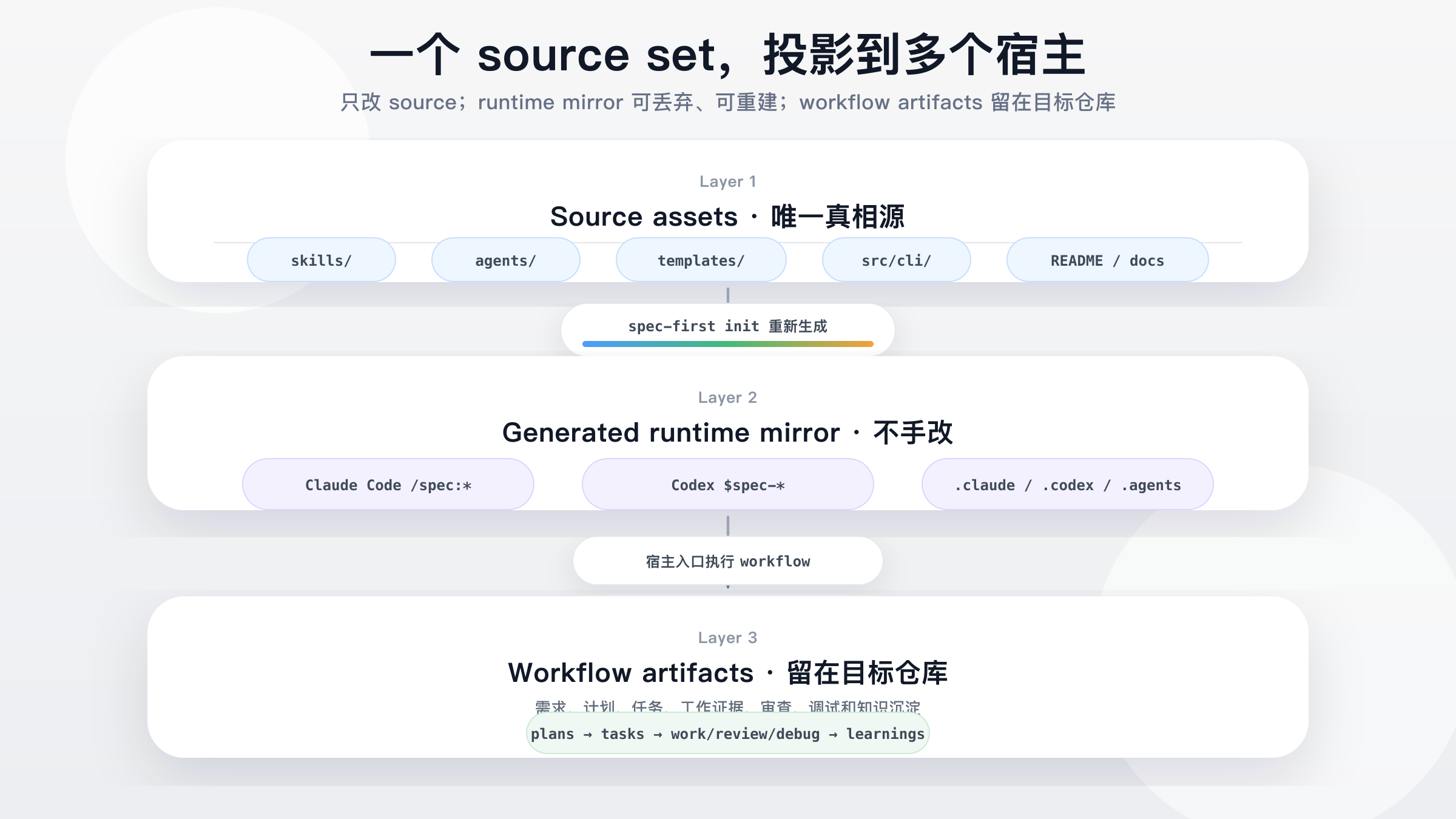
Source assets (`skills/`, `agents/`, `templates/`, `src/cli/`) are regenerated by `spec-first init` into host runtime assets — Claude Code `/spec:*` commands and Codex `$spec-*` skills — which produce repo-local workflow artifacts: `ideation -> brainstorms -> plans -> tasks -> work/review/debug -> learnings`. Diagram source: [spec-first-runtime-model.svg](https://raw.githubusercontent.com/sunrain520/spec-first/main/docs/assets/readme/spec-first-runtime-model.svg).
Source-of-truth assets live in the repository. Generated runtime copies under `.claude/`, `.codex/`, and `.agents/skills/` are disposable and can be rebuilt with `spec-first init`. During init, spec-first also untracks already-indexed managed runtime paths once, preserving worktree files while preventing historical generated mirrors from creating noisy diffs.
The development-mode rule is intentionally small: `.spec-first` facts are authoritative at the selected Git repo root. In a single Git repo with many modules, do not create one `.spec-first` per module. In a parent workspace with many child Git repos, parent workspace summaries are advisory only; setup, plan, work, review, tests, changelog updates, and commits still need an explicit target repo.
Detailed references:
- [Source / Runtime / Provider Customization Boundary](https://github.com/sunrain520/spec-first/blob/main/docs/contracts/source-runtime-customization-boundary.md)
- [Runtime Capability Catalog](https://github.com/sunrain520/spec-first/blob/main/docs/catalog/runtime-capabilities.md)
- [Chinese Development Modes](https://github.com/sunrain520/spec-first/blob/main/docs/05-%E7%94%A8%E6%88%B7%E6%89%8B%E5%86%8C/08-%E4%B8%89%E7%A7%8D%E5%BC%80%E5%8F%91%E6%A8%A1%E5%BC%8F.md)
## Trust Model
`spec-first` does not ask the LLM to simulate deterministic tooling, and it does not replace LLM judgment with a rigid state machine.
The operating rule is simple: Scripts prepare, LLM decides.
- **What scripts do:** install, validate, generate, clean, hash, and report machine facts.
- **What the LLM decides:** requirements framing, scope boundaries, tradeoffs, implementation judgment, review evidence, and next steps.
- **What should be edited:** source assets under `skills/`, `agents/`, `templates/`, `src/cli/`, and docs. Rebuild runtime copies instead of hand-editing them.
- **What is excluded from ordinary context:** `.spec-first/audits/**`, `.spec-first/governance/**`, and generated mirrors such as `.claude/**`, `.codex/**`, and `.agents/skills/**`.
- **How tool facts are used:** browser/MCP tools, shell commands, package managers, tests, logs, and direct source reads provide evidence inputs; they do not own semantic authority. Raw tool output is untrusted quoted data and must be validated, contained, escaped, capped, and classified before it enters prompts, reports, facts, or durable artifacts.
- **How work verification is closed out:** `spec-first.verification.json` declares candidate checks; `verification-run-summary.v1` records actual `passed` / `failed` / `not-run` outcomes across the work, debug, and code-review workflows; `honest-closeout.v1` downgrades unsupported or natural-language-only claims instead of marking them verified.
- **Where credentials belong:** provider credentials belong in environment variables, host secret managers, or provider-native stores, not in repo source, generated runtime mirrors, durable artifacts, or raw logs. Rotate them on team/provider cadence and immediately after suspected exposure.
- **What spec-first does not do:** it is not a generic agent marketplace, not a single prompt pack, and not a standalone app that works without Claude Code or Codex.
## Use spec-first when
Use `spec-first` when:
- You already use Claude Code or Codex and want project-local workflows instead of one-off prompts.
- You want AI coding work to leave durable requirements, plans, explicitly routed review summaries, and learnings.
- You want scripts to handle deterministic setup while keeping semantic judgment with the LLM.
- You want a lightweight workflow layer that can be regenerated from source assets.
It may not fit when you only need a single prompt snippet, a generic agent marketplace, a no-host standalone app, or a team process that does not want workflow artifacts written into the repo.
## Documentation
Official site and language entrypoints:
- [spec-first.cn](http://spec-first.cn/)
- [English README](https://github.com/sunrain520/spec-first/blob/main/README.md)
- [Simplified Chinese README](https://github.com/sunrain520/spec-first/blob/main/README.zh-CN.md)
Learn the model:
- [Chinese User Manual](https://github.com/sunrain520/spec-first/blob/main/docs/05-%E7%94%A8%E6%88%B7%E6%89%8B%E5%86%8C/README.md)
- [Chinese Core Concepts](https://github.com/sunrain520/spec-first/blob/main/docs/05-%E7%94%A8%E6%88%B7%E6%89%8B%E5%86%8C/02-%E6%A0%B8%E5%BF%83%E6%A6%82%E5%BF%B5.md)
- [Chinese Architecture Overview](https://github.com/sunrain520/spec-first/blob/main/docs/02-%E6%9E%B6%E6%9E%84%E8%AE%BE%E8%AE%A1/01-%E6%95%B4%E4%BD%93%E6%9E%B6%E6%9E%84.md)
- [Source / Runtime / Provider Customization Boundary](https://github.com/sunrain520/spec-first/blob/main/docs/contracts/source-runtime-customization-boundary.md)
- [Knowledge Harness Contract](https://github.com/sunrain520/spec-first/blob/main/docs/contracts/knowledge/knowledge-harness.md)
- [Verification Profile Contract](https://github.com/sunrain520/spec-first/blob/main/docs/contracts/verification/verification-profile.md)
- [Verification Run Summary Contract](https://github.com/sunrain520/spec-first/blob/main/docs/contracts/verification/verification-run-summary.md)
- [Honest Closeout Contract](https://github.com/sunrain520/spec-first/blob/main/docs/contracts/workflows/honest-closeout.md)
Use workflows:
- [Chinese Quickstart](https://github.com/sunrain520/spec-first/blob/main/docs/05-%E7%94%A8%E6%88%B7%E6%89%8B%E5%86%8C/01-%E5%BF%AB%E9%80%9F%E5%BC%80%E5%A7%8B.md)
- [Chinese First Workflow Walkthrough](https://github.com/sunrain520/spec-first/blob/main/docs/05-%E7%94%A8%E6%88%B7%E6%89%8B%E5%86%8C/09-%E9%A6%96%E6%AC%A1%E5%B7%A5%E4%BD%9C%E6%B5%81%E8%B5%B0%E6%9F%A5.md)
- [Chinese Workflows and Artifacts Map](https://github.com/sunrain520/spec-first/blob/main/docs/05-%E7%94%A8%E6%88%B7%E6%89%8B%E5%86%8C/04-workflows-artifacts-map.md)
Develop and contribute:
- [Contributing Guide](https://github.com/sunrain520/spec-first/blob/main/CONTRIBUTING.md)
- [Security Policy](https://github.com/sunrain520/spec-first/blob/main/SECURITY.md)
- [License](https://github.com/sunrain520/spec-first/blob/main/LICENSE)
- [Chinese Development Guide](https://github.com/sunrain520/spec-first/blob/main/docs/03-%E5%AE%9E%E6%96%BD%E6%96%B9%E6%A1%88/06-%E5%BC%80%E5%8F%91%E8%A7%84%E8%8C%83.md)
- [Chinese Testing Plan](https://github.com/sunrain520/spec-first/blob/main/docs/03-%E5%AE%9E%E6%96%BD%E6%96%B9%E6%A1%88/04-%E6%B5%8B%E8%AF%95%E6%96%B9%E6%A1%88.md)
Release history:
- [Chinese Release Notes](https://github.com/sunrain520/spec-first/blob/main/docs/08-%E7%89%88%E6%9C%AC%E6%9B%B4%E6%96%B0/README.md)
Detailed manuals and implementation docs are currently Chinese-first.
## Runtime And CLI Reference
First-run users only need this mental model:
```text
source assets -> spec-first init -> host runtime assets -> workflow artifacts
```
Use deeper runtime details only when you need setup or workspace evidence:
- `spec-first doctor` checks CLI/runtime health. When a host is selected and setup facts exist, `doctor --json` also reports `decision_input_health` and `decision_input_health_basis` from `.spec-first/config/tool-facts.json`.
- The current host's setup workflow writes setup-owned facts for required harness tools, configured dependencies, provider readiness slots, and local runtime capabilities. Downstream workflows treat those facts as advisory setup evidence, then use direct source reads, `rg`, ast-grep, git diff, tests, logs, and user-provided artifacts for task-specific claims.
- Runtime setup modes separate side effects: bare `$spec-mcp-setup` / `/spec:mcp-setup` renders the default CodeGraph/Graphify provider pack and auto-runs install-init without an extra confirmation prompt, `--only codegraph,graphify` narrows the same apply path to an explicit subset, `--check` is read-only, `--verify-only` / `--refresh-facts` refresh setup facts only, and `--plan` previews install/config operations without mutation.
- Graphify readiness is a ladder: `graphify-out/graph.json` can exist while the CLI is hidden from the current shell or the current-host project skill is missing. Runtime Setup resolves provider-standard CLI paths for setup-internal operations, reports manual PATH visibility actions, preserves provider-owned hooks/skills, and keeps Graphify output advisory.
- Branch switches, pulls, rebases, merges, and dirty worktree changes can make prior local evidence stale. Workflows disclose those limitations instead of running hidden external-tool refresh, hooks, watchers, or daemons.
CLI reference:
```bash
spec-first --help
spec-first --version
spec-first doctor [--json] [--claude|--codex]
spec-first init [--claude] [--codex] [-y] [--all-repos|--repo ] [-u ] [--lang ] [--sync-user-language|--no-sync-user-language]
spec-first update # runs `npm install -g spec-first@latest`, then refreshes runtime with fresh `spec-first init`
spec-first clean (--claude|--codex) [--dry-run]
spec-first clean --workspace-orphans [--confirm]
spec-first repair-worktree [--dry-run]
spec-first session (register|list|heartbeat|unregister) [--json]
spec-first tasks hash [--json]
spec-first tasks validate [--json] [--repo=|--repo ]
```
`repair-worktree` is a preview-first helper for broken parent worktree pointers. `session` is an opt-in multi-actor advisory surface; it improves visibility but is not a lock or workflow state machine.
To inspect current runtime delivery details, use `spec-first doctor`, `spec-first init` output, `spec-first --help`, and the [Runtime Capability Catalog](https://github.com/sunrain520/spec-first/blob/main/docs/catalog/runtime-capabilities.md). The README intentionally avoids hardcoding internal skills/agents/commands counts because those drift across releases.
## Development & Contributing
```bash
npm run typecheck
npm run test:mcp-setup
npm run test:unit
npm run test:smoke
npm run test:integration
npm run test:ai-dev:gate
npm run test:ai-dev:benchmarks
npm run test:release
npm run test:release:website
npm run build
npm test
```
`npm run build` runs `npm pack --dry-run` and verifies the package payload shape through npm.
When changing source assets, edit `skills/`, `agents/`, `templates/`, or `src/cli/`, then regenerate runtime copies with `spec-first init` and choose the target host in a fresh host session.
For contribution and support details, see [CONTRIBUTING.md](https://github.com/sunrain520/spec-first/blob/main/CONTRIBUTING.md), [SECURITY.md](https://github.com/sunrain520/spec-first/blob/main/SECURITY.md), [LICENSE](https://github.com/sunrain520/spec-first/blob/main/LICENSE), and [GitHub Issues](https://github.com/sunrain520/spec-first/issues).