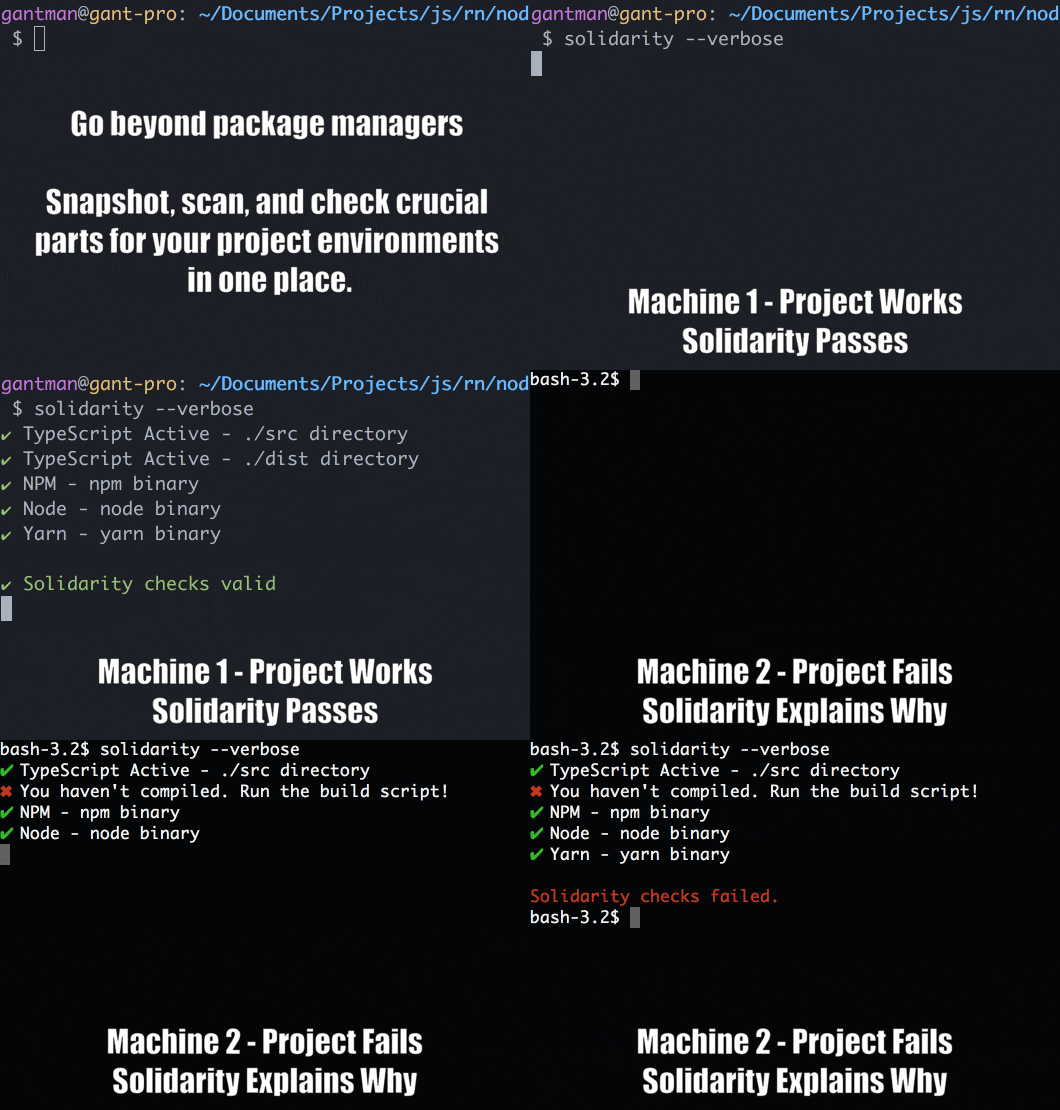
Solidarity is an environment checker for project dependencies across multiple machines.






 ### When the same exact code works on one machine but not another, Solidarity is the answer
### Docs Website
https://infinitered.github.io/solidarity/
-------
> _We now return you to your regularly scheduled ReadMe_
-------
## Install
Install the command globally OR use via `node_modules`. It's suggested you install your snapshot plugins in the same place.
Note:
Node.js version must be >= `7.6.0`.
```sh
# example of installing global with npm and react-native snapshot
$ npm i -g solidarity solidarity-react-native
# example of installing local with yarn and elixir snapshot (dev dependencies)
$ yarn add solidarity solidarity-elixir --dev
```
## How do I use it?
Using solidarity is easy! Run the following command to check the current project environment.
```sh
$ solidarity
```
This command looks for the `.solidarity` file in the working directory, and then runs a check of the containing rules against your environment. The command exit code is tied to the success of the solidarity check for testing frameworks.
[Write your Solidarity file by hand](https://infinitered.github.io/solidarity/#/docs/options), or use a snapshot.
## How do I update it to my machine specs?
Environment updates can be stored to solidarity quickly.
```sh
$ solidarity snapshot
```
The `snapshot` parameter will update the rules in the `.solidarity` file to the current system specs. By default a snapshot will be strict with the versions of _everything_ detected. But, semantic versioning is supported.
## How do I create my first snapshot?
If no `.solidarity` file is present, then `solidarity snapshot` prompts you to identify the technology your project depends on.
```sh
$ solidarity snapshot
No `.solidarity` file found for this project. Would you like to create one? (Y/n)
```
Custom rule-sets can be created by modifying the `.solidarity` file by hand, or by creating a solidarity plugin for a given technology. [See documentation](https://infinitered.github.io/solidarity/) for how you can create your own.
## How do I update my snapshots?
Given there is already a `.solidarity` file present, then you can run `solidarity snapshot [rule]`
```sh
$ solidarity snapshot cli node
```
Solidarity will follow up with aditional questions to help drill down your new snapshot rule.
## Cross Platform
Solidarity works with Mac/Linux/Windows environments. CI tests all rules with each platform on every update.
## Using Solidarity for GitHub Reports

You've already identified everything that's important to your project. So when anyone files bugs on your repo, they can just report using Solidarity!
Just run `solidarity report`
The resulting output is copy/paste markdown. If you're confused, here's [the full blog post](https://shift.infinite.red/effortless-environment-reports-d129d53eb405).
## Project Support
#### Open Source
Solidarity, as open source, is free to use and always will be :heart:. It's MIT Licensed and we'll always do our best to help and quickly answer issues. If you'd like to get a hold of us, join our [community slack](http://community.infinite.red) and look for the #solidarity room.
#### Premium
[Infinite Red](https://infinite.red/) offers premium Solidarity support and general mobile app design/development services. Email us at [hello@infinite.red](mailto:hello@infinite.red) to get in touch with us for more details.
## Additional Info
### You can help!
* Spread the word [](https://twitter.com/intent/tweet?text=%F0%9F%92%BB%20Developer%20Environment%20Protection:&url=https%3A%2F%2Fgithub.com%2Finfinitered%2Fsolidarity)
* Star the repo!
* Clap on Medium
* Read the [Contributors Guide](https://github.com/infinitered/solidarity/blob/master/docs/contributorsGuide.md)
* Add solidarity to all your projects
* [Build plugins](https://github.com/infinitered/solidarity/blob/master/docs/plugins.md)
* Join our Slack
 ### License
The MIT License (MIT). Please see [License File](LICENSE) for more information.
### NPM Details
[](https://npmjs.org/package/solidarity)
### License
The MIT License (MIT). Please see [License File](LICENSE) for more information.
### NPM Details
[](https://npmjs.org/package/solidarity)