%%%%
%% Sample slides converted to markdown
%%%%%%%%%%%%%%%%%
%
%
!SLIDE biglogo
%%%%%%%%%%%%%%%%%
%
%
% Title Goes Here Up
%
% To Two Lines
%
%
% Sergey Brin
%
% May 10, 2011
%
%
TODO
TODO - how to create heading with break in markdown - possible? works like in paragraph???
%%%%%%%%%%%%%%%%%%
%
%
% This is a slide with just text. This is a slide with just text.
% This is a slide with just text. This is a slide with just text.
% This is a slide with just text. This is a slide with just text.
%
%
% There is more text just underneath.
%
%
!SLIDE
This is a slide with just text. This is a slide with just text.
This is a slide with just text. This is a slide with just text.
This is a slide with just text. This is a slide with just text.
There is more text just underneath.
%%%%%%%%%%%%%%%%%%
%
%
% Simple slide with header and text
%
%
% This is a slide with just text. This is a slide with just text.
% This is a slide with just text. This is a slide with just text.
% This is a slide with just text. This is a slide with just text.
%
%
% There is more text just underneath with a code sample: 5px.
%
%
!SLIDE
### Simple slide with header and text
This is a slide with just text. This is a slide with just text.
This is a slide with just text. This is a slide with just text.
This is a slide with just text. This is a slide with just text.
There is more text just underneath with a `code sample: 5px`.
%%%%%%%%%%%%%%%%%%%%%%%
%
%
% Simple slide with header and text (small font)
%
%
% This is a slide with just text. This is a slide with just text.
% This is a slide with just text. This is a slide with just text.
% This is a slide with just text. This is a slide with just text.
%
%
% There is more text just underneath with a code sample: 5px.
%
%
!SLIDE smaller
### Simple slide with header and text (small font)
This is a slide with just text. This is a slide with just text.
This is a slide with just text. This is a slide with just text.
This is a slide with just text. This is a slide with just text.
There is more text just underneath with a `code sample: 5px`.
%%%%%%%%%%%%%%%%%%%%%%%%%
%
%
% Slide with bullet points and a longer title, just because we
% can make it longer
%
%
% -
% Use this template to create your presentation
%
% -
% Use the provided color palette, box and arrow graphics, and
% chart styles
%
% -
% Instructions are provided to assist you in using this
% presentation template effectively
%
% -
% At all times strive to maintain Google's corporate look and feel
%
%
%
!SLIDE
### Slide with bullet points and a longer title, just because we can make it longer
- Use this template to create your presentation
- Use the provided color palette, box and arrow graphics, and chart styles
- Instructions are provided to assist you in using this presentation template effectively
- At all times strive to maintain Google's corporate look and feel
%%%%%%%%%%%%%%%%%%%%%%%%%%%%%
%
%
% Slide with bullet points that builds
%
%
% -
% This is an example of a list
%
% -
% The list items fade in
%
% -
% Last one!
%
%
%
%
%
Any element with child nodes can build.
%
It doesn't have to be a list.
%
% Slide with bullet points (small font)
%
%
% -
% Use this template to create your presentation
%
-
% Use the provided color palette, box and arrow graphics, and
% chart styles
%
-
% Instructions are provided to assist you in using this
% presentation template effectively
%
-
% At all times strive to maintain Google's corporate look and feel
%
%
Slide with a table
|
Name
|
Occupation
|
|
Luke Mahé
|
V.P. of Keepin’ It Real
|
|
Marcin Wichary
|
The Michael Bay of Doodles
|
Slide with a table (smaller text)
|
Name
|
Occupation
|
|
Luke Mahé
|
V.P. of Keepin’ It Real
|
|
Marcin Wichary
|
The Michael Bay of Doodles
|
Styles
-
class="red"
-
class="blue"
-
class="green"
-
class="yellow"
-
class="black"
-
class="white"
-
bold and italic
Segue slide
Slide with an image
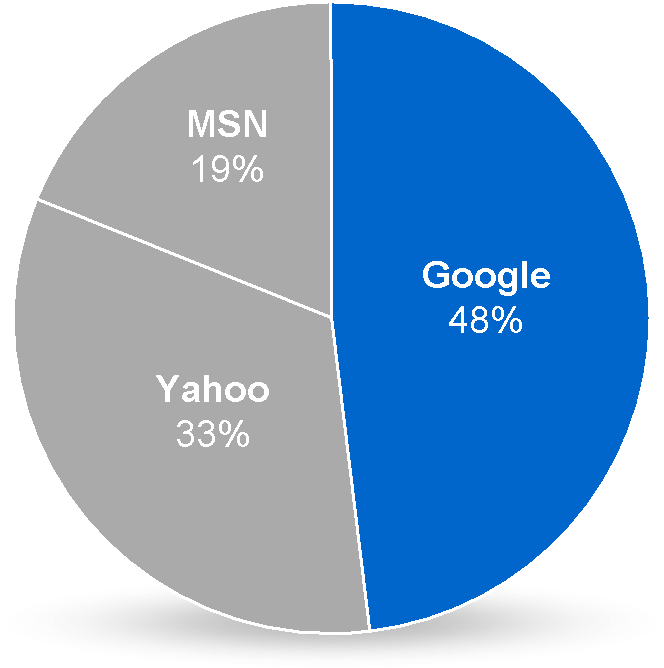
Source: Sergey Brin
Slide with an image (centered)
Source: Larry Page
Image filling the slide (with optional header)

Source: Eric Schmidt
This slide has some code
<script type='text/javascript'>
  // Say hello world until the user starts questioning
  // the meaningfulness of their existence.
  function helloWorld(world) {
    for (var i = 42; --i >= 0;) {
      alert('Hello ' + String(world));
    }
  }
</script>
<style>
  p { color: pink }
  b { color: blue }
  u { color: 'umber' }
</style>
This slide has some code (small font)
<script type='text/javascript'>
  // Say hello world until the user starts questioning
  // the meaningfulness of their existence.
  function helloWorld(world) {
    for (var i = 42; --i >= 0;) {
      alert('Hello ' + String(world));
    }
  }
</script>
<style>
  p { color: pink }
  b { color: blue }
  u { color: 'umber' }
</style>
The best way to predict the future is to invent it.
Alan Kay
A distributed system is one in which the failure of a computer
you didn’t even know existed can render your own computer unusable.
Leslie Lamport
A slide with an embed + title
Full-slide embed with (optional) slide title on top
Thank you!