# SkillTrace ─ An AI Agent Skill Debugging Utility [![License: MIT](https://img.shields.io/badge/License-MIT-blue.svg)](https://github.com/hideya/skilltrace/blob/main/NOTICE.md) [![npm version](https://img.shields.io/npm/v/skilltrace.svg)](https://www.npmjs.com/package/skilltrace)

**SkillTrace is a free observability tool for AI agent skill usage.**

When an agent can choose from multiple skills, it can be hard to tell which
ones it used, in what order, and why.

SkillTrace helps you inspect whether an agent read skill files, whether it
declared skill usage through MCP, and how its post-run reflection attributed
the work to specific skills, references, files, steps, and uncertainties.

> here is a quick start guide: [**_Tracing AI Agent Skill Usage with SkillTrace_**](https://levelup.gitconnected.com/tracing-ai-agent-skill-usage-with-skilltrace-cf5feba84d02)

<table>
  <tr>
    <td>
      <a href="https://github.com/user-attachments/assets/5958429c-e98b-43e9-a872-329998b2e0f6" target=”_blank”>
        <img src="https://raw.githubusercontent.com/hideya/skilltrace/main/docs/images/skilltrace-video-cover.webp" height="250px" />
      </a>
      <br />
      <sub>SkillTrace demo video clip</sub>
    </td>
    <td>
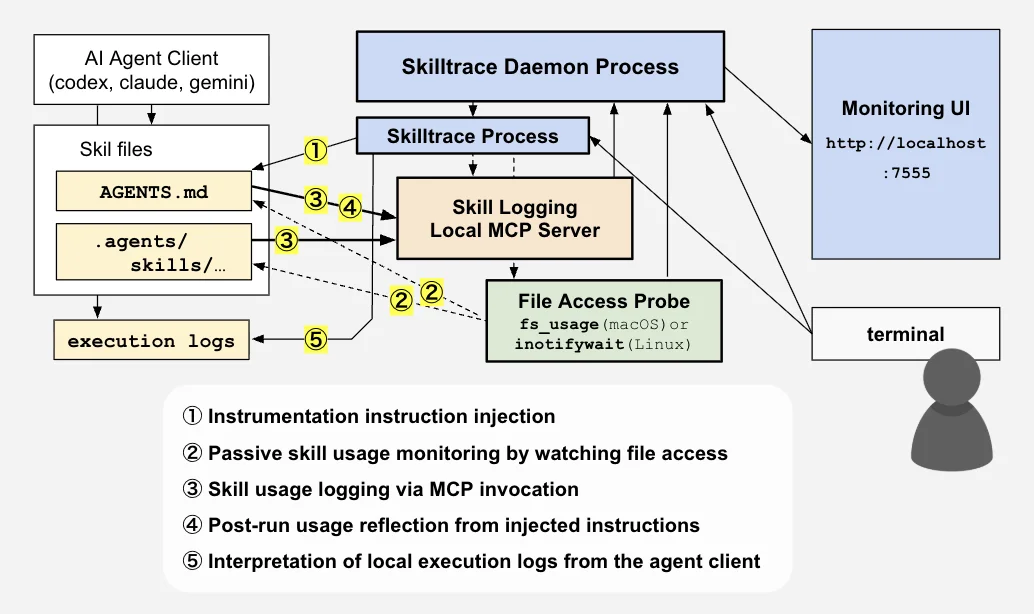
      <img src="https://raw.githubusercontent.com/hideya/skilltrace/main/docs/images/skilltrace-diagram.webp" height="250px" />
      <br />
      <sub>System diagram</sub>
    </td>
  </tr>
</table>

Skill usage is hard to capture because it is often buried inside the LLM's
decision-making process. Unlike MCP tool calls, skills do not necessarily cross
a clear execution boundary.

SkillTrace combines passive file-access probing, local agent execution logs,
dedicated MCP tool invocations, and structured post-run reflection so
you can compare what was observed, what the client recorded, what was declared,
and what the agent later believed influenced the run.

SkillTrace is aimed at people developing and debugging agent skills.

## What It Captures

SkillTrace records four evidence streams from the same run:

- **Passive traces**: observed file access, such as `SKILL.md` or reference
  file reads.
- **Semantic traces**: instructed MCP invocations such as skill start,
  reference read, and skill finish.
- **Reflection**: structured post-run attribution by the agent, including which
  skills, references, files, steps, uncertainties, and recommended skill changes
  it believes were relevant to the run.
- **Agent execution logs**: local records maintained by Codex CLI, Claude Code,
  or Gemini CLI, including skill reads, tool operations, and verification
  outcomes (privacy-filtered).

The UI lists and compares the events obtained from those streams so you can see
when evidence aligns, when the agent skipped a declaration, or when passive
probing saw something the reflection omitted.

Reflection is a self-report, not ground truth. Its value comes from being
compared with passive traces, agent execution logs, semantic MCP declarations,
and human judgment.

Each run also records basic SkillTrace execution metadata, such as the
SkillTrace version, dev/package mode, OS platform, Node.js version, and passive
probe backend. This helps interpret runs collected across different machines,
containers, operating systems, and SkillTrace versions.

<table>
  <tr>
    <td>
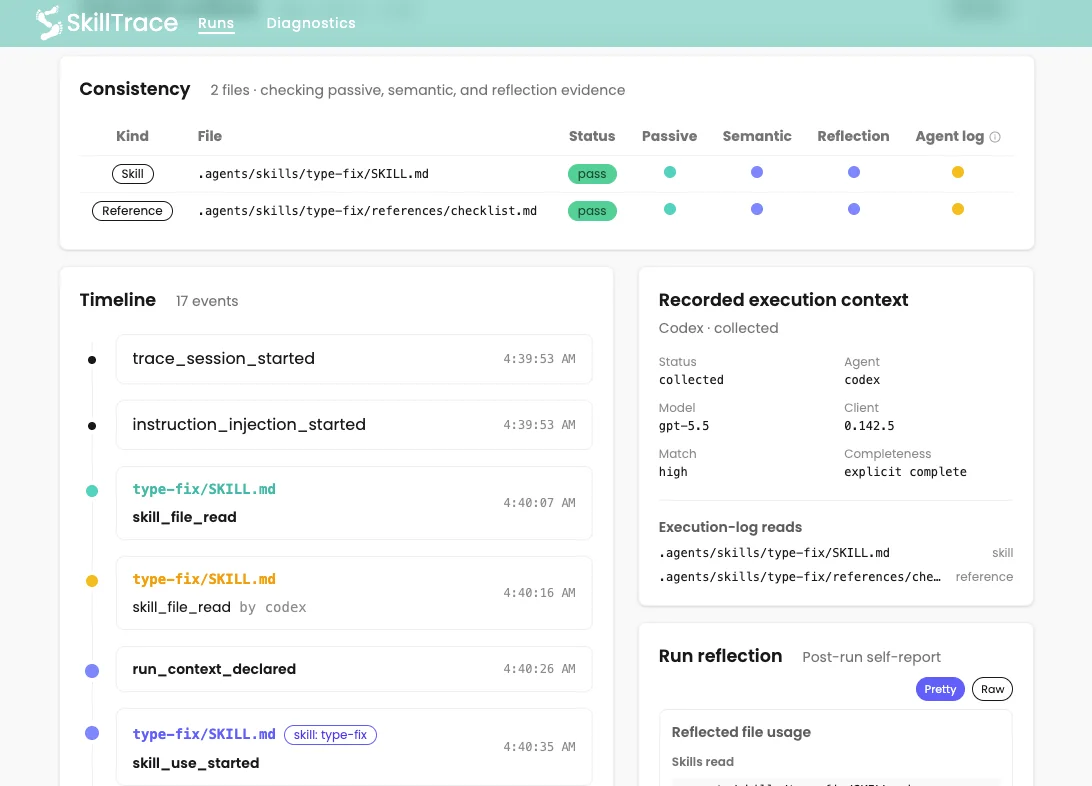
      <img src="https://raw.githubusercontent.com/hideya/skilltrace/main/docs/images/skilltrace-run-details-2.webp" height="250px"><br>
      <sub>SkillTrace Consistency Check</sub>
    </td>
    <td>
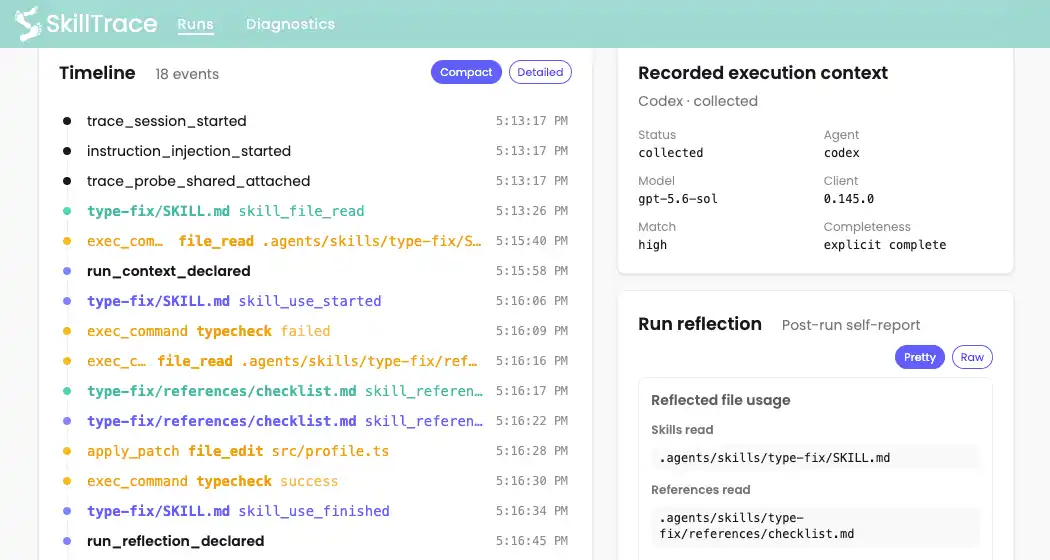
      <img src="https://raw.githubusercontent.com/hideya/skilltrace/main/docs/images/skilltrace-timeline.webp" height="250px"><br>
      <sub>Run Timeline</sub>
    </td>
  </tr>
</table>

## Status

SkillTrace is currently pre-alpha developer tooling.

It is intended for people experimenting with AI agent skills, MCP workflows,
and skill observability. Expect rough edges, platform-specific behavior, and
occasional missing traces.

## Requirements

- Node.js 22+
- npm
- Codex CLI, Claude Code, or Gemini CLI
- macOS or Linux
  - macOS only: admin password may be required
  - Linux only: `inotify-tools` installation may be required

Platform notes:

- macOS uses a `fs_usage` passive probe and may ask for your admin password.
- Linux uses an `inotifywait` probe. Install `inotify-tools` if passive file
  access is not captured.

SkillTrace currently supports command-line workflows for Codex CLI, Claude
Code, and Gemini CLI. Codex App support is not yet available.

SkillTrace supports two instruction profiles: the interoperable convention
of AGENTS.md plus .agents/skills/, and the convention used by Claude Code.
See [`docs/agent-skills-location-policy.md`](./docs/agent-skills-location-policy.md)
for details.

## Installation

```bash
npm install -g skilltrace
```

Check the installed version:

```bash
skilltrace --version
```

Show CLI help:

```bash
skilltrace --help
```

Start the local daemon:

```bash
skilltrace daemon start
```

On macOS, this may ask for your admin password so SkillTrace can run `fs_usage`
for passive skill-file access probing.

Open the UI:

```text
http://localhost:7555
```

For a Linux container or VM where you want to open the UI from the host
machine, start the daemon like this to bind to all interfaces:

```bash
HOST=0.0.0.0 skilltrace daemon start
```

The daemon output shows the detected UI URL.

Only bind to `0.0.0.0` in a trusted local network or isolated development
environment.

## Register The MCP Server

SkillTrace uses MCP tools to record skill usage. Before using SkillTrace,
register the SkillTrace local MCP server with your agent client.

The easiest path is to let SkillTrace register itself for every supported agent
CLI it can find on your PATH:

```bash
skilltrace mcp install
```

Check the registration:

```bash
skilltrace mcp status
```

You can target one client if needed:

```bash
skilltrace mcp install --agent codex
skilltrace mcp install --agent claude
skilltrace mcp install --agent gemini
```

Under the hood, this runs the appropriate agent-specific commands.

For Codex CLI:

```bash
codex mcp add skilltrace -- skilltrace mcp serve
```

As of June 2026, Codex CLI stores MCP registration globally by default and does
not expose a `--scope` flag.

Check it:

```bash
codex mcp get skilltrace
```

For Claude Code:

```bash
claude mcp remove skilltrace -s user
claude mcp add skilltrace --scope user -- skilltrace mcp serve
```

SkillTrace removes the existing Claude Code registration before adding it,
because Claude Code does not overwrite an existing `skilltrace` MCP server.

Check it:

```bash
claude mcp get skilltrace
```

For Gemini CLI:

```bash
gemini mcp add skilltrace skilltrace mcp serve --scope user
```

Check it:

```bash
gemini mcp list
```

The `/app/diagnostics` page also checks whether Codex, Claude Code, and Gemini
CLI MCP registrations match the installed command when those CLIs are
available.

## Quick Start

From the target repo you want to trace:

SkillTrace expects the repo to have an agent instruction surface, such as
`AGENTS.md` with `.agents/skills/`, or `CLAUDE.md` with `.claude/skills/`.

The normal SkillTrace workflow is one command. It starts the trace, runs the
agent specified via the command line with the terminal attached, and stops the
trace automatically when the agent exits:

```bash
cd <repo>
skilltrace run -- codex "fix the TypeScript errors in this repo"
```

The same wrapper works with the other supported command-line agents:

```bash
skilltrace run -- claude "review this change"
skilltrace run -- gemini "update the tests"
```

Put SkillTrace options before `--` and agent options after it:

```bash
skilltrace run --mode passive_only -- codex --model gpt-5.6 "fix the errors"
```

`run` inherits the terminal and environment and launches the child from the
trace target root. It forwards interrupt and termination signals to the child,
performs the normal instruction cleanup after the child exits, and returns the
child's exit code. When the trace is retained, SkillTrace also collects matching
agent execution-log evidence after the child exits.

By default, a nonzero exit, handled signal termination, or post-preflight
startup failure discards the trace after showing the child's complete native
output and a concise SkillTrace outcome. Use `--keep-on-error` when diagnosing
a failure and you want to preserve what happened before the agent exited:

```bash
skilltrace run --keep-on-error -- codex "reproduce the unexpected crash"
```

Add a short note when you want the run list to show what you were trying:

```bash
skilltrace run --note "trying to simplify AGENTS.md" -- codex
```

`-n` is accepted as a short alias.

Be sure to allow SkillTrace MCP server tool invocations. A smaller LLM
sometimes skips the instructions for invoking the MCP tools. Try a larger model
if you encounter this issue.

SkillTrace rejects a missing or non-executable child command before starting a
trace, so a typo such as `codexx` creates no DB record or temporary injection.
Once the executable passes preflight and the trace starts, failed children are
discarded by default unless `--keep-on-error` is present.

For cases that need separate control over the trace and agent lifecycles, see
[Manual Start And Stop](#manual-start-and-stop).

Before tracing sensitive repositories, read
[Privacy And Data](#privacy-and-data).

## Try It On A Toy Skill

```bash
git clone https://github.com/hideya/skilltrace.git
cd skilltrace
mkdir -p tmp
cp -RP examples/type-fix-demo tmp/type-fix-demo
cd tmp/type-fix-demo
npm install

# If the daemon is not already running:
skilltrace daemon start
skilltrace mcp install
skilltrace diagnostics

skilltrace run --note "demo type-fix run" -- \
  codex "Fix the TypeScript error using the available skill"
# skilltrace run -- claude "Fix the TypeScript error using the available skill"
# skilltrace run -- gemini "Fix the TypeScript error using the available skill"
```

Open `http://localhost:7555` in your browser after `skilltrace daemon start`.

To retry the toy demo from a clean copy:

```bash
cd ../..
rm -rf tmp/type-fix-demo
cp -RP examples/type-fix-demo tmp/type-fix-demo
cd tmp/type-fix-demo
npm install
```

## Target Repo Requirements

By default, SkillTrace auto-detects one of these supported instruction profiles
(skill file directory formats) when a trace begins:

- `agents`: `AGENTS.md` and `.agents/skills/`
- `claude_code`: `CLAUDE.md` or `.claude/CLAUDE.md`, plus `.claude/skills/`

SkillTrace expects each skill root to use the common one-directory-per-skill
layout:

```text
<repo>/.agents/skills/
  <skill-name>/
    SKILL.md
    <reference-dir>/
      <reference-files>
```

The same per-skill shape is commonly used in user-level roots such as
`~/.agents/skills/`. SkillTrace's default passive probing is project-local, so
README examples use `<repo>/.agents/skills/`. See
[`docs/agent-skills-location-policy.md`](./docs/agent-skills-location-policy.md)
for the supported locations by agent client.

Use `--instruction-profile agents` or
`--instruction-profile claude-code` when a repo has more than one instruction
surface or when you want to be explicit.

SkillTrace injects a temporary tracing-policy instruction into the selected
instruction file, writes `.skilltrace/instrumentation.md`, and creates
`.skilltrace.json` when needed. `skilltrace run` removes the temporary
instruction and generated files when the child exits and they are unchanged.
A manual `skilltrace stop` performs the same cleanup.

Only one trace session can be active at a time. `skilltrace run` and
`skilltrace start` both refuse to begin while another session is active.

## Trace Modes

For your first run, just type:

```bash
skilltrace run -- <agent> ...
```

This enables all available probing methods.

Full probing is useful for understanding agent decisions about skill usage, but
it can affect how the agent behaves because it asks the agent to think more
explicitly about skill usage and report it through MCP tool calls.

If you want to reduce instrumentation effects, you can try less interfering
modes to see whether the agent keeps working as expected.

SkillTrace supports three modes:

```bash
skilltrace run --mode full -- <agent> ...
skilltrace run --mode passive_reflection -- <agent> ...
skilltrace run --mode passive_only -- <agent> ...
```

- `full`: passive file access, live semantic MCP declarations, and final
  reflection.
- `passive_reflection`: passive file access plus final reflection, without live
  skill lifecycle declarations. This should interfere less with the agent's
  normal task flow.
- `passive_only`: passive file access as the only verdict-bearing consistency
  source, with no instruction injection or required reflection.
  Best-effort agent execution logs may still be collected after the run as
  advisory evidence.
  This mode should minimally interfere with the agent, though passive probing
  may still have platform-specific overhead or blind spots.

The default is `full`.

These modes control instruction injection and the verdict-bearing evidence
expected by the consistency checker. Best-effort execution-log collection can
annotate a supported run in any mode, but it never becomes an expected source.

Passive traces are evidence of file access, not proof of skill use. Some agent
clients scan multiple `SKILL.md` entrypoints while building a catalog of
available skills. SkillTrace keeps those reads in the timeline, but classifies
entrypoint-only scans as neutral `discovered` evidence unless later semantic,
reflection, or reference-file evidence shows material use. See
[`docs/passive-skill-discovery.md`](./docs/passive-skill-discovery.md).

## Manual Start And Stop

For most foreground agent tasks, use `skilltrace run`. The separate
`skilltrace start` and `skilltrace stop` lifecycle is useful when:

- you are investigating recurring unexpected agent termination and want the
  trace to remain active until you explicitly stop it
- the agent is launched by another process or terminal
- the trace needs to span multiple commands or foreground processes
- the agent intentionally detaches from its launcher

For a single foreground child whose failed run should be retained,
`skilltrace run --keep-on-error -- ...` is usually simpler. The manual
lifecycle gives you control when the agent and trace cannot share one process
lifecycle:

```bash
cd <repo>
skilltrace start --note "investigating an unexpected agent crash"
codex "reproduce the crash"
skilltrace stop
```

The start command accepts the same trace options, such as
`--mode passive_only` and `--instruction-profile claude-code`.

If the agent terminates unexpectedly, use `skilltrace status` to confirm the
session is still active, then run `skilltrace stop`. SkillTrace finishes and
preserves the run, including events captured before termination and any
matching agent execution-log evidence available at stop time.

Only an explicit discard deletes a manual run:

```bash
skilltrace stop --discard
```

This cleans up temporary instruction injection and deletes the active run
record after confirmation. Use `--yes` to skip the prompt.

Background or detached agent modes and machine crashes cannot guarantee
automatic cleanup. After an interrupted session, use `skilltrace status` and
`skilltrace stop` to recover the active trace when possible.

## UI

Useful pages:

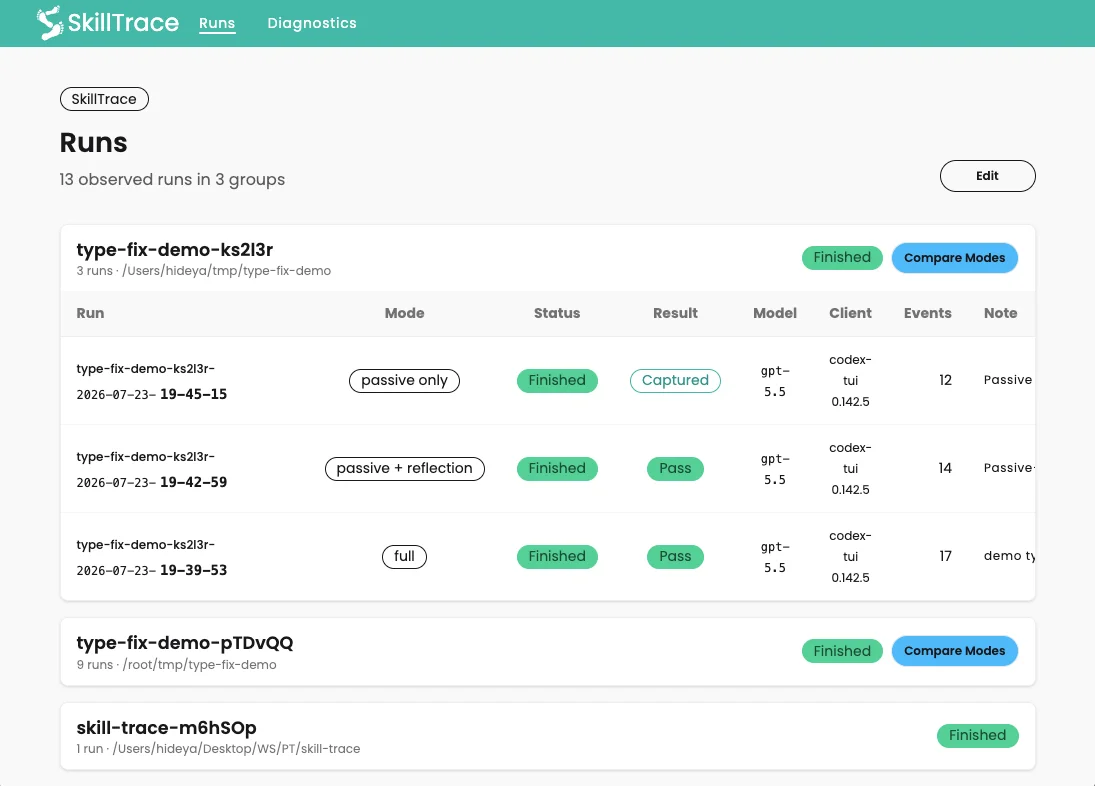
- `/app/runs`: grouped trace runs, status, mode, result, model/client context,
  and mode comparison. When an agent execution log is matched, its recorded
  model and client identity take precedence over agent-declared values. When
  both are available from the log, the corresponding agent-declared uncertainty
  note is omitted.
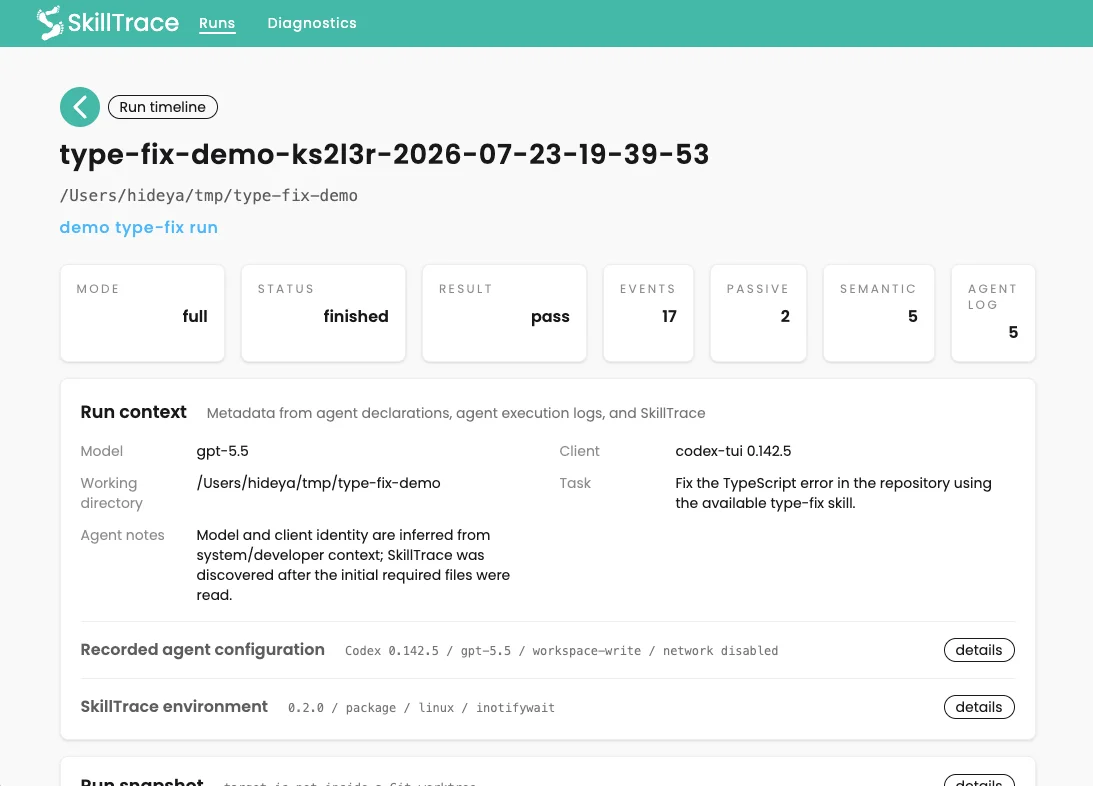
- `/app/runs/<run-id>`: timeline, run context, execution-log collection
  summary, Git snapshot if available, captured instruction contents,
  consistency table, and reflection. The timeline can switch to a compact,
  single-line view for scanning long runs.
- `/app/diagnostics`: daemon/server health, active session, passive probe state,
  and MCP registration for supported command-line clients.

For the same setup check from the command line, run:

```bash
skilltrace diagnostics
skilltrace diagnostics --verbose
```

Run IDs use the form `<repo-name>-<path-token>-<timestamp>`, such as
`type-fix-demo-3KGUxK-2026-07-02-18-31-15`. The short path token is derived
from the absolute target directory path, so repeated runs from the same copied
repo group together, while repos with the same folder name in different
locations remain distinguishable.

The run detail page checks consistency among the captured evidence.

It shows a consistency table across passive, semantic, and reflection evidence,
and compares whether there is consistent evidence of skill usage.

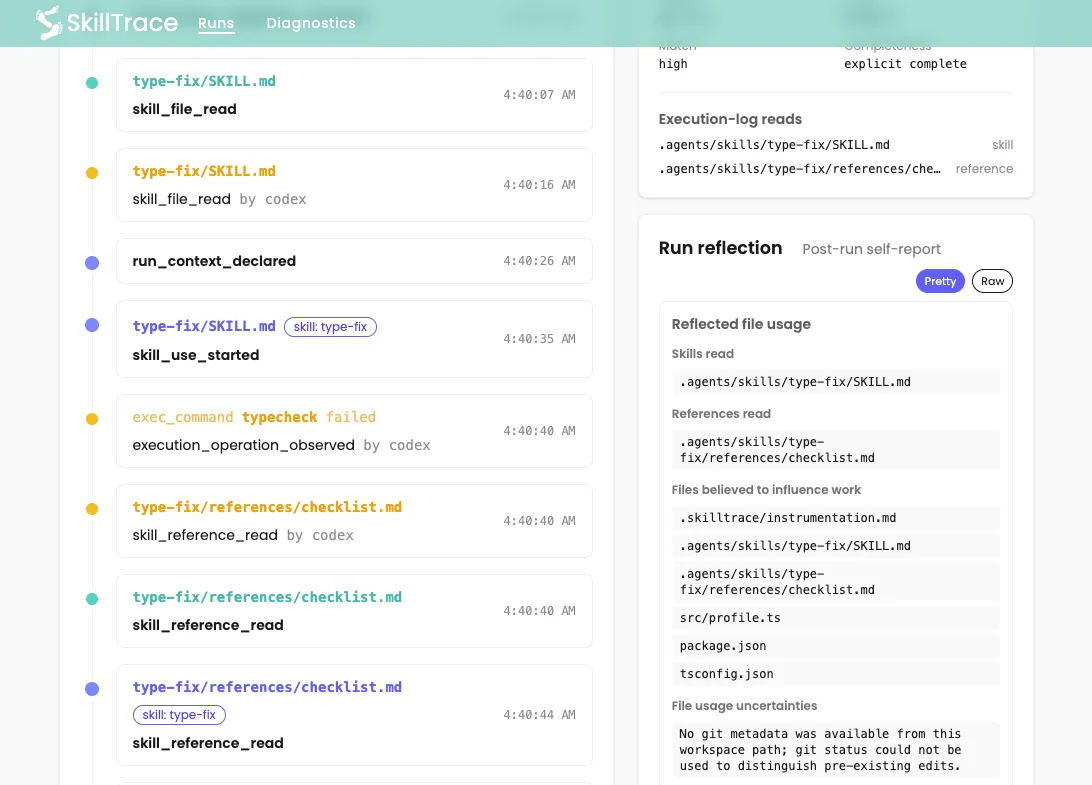
Operations from agent execution logs appear in the timeline as a compact
sequence of tool name, operation kind, normalized target paths, and known
outcome. These events are operation context, not proof that a skill influenced
the operation.

The execution-log event stream can provide rich operation context, but it
remains advisory. Agent execution logs are client-owned, version-unstable
records that were not designed as definitive skill-use evidence. They may be
incomplete or ambiguous, and a recorded operation does not prove that a skill
influenced it. Execution-log observations therefore do not participate in the
consistency verdict.

An **Agent log** column aligns normalized execution-log records as advisory
observations. A filled amber dot means a positive execution-log observation,
while an amber outline means that a context-only file-read operation targeted
the same path without becoming positive evidence. A gray outline means
completed collection found no matching record, and a dash means collection
could not establish one. Agent execution logs do not affect the consistency
status, issue count, or run result. Execution-log-only positive paths remain
visible as neutral **not evaluated** rows.

Passive `SKILL.md` reads that only look like startup skill discovery appear as
`discovered` rows. They remain visible in run details, but they do not turn the
run result into **Warning** or make mode comparison look different by
themselves.

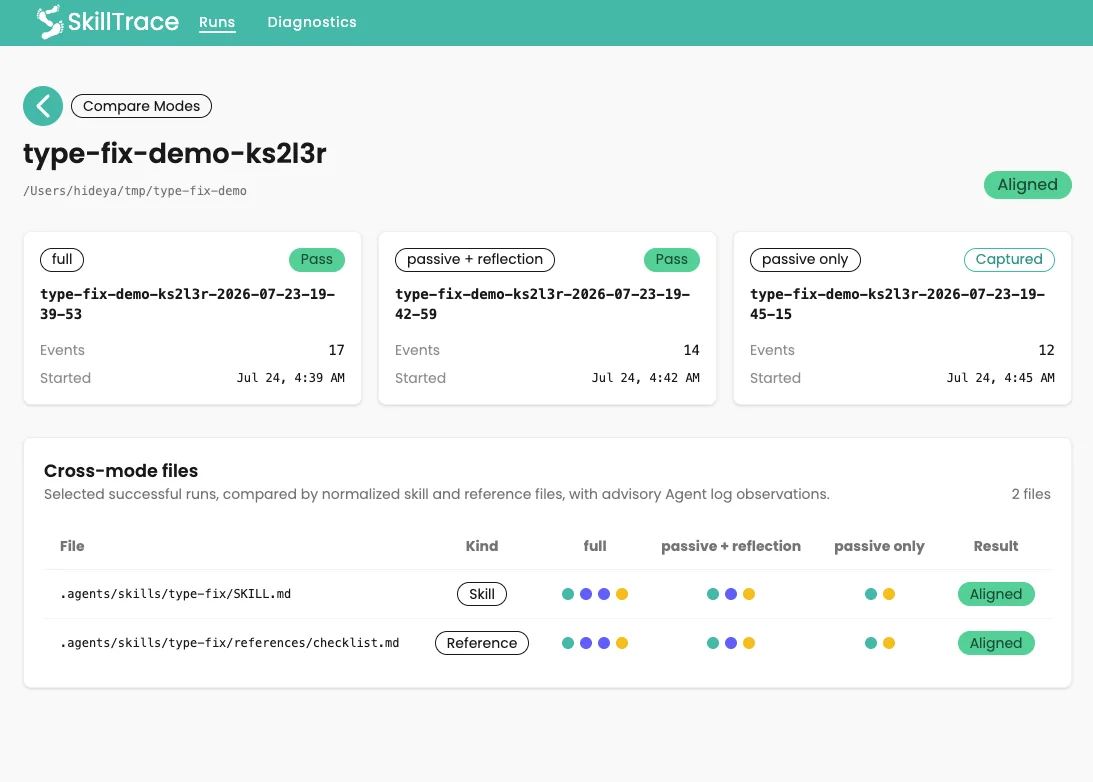
Passive-only runs are labeled as **Captured** rather than **Pass**, because
there is no second verdict-bearing evidence stream to compare.

<table>
  <tr>
    <td>
      <img src="https://raw.githubusercontent.com/hideya/skilltrace/main/docs/images/skilltrace-runs.webp" height="250px"><br>
      <sub>SkillTrace runs page</sub>
    </td>
    <td>
      <img src="https://raw.githubusercontent.com/hideya/skilltrace/main/docs/images/skilltrace-run-details-1.webp" height="250px"><br>
      <sub>Run Details Page</sub>
    </td>
  </tr>
  <tr>
    <td>
      <img src="https://raw.githubusercontent.com/hideya/skilltrace/main/docs/images/skilltrace-run-details-2.webp" height="250px"><br>
      <sub>Consistency Check</sub>
    </td>
    <td>
      <img src="https://raw.githubusercontent.com/hideya/skilltrace/main/docs/images/skilltrace-run-details-3.webp" height="250px"><br>
      <sub>Run Timeline</sub>
    </td>
  </tr>
</table>

### Compare Modes

After you have successful runs for the same target repo in different trace
modes, the runs page can compare them.

This is useful when developing a skill:

1. Start with `full` mode to debug whether the agent reads and declares the
   expected skill usage.
2. Try `passive_reflection` to reduce live semantic reporting.
3. Try `passive_only` to observe skill file access with minimal intervention.

Compare Modes checks whether the same skill and reference files appear across
those runs. Since instrumentation may affect an agent's decisions, Compare
Modes helps you gain confidence that the target skills still appear to be used
when tracing becomes less intrusive.

Neutral `discovered` and execution-log-only rows are omitted from mode
comparison so broad startup skill scans and advisory observations do not
obscure differences in material skill or reference use.

For files established by verdict-bearing evidence, each mode cell also shows
the same verdict-neutral **Agent log** state used in Run details. This advisory
marker does not make a missing file present and does not affect
**Aligned/Different**.

<table>
  <tr>
    <td>
      <img src="https://raw.githubusercontent.com/hideya/skilltrace/main/docs/images/skilltrace-run-mode-comparison.webp" height="250px"><br>
      <sub>Run mode comparison page</sub>
    </td>
  </tr>
</table>

## Git Provenance

When repeatedly modifying Skill files and verifying their behavior, you may want to know the state of the Skill files actually used during a run.

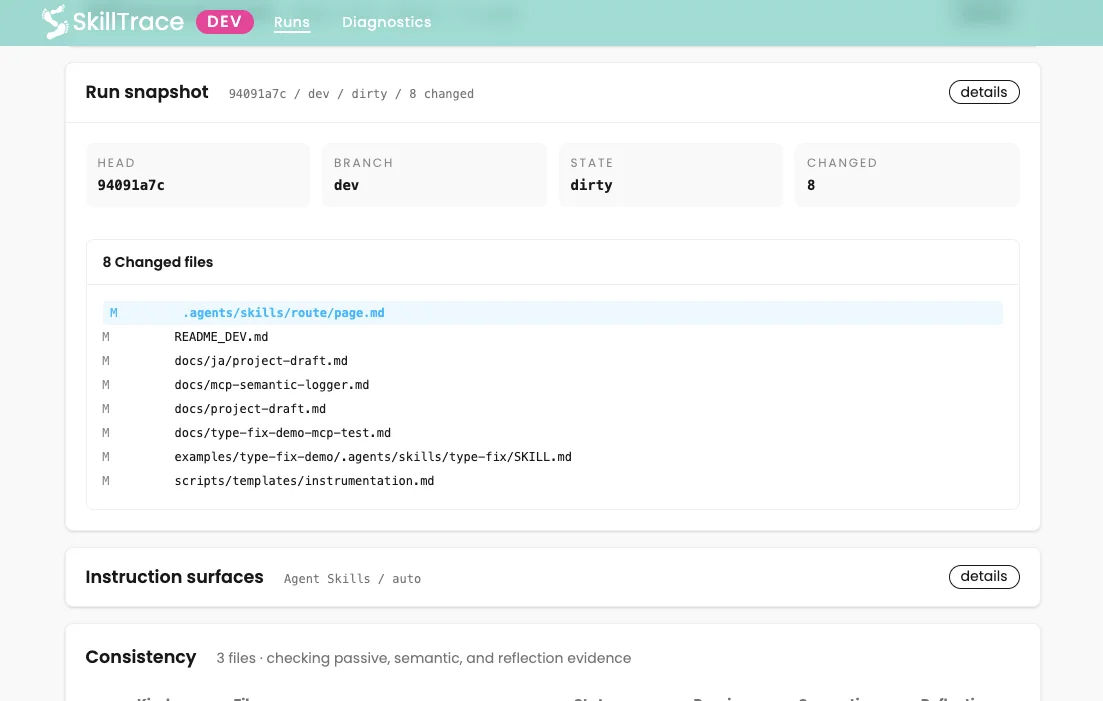
To facilitate this, when a trace begins inside a Git worktree, SkillTrace
records a lightweight run snapshot:

- HEAD commit and branch
- broad changed-file status
- bounded diffs for instruction-relevant files
- bounded plain-text contents for changed instruction-relevant files

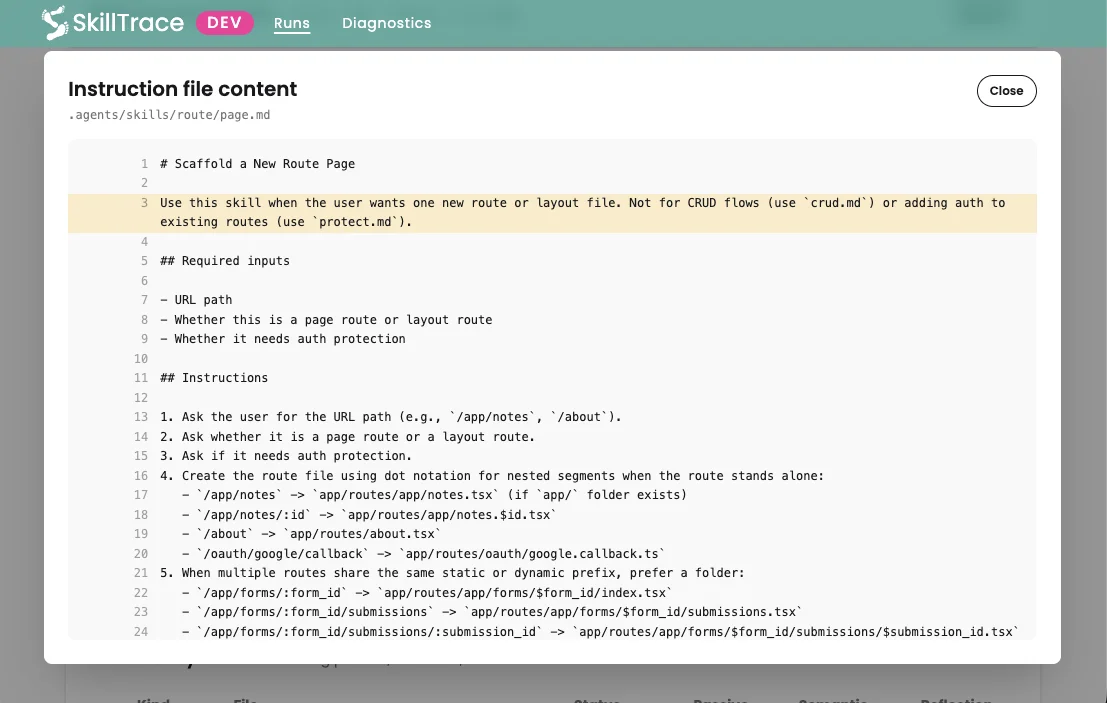
This helps compare successful and failed runs against the skill/instruction
state they used.

In the run detail page, changed instruction files are highlighted in the Run
snapshot panel; click one to inspect the exact captured plain-text contents used
by that run. Lines with uncommitted changes are highlighted in the viewer.

The snapshot is stored with the run metadata, so deleting a run also removes
its captured provenance.

<table>
  <tr>
    <td>
      <img src="https://raw.githubusercontent.com/hideya/skilltrace/main/docs/images/skilltrace-snapshot-1.webp" height="250px"><br>
      <sub>Git Info Section</sub>
    </td>
    <td>
      <img src="https://raw.githubusercontent.com/hideya/skilltrace/main/docs/images/skilltrace-snapshot-2.webp" height="250px"><br>
      <sub>File Diff Dialog</sub>
    </td>
</table>

## Troubleshooting

Run a quick preflight before launching an agent:

```bash
skilltrace diagnostics
```

Use `skilltrace diagnostics --verbose` when the compact output shows a warning.
It reports daemon/server state, active session, shared probe status when
applicable, and MCP registration for Codex CLI, Claude Code, and Gemini CLI
separately.

If `skilltrace run` cannot connect to the server, start the daemon first:

```bash
skilltrace daemon start
```

Then run `skilltrace diagnostics`, or open `/app/diagnostics`, and confirm the
daemon, server, active session, passive probe, and per-agent MCP registration
state before launching the agent.

If no passive events appear:

- Prefer `skilltrace run -- <agent> ...`, which begins tracing before it
  launches the child. With the manual lifecycle, make sure `skilltrace start`
  completed before launching the agent.
- On macOS, check `/app/diagnostics` or `skilltrace daemon status` and confirm
  the shared probe is running. Starting the daemon may ask for your admin
  password once because the macOS passive probe uses `fs_usage`.
- On Linux, install `inotify-tools` and confirm the run status says the probe is
  running.
- Confirm the target repo has the expected instruction surface, such as
  `AGENTS.md` with `.agents/skills/` or `CLAUDE.md` with `.claude/skills/`.
- For Claude Code, check the selected instruction profile in the run detail
  page. If a repo has both `AGENTS.md`/`.agents/skills/` and
  `CLAUDE.md`/`.claude/skills/`, SkillTrace may default to `agents` while
  Claude reads its native `.claude/skills/` files. Use
  `--instruction-profile claude-code`, or preserve symlinks when copying a test
  repo, such as with `cp -RP`.
- If events still do not appear, restart the daemon and inspect the probe log
  printed by `skilltrace daemon status`.

If no semantic events or run reflection appear:

- Confirm the MCP server is registered to the same command you are testing.
  Run `skilltrace mcp status`, or use `skilltrace mcp install` to register
  all supported agent clients found on PATH.
- Restart the agent after changing MCP registration.
- Try a stronger model or rerun the same scenario. Semantic reporting and
  reflection depend on the agent following the injected instructions.
  A smaller LLM sometimes forgets the instructions to invoke the MCP tools.
- Check the first timeline item for an instrumentation warning. A run started
  without instruction injection can still capture passive events, but the agent
  may never see the MCP reporting instructions.
- Confirm the run mode is `full` or `passive_reflection`; `passive_only`
  intentionally records no semantic declarations or reflection.

## How Is This Different From General Agent Observability?

General agent observability tools trace model calls, tool calls, spans, latency,
cost, and production behavior.

SkillTrace focuses on a narrower question:

> How do we know whether a natural-language skill was activated, declared, and
> reflected as influential in a specific agent run?

It does this by recording four evidence streams:

- passive file-access traces
- MCP semantic declarations
- structured post-run reflection
- privacy-filtered local agent execution logs from Codex CLI, Claude Code, or
  Gemini CLI

SkillTrace is not a replacement for LangSmith, Langfuse, Phoenix, Braintrust,
Weave, or OpenTelemetry-based tracing. It is a complementary local probe for
debugging skill usage itself.

## Why This Matters

The longer-term idea is this:

[**_The unit of human knowledge accumulation is shifting from documents to
executable work units enriched with execution evidence and failure histories._**](https://medium.com/@h1deya/934eaf5cd75d?sourc)

SkillTrace is based on the idea that agent skills should not become trusted
reusable knowledge merely by being shared. To become trustworthy executable
units of collective intelligence, skills need evidence of how they were
activated, how they were used, where they failed, and how those failures
informed improvement.

SkillTrace is a small but concrete first step in that direction. It is not just
a skill execution tracer; it is an attempt to make skill usage observable enough
that failures can eventually become reusable procedural knowledge.

## Known Limitations

SkillTrace is currently pre-alpha.

Known limitations include:

- Codex CLI, Claude Code, and Gemini CLI are the first supported command-line
  workflows.
- Codex App support is not yet available.
- MCP registration diagnostics are read-only and depend on the corresponding
  command-line clients being available on the server process path.
- Passive file access probing is platform-dependent.
- macOS passive probing may require admin privileges.
- Linux passive probing depends on `inotifywait`.
- Semantic traces and reflections depend on agent cooperation.
- Reflection is not ground truth; it may omit, misattribute, or overstate
  influence.
- Instrumentation may change model behavior, especially in `full` mode.
- Passive-only mode can show that files were accessed, but not whether they were
  actually used.
- Execution-log collection currently supports Codex CLI rollout files, Claude
  Code project-session files, and Gemini CLI chat-session files.
- Agent execution logs use local, client-owned, version-unstable formats.
  Missing, ambiguous, or changing logs are nonfatal and may yield no events.
- Passive `SKILL.md` access may be startup discovery rather than task-specific
  use; SkillTrace treats entrypoint-only scans as neutral `discovered` rows.
- SkillTrace currently focuses on observability, not automatic postmortem
  generation or skill improvement.

## Privacy And Data

The normal local tracing workflow makes no remote connections except Google
Fonts loading by the UI, but it may capture sensitive development context. The
parked auth/admin scaffold can use configured OAuth, SMTP, or remote database
services when deliberately enabled; see
[`docs/auth-admin-scaffold.md`](docs/auth-admin-scaffold.md).

Depending on the trace mode and repository state, captured data may include:

- skill files and reference files
- injected instrumentation instructions
- Git metadata
- changed-file status
- bounded diffs for instruction-relevant files
- bounded plain-text contents for changed instruction-relevant files
- agent-declared summaries, uncertainties, and file attribution
- MCP semantic logging events
- normalized execution-log facts such as skill paths, operation target paths,
  verification categories and outcomes, agent session/client/model identifiers,
  and collection status
- SkillTrace version and local runtime metadata such as OS platform, CPU
  architecture, Node.js version, and probe backend
- for `skilltrace run`, the launched executable, process ID, exit code, and
  terminating signal when applicable

When a trace finishes normally through `skilltrace run` or a manual
`skilltrace stop`, SkillTrace transiently inspects the matching local Codex CLI
rollout, Claude Code project session, or Gemini CLI chat session.
SkillTrace checks all three supported local stores and imports only one
uniquely matched session. Multiple plausible execution-log matches are reported
as ambiguous and import no events. SkillTrace does not store or send
prompts, responses, reasoning, raw tool output, full shell commands, file
contents, or patch bodies. Discarding a failed `skilltrace run` or using
`skilltrace stop --discard` skips execution-log collection.

`skilltrace run` does not retain the child arguments or prompt. It records only
the executable passed after `--` and bounded process-lifecycle metadata.

Raw reasoning can contain useful planning or uncertainty clues, but normal
SkillTrace collection deliberately excludes it because it is sensitive,
client-dependent, difficult to redact, and not authoritative evidence.
SkillTrace instead asks for concise structured semantic declarations and run
reflection. See
[`docs/data-and-evidence-management.md`](docs/data-and-evidence-management.md)
for the current policy and gated future direction.

Do not run SkillTrace on sensitive repositories unless you understand what is
being recorded. Review captured runs before sharing logs, screenshots, or run
exports.

Local SkillTrace data is stored under `~/.skilltrace`.

## Stop And Uninstall

Stop the daemon:

```bash
skilltrace daemon stop
```

Unregister SkillTrace MCP from supported agent clients:

```bash
skilltrace mcp uninstall
```

Uninstall the package:

```bash
npm uninstall -g skilltrace
```

Uninstalling the package does not remove local SkillTrace data. Remove
`~/.skilltrace` separately if you want to delete captured runs and logs.

## Development

For local development, packaging notes, dogfooding details, and architecture
decisions, see:

- [README_DEV.md](https://github.com/hideya/skilltrace/blob/main/README_DEV.md)
- [docs/architecture-decisions.md](https://github.com/hideya/skilltrace/blob/main/docs/architecture-decisions.md)
- [docs/auth-admin-scaffold.md](https://github.com/hideya/skilltrace/blob/main/docs/auth-admin-scaffold.md)
- [docs/agent-profile-architecture.md](https://github.com/hideya/skilltrace/blob/main/docs/agent-profile-architecture.md)
- [docs/data-and-evidence-management.md](https://github.com/hideya/skilltrace/blob/main/docs/data-and-evidence-management.md) (retention, evidence, reasoning, and future analysis policy)
- [docs/passive-skill-discovery.md](https://github.com/hideya/skilltrace/blob/main/docs/passive-skill-discovery.md)
- [docs/mcp-semantic-logger.md](https://github.com/hideya/skilltrace/blob/main/docs/mcp-semantic-logger.md)
- [docs/provider-history-event-source.md](https://github.com/hideya/skilltrace/blob/main/docs/provider-history-event-source.md) (agent execution-log event source implementation and roadmap)
- [docs/provider-history-formats.md](https://github.com/hideya/skilltrace/blob/main/docs/provider-history-formats.md) (observed agent execution-log format field guide)
- [docs/tested-clients-and-models.md](https://github.com/hideya/skilltrace/blob/main/docs/tested-clients-and-models.md) (dated client, model, and workflow validation ledger)
- [docs/type-fix-demo-mcp-test.md](https://github.com/hideya/skilltrace/blob/main/docs/type-fix-demo-mcp-test.md)

## Changelog

Can be found [here](https://raw.githubusercontent.com/hideya/skilltrace/refs/heads/main/CHANGELOG.md)

## License

MIT License - see [Notices](https://raw.githubusercontent.com/hideya/skilltrace/refs/heads/main/NOTICE.md) and [LICENSE](https://raw.githubusercontent.com/hideya/skilltrace/refs/heads/main/LICENSE) file for details.