# Simple Virtual Table - Svelte
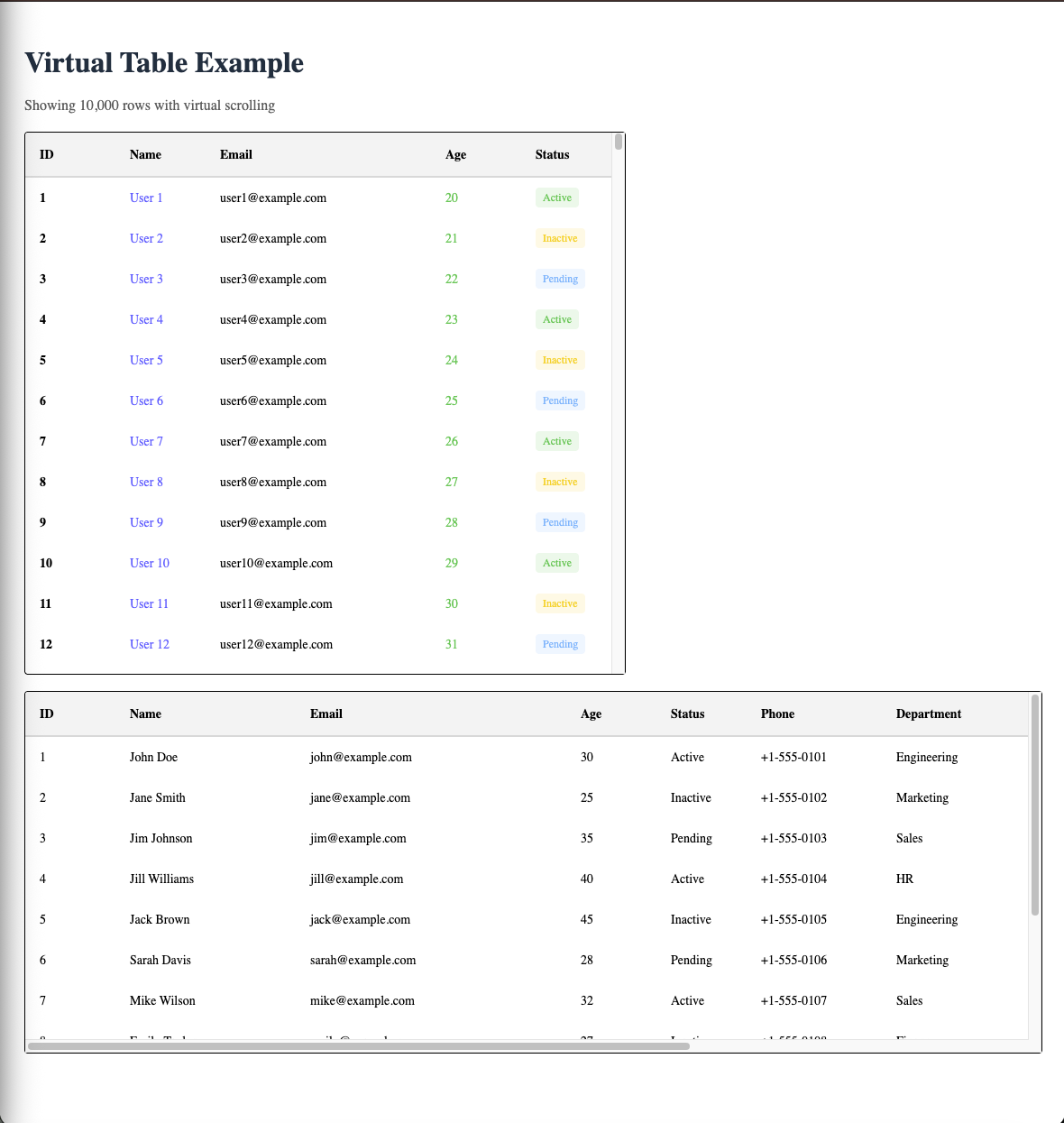
A declarative, high-performance virtual table component for Svelte 5 with automatic row virtualization.
## Installation
```bash
npm install simple-virtual-table-svelte
# or
yarn add simple-virtual-table-svelte
# or
pnpm add simple-virtual-table-svelte
```
## Quick Start
```svelte
Virtual Table Example
Showing {data.length.toLocaleString()} rows with virtual scrolling
| ID |
Name |
Email |
Age |
Status |
{#snippet children(startIndex: number, endIndex: number)}
{#each data.slice(startIndex, endIndex) as row, index (row.id)}
{@const status = row.status}
|
{row.id}
|
{row.name}
|
{row.email} |
{row.age}
|
{status}
|
{/each}
{/snippet}
| ID |
Name |
Email |
Age |
Status |
Phone |
Department |
Salary |
Location |
Join Date |
Manager |
{#snippet children(startIndex: number, endIndex: number)}
{#each smallData.slice(startIndex, endIndex) as row, index (row.id)}
| {row.id} |
{row.name} |
{row.email} |
{row.age} |
{row.status} |
{row.phone || "-"} |
{row.department || "-"} |
{row.salary ? `$${row.salary.toLocaleString()}` : "-"} |
{row.location || "-"} |
{row.joinDate || "-"} |
{row.manager || "-"} |
{/each}
{/snippet}
```
## Components
### Table
The root component that provides context to all child components.
**Props:**
| Prop | Type | Required | Default | Description |
| -------------------- | --------- | -------- | ------- | --------------------------------------------- |
| `totalData` | `number` | Yes | - | Total number of rows in the dataset |
| `height` | `number` | No | `400` | Height of the table container |
| `rowHeight` | `number` | No | `40` | Height of each row in pixels |
| `overscan` | `number` | No | `5` | Number of rows to render outside visible area |
| `containerStyle` | `string` | No | - | Custom styles for the table container |
| `containerClassName` | `string` | No | - | CSS classname |
| `children` | `Snippet` | Yes | - | Child components (Thead, Tbody) |
### Thead
Header container component. Must wrap all `Th` components.
**Props:**
| Prop | Type | Required | Default | Description |
| -------------- | ---------------- | -------- | ------- | ----------------------------------------------------------------------------- |
| `headerHeight` | `number` | No | `50` | Height of the header row |
| `style` | `string` | No | - | Custom styles for the header container |
| `...props` | `HTMLDivElement` | No | - | All standard HTML div attributes (class, onclick, onmouseover, data-\*, etc.) |
**Note:**
- `Thead` automatically collects column widths from `Th` children and updates the table context.
- The `headerHeight` prop is optional and defaults to 50px. Typically you can omit this prop and use the default.
- All standard HTML div attributes are accepted and will be applied to the header container element.
### Th
Header cell component. Must be used inside `Thead`.
**Props:**
| Prop | Type | Required | Default | Description |
| ---------- | ---------------- | -------- | ------- | ----------------------------------------------------------------------------- |
| `width` | `number` | No | `100` | Width of the column in pixels |
| `colIndex` | `number` | **Yes** | - | Zero-based index of the column (must be explicitly provided) |
| `colSpan` | `number` | No | `1` | Number of columns the header cell should span |
| `style` | `string` | No | - | Custom styles for the header cell |
| `children` | `Snippet` | Yes | - | Content of the header cell |
| `...props` | `HTMLDivElement` | No | - | All standard HTML div attributes (class, onclick, onmouseover, data-\*, etc.) |
**Important:** Unlike the React version, `colIndex` **must be explicitly provided** to each `Th` component. This is required for proper column width tracking.
### Tbody
Body container component. Must wrap all `Tr` components.
**Props:**
| Prop | Type | Required | Default | Description |
| -------------- | ---------------- | -------- | ------- | ----------------------------------------------------------------------------- |
| `offsetHeight` | `number` | No | `45` | Height offset for calculating total height |
| `style` | `string` | No | - | Custom styles for the body container |
| `children` | `Snippet` | Yes | - | Child snippet that accepts `(startIndex: number, endIndex: number)` |
| `...props` | `HTMLDivElement` | No | - | All standard HTML div attributes (class, onclick, onmouseover, data-\*, etc.) |
**Note:**
- `Tbody` automatically calculates `totalHeight` and `totalWidth` from table context.
- `Tbody` only renders visible rows (plus overscan rows) to optimize performance.
- **The `children` prop must be a snippet that accepts `startIndex` and `endIndex` parameters.** Use `{#snippet children(startIndex: number, endIndex: number)}` to define the snippet.
- Inside the snippet, slice your data array using `data.slice(startIndex, endIndex)` and iterate over the sliced data with `{#each}`.
- The `offsetHeight` prop is optional and used to calculate the total height (defaults to 45px). Typically you can omit this prop and use defaults.
- All standard HTML div attributes are accepted and will be applied to the body container element.
### Tr
Row component. Must be used inside `Tbody`.
**Props:**
| Prop | Type | Required | Default | Description |
| ---------- | ---------------- | -------- | ------- | ----------------------------------------------------------------------------- |
| `rowIndex` | `number` | **Yes** | - | The absolute row index in the dataset (must be `startIndex + index` from the snippet) |
| `style` | `string` | No | - | Custom styles for the row |
| `children` | `Snippet` | Yes | - | Child components (Td) |
| `...props` | `HTMLDivElement` | No | - | All standard HTML div attributes (class, onclick, onmouseover, data-\*, etc.) |
**Note:**
- **You must provide `rowIndex` explicitly.** When using `{#each data.slice(startIndex, endIndex) as row, index}`, set `rowIndex={startIndex + index}` to ensure the row index is correct.
- All standard HTML div attributes are accepted and will be applied to the row element.
### Td
Cell component. Must be used inside `Tr`.
**Props:**
| Prop | Type | Required | Default | Description |
| ---------- | ---------------- | -------- | ------- | ----------------------------------------------------------------------------- |
| `colIndex` | `number` | No | - | Zero-based index of the column (automatically calculated if omitted) |
| `colSpan` | `number` | No | `1` | Number of columns the cell should span |
| `rowSpan` | `number` | No | `1` | Number of rows the cell should span |
| `style` | `string` | No | - | Custom styles for the cell |
| `children` | `Snippet` | Yes | - | Content of the cell |
| `...props` | `HTMLDivElement` | No | - | All standard HTML div attributes (class, onclick, onmouseover, data-\*, etc.) |
**Note:** `colIndex` is automatically calculated based on previous cells and spanning.
**Important:** The cell width automatically matches the corresponding `Th` width from the header.
**Note:**
- The cell width automatically matches the corresponding `Th` width from the header.
- All standard HTML div attributes are accepted and will be applied to the cell element.
**Performance Note:** Even with 10,000 rows, only ~15-20 DOM nodes (visible rows + overscan) are rendered at any time. The table maintains smooth scrolling and low memory usage regardless of dataset size.
## Virtualization
The table automatically handles row virtualization. Only visible rows (plus overscan rows) are rendered in the DOM, making it performant even with thousands of rows.
**Important:**
- Pass `totalData` (the total number of rows) to the `Table` component
- In `Tbody`, you **must** use a snippet pattern with `startIndex` and `endIndex` parameters:
```svelte
{#snippet children(startIndex: number, endIndex: number)}
{#each data.slice(startIndex, endIndex) as row, index (row.id)}
{/each}
{/snippet}
```
- The table handles virtualization internally by:
1. Calculating which rows are visible based on scroll position
2. Passing `startIndex` and `endIndex` to your snippet
3. Rendering spacers above and below visible rows to maintain correct scroll height
4. Only rendering visible rows in the DOM
- **You must explicitly provide `colIndex` to both `Th` and `Td` components** (starting from 0 and incrementing for each column)
- **You must explicitly provide `rowIndex` to `Tr` components** using `rowIndex={startIndex + index}`
## Styling
All components extend standard HTML div attributes and can be styled via:
- Inline `style` prop (available on all components) - accepts a string
- `containerStyle` prop on `Table` component for container-specific styling
- Standard HTML attributes (`class`, `onclick`, `onmouseover`, `data-*` attributes, etc.)
- CSS targeting the component elements via class
**Note:** Since all components render as `div` elements, you can apply any standard HTML div attributes to them.
## TypeScript Support
Full TypeScript support is included. All components are fully typed and work with TypeScript out of the box.
## Component Hierarchy Requirements
- `Th` **must** be used inside `Thead`
- `Tr` **must** be used inside `Tbody`
- `Td` **must** be used inside `Tr`
- `Table` **must** wrap everything
Violating these requirements will throw helpful error messages.
## Key Differences from React Version
1. **`colIndex` is optional**: Similar to the React version, `colIndex` is now automatically calculated for both `Th` and `Td` components.
2. **`rowIndex` is required**: In the Svelte version, you must explicitly provide `rowIndex` to `Tr` components using `rowIndex={startIndex + index}`.
3. **Snippet Pattern**: The `Tbody` component requires a snippet that accepts `startIndex` and `endIndex` parameters. You must slice your data array and iterate over the sliced portion.
4. **Svelte 5 Runes**: This package uses Svelte 5's runes syntax (`$props()`, `$state()`, `$derived()`, `$effect()`). Make sure you're using Svelte 5.39.6 or higher.
5. **Slot Rendering**: Uses Svelte's `{@render children()}` syntax for rendering child components.
6. **Iteration**: Use Svelte's `{#each}` syntax for iterating over the sliced data array within the snippet.
## Notes
- Column widths are defined declaratively via `Th` components
- Row heights are consistent (controlled by `rowHeight` prop)
- The table supports horizontal scrolling when content is wider than container
- Header is sticky and remains visible while scrolling
- All components accept standard HTML div attributes for maximum flexibility
- The `height` prop on `Table` is optional, but recommended for proper virtualization behavior
- Remember to provide `colIndex` starting from 0 for each column in both `Th` and `Td` components
- Remember to use the snippet pattern in `Tbody` with `startIndex` and `endIndex` parameters
- Remember to provide `rowIndex={startIndex + index}` to each `Tr` component
rn in `Tbody` with `startIndex` and `endIndex` parameters
- Remember to provide `rowIndex={startIndex + index}` to each `Tr` component