
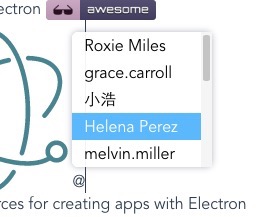
# 👨‍👩‍👧‍👦 vue-at&nbsp;&nbsp;[![](https://img.shields.io/github/stars/fritx/vue-at?style=social)](https://github.com/fritx/vue-at)

<a href="https://we-demo.github.io/vue-at-vite-app/"><img width="76" height="20" src="https://img.shields.io/website?url=https%3A%2F%2Fwe-demo.github.io%2Fvue-at-vite-app%2F"></a>&nbsp;&nbsp;<a href="https://www.npmjs.com/package/vue-at"><img height="20" src="https://img.shields.io/npm/dm/vue-at.svg"></a>&nbsp;&nbsp;<a href="https://github.com/fritx/vue-at"><img width="90" height="20" src="https://img.shields.io/badge/PRs-welcome-brightgreen.svg" /></a>&nbsp;&nbsp;<a href="https://github.com/fritx/vue-at"><img width="84" height="20" src="https://img.shields.io/badge/license-MIT-blue.svg"></a>&nbsp;&nbsp;<a href="https://gitter.im/fritx/vue-at?utm_source=badge&utm_medium=badge&utm_campaign=pr-badge&utm_content=badge"><img width="92" src="https://badges.gitter.im/fritx/vue-at.svg" alt="Join the chat at https://gitter.im/fritx/vue-at"></a>

<img width="262" height="218" src="WechatIMG1.jpeg">&nbsp;&nbsp;<img width="262" height="218" src="WechatIMG2.jpeg">

- [x] Chrome / Firefox / Edge / IE9~IE11
- [x] Plain-text based, no jQuery, no extra nodes
- [x] Content-Editable / Textarea
- [x] Avatars, custom templates
- [x] Vite / Vue3 / Vue2 / Vue1
- [x] Quasar / Vuetify / Element UI / Element Plus
- [x] Vue-CLI build migration
- [ ] Vite build migration
- [x] CommonJS / UMD Support

Playground: https://we-demo.github.io/vue-at-vite-app/<br>
Vue2 Docs: https://github.com/fritx/vue-at/tree/vue2#readme<br>
Vue3 Docs: See below<br>
See also: [react-at](https://github.com/fritx/react-at)

**If you're using Vue2, read [branch vue2](https://github.com/fritx/vue-at/tree/vue2#readme) instead.**

```plain
npm i vue-at@next  # for Vue3 (branch vue3)
npm i vue-at@2.x  # for Vue2 (branch vue2)
npm i vue-at@1.x  # for Vue1 (branch vue1-legacy)
npm i vue1-at  # for Vue1 (branch vue1-new)
```

```vue
<template>
  <at :members="members">
    <div :contenteditable="true"></div>
  </at>
  <at-ta :members="members">
    <textarea></textarea>
  </at-ta>
</template>

<script>
import At from 'vue-at' // for content-editable
import AtTa from 'vue-at/dist/vue-at-textarea' // for textarea

export default {
  components: { At, AtTa },
  data () {
    return {
      members: ['Roxie Miles', 'grace.carroll', '小浩']
    }
  }
}
</script>

<style>
#app .atwho-view { /* more */ }
#app .atwho-ul { /* more */ }
</style>
```

## UMD Also Supported

```html
<!-- for Vue2 -->
<script src="//unpkg.com/vue@2"></script>
<script src="//unpkg.com/vue-at@2/dist/vue-at.umd.js"></script>
<script src="//unpkg.com/vue-at@2/dist/vue-at-textarea.umd.js"></script>
<!-- ...-->

<!-- for Vue3 -->
<script src="//unpkg.com/vue@3"></script>
<script src="//unpkg.com/vue-at@next/dist/vue-at.umd.js"></script>
<script src="//unpkg.com/vue-at@next/dist/vue-at-textarea.umd.js"></script>
<div id="app">
  <at v-model:value="html">
    <div contenteditable></div>
  </at>
  <at-textarea>
    <textarea v-model="text"></textarea>
  </at-textarea>
</div>
<script>
Vue.createApp({
  components: { At, AtTextarea },
  // ...
}).mount('#app')
</script>
```

## Using V-Model (Recommended)

With Content-Editable, use `<at v-model:value="v">`<br>
With Textarea, you can use either `<at-ta v-model:value="v">` or `<textarea v-model="v">`

```vue
<at v-model:value="html">
  <div :contenteditable="true"></div>
</at>
<at-ta v-model:value="text">
  <textarea></textarea>
</at-ta>
<at-ta>
  <textarea v-model="text"></textarea>
</at-ta>
```

## Custom Templates

### Custom List

```vue
<template>
  <at :members="members" name-key="name">
    <template slot="item" slot-scope="s">
      <img :src="s.item.avatar">
      <span v-text="s.item.name"></span>
    </template>
    <div :contenteditable="true"></div>
  </at>
</template>

<script>
// ...
members: [{
  avatar: 'https://randomuser.me/api/portraits/men/2.jpg',
  name: 'myrtie.green'
}, {
  avatar: 'https://randomuser.me/api/portraits/men/8.jpg',
  name: '椿木'
}]
</script>

<style>
#app .atwho-li { /* more */ }
#app .atwho-li img { /* more */ }
#app .atwho-li span { /* more */ }
</style>
```

#### Custom List with Vue 1.x

There is no "scoped slot" feature in Vue 1.<br>
Use a "normal slot" with `data-` attribute instead.

```vue
<!-- vue1-at for vue@1.x -->
<template slot="item">
  <img data-src="item.avatar">
  <span data-text="item.name"></span>
</template>
```

### Custom Tags

This gives you the option of changing the style of inserted tagged items. It is only supported for ContentEditable version, not Textarea.

```vue
<span slot="embeddedItem" slot-scope="s">
  <span class="tag"><img :src="s.current.avatar">{{ s.current.name }}</span>
</span>

<!-- with Vue 2.6+ 'v-slot' / '#slot' directive -->
<!-- note at least two '<span>' wrapper are required to work -->
<template #embeddedItem="s">
  <span><span class="tag"><img class="avatar" :src="s.current.avatar">{{ s.current.name }}</span></span>
</template>
```

## Used with 3rd-party libraries

### Vuetify v-textarea

```vue
<at-ta :members="members">
  <!-- slots -->
  <v-textarea v-model="text"></v-textarea>
</at-ta>
```

### Element UI / Element-Plus el-input

```vue
<at-ta :members="members">
  <!-- slots -->
  <el-input v-model="text" type="textarea"></el-input>
</at-ta>
```
