# Hydrogen Predictive Search
Our skeleton template ships with predictive search functionality. While [regular search](../search/search.md)
provides paginated search of `pages`, `articles` and `products` inside the `/search` route,
predictive provides real-time results in a aside drawer for `pages`, `articles`, `products`, `collections` and
recommended `queries/suggestions`.
This integration uses the storefront API (SFAPI) [predictiveSearch](https://shopify.dev/docs/api/storefront/latest/queries/vpredictiveSearch) endpoint to retrieve predictive search results based on a search term.
## Components Architecture
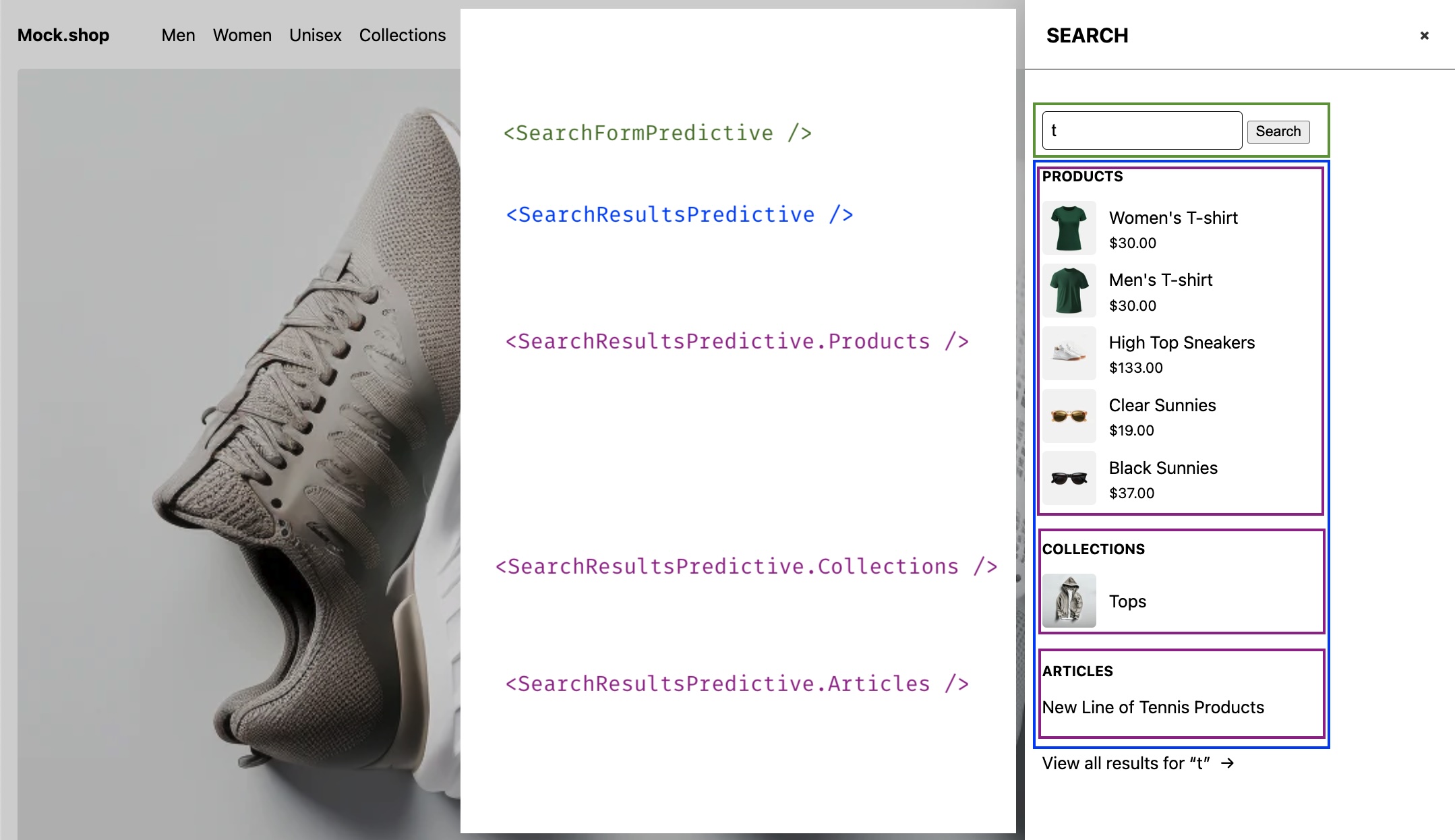
## Components
| File | Description |
| ------------------------------------------------------------------------------------------------ | ------------------------------------------------------------------------------------------------------------------------------------------------------ |
| [`app/components/SearchFormPredictive.tsx`](../../app/components/SearchFormPredictive.tsx) | A fully customizable form component configured to make form `GET` requests to the `/search` route. |
| [`app/components/SearchResultsPredictive.tsx`](../../app/components/SearchResultsPredictive.tsx) | A fully customizable search results wrapper, that provides compound components to render `articles`, `pages`, `products`, `collections` and `queries`. |
## Instructions
### 1. Create the search route
Create a new file at `/routes/search.tsx` (if not already created)
### 3. Add `predictiveSearch` query and fetcher
The predictiveSearch fetcher parses the `q` and `limit` formData properties sent
by the `` component and performs the predictive search
SFAPI request.
```ts
/**
* Predictive search query and fragments
* (adjust as needed)
*/
const PREDICTIVE_SEARCH_ARTICLE_FRAGMENT = `#graphql
fragment PredictiveArticle on Article {
__typename
id
title
handle
blog {
handle
}
image {
url
altText
width
height
}
trackingParameters
}
` as const;
const PREDICTIVE_SEARCH_COLLECTION_FRAGMENT = `#graphql
fragment PredictiveCollection on Collection {
__typename
id
title
handle
image {
url
altText
width
height
}
trackingParameters
}
` as const;
const PREDICTIVE_SEARCH_PAGE_FRAGMENT = `#graphql
fragment PredictivePage on Page {
__typename
id
title
handle
trackingParameters
}
` as const;
const PREDICTIVE_SEARCH_PRODUCT_FRAGMENT = `#graphql
fragment PredictiveProduct on Product {
__typename
id
title
handle
trackingParameters
selectedOrFirstAvailableVariant(
selectedOptions: []
ignoreUnknownOptions: true
caseInsensitiveMatch: true
) {
id
image {
url
altText
width
height
}
price {
amount
currencyCode
}
}
}
` as const;
const PREDICTIVE_SEARCH_QUERY_FRAGMENT = `#graphql
fragment PredictiveQuery on SearchQuerySuggestion {
__typename
text
styledText
trackingParameters
}
` as const;
// NOTE: https://shopify.dev/docs/api/storefront/latest/queries/predictiveSearch
const PREDICTIVE_SEARCH_QUERY = `#graphql
query predictiveSearch(
$country: CountryCode
$language: LanguageCode
$limit: Int!
$limitScope: PredictiveSearchLimitScope!
$term: String!
$types: [PredictiveSearchType!]
) @inContext(country: $country, language: $language) {
predictiveSearch(
limit: $limit,
limitScope: $limitScope,
query: $term,
types: $types,
) {
articles {
...PredictiveArticle
}
collections {
...PredictiveCollection
}
pages {
...PredictivePage
}
products {
...PredictiveProduct
}
queries {
...PredictiveQuery
}
}
}
${PREDICTIVE_SEARCH_ARTICLE_FRAGMENT}
${PREDICTIVE_SEARCH_COLLECTION_FRAGMENT}
${PREDICTIVE_SEARCH_PAGE_FRAGMENT}
${PREDICTIVE_SEARCH_PRODUCT_FRAGMENT}
${PREDICTIVE_SEARCH_QUERY_FRAGMENT}
` as const;
/**
* Predictive search fetcher
*/
async function predictiveSearch({
request,
context,
}: Pick) {
const {storefront} = context;
const formData = await request.formData();
const term = String(formData.get('q') || '');
const limit = Number(formData.get('limit') || 10);
// Predictively search articles, collections, pages, products, and queries (suggestions)
const {predictiveSearch: items, errors} = await storefront.query(
PREDICTIVE_SEARCH_QUERY,
{
variables: {
// customize search options as needed
limit,
limitScope: 'EACH',
term,
},
},
);
if (errors) {
throw new Error(
`Shopify API errors: ${errors.map(({message}) => message).join(', ')}`,
);
}
if (!items) {
throw new Error('No predictive search data returned');
}
const total = Object.values(items).reduce((acc, {length}) => acc + length, 0);
return {term, result: {items, total}, error: null};
}
```
### 3. Add a `loader` export to the route
This action receives and processes `GET` requests from the ``
component. These request include the search parameter `predictive` to identify them over
regular search requests.
A `q` URL parameter will be used as the search term and appended automatically by
the form if present in it's children prop.
```ts
/**
* Handles predictive search GET requests
* requested by the SearchFormPredictive component
*/
export async function loader({request, context}: LoaderFunctionArgs) {
const url = new URL(request.url);
const isPredictive = url.searchParams.has('predictive');
if (!isPredictive) {
return {};
}
const searchPromise = predictiveSearch({request, context});
searchPromise.catch((error: Error) => {
console.error(error);
return {term: '', result: null, error: error.message};
});
return await searchPromise;
}
```
### 4. Render the predictive search form and results
Create a SearchAside or similar component to render the form and results.
```ts
import { SearchFormPredictive } from '~/components/SearchFormPredictive';
import { SearchResultsPredictive } from '~/components/SearchResultsPredictive';
function SearchAside() {
return (
);
}
```
## Additional Notes
### How to use a different URL search parameter?
- Modify the `name` attribute in the forms input element. e.g
```ts
`.
```
- Modify the fetchers term variable to parse the new name. e.g
```ts
const term = String(searchParams.get('query') || '');
```
### How to customize the way the results look?
Simply go to `/app/components/SearchResultsPredictive.tsx` and look for the compound
component you would like to modify.
Here we add images to each predictive product result item
```diff
SearchResultsPredictive.Products = function ({
products,
closeSearch,
term,
}: SearchResultsPredictiveProductsProps) {
if (!products.length) return null;
return (