<p align='center'>
  <img src='https://raw.githubusercontent.com/jiaweihli/shipherd/meta/images/noun_731060_51A7F9.png' width='180px' alt='Shipherd'>
</p>

<p align='center'>
  <a href='https://www.npmjs.com/package/shipherd'>
    <img src='https://badge.fury.io/js/shipherd.svg alt='npm version'>
  </a>

  <a href='https://circleci.com/gh/jiaweihli/shipherd'>
    <img src='https://circleci.com/gh/jiaweihli/shipherd.svg?style=shield' alt='Build Status'>
  </a>

  <a href='https://github.com/semantic-release/semantic-release'>
    <img src='https://img.shields.io/badge/%20%20%F0%9F%93%A6%F0%9F%9A%80-semantic--release-e10079.svg' alt='semantic-release'>
  </a>

  <a href='http://commitizen.github.io/cz-cli/'>
    <img src='https://img.shields.io/badge/commitizen-friendly-brightgreen.svg' alt='Commitizen friendly'>
  </a>

  <a href='https://conventionalcommits.org'>
    <img src='https://img.shields.io/badge/Conventional%20Commits-1.0.0-green.svg' alt='Conventional Commits'>
  </a>
</p>

## Intro

Shipherd is a runnable service for reporting CI statuses to Slack.  Only supports CircleCI at the 
moment.

**Features**:
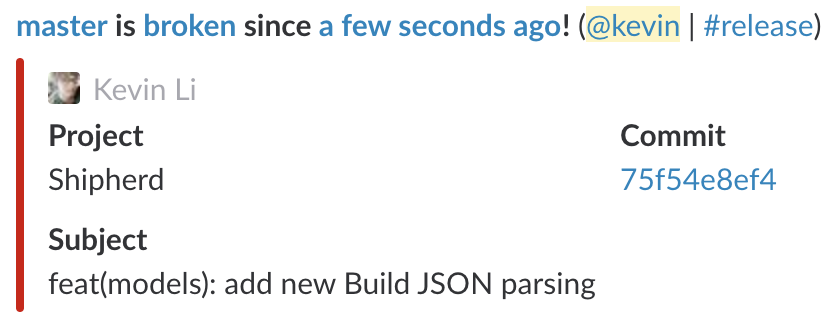
  - Messages a channel when a build is broken:
    <p>
      <img src='https://raw.githubusercontent.com/jiaweihli/shipherd/meta/images/shipherd_broken.png' width='420px' alt='Build broken'>
    </p>
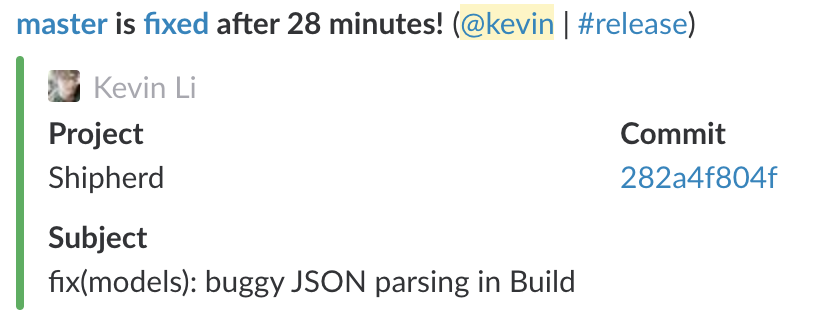
  - Messages a channel when a build is fixed:
    <p>
      <img src='https://raw.githubusercontent.com/jiaweihli/shipherd/meta/images/shipherd_fixed.png' width='420px' alt='Build fixed'>
    </p>

## Setup

1. Install from npm:

```bash
$ npm install -g shipherd
```

2. Rename `sample.js` to `production.js`, and replace the values with your personal
tokens/urls/configs.

## Usage

To start the service, run `shipherd start`.  It's highly recommended to do this in a screen or tmux
session (optionally with an auto log).

## Config

To edit config values, run `shipherd config`.  This will modify `config/production.js`.

The config file template lives in `config/default.js`.  This is the base template inherited by all
other configs.  Any values which are `undefined` that aren't overridden by another config will throw
a runtime error on access, so make sure to add values for these!

A sample config lives at `config/sample.js`.