# sfdx-decomposer
[](https://www.npmjs.com/package/sfdx-decomposer) [](https://npmjs.org/package/sfdx-decomposer) [](https://raw.githubusercontent.com/mcarvin8/sfdx-decomposer-plugin/main/LICENSE.md)
**DEPRECATION**: The current version of this plugin, `sfdx-decomposer`, will be deprecated and renamed to `sf-decomposer`. Please download the plugin under [sf-decomposer](https://npmjs.org/package/sf-decomposer).
The `sfdx-decomposer` is a Salesforce plugin to read the original metadata files (XML) and create smaller, more manageable files for version control. The inverse function (`recompose`) will recreate metadata files for deployments.
This plugin requires [git](https://git-scm.com/downloads) to be installed and that it can be called using the command `git`.
This will parse and retain the following in the original XMLs:
- Character Data (CDATA)
- Comments
- Attributes
The decomposed file format can be XML, JSON, or YAML. Based on testing, XML and YAML handles CDATA formatting nicer than JSON.
**DISCLAIMERS:**
- You must update the `.forceignore` to have the Salesforce CLI ignore the decomposed files created by this plugin. See section `Ignore Files`. Updates to the `.gitignore` are optional and can be updated based on what you want staged in your repo.
- It is highly recommended that you extensively test this plugin in a sandbox environment on the metadata types you wish to use this tool for.
- Do not change your production/QA pipelines until you have tested this and are happy with the results.
- Confirm your deployment pipelines are stable prior to implementing this plugin.
## Install
```bash
sf plugins install sfdx-decomposer@x.y.z
```
## Commands
The `sfdx-decomposer` supports 2 commands:
- `sf decomposer decompose`
- `sf decomposer recompose`
Both commands need to be ran somewhere inside your Salesforce DX git repository, whether in the root folder (recommended) or in a subfolder. This plugin will determine the root folder of this repository and read the `sfdx-project.json` file in the root folder. All package directories listed in the `sfdx-project.json` file will be processed when running this plugin.
## `sf decomposer decompose`
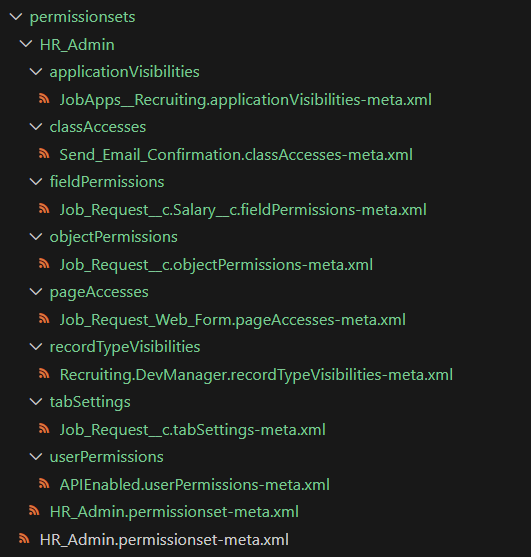
Decomposes the original metadata files into smaller files for version control. Excluding custom labels, the smaller files will be placed into new sub-directories:
Custom Labels will be decomposed directly in the root labels folder:
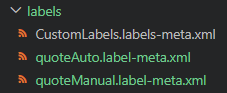
Unique ID elements are used to name decomposed files for nested elements. The default unique ID elements for all metadata types are `` and ``. In this example XML below, the `` tag is included in the nested element and its contents (`quoteAuto`) will be used to name the decomposed file.
```xml
quoteAuto
This is an automatically generated quote.
en_US
false
Automatic Quote
```
If the default unique ID elements are not found in the nested element, the plugin will look for any other metadata specific unique ID elements (see `CONTRIBUTING` section for more information).
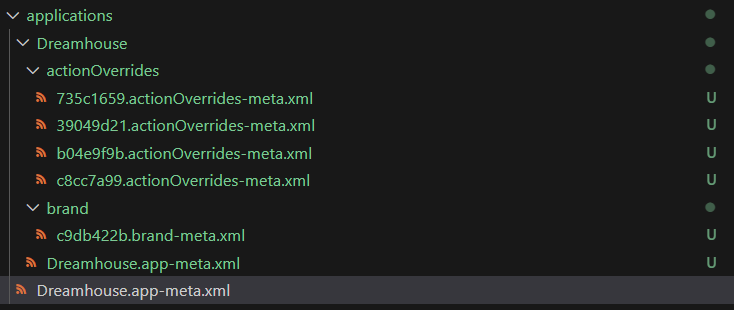
If a unique ID element is not found in the nested element, the short SHA-256 hash of the element contents will be used to name the decomposed file, as shown below.
It's recommended to add the `--prepurge` flag to the `decompose` command to remove pre-existing decomposed files that may conflict with newer decomposed files due to different SHA hashes.
Using the `--format` flag, you can set the desired file type for the decomposed files to XML (default), YAML, or JSON. **Note**: The `--format` flag for the recompose command must match what you selected for the decompose `--format`.
```
USAGE
$ sf decomposer decompose -m -f [--prepurge --postpurge --debug --json]
FLAGS
-m, --metadata-type= The metadata suffix to process, such as 'flow', 'labels', etc. You can provide this flag multiple times to process multiple metadata types at once.
-f, --format= [default: 'xml'] The file type for the decomposed files.
--prepurge [default: false] If provided, purge directories of pre-existing decomposed files.
--postpurge [default: false] If provided, purge the original files after decomposing them.
--debug [default: false] If provided, log debugging results to a text file (disassemble.log).
GLOBAL FLAGS
--json Format output as json.
DESCRIPTION
This command will read all of the original metadata files and separate them into smaller files in each package directory.
These smaller decomposed files can be XMLs, YAMLs, or JSONs.
You should run this after retrieving metadata from an org.
EXAMPLES
Decompose all flows:
$ sf decomposer decompose -m "flow" -f "xml" --prepurge --postpurge --debug
Decompose all flows and custom labels:
$ sf decomposer decompose -m "flow" -m "labels" -f "xml" --prepurge --postpurge --debug
```
## `sf decomposer recompose`
Reads all of the files created by the decompose command and recreates metadata files suitable for deployments.
Ensure the `--format` flag of the recompose command matches the file format selected for the `--format` flag in the decompose command. File formats for the decomposed files can be XML (default), YAML, or JSON.
This command will always create XMLs as its output format.
```
USAGE
$ sf decomposer recompose -m -f [--postpurge --debug --json]
FLAGS
-m, --metadata-type= The metadata suffix to process, such as 'flow', 'labels', etc. You can provide this flag multiple times to process multiple metadata types at once.
-f, --format= [default: 'xml'] The file format for the decomposed files.
--postpurge [default: false] If provided, purge the decomposed files after recomposing them.
--debug [default: false] If provided, log debugging results to a text file (disassemble.log).
GLOBAL FLAGS
--json Format output as json.
DESCRIPTION
This command will read all of the decomposed files and recreate deployment compatible metadata files in each package directory.
You should run this before you deploy the metadata to an org.
EXAMPLES
Recompose all flows:
$ sf decomposer recompose -m "flow" -f "xml" --postpurge --debug
Recompose all flows and custom labels:
$ sf decomposer recompose -m "flow" -m "labels" -f "xml" --postpurge --debug
```
## Supported Metadata
All parent metadata types imported from this plugin's version of @salesforce/source-deploy-retrieve (SDR) toolkit are supported except for certain types.
The `--metadata-type`/`-m` flag should be the metadata's `"suffix"` value as listed in the [metadataRegistry.json](https://github.com/forcedotcom/source-deploy-retrieve/blob/main/src/registry/metadataRegistry.json).
The suffix is this part of the original meta file name - `labels` is the suffix in `*.labels-meta.xml`.
Here are some examples:
- Custom Labels (`--metadata-type "labels"`)
- Workflows (`--metadata-type "workflow"`)
- Profiles (`--metadata-type "profile"`)
- Permission Sets (`--metadata-type "permissionset"`)
- Flows (`--metadata-type "flow"`)
- Matching Rules (`--metadata-type "matchingRule"`)
- Assignment Rules (`--metadata-type "assignmentRules"`)
- Escalation Rules (`--metadata-type "escalationRules"`)
- Sharing Rules (`--metadata-type "sharingRules"`)
- Auto Response Rules (`--metadata-type "autoResponseRules"`)
- Global Value Set Translation (`--metadata-type "globalValueSetTranslation"`)
- Standard Value Set Translation (`--metadata-type "standardValueSetTranslation"`)
- Translations (`--metadata-type "translation"`)
- Standard Value Sets (`--metadata-type "standardValueSet"`)
- Global Value Sets (`--metadata-type "globalValueSet"`)
- AI Scoring Model Definition (`--metadata-type "aiScoringModelDefinition"`)
- Decision Matrix Definition (`--metadata-type "decisionMatrixDefinition"`)
- Bot (`--metadata-type "bot"`)
- **NOTE**: Running "bot" will also decompose and recompose Bot Version meta files
- The `botVersion` meta suffix will be blocked from running directly
- Marketing App Extension (`--metadata-type "marketingappextension"`)
### Exceptions
`botVersion` is blocked from being ran directly. Please use the `bot` meta suffix to decompose and recompose bots and bot versions.
```
Error (1): `botVersion` suffix should not be used. Please use `bot` to decompose/recompose bot and bot version files.
```
Custom Objects are not supported by this plugin.
```
Error (1): Custom Objects are not supported by this plugin.
```
Metadata types such as Apex Classes, Apex Components, Triggers, etc. with certain SDR adapter strategies (`matchingContentFile`, `digitalExperience`, `mixedContent`, `bundle`) are not supported by this plugin.
```
Error (1): Metadata types with [matchingContentFile, digitalExperience, mixedContent, bundle] strategies are not supported by this plugin.
```
Children metadata types (ex: custom fields) are not supported and will result in this general error:
```
Error (1): Metadata type not found for the given suffix: field.
```
### Issues
Please create "Issues" in this repository if you experience problems decomposing and recomposing specific metadata types or if this plugin's version of SDR needs to be updated to account for new metadata types.
## Warnings and Logging
The package used to decompose and recompose XMLs, `xml-disassembler`, will log errors, and optionally debugging statements, to a log file, `disassemble.log`. This log will be created in the working directory and will be created when runnign this plugin at all times. If there were no XML decomposing/recomposing errors, this log will simply be empty.
By default, this package will only log errors to the file. This plugin will print `xml-disassembler` errors as warnings in the command terminal to allow all other files to be processed.
These warnings when running `decompose` and `recompose` commands will look as such:
```
Warning: [2024-04-08T19:27:43.622] [ERROR] default - C:\Users\matth\Documents\sfdx-decomposer-plugin\test\baselines\flows\Get_Info\actionCalls\Get_Info.actionCalls-meta.xml was unabled to be parsed and will not be processed. Confirm formatting and try again.
```
To add additional debugging statements to the log file, provide the `--debug` flag to either command to generate additional logging statements to `disassemble.log`.
General debugging statements in the log file will look like:
```
[2024-03-30T14:28:37.959] [DEBUG] default - Created disassembled file: mock\no-nested-elements\HR_Admin\HR_Admin.permissionset-meta.xml
```
Recommend adding the `disassemble.log` to your `.gitignore` file.
## Hook
A post-retrieve hook has been configured if you elect to use it. The post-retrieve hook will automatically decompose the desired metadata types after every Salesforce CLI retrieval if you create this file in the root of your repo: `.sfdecomposer.config.json`
The `.sfdecomposer.config.json` should look like this:
```json
{
"metadataSuffixes": "labels,workflow,profile",
"prePurge": true,
"postPurge": true,
"decomposedFormat": "xml"
}
```
- `metadataSuffixes` is required and should be a comma-separated string of metadata suffixes to decompose automatically after retrievals.
- `prePurge` is optional and should be a boolean. If true, this will delete any existing decomposed files before decomposing the files. If you do not provide this, the default will be `false`.
- `postPurge` is optional and should be a boolean. If true, this will delete the retrieval file after decomposing it. If you do not provide this, the default will be `false`.
- `decomposedFormat` is optional and should be either `xml`, `json`, or `yaml`, depending on what file format you want the decomposed files created as. If you do not provide this, the default will be `xml`.
If the `.sfdecomposer.config.json` file isn't found, the hook will be skipped.
**NOTE:** In order to avoid errors during the retrieval, you must configure your `.forceignore` file to have the Salesforce CLI ignore the decomposed files. See section below.
## Ignore Files
The `.gitignore` and `.forceignore` files in your repository should be updated based on the metadata types you wish to decompose.
Reference the below examples:
### `.gitignore` updates
Git should ignore the recomposed files.
```
# Ignore recomposed files
**/permissionsets/*.permissionset-meta.xml
**/profiles/*.profile-meta.xml
**/labels/CustomLabels.labels-meta.xml
**/workflows/*.workflow-meta.xml
**/flows/*.flow-meta.xml
**/matchingRules/*.matchingRule-meta.xml
**/assignmentRules/*.assignmentRules-meta.xml
**/escalationRules/*.escalationRules-meta.xml
**/sharingRules/*.sharingRules-meta.xml
**/autoResponseRules/*.autoResponseRules-meta.xml
**/globalValueSetTranslations/*.globalValueSetTranslation-meta.xml
**/standardValueSetTranslations/*.standardValueSetTranslation-meta.xml
**/translations/*.translation-meta.xml
**/globalValueSets/*.globalValueSet-meta.xml
**/standardValueSets/*.standardValueSet-meta.xml
**/decisionMatrixDefinition/*.decisionMatrixDefinition-meta.xml
**/aiScoringModelDefinitions/*.aiScoringModelDefinition-meta.xml
**/bots/*/*.botVersion-meta.xml
**/bots/*/*.bot-meta.xml
**/marketingappextensions/*.marketingappextension-meta.xml
```
Git should also ignore the log created by the `xml-disassembler` package (see previous section).
```
disassemble.log
```
### `.forceignore` updates
The Salesforce CLI should ignore the decomposed files and should allow the recomposed files. Update based on the decomposed file format you are using (`.xml`, `.json`, or `.yaml`).
```
# Ignore decomposed files
**/profiles/**/*.xml
**/permissionsets/**/*.xml
**/labels/*.xml
**/workflows/**/*.xml
**/flows/**/*.xml
**/matchingRules/**/*.xml
**/assignmentRules/**/*.xml
**/escalationRules/**/*.xml
**/sharingRules/**/*.xml
**/autoResponseRules/**/*.xml
**/globalValueSetTranslations/**/*.xml
**/standardValueSetTranslations/**/*.xml
**/translations/**/*.xml
**/globalValueSets/**/*.xml
**/standardValueSets/**/*.xml
**/decisionMatrixDefinition/**/*.xml
**/aiScoringModelDefinitions/**/*.xml
**/bots/**/*.xml
**/marketingappextensions/**/*.xml
# Allow the recomposed files
!**/permissionsets/*.permissionset-meta.xml
!**/labels/CustomLabels.labels-meta.xml
!**/workflows/*.workflow-meta.xml
!**/profiles/*.profile-meta.xml
!**/flows/*.flow-meta.xml
!**/matchingRules/*.matchingRule-meta.xml
!**/assignmentRules/*.assignmentRules-meta.xml
!**/escalationRules/*.escalationRules-meta.xml
!**/sharingRules/*.sharingRules-meta.xml
!**/autoResponseRules/*.autoResponseRules-meta.xml
!**/globalValueSetTranslations/*.globalValueSetTranslation-meta.xml
!**/standardValueSetTranslations/*.standardValueSetTranslation-meta.xml
!**/translations/*.translation-meta.xml
!**/globalValueSets/*.globalValueSet-meta.xml
!**/standardValueSets/*.standardValueSet-meta.xml
!**/decisionMatrixDefinition/*.decisionMatrixDefinition-meta.xml
!**/aiScoringModelDefinitions/*.aiScoringModelDefinition-meta.xml
!**/bots/*/*.botVersion-meta.xml
!**/bots/*/*.bot-meta.xml
!**/marketingappextensions/*.marketingappextension-meta.xml
```