# Sets
Sets provides utility functions that can be used to work with sets. We put a focus on **ease of use**. Most importantly, all functions accept both [Set](https://developer.mozilla.org/en-US/docs/Web/JavaScript/Reference/Global_Objects/Set) objects and arrays. This means that you can use Set objects if you want, but you don't need to construct them if you simply want to, for example, check whether one array is a subset of another.
Sets treats all inputs as immutable, so the functions won't modify their arguments.
## Getting Started
Install Sets with npm:
npm install --save sets
The `--save` option is the default since [NPM 5.0](http://blog.npmjs.org/post/161081169345/v500), so you can omit it if you have NPM with a sufficient version.
To use Sets, you can import all functions with the following import statement:
import * as sets from 'sets';
You can also selectively import only the functions you need, like so:
import { union, isSubset } from 'sets';
Now you are set (hah!), and you can begin using the awesome functions Sets provides!
## Usage
In this section, we will go through the functions and demonstrate their usage through examples. To keep the terminology short and simple, we will refer to Set objects and arrays collectively as simply *sets* (written in lowercase). For brevity in examples, we will use arrays.
The functions have been annotated with [Flow](https://flow.org/) types. In order to understand the types, we have to define the following type that encodes the set concept from above:
type Collection = Set | Array;
This simply means that a collection of arbitrarily-typed elements can be either a Set or an Array.
In the following examples, we assume that the import looks as such:
import * as sets from 'sets';
#### isSubset
With `isSubset` you can check whether the left set is a subset of the right set:
sets.isSubset([1, 2], [3, 1, 2]) // => true
sets.isSubset([1, 2, 3], [3, 1, 2]) // => true
sets.isSubset([1, 2, 3], [1, 2]) // => false
The type of `isSubset` is:
isSubset(left: Collection, right: Collection): boolean
#### areEqual
With `areEqual` you can check whether two sets are equal:
sets.areEqual([1, 2, 3], [3, 1, 2]) // => true
sets.areEqual([1, 2], [3, 1, 2]) // => false
The type of `areEqual` is:
areEqual(left: Collection, right: Collection): boolean
#### union

The `union` function builds the union of two sets:
sets.union([1, 2, 3], [2, 3, 4]) // => Set([1, 2, 3, 4])
sets.union(['x', 'y'], ['x', 5]) // => Set(['x', 'y', 5])
Note that `union` always produces a Set, even if both arguments are arrays. The type of `union` is:
union(c1: Collection, c2: Collection): Set
#### intersection

The `intersection` function builds the intersection of two sets:
sets.intersection([1, 2, 3], [2, 3, 4]) // => Set([2, 3])
sets.intersection(['x', 'y'], ['x', 5]) // => Set(['x'])
Note that `intersection` always produces a Set, even if both arguments are arrays. The type of `intersection` is:
intersection(c1: Collection, c2: Collection): Set
#### difference
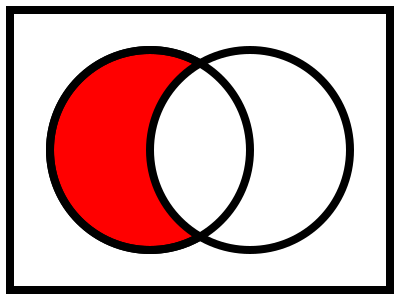
The `difference` function removes elements from the left set that are contained in the right set:
sets.difference([1, 2, 3], [2, 3, 4]) // => Set([1])
sets.difference(['x', 'y'], ['x', 5]) // => Set(['y'])
Note that `difference` always produces a Set, even if both arguments are arrays. Please remember that the argument set is **not modified**, you need to use the return value of this function. The type of `difference` is:
difference(c1: Collection, c2: Collection): Set
#### symmetricDifference
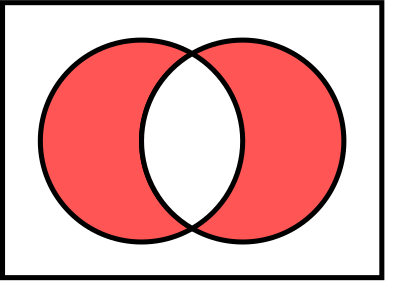
The `symmetricDifference` function builds the symmetric difference of two sets, which is best exemplified by the graphic above.
sets.symmetricDifference([1, 2, 3], [2, 3, 4]) // => Set([1, 4])
sets.symmetricDifference(['x', 'y'], ['x', 5]) // => Set(['y', 5])
This behaviour is equal to the following expression:
sets.union(sets.difference(c1, c2), sets.difference(c2, c1));
The type of `symmetricDifference` is:
symmetricDifference(c1: Collection, c2: Collection): Set