 ### On NodeJS Environment
 ### Object Type apis
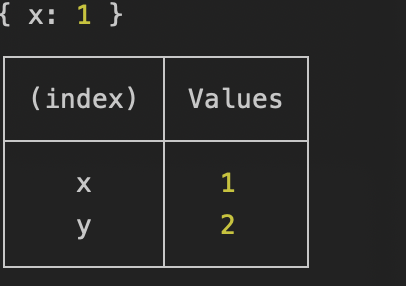
This api include argument of object type and it same to console api
```javascript
import { dir, table } from 'seogi';
dir({ x: 1 });
table({ x: 1, y: 2 });
```
### Object Type apis
This api include argument of object type and it same to console api
```javascript
import { dir, table } from 'seogi';
dir({ x: 1 });
table({ x: 1, y: 2 });
```
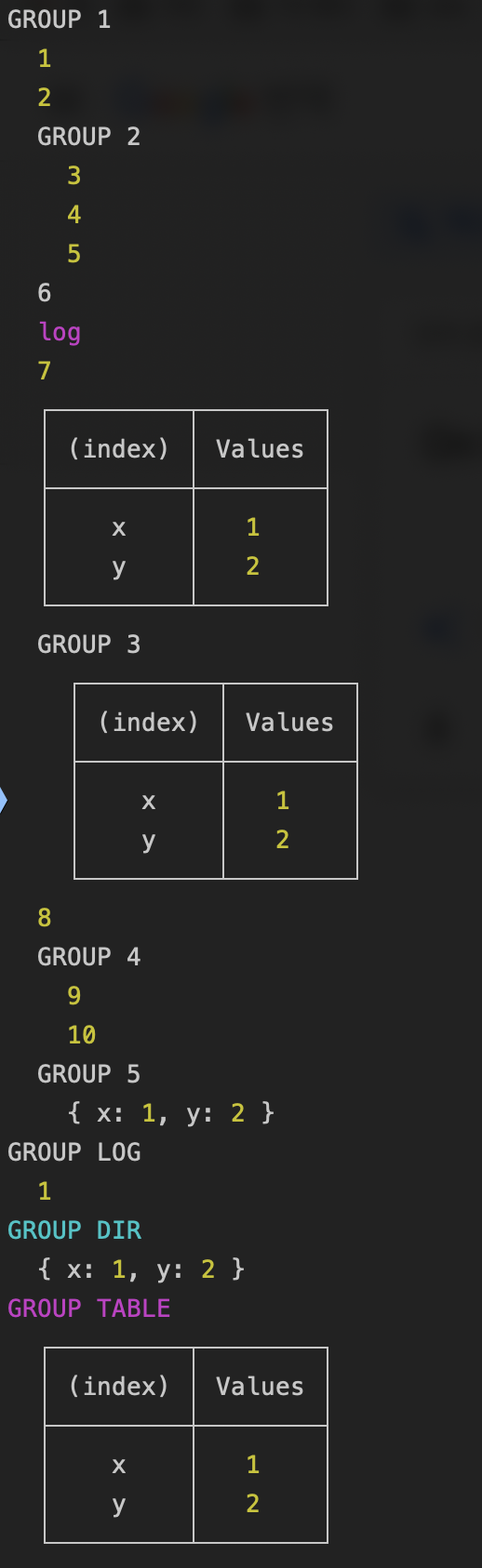
 ### Group Type apis
```javascript
import {
group,
log,
table,
groupLog,
groupTable,
groupDir,
} from 'seogi';
group(
[
1,
2,
() => group([3, 4, 5], 'GROUP 2'),
'6',
() => log('log', { color: 'magenta' }),
7,
() => table({ x: 1, y: 2 }),
() => groupTable({ x: 1, y: 2 }, 'GROUP 3'),
8,
() => group([9, 10], 'GROUP 4'),
() => groupDir({ x: 1, y: 2 }, 'GROUP 5'),
],
'GROUP 1'
);
groupLog(1, null, 'GROUP LOG', { color: 'white' });
groupDir({ x: 1, y: 2 }, 'GROUP DIR', { color: 'cyan' });
groupTable({ x: 1, y: 2 }, 'GROUP TABLE', { color: 'magenta' });
```
### Group Type apis
```javascript
import {
group,
log,
table,
groupLog,
groupTable,
groupDir,
} from 'seogi';
group(
[
1,
2,
() => group([3, 4, 5], 'GROUP 2'),
'6',
() => log('log', { color: 'magenta' }),
7,
() => table({ x: 1, y: 2 }),
() => groupTable({ x: 1, y: 2 }, 'GROUP 3'),
8,
() => group([9, 10], 'GROUP 4'),
() => groupDir({ x: 1, y: 2 }, 'GROUP 5'),
],
'GROUP 1'
);
groupLog(1, null, 'GROUP LOG', { color: 'white' });
groupDir({ x: 1, y: 2 }, 'GROUP DIR', { color: 'cyan' });
groupTable({ x: 1, y: 2 }, 'GROUP TABLE', { color: 'magenta' });
```
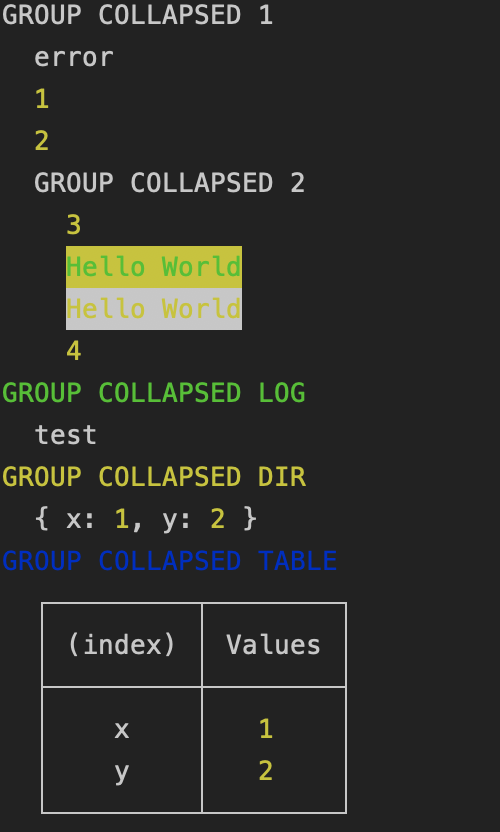
 ### Group Collapsed Type apis
```javascript
import {
error,
warn,
info,
groupCollapsed,
groupCollapsedLog,
groupCollapsedDir,
groupCollapsedTable,
} from 'seogi';
groupCollapsed(
[
() => error('error'),
1,
2,
() =>
groupCollapsed(
[
3,
() => info('Hello World', { color: 'green', backgroundColor: 'yellow' }),
() => warn('Hello World', { color: 'yellow', backgroundColor: 'white' }),
4,
],
'GROUP COLLAPSED 2'
),
],
'GROUP COLLAPSED 1'
);
groupCollapsedLog('test', null, 'GROUP COLLAPSED LOG', { color: 'green' });
groupCollapsedDir({ x: 1, y: 2 }, 'GROUP COLLAPSED DIR', { color: 'yellow' });
groupCollapsedTable({ x: 1, y: 2 }, 'GROUP COLLAPSED TABLE', { color: 'blue' });
```
### Group Collapsed Type apis
```javascript
import {
error,
warn,
info,
groupCollapsed,
groupCollapsedLog,
groupCollapsedDir,
groupCollapsedTable,
} from 'seogi';
groupCollapsed(
[
() => error('error'),
1,
2,
() =>
groupCollapsed(
[
3,
() => info('Hello World', { color: 'green', backgroundColor: 'yellow' }),
() => warn('Hello World', { color: 'yellow', backgroundColor: 'white' }),
4,
],
'GROUP COLLAPSED 2'
),
],
'GROUP COLLAPSED 1'
);
groupCollapsedLog('test', null, 'GROUP COLLAPSED LOG', { color: 'green' });
groupCollapsedDir({ x: 1, y: 2 }, 'GROUP COLLAPSED DIR', { color: 'yellow' });
groupCollapsedTable({ x: 1, y: 2 }, 'GROUP COLLAPSED TABLE', { color: 'blue' });
```
 ### getStyleMsg apis
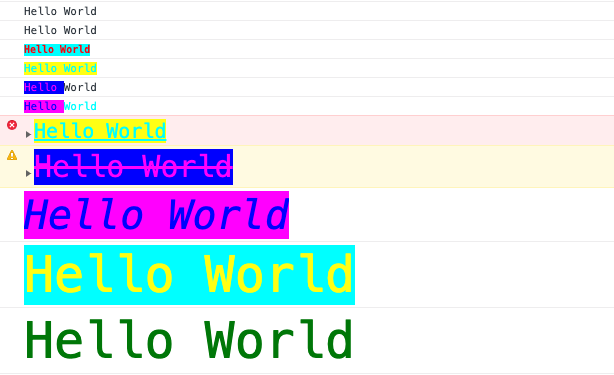
If you need make console arguments that use to native api, you can use this `getStyleMsg API`
```javascript
import { getStyleMsg } from 'seogi';
console.log(...getStyleMsg('Hello World'));
console.log(...getStyleMsg(['Hello', 'World']));
console.log(
...getStyleMsg('Hello World', { color: 'red', backgroundColor: 'cyan', fontWeight: 'bold', fontSize: '10px' })
);
console.log(...getStyleMsg(['Hello', 'World'], { color: 'cyan', backgroundColor: 'yellow' }));
console.log(...getStyleMsg(['Hello', 'World'], [{ color: 'magenta', backgroundColor: 'blue' }]));
console.log(...getStyleMsg(['Hello', 'World'], [{ color: 'blue', backgroundColor: 'magenta' }, { color: 'cyan' }]));
```
### Functions
### getStyleMsg apis
If you need make console arguments that use to native api, you can use this `getStyleMsg API`
```javascript
import { getStyleMsg } from 'seogi';
console.log(...getStyleMsg('Hello World'));
console.log(...getStyleMsg(['Hello', 'World']));
console.log(
...getStyleMsg('Hello World', { color: 'red', backgroundColor: 'cyan', fontWeight: 'bold', fontSize: '10px' })
);
console.log(...getStyleMsg(['Hello', 'World'], { color: 'cyan', backgroundColor: 'yellow' }));
console.log(...getStyleMsg(['Hello', 'World'], [{ color: 'magenta', backgroundColor: 'blue' }]));
console.log(...getStyleMsg(['Hello', 'World'], [{ color: 'blue', backgroundColor: 'magenta' }, { color: 'cyan' }]));
```

### Functions
ArrayReturn console arguments that included a style or not
Write log message on the console tab
Write error message on the console tab
Write warn message on the console tab
Write information message on the console tab
Write debug message on the console tab It will be call the log api without style at only IE9 to IE10 browser
Write object information on the console tab It will be call a log api at only IE10 browser
Write log message on the console tab when return true by assertion function
Write object information in the table
Write group message on the console tab This api cannot use at IE9 to IE10 browser because browser compatibility issue
Write groupCollapsed message on the console tab This api cannot use at IE9 to IE10 browser because browser compatibility issue
Write group message with log message on the console tab This api cannot use at IE9 to IE10 browser because browser compatibility issue
Write group message with object information on the console tab This api cannot use at IE9 to IE10 browser because browser compatibility issue
Write group message with object information on the console tab This api cannot use at IE9 to IE10 browser because browser compatibility issue
Write groupCollapsed message with log message on the console tab This api cannot use at IE9 to IE10 browser because browser compatibility issue
Write groupCollapsed message with object information on the console tab This api cannot use at IE9 to IE10 browser because browser compatibility issue
Write groupCollapsed message with object information on the console tab This api cannot use at IE9 to IE10 browser because browser compatibility issue
Draw image that included the text on the console tab This api can use at only browser that supported canvas api
Array
Return console arguments that included a style or not
**Kind**: global function
**Returns**: Array - Console arguments that included a style or not
| Param | Type | Description |
| --- | --- | --- |
| msg | string \| Array.<string> | console message |
| style | Object \| Array.<Object> | style object |
**Example**
```js
console.log(...getStyleMsg('Hello World', { color: 'red }));
```
### log(msg, style)
Write log message on the console tab
**Kind**: global function
| Param | Type | Description |
| --- | --- | --- |
| msg | string \| Array.<string> | console message |
| style | Object \| Array.<Object> | style object |
**Example**
```js
log('Hello World', { color: 'red' });
```
### error(msg, style)
Write error message on the console tab
**Kind**: global function
| Param | Type | Description |
| --- | --- | --- |
| msg | string \| Array.<string> | console message |
| style | Object \| Array.<Object> | style object |
**Example**
```js
error('Hello World', { color: 'red' });
```
### warn(msg, style)
Write warn message on the console tab
**Kind**: global function
| Param | Type | Description |
| --- | --- | --- |
| msg | string \| Array.<string> | console message |
| style | Object \| Array.<Object> | style object |
**Example**
```js
warn('Hello World', { color: 'red' });
```
### info(msg, style)
Write information message on the console tab
**Kind**: global function
| Param | Type | Description |
| --- | --- | --- |
| msg | string \| Array.<string> | console message |
| style | Object \| Array.<Object> | style object |
**Example**
```js
info('Hello World', { color: 'red' });
```
### debug(msg, style)
Write debug message on the console tab
It will be call the log api without style at only IE9 to IE10 browser
**Kind**: global function
| Param | Type | Description |
| --- | --- | --- |
| msg | string \| Array.<string> | console message |
| style | Object \| Array.<Object> | style object |
**Example**
```js
debug('Hello World', { color: 'red' });
```
### dir(value)
Write object information on the console tab
It will be call a log api at only IE10 browser
**Kind**: global function
| Param | Type | Description |
| --- | --- | --- |
| value | Object | An any value |
**Example**
```js
dir({ x: 1 });
```
### assert(assertion, msg, style)
Write log message on the console tab when return true by assertion function
**Kind**: global function
| Param | Type | Description |
| --- | --- | --- |
| assertion | function | assertion function |
| msg | string \| Array.<string> | console message |
| style | Object \| Array.<Object> | style object |
**Example**
```js
assert(() => true, 'Hello World');
```
### table(value)
Write object information in the table
**Kind**: global function
| Param | Type | Description |
| --- | --- | --- |
| value | Object | An any value |
**Example**
```js
table({ x: 1 });
```
### group([value], [label], style)
Write group message on the console tab
This api cannot use at IE9 to IE10 browser because browser compatibility issue
**Kind**: global function
| Param | Type | Default | Description |
| --- | --- | --- | --- |
| [value] | Object | [] | group list |
| [label] | string \| Array.<string> | "'group'" | label |
| style | Object \| Array.<Object> | | style object |
**Example**
```js
group([1, 2, 3], 'GROUP 1')
```
### groupCollapsed([value], [label], style)
Write groupCollapsed message on the console tab
This api cannot use at IE9 to IE10 browser because browser compatibility issue
**Kind**: global function
| Param | Type | Default | Description |
| --- | --- | --- | --- |
| [value] | Object | [] | groupCollapsed list |
| [label] | string \| Array.<string> | "'group'" | label |
| style | Object \| Array.<Object> | | style object |
**Example**
```js
groupCollapsed([1, 2, 3], 'GROUP 1')
```
### groupLog(msg, style, [label], labelStyle)
Write group message with log message on the console tab
This api cannot use at IE9 to IE10 browser because browser compatibility issue
**Kind**: global function
| Param | Type | Default | Description |
| --- | --- | --- | --- |
| msg | string \| Array.<string> | | console message |
| style | Object \| Array.<Object> | | style object |
| [label] | string \| Array.<string> | "'group'" | label |
| labelStyle | Object \| Array.<Object> | | style object |
**Example**
```js
groupLog(1, null, 'GROUP LOG', { color: 'white' });
```
### groupTable(value, [label], labelStyle)
Write group message with object information on the console tab
This api cannot use at IE9 to IE10 browser because browser compatibility issue
**Kind**: global function
| Param | Type | Default | Description |
| --- | --- | --- | --- |
| value | Object | | object value |
| [label] | string \| Array.<string> | "'group'" | label |
| labelStyle | Object \| Array.<Object> | | style object |
**Example**
```js
groupTable({ x: 1, y: 2 }, 'GROUP TABLE', { color: 'magenta' });
```
### groupDir(value, [label], labelStyle)
Write group message with object information on the console tab
This api cannot use at IE9 to IE10 browser because browser compatibility issue
**Kind**: global function
| Param | Type | Default | Description |
| --- | --- | --- | --- |
| value | Object | | object value |
| [label] | string \| Array.<string> | "'group'" | label |
| labelStyle | Object \| Array.<Object> | | style object |
**Example**
```js
groupDir({ x: 1, y: 2 }, 'GROUP DIR', { color: 'cyan' });
```
### groupCollapsedLog(msg, style, [label], labelStyle)
Write groupCollapsed message with log message on the console tab
This api cannot use at IE9 to IE10 browser because browser compatibility issue
**Kind**: global function
| Param | Type | Default | Description |
| --- | --- | --- | --- |
| msg | string \| Array.<string> | | console message |
| style | Object \| Array.<Object> | | style object |
| [label] | string \| Array.<string> | "'group'" | label |
| labelStyle | Object \| Array.<Object> | | style object |
**Example**
```js
groupCollapsedLog('test', null, 'GROUP COLLAPSED LOG', { color: 'green' });
```
### groupCollapsedTable(value, [label], labelStyle)
Write groupCollapsed message with object information on the console tab
This api cannot use at IE9 to IE10 browser because browser compatibility issue
**Kind**: global function
| Param | Type | Default | Description |
| --- | --- | --- | --- |
| value | Object | | object value |
| [label] | string \| Array.<string> | "'group'" | label |
| labelStyle | Object \| Array.<Object> | | style object |
**Example**
```js
groupCollapsedTable({ x: 1, y: 2 }, 'GROUP COLLAPSED TABLE', { color: 'blue' });
```
### groupCollapsedDir(value, [label], labelStyle)
Write groupCollapsed message with object information on the console tab
This api cannot use at IE9 to IE10 browser because browser compatibility issue
**Kind**: global function
| Param | Type | Default | Description |
| --- | --- | --- | --- |
| value | Object | | object value |
| [label] | string \| Array.<string> | "'group'" | label |
| labelStyle | Object \| Array.<Object> | | style object |
**Example**
```js
groupCollapsedDir({ x: 1, y: 2 }, 'GROUP COLLAPSED DIR', { color: 'yellow' });
```
### image(url, [option])
Draw image that included the text on the console tab
This api can use at only browser that supported canvas api
**Kind**: global function
| Param | Type | Default | Description |
| --- | --- | --- | --- |
| url | string | | Image url |
| [option] | Object | { x = 0, y = 0, font = "10px 'serif'" } | Font style object |
| option.text | string | | Text on the image |
| option.x | number | | X-axis of the text |
| option.y | number | | Y-axis of the text |
| option.font | string | | Font style |
**Example**
```js
image('https://pubpress.net/houseads/2018/03/15/wordads/3-8-300x250.png', { text: 'Hello World', color: 'azure' });
```