# SenangWebs Kiln (SWK)
A lightweight, powerful 3D modeling editor library built on Three.js. Create interactive 3D modeling experiences in your web applications with minimal code.
[](LICENSE.md)
[](https://threejs.org/)
[](https://github.com/bookklik-technologies/senangstart-icons)
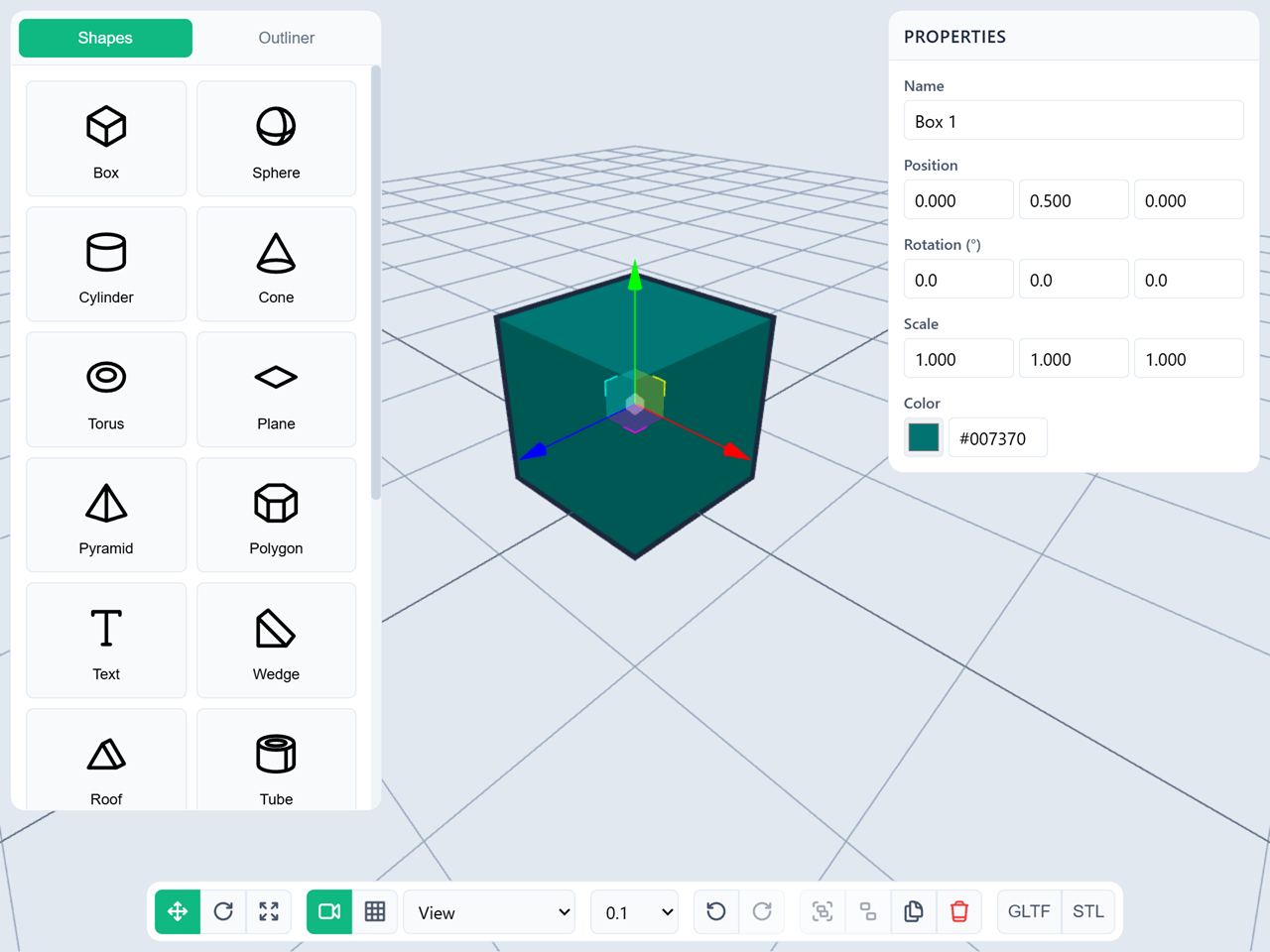
## Features
- **19 Built-in Primitives**: Box, Sphere, Cylinder, Cone, Torus, Plane, Pyramid, Torus Knot, Platonic solids, Polygon, Wedge, Half Cylinder, Half Sphere, Roof, Heart, and Tube
- **Text Support**: 3D text with multiple fonts (Sans, Serif, Monospace)
- **Selection System**: Single and multi-select with visual outlining
- **Transform Controls**: Translate, rotate, and scale with snapping
- **Grouping**: Organize multiple objects into groups (nested groups are not supported)
- **Undo/Redo**: Full history system with 50 action stack
- **Complete UI**: Optional panels for shapes, properties, outliner, and controls
- **Export**: GLTF, GLB, STL, and JSON (save/load) format support
- **Dual Camera Modes**: Perspective and orthographic views
- **Keyboard Shortcuts**: T/R/S for transform modes, Ctrl+Z/Y for undo/redo
- **Responsive**: Works on desktop and mobile devices
- **Customizable**: Extensive configuration options
- **Lightweight**: ~205KB gzipped JavaScript + ~10KB CSS (production build)
## Installation
### Via CDN (Easiest)
```html
```
### Via NPM (Coming Soon)
```bash
npm install senangwebs-kiln
```
## Quick Start
### Method 1: JavaScript API (Headless Mode)
Perfect for integrating into existing applications with custom UI.
```html
```
### Method 2: HTML Attributes (Full UI Mode)
Perfect for quick prototyping or standalone 3D modeling tools.
```html
```
## Examples
See the `examples/` folder for complete working examples:
- `js-init.html` - JavaScript API initialization (headless mode)
- `html-init.html` - HTML attributes initialization (full UI mode)
## Core Concepts
### Shapes
Create any built-in primitive or 3D text:
```javascript
const box = editor.addShape("box", { width: 2, height: 2, depth: 2 });
const sphere = editor.addShape("sphere", { radius: 1 });
const text = editor.addShape("text", { text: "Hello", fontSize: 1 });
```
### Selection
Select objects to transform or edit:
```javascript
// Single selection
editor.selectObject(box);
// Multi-selection (Ctrl+Click in UI)
editor.addToSelection(sphere);
// Get selected objects
const selected = editor.getSelectedObjects();
// Deselect all
editor.deselectAll();
```
### Transforms
Move, rotate, and scale objects:
```javascript
// Set transform mode
editor.setTransformMode("translate"); // 'rotate', 'scale'
// Set transform space
editor.setTransformSpace("local"); // or 'world'
// Enable snapping
editor.setSnapUnit(0.5); // Snap to 0.5 units
```
### Grouping
Organize multiple objects:
```javascript
// Group selected objects
const group = editor.groupSelected();
// Ungroup
editor.ungroupSelected();
// Check if object is a group
editor.isGroupContainer(object);
```
### History
Undo and redo actions:
```javascript
editor.undo();
editor.redo();
// Check availability
if (editor.canUndo()) {
editor.undo();
}
```
### Cleanup
Destroy an editor before removing its container or replacing it with another
instance. This stops rendering, removes window and canvas listeners, and
releases Three.js controls and WebGL resources.
```javascript
editor.destroy();
```
### Export
Export to industry-standard formats:
```javascript
// Export entire scene as GLTF
await editor.exportGLTF();
// Export as binary GLB
await editor.exportGLB();
// Export as STL
await editor.exportSTL();
// Export selected objects only
await editor.exportSelected('gltf');
// Export scene as JSON (save file)
await editor.exportJSON({ filename: 'my-scene' });
// Import scene from JSON (load file)
// From a File object (e.g., from )
const fileInput = document.getElementById('file-input');
fileInput.addEventListener('change', async (e) => {
const file = e.target.files[0];
await editor.importJSON(file);
});
// From a JSON string or object
const saveData = { ... };
await editor.importJSON(saveData);
```
## Keyboard Shortcuts
- **T** - Translate mode
- **R** - Rotate mode
- **S** - Scale mode
- **Delete/Backspace** - Delete selected objects
- **Ctrl+Z** - Undo
- **Ctrl+Y** or **Ctrl+Shift+Z** - Redo
- **Ctrl+Click** - Multi-select (add to selection)
## Configuration
Full configuration options:
```javascript
const editor = new SWK("#editor", {
// Container & Sizing
width: "100%",
height: "100%",
// Viewport
viewportBackground: "#e2e8f0",
outlineColor: "#10b981",
// Grid
grid: {
show: true,
size: 20,
divisions: 20,
centerColor: "#888888",
linesColor: "#cccccc",
},
// Camera
camera: {
mode: "perspective", // 'perspective' or 'orthographic'
fov: 75,
near: 0.1,
far: 1000,
position: [5, 5, 5],
},
// Transform
transform: {
mode: "translate", // 'translate', 'rotate', 'scale'
space: "local", // 'local' or 'world'
snapUnit: 0.1,
},
// UI
ui: {
enabled: false, // Enable full UI panels
panels: {
shapes: true, // Shape creation panel
properties: true, // Property editor panel
outliner: true, // Scene hierarchy panel
controls: true, // Bottom toolbar
},
},
// History
history: {
enabled: true,
maxSize: 50, // Maximum undo stack size
},
// Features
features: {
grouping: true,
undo: true,
export: true,
},
});
```
## API Reference
See [API.md](docs/API.md) for complete API documentation.
### Core Methods
- `addShape(type, options)` - Create a shape
- `deleteObject(mesh)` - Delete an object
- `duplicateObject(mesh)` - Duplicate an object
- `selectObject(mesh)` - Select an object
- `deselectAll()` - Clear selection
- `getSelectedObjects()` - Get selected objects
- `getAllObjects()` - Get all objects in scene
### Transform Methods
- `setTransformMode(mode)` - Set transform mode
- `setTransformSpace(space)` - Set transform space
- `setSnapUnit(value)` - Set snap unit
### Group Methods
- `groupSelected()` - Group selected objects
- `ungroupSelected()` - Ungroup selected group
- `isGroupContainer(object)` - Check if object is a group
### History Methods
- `undo()` - Undo last action
- `redo()` - Redo last undone action
- `canUndo()` - Check if undo is available
- `canRedo()` - Check if redo is available
### Export Methods
- `exportGLTF(options)` - Export as GLTF
- `exportGLB(options)` - Export as GLB
- `exportSTL(options)` - Export as STL
- `exportSelected(format, options)` - Export selected only
- `exportJSON(options)` - Export scene as JSON (save file)
- `importJSON(source)` - Import scene from JSON (load file)
### Camera Methods
- `setCameraMode(mode)` - Set camera mode
- `resetCamera()` - Reset camera position
### Events
```javascript
editor.on("initialized", () => {});
editor.on("objectAdded", (object) => {});
editor.on("objectRemoved", (object) => {});
editor.on("selectionChanged", (selected, deselected) => {});
editor.on("transformModeChanged", (mode) => {});
editor.on("groupCreated", (group) => {});
editor.on("historyChanged", (data) => {});
editor.on("exportComplete", (data) => {});
```
## Development
### Build from Source
```bash
# Install dependencies
npm install
# Development build
npm run build:dev
# Production build
npm run build:prod
# Watch mode
npm run watch
```
## Contributing
Contributions are welcome! Please feel free to submit a Pull Request.
## License
MIT License - see [LICENSE.md](LICENSE.md) for details
## Contributing
Contributions are welcome! Please feel free to submit issues and pull requests.