# SenangWebs Chatbot (SWC)
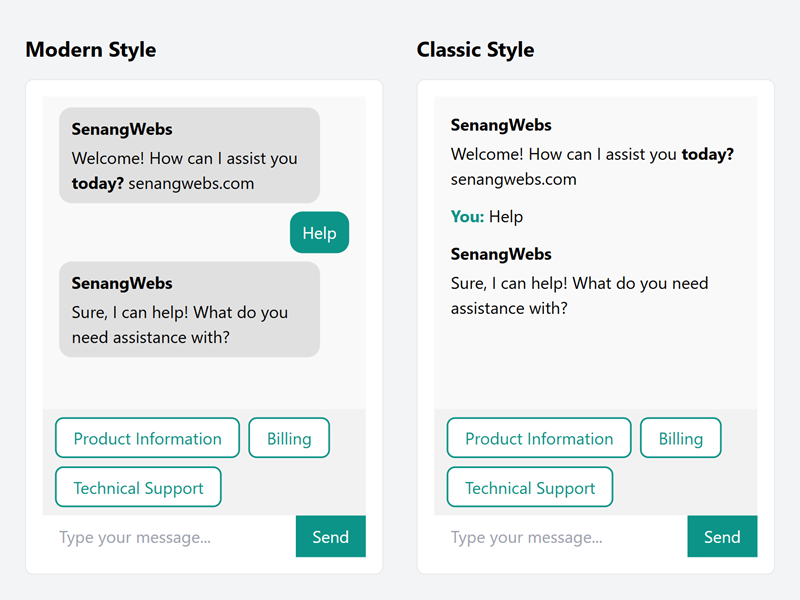
An embeddable JavaScript chatbot with keyword conversations, OpenRouter-compatible AI, and hybrid routing. It ships a UMD JavaScript bundle and a separate stylesheet, with modern and classic layouts.
## Installation
```bash
npm install senangwebs-chatbot
```
With a browser bundler:
```javascript
import * as SWC from "senangwebs-chatbot";
import "senangwebs-chatbot/dist/swc.css";
const { SenangWebsChatbot, initializeChatbot, defaultKnowledgeBase, OpenRouterAPI, ContextManager } = SWC;
```
With CommonJS:
```javascript
const { SenangWebsChatbot, initializeChatbot, defaultKnowledgeBase, OpenRouterAPI, ContextManager } = require("senangwebs-chatbot");
```
The package entry is UMD, intended for CommonJS or a browser bundler; it is not a native browser ES module. Requiring it without a DOM is supported. For CDN use, pin a released version:
```html
```
These CDN examples target the next 1.4.0 release. Until it is published, use the local `dist` assets. Both readable and minified distributions expose `SWC`, `initializeChatbot`, `OpenRouterAPI`, and `ContextManager` in the browser. The main chatbot class is `SWC.SenangWebsChatbot`.
## Keyword conversations
```html
```
Widgets initialize automatically when the DOM is ready. Repeated calls to `initializeChatbot()` do not duplicate an existing widget. For a custom knowledge base, add `data-swc-manual-init` before loading the bundle:
```html
```
Each node requires a unique string `id`, a `keyword` array of nonempty strings, and a string `reply`. Optional `options` require string `label` and `reply_id` fields; every knowledge-base option must refer to an existing node. An empty knowledge base is supported. Partial keyword matching is case-insensitive. Hybrid mode uses AI when there is no match or the match confidence is below `hybridThreshold`.
Knowledge replies support sanitized HTML. DOMPurify is bundled, using its HTML profile with style elements disabled. User messages, AI output, fallback replies, and errors render as literal text. These same rules apply when restoring history; legacy bot messages without a source use sanitized HTML.
## External knowledge base
Use a JSON file containing `{ "knowledgeBase": [...] }` with the same node structure. Mark the container for manual initialization so auto-init does not install the default knowledge base before the fetch finishes:
```html
```
There is a runnable example in `examples/advanced-features/03-external-knowledge-base.html`. `data-swc-load` loads conversation history, not a knowledge base.
## AI and hybrid conversations
Keep provider keys on your server. Point the widget at an exact proxy endpoint:
```html
```
Set the mode to `hybrid` to use keyword replies first. Set `data-swc-api-streaming="false"` for ordinary JSON completions. Streaming requests remain stoppable when a reply delay is configured, including before the first token arrives.
`data-swc-api-base-url` / `baseURL` specify an API root: the client appends `/chat/completions`. `data-swc-api-endpoint` / `endpointURL` specify the complete endpoint and take precedence over the root. Relative URLs resolve against the page's base URL. Migrate proxy URLs formerly shown in the base-url attribute to the endpoint attribute.
The proxy receives an OpenAI-compatible POST body with `model`, `messages`, `max_tokens`, `temperature`, and `stream`. Return a chat completion JSON object when `stream` is false, or SSE when it is true. Proxy requests without a configured key send only the `Content-Type` application header. Attribution headers are sent only to `openrouter.ai`; a supplied key adds `Authorization`. Browser cookies follow fetch's default same-origin policy.
The examples in `examples/proxy-servers/` illustrate the transport contract. Server authentication, abuse prevention, CORS, and cost controls must be configured by the host application; those examples are not a production security certification.
Direct OpenRouter access with `apiKey` / `data-swc-api-key` remains available for local experiments. Any key configured in a browser is visible to visitors.
## Configuration
| Attribute | Default / meaning |
|---|---|
| `data-swc` | Marks a widget container |
| `data-swc-manual-init` | Skip automatic/default initialization; pass a knowledge base explicitly |
| `data-swc-bot-name` | `Bot` |
| `data-swc-theme-color` | `#007bff`; choose a color with sufficient contrast |
| `data-swc-chat-display` | `classic`; also accepts `modern` |
| `data-swc-reply-duration` | `0`; nonnegative delay in milliseconds |
| `data-swc-load` | History JSON or a relative/absolute history URL |
| `data-swc-api-mode` | `keyword-only`; `hybrid` when an API URL or key is supplied; also accepts `ai-only` |
| `data-swc-api-key` | Optional for proxies; required for OpenRouter |
| `data-swc-api-base-url` | API root; default `https://openrouter.ai/api/v1` |
| `data-swc-api-endpoint` | Exact proxy/completion URL; overrides the root |
| `data-swc-api-model` | `openai/gpt-3.5-turbo`; use a model supported by your provider |
| `data-swc-api-streaming` | `true` |
| `data-swc-api-max-tokens` | `500`; integer from 1 to 32768 |
| `data-swc-api-temperature` | `0.7`; number from 0 to 2 |
| `data-swc-system-prompt` | `You are a helpful assistant.` |
| `data-swc-hybrid-threshold` | `0.3`; number from 0 to 1 |
| `data-swc-context-max-messages` | `10`; integer from 0 to 10000 |
| `data-swc-context-max-tokens` | `2000`; nonnegative integer, estimated conversation tokens |
| `data-swc-api-timeout` | `30000`; milliseconds for the whole request, including retries and body consumption; `0` disables |
| `data-swc-api-retry-attempts` | `2`; integer from 0 to 10 |
| `data-swc-api-retry-delay` | `1000`; nonnegative base backoff in milliseconds |
| `data-swc-debug` | `false`; enables diagnostic logging |
Invalid numeric settings are rejected instead of silently producing a broken widget. Valid zero settings are preserved. Initialization failures emit `swc:error` and do not prevent other containers from initializing. The active user question is always sent, even when memory is disabled or the question exceeds the memory budget. The system prompt and active question are separate from the estimated conversation-memory budget; token estimates do not guarantee a provider's context limit.
## JavaScript API
```javascript
const bot = new SWC.SenangWebsChatbot(knowledgeBase, { botName: "Support", themeColor: "#0D9488" }, {
mode: "hybrid", endpointURL: "https://example.com/api/chat", streaming: true,
maxTokens: 500, temperature: 0.7, systemPrompt: "Be helpful.",
contextMaxMessages: 10, contextMaxTokens: 2000, hybridThreshold: 0.3,
timeout: 30000, retryAttempts: 2, retryDelay: 1000
});
bot.init();
const response = await bot.handleInput("hello", {
onStart: () => {},
onChunk: ({ content, fullContent }) => {},
onComplete: ({ content, model, cancelled }) => {},
onError: error => {}
});
```
The constructor creates the conversation engine. `initializeChatbot(knowledgeBase)` mounts UI into marked containers; access each mounted engine through `element.chatbotInstance`.
| Method | Behavior |
|---|---|
| `init()` | Select welcome/first node and return its reply/options |
| `handleInput(input, callbacks)` | Return a Promise for a reply; overlapping AI input returns `busy: true` without recording it |
| `handleOptionSelection(replyId)` | Return a keyword reply/options |
| `cancelAIResponse()` | Stop generation; return whether an AI request was active |
| `getAPIStatus()` | Configuration/status without exposing the API key |
| `exportHistory()` | Export a JSON string |
| `getHistory()` | Return a detached history object |
| `getCurrentState()` | Current node and message-count metadata |
| `loadHistory(data)` | Atomically import history; return `{ success, messageCount, messages }` or `{ success: false, error, messages: [] }` |
| `clearHistory()` | Cancel pending work, clear AI context, restore welcome |
| `destroy()` | Idempotent teardown; cancel work and remove owned UI while preserving host content |
After `destroy()`, initialize the container again. For containers with `data-swc-manual-init`, pass the knowledge base again. New input or history mutations on a destroyed engine are rejected.
Cancellation retains any partial AI text as one bot message, returns `cancelled: true`, and invokes `onComplete` with that flag rather than `onError`. Clear/load/destroy invalidate pending callbacks and discard their results. Transient network failures, HTTP 429, and HTTP 5xx may retry before content is delivered; cancellation, timeout, malformed/provider stream events, consumer callback exceptions, and partial responses do not retry. Completion and error callbacks are mutually exclusive.
`OpenRouterAPI` and `ContextManager` are also exported. The client supports `sendMessage(messages, onChunk, onComplete, onError)`, `cancel()`, and `getModelInfo()`. Context supports `addMessage(role, content)`, `getContext(includeSystem)`, `clear()`, `getStats()`, `getLastMessages(count)`, `setSystemPrompt(prompt)`, `summarize()`, `export()`, `import(data)`, and `injectKnowledge(text)`. Standalone clients accept the transport fields above without the `mode` or context fields. Relative endpoints require a browser document; server-side clients need absolute URLs.
## History and events
```json
{
"version": "2.0",
"botName": "Support",
"themeColor": "#0D9488",
"messages": [
{ "type": "user", "content": "Hello" },
{ "type": "bot", "content": "Welcome", "source": "keyword", "nodeId": "welcome" }
],
"currentNodeId": "welcome"
}
```
Both 1.x and 2.x history formats are accepted. Types must be `user` or `bot`; content must be a string. Optional `source` is `keyword`, `api`, `fallback`, or `error`. Invalid imports leave the current conversation unchanged. Failed declarative history loading restores welcome. External history loading disables input until it settles; clear/load/destroy can invalidate that load.
Mounted widgets dispatch these events on their container:
| Event | Detail fields (plus `timestamp`) |
|---|---|
| `swc:history-exported` | `messageCount`, `historyJSON` |
| `swc:history-loaded` | `messageCount` |
| `swc:history-cleared` | No additional fields |
| `swc:error` | `code: "configuration"`, `message` |
```javascript
const element = document.querySelector("[data-swc]");
element.addEventListener("swc:history-exported", event => {
const history = JSON.parse(event.detail.historyJSON);
});
```
History may contain personal information. Storage, retention, and export controls belong to the host application; the library does not persist history automatically.
## Styling and accessibility
Override `.swc-bot-message`, `.swc-user-message`, `.swc-input-container`, and `.swc-options-container` in your application stylesheet. The transcript is a labeled, focusable log; a separate polite status region announces completed replies and loading state without announcing every streamed token. Inputs have accessible labels, buttons do not submit enclosing forms, and focus remains visible. Reduced-motion settings disable animations and smooth scrolling. Custom theme colors require host-side contrast verification.
## Development and release
```bash
npm ci
npm run build
npm run check:package
npx playwright install chromium firefox webkit
npm run test:browser
```
The build emits exactly `dist/swc.css`, `dist/swc.min.css`, `dist/swc.js`, and `dist/swc.min.js`. Run the unit suite with `npm test` **only after explicit permission**, following AGENTS.md. CI runs build, packaging, advisory, and browser checks; unit checks require the manual workflow's approval checkbox. See [SECURITY.md](SECURITY.md) for reporting vulnerabilities.
Serve examples with `node scripts/serve-examples.cjs`, then open `http://127.0.0.1:8777/examples/index.html`. `npm run dev` rebuilds assets in watch mode.
The documented browser baseline remains Chrome 90+, Firefox 88+, Safari 14+, Edge 90+, and Opera 76+. Automated browser checks use current Chromium, Firefox, and WebKit; these checks do not certify every historical minimum version.
## License
MIT. Bundled DOMPurify licensing is reproduced in [THIRD_PARTY_LICENSES.md](THIRD_PARTY_LICENSES.md).