# semantic-ui-react-datetimeinput
Time and Date input controls with step buttons for [Semantic UI React]
[![version][version-badge]][package]
[![MIT License][license-badge]][license]
DateInput
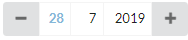
TimeInput
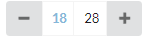
DateInput
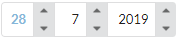
TimeInput
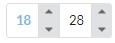
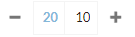
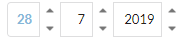
Controls with large + and - buttons are ideal for mobile sites. These controls are specifically designed for analytics purposes
where you want to specify "start" date/time and "end" date/time. These can be specified with valueType prop of the components.
Double-clicking "start" type input value, sets its value to minimum value and double-clicking "end" type input value sets its value to maximum value.
Additionally, for example, Time input control can be configured to increment/decrement minutes by 5, 10 or 15 minutes whichever is mostly suitable for
your analytics need. Similarly Date input control by default decrements/increments day value on double click by one week (7 days) and month value
on double click by one quarter (3 months). All of these increment/decrement amounts for each part of time and date are fully configurable.
## Prerequisites
"react": "^16.0.0",
"react-dom": "^16.0.0",
"semantic-ui-react": "^0.87.0"
## Installation
npm install --save semantic-ui-react-datetimeinput
## Demo
TimeInput, DateInput and DateTimeInput [demo]
## Example usage
import React from 'react';
import { DateInput, TimeInput } from 'semantic-ui-react-datetimeinput';
class DateAndTimeInputExample extends React.Component {
constructor(props) {
super(props);
this.state = {
dateValue: new Date()
};
}
changeDateValue = (newDateValue) => {
this.setState({ dateValue: newDateValue });
}
render() => {(
)};
}
Render TimeInput, DateInput or DateTimeInput with step buttons on outside of control (this is default behavior, if buttonPlacement is not specified)
Render TimeInput, DateInput or DateTimeInput with step buttons inside control
## Mandatory TimeInput, DateInput and DateTimeInput properties
dateValue: Date,
onDateValueChange: (newDateValue: Date) => void,
## Common optional properties
| property | description |
| --------------------------| -------------------------------------------------------------------------------------------------------------------------------|
| buttonPlacement | Specifies how step buttons are placed |
| focusColor | Specifies color for focused input text |
| doubleClickDelayInMillis | Specifies button double click delay in milliseconds |
| showTooltipDelayInMillis | Specifies a delay in milliseconds for showing a tooltip |
| showTooltips | Specifies if tooltips are shown |
| size | Specifies the size of the control |
| valueType | Specifies if value type, ie. start or end time/date or unspecified |
## Common optional property types
buttonPlacement: 'buttonsInside' | 'buttonsOutside',
focusColor: string,
doubleClickDelayInMillis: number,
showTooltipDelayInMillis: number,
showTooltips: boolean,
size: 'mini' | 'small' | 'large' | 'big' | 'huge' | 'massive',
valueType: 'start' | 'end' | 'unspecified'
## Default values for common optional properties
buttonPlacement: 'buttonsOutside',
focusColor: '#85b7d9',
doubleClickDelayInMillis: 250,
showTooltipDelayInMillis: 500,
showTooltips: true,
size: 'small',
valueType: 'start'
## TimeInput optional properties
| property | description |
| ----------------------------| -------------------------------------------------------------------------------------------------------------------------------------|
| hourSingleClickStepCount | Specifies how many hours a single click of a button increments or decrements current date value |
| hourDoubleClickStepCount | Specifies how many hours a double click of a button increments or decrements current date value, zero value disables double clicks |
| minuteSingleClickStepCount | Specifies how many minutes a single click of a button increments or decrements current date value |
| minuteDoubleClickStepCount | Specifies how many minutes a double click of a button increments or decrements current date value, zero value disables double clicks|
## TimeInput optional property types
hourSingleClickStepCount: number,
hourDoubleClickStepCount: number,
minuteSingleClickStepCount: number,
minuteDoubleClickStepCount: number
## Default values for TimeInput optional properties
hourSingleClickStepCount: 1,
hourDoubleClickStepCount: 4,
minuteSingleClickStepCount: 1,
minuteDoubleClickStepCount: 5
## DateInput optional properties
| property | description |
| ----------------------------| ------------------------------------------------------------------------------------------------------------------------------------|
| daySingleClickStepCount | Specifies how many days a single click of a button increments or decrements current date value |
| dayDoubleClickStepCount | Specifies how many days a double click of a button increments or decrements current date value, zero value disables double clicks |
| monthSingleClickStepCount | Specifies how many months a single click of a button increments or decrements current date value |
| monthDoubleClickStepCount | Specifies how many months a double click of a button increments or decrements current date value, zero value disables double clicks|
| yearSingleClickStepCount | Specifies how many years a single click of a button increments or decrements current date value |
| yearDoubleClickStepCount | Specifies how many years a double click of a button increments or decrements current date value, zero value disables double clicks |
## TimeInput optional property types
daySingleClickStepCount: number,
dayDoubleClickStepCount: number,
monthSingleClickStepCount: number,
monthDoubleClickStepCount: number,
yearhSingleClickStepCount: number,
yearDoubleClickStepCount: number
## Default values for TimeInput optional properties
daySingleClickStepCount: 1,
dayDoubleClickStepCount: 7,
monthSingleClickStepCount: 1,
monthDoubleClickStepCount: 3,
yearSingleClickStepCount: 1,
yearhDoubleClickStepCount: 5
## Keyboard actions
Following keyboard actions are available when a certain input is focused
|key |action |
|---------------|---------------------------------------------------|
|ArrowUp | Increments value like a button single click |
|ArrowDown | Decrements value like a button single click |
|+ | Increments value like a button single click |
|- | Decrements value like a button single click |
|PageUp | Increments value like a button double click |
|PageDown | Decrements value like a double button click |
|Home | Sets value to minimum value |
|End | Sets value to maximum value |
|Ctrl+ArrowUp | Increments value like a button double click |
|Ctrl+ArrowDown | Decrements value like a button double click |
|Ctrl + + | Increments value like a button double click |
|Ctrl + - | Decrements value like a button double click |
## Styling example

styles.css
.timeInput .ui.button, .dateInput .ui.button {
background-color: transparent;
}
.dateTimeInput {
display: flex;
}
.dateTimeInput .timeInput {
margin-left: 2em;
}
Applying CSS using className
## License
MIT License
[license-badge]: https://img.shields.io/badge/license-MIT-green
[license]: https://github.com/pksilen/semantic-ui-react-datetimeinput/blob/master/LICENSE
[version-badge]: https://img.shields.io/npm/v/semantic-ui-react-datetimeinput.svg?style=flat-square
[package]: https://www.npmjs.com/package/semantic-ui-react-datetimeinput
[demo]: https://pksilen.github.io/semantic-ui-react-datetimeinput/
[Semantic UI React]: https://react.semantic-ui.com/