 # SelectPage
A simple style and powerful selection jQuery plugin, including ajax remote data, autocomplete, pagination, tags, i18n and keyboard navigation features
# SelectPage
A simple style and powerful selection jQuery plugin, including ajax remote data, autocomplete, pagination, tags, i18n and keyboard navigation features







 ](http://godban.github.io/browsers-support-badges/)IE / Edge | [
 ](http://godban.github.io/browsers-support-badges/)Firefox | [
 ](http://godban.github.io/browsers-support-badges/)Chrome | [
 ](http://godban.github.io/browsers-support-badges/)Safari | [
 ](http://godban.github.io/browsers-support-badges/)Opera |
| --------- | --------- | --------- | --------- | --------- |
| IE8, IE9, IE10, IE11, Edge| Firefox 18+| Chrome 49+| Safari 10+| Opera 36+
## Plugin Preview
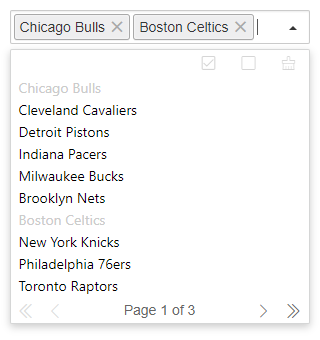
Multiple Selection with Tags form

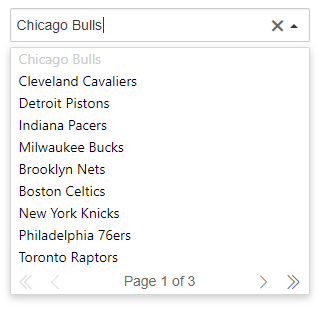
Regular select mode ( single selection )
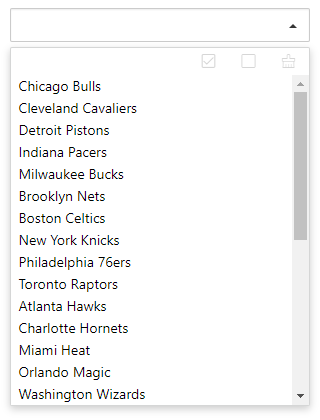
List only ( pagination bar close, disable typing to quick search, select only )
## Installation
Download SelectPage plugin zip file by last release, or [click me](https://github.com/TerryZ/SelectPage/archive/master.zip) to download SelectPage
or use **NPM**
```sh
npm install selectpage
```
](http://godban.github.io/browsers-support-badges/)Opera |
| --------- | --------- | --------- | --------- | --------- |
| IE8, IE9, IE10, IE11, Edge| Firefox 18+| Chrome 49+| Safari 10+| Opera 36+
## Plugin Preview
Multiple Selection with Tags form

Regular select mode ( single selection )

List only ( pagination bar close, disable typing to quick search, select only )

## Installation
Download SelectPage plugin zip file by last release, or [click me](https://github.com/TerryZ/SelectPage/archive/master.zip) to download SelectPage
or use **NPM**
```sh
npm install selectpage
```
 ## Usage
As you can see in the [Demo Page](https://terryz.github.io/selectpage/demo.html), you will need to include:
- [jQuery library](http://jquery.com) (1.10.2+), untest on jquery2.x & 3.x
- The JavaScript file `selectpage.js` (or its minified version `selectpage.min.js`)
- The css file `selectpage.css`
### Including files
```html
```
### HTML input element set
the SelectPage plugin just need put a input tag in the page
```html
```
### Javascript init plugin
```js
// defined a array (the server side returned data format was same like that)
// Array[{Object},{...}]
var data = [
{id: 1, name: 'Chicago Bulls', desc: '芝加哥公牛' },
{id: 2, name: 'Cleveland Cavaliers', desc: '克里夫兰骑士' },
{id: 3, name: 'Detroit Pistons', desc: '底特律活塞' },
{id: 4, name: 'Indiana Pacers', desc: '印第安纳步行者' }
]
// init SelectPage
$('#selectpage').selectPage({
showField : 'desc',
keyField : 'id',
data : data
})
```
## Stargazers over time
[](https://starcharts.herokuapp.com/TerryZ/SelectPage)
## Options
The plugin initialize options
### data
- type: `string | object`
- default: `undefined`
data source (string:ajax search URL | object:JSON format array)
```js
// serverside request url address
$('#selectpage').selectPage({
data: 'https://some-site/some-route'
})
// JSON format array
var data = [{a:1,b:2,c:3},{...}]
$('#selectpage').selectPage({
data: data
})
```
### lang
- type: `string`
- default: `cn`
plugin language
| code | language |
| ------ | ------ |
| cn | chinese |
| en | english |
| de | german |
| es | spanish |
| ja | japanse |
| pt-br | Brazilian Portuguese |
### multiple
- type: `boolean`
- default: `false`
whether it is multi-select mode(use tags mode)
### pagination
- type: `boolean`
- default: `true`
paging or not
### listSize
- type: `number`
- default: `10`
the list shows the number of items, and the other items are displayed in a scroll bar,it only work on `pagination : false`
### multipleControlbar
- type: `boolean`
- default: `true`
whether to enable the multi-select mode control button area,only work on `multiple: true`
### maxSelectLimit
- type: `number`
- default: `0`
maximum number of selections in multi-select mode,0 is unlimited
### selectToCloseList
- type: `boolean`
- default: `true`
is close list after item select,it only work on `multiple:true`
### initRecord
- type: `string`
- default: `undefined`
the initial value of the plugin, The value will match the option.keyField field, and if it matches, it will be automatically selected and highlighted
### dbTable
- type: `string`
- default: `'tbl'`
use this parameter to set the corresponding data table name in server side(ajax) mode
### keyField
- type: `string`
- default: `'id'`
value field, usually the contents of the field will be automatically saved in the hidden domain
### showField
- type: `string`
- default: `'name'`
the result is used to display the name of the attribute
### searchField
- type: `string`
- default: `undefined`
query field, set server side query field when data source is server side mode, if not set default use of option.showField
### andOr
- type: `string`
- default: `'AND'`
multiple keywords search type ('AND' or 'OR')
### orderBy
- type: `string[]`
- default: `undefined`
result data sort type, default use showField specified field
```js
$('#selectpage').selectPage({
...
orderBy : ['id desc'] // use id field sort desc
})
```
### pageSize
- type: `number`
- default: `10`
the number of records per page
### params
- type: `function (): object`
- return `object`
- default: `undefined`
send request params for server side data source(ajax)
```js
$('#selectpage').selectPage({
...
params : function() {
return {
name: 'aa',
sex: 1
}
}
})
```
### formatItem
- type: `function (data: object): string`
- data `object` row data object format
- return `string`
- default: `undefined`
list item display content formatting
```js
$('#selectpage').selectPage({
...
formatItem : function(data) {
return data.a + '(' + data.b + ')'
}
})
```
### focusDropList
- type: `boolean`
- default: `true`
when input box get focus,drop the list
### autoSelectFirst
- type: `boolean`
- default: `true`
whether to automatically select the first item in the list (enter the keyword query mode, use the mouse directly does not trigger)
### autoFillResult
- type: `boolean`
- default: `true`
whether to automatically fill the content, if the list item is highlighted, in the focus away from the control, automatically set the item for the selected content
### noResultClean
- type: `boolean`
- default: `true`
enter the keyword to query and no item match,when focus leave plugin,whether to clear enter keywords
### selectOnly
- type: `boolean`
- default: `false`
select only mode,the input box can not enter any word
### inputDelay
- type: `number`
- default: `0.5(second)`
enter the keyword query delay, work on server side(ajax) mode
### eSelect
- type: `function (data: object|object[]): void`
- data `object | array` selected row or rows data(json)
- default: `undefined`
item selected callback
```js
$('#selectpage').selectPage({
...
eSelect : function(data) {
console.log(data)
}
})
```
### eOpen
- type: `function (self: object): void`
- self `object` plugin inner object
- default: `undefined`
before show up result list callback
```js
$('#selectpage').selectPage({
...
eOpen : function(self) {
console.log(data)
}
})
```
### eAjaxSuccess
- type: `function (data: object): object`
- data `object` server side return data(json)
- return `object` convert to SelectPage required data format
- default: `undefined`
in server side mode, this is the callback function when request success, the role of the callback is used to custom processing of the return data
server side return data for example
```js
{
"values": {
"gridResult": {
"pageSize": 10,
"pageNumber": 1,
"totalRow": 11,
"totalPage": 2,
"listData": [
{ "name": "name1", "id": "1" },
{ "name": "name2", "id": "2" },
{ ... }
]
}
}
}
```
`eAjaxSuccess` required data format
```js
{
list: object[], // rows data
totalRow: number // total record count number
}
```
then `eAjaxSuccess` code for example below
```js
$('#selectpage').selectPage({
...
data: 'https://some-site/some-route',
eAjaxSuccess : function(data) {
var dataNode = data.values.gridResult
return {
list : dataNode.listData,
totalRow : dataNode.totalRow
}
}
})
```
### eTagRemove
- type: `function (removeCount: number): void`
- removeCount `number` removed tag count
- default: `undefined`
this callback function is used to close tag, when `multiple : true`
```js
$('#selectpage').selectPage({
...
eTagRemove : function(removeCount) {
console.log(removeCount)
}
})
```
## API
### selectPageClear
- `selectPageClear(): void`
clear all select items
```js
$('#selectpage').selectPageClear()
```
### selectPageRefresh
- `selectPageRefresh(): void`
refresh plugin selected items info
```js
$('#selectpage').val(20) // modify selected by id used javascript
$('#selectpage').selectPageRefresh() // refresh selection item info
```
### selectPageData
- `selectPageData(data: object): void`
- data `array` new data, the data format is same to plugin data source
change plugin data source,only work on json data source mode
```js
var newdata = [
{ a: 1, b: 11, c: 111 },
{ a: 2, b: 22, c: 222 },
{ ... }
]
$('#selectpage').selectPageData(newdata)
```
### selectPageDisabled
- `selectPageDisabled(status?: boolean): void`
- status `boolean(optional)` set disabled stauts. `true` to disabled, `false` to enabled
get plugin disabled status or set plugin status to `disabled` / `enabled`
```js
// get plugin disabled stuats
if($('#selectpage').selectPageDisabled()) {
// set plugin to enabled
$('#selectpage').selectPageDisabled(false)
}
```
### selectPageText
- `selectPageText(): string`
- return `string` selected items string content
get plugin selected items text
```js
alert($('#selectpage').selectPageText())
```
### selectPageSelectedData
- `selectPageSelectedData(): object[]`
- return `object[]` selected items raw datas
get selected items raw data
```js
console.log($('#selectpage').selectPageSelectedData())
```
## License
[](https://app.fossa.io/projects/git%2Bgithub.com%2FTerryZ%2FSelectPage?ref=badge_large)
## Usage
As you can see in the [Demo Page](https://terryz.github.io/selectpage/demo.html), you will need to include:
- [jQuery library](http://jquery.com) (1.10.2+), untest on jquery2.x & 3.x
- The JavaScript file `selectpage.js` (or its minified version `selectpage.min.js`)
- The css file `selectpage.css`
### Including files
```html
```
### HTML input element set
the SelectPage plugin just need put a input tag in the page
```html
```
### Javascript init plugin
```js
// defined a array (the server side returned data format was same like that)
// Array[{Object},{...}]
var data = [
{id: 1, name: 'Chicago Bulls', desc: '芝加哥公牛' },
{id: 2, name: 'Cleveland Cavaliers', desc: '克里夫兰骑士' },
{id: 3, name: 'Detroit Pistons', desc: '底特律活塞' },
{id: 4, name: 'Indiana Pacers', desc: '印第安纳步行者' }
]
// init SelectPage
$('#selectpage').selectPage({
showField : 'desc',
keyField : 'id',
data : data
})
```
## Stargazers over time
[](https://starcharts.herokuapp.com/TerryZ/SelectPage)
## Options
The plugin initialize options
### data
- type: `string | object`
- default: `undefined`
data source (string:ajax search URL | object:JSON format array)
```js
// serverside request url address
$('#selectpage').selectPage({
data: 'https://some-site/some-route'
})
// JSON format array
var data = [{a:1,b:2,c:3},{...}]
$('#selectpage').selectPage({
data: data
})
```
### lang
- type: `string`
- default: `cn`
plugin language
| code | language |
| ------ | ------ |
| cn | chinese |
| en | english |
| de | german |
| es | spanish |
| ja | japanse |
| pt-br | Brazilian Portuguese |
### multiple
- type: `boolean`
- default: `false`
whether it is multi-select mode(use tags mode)
### pagination
- type: `boolean`
- default: `true`
paging or not
### listSize
- type: `number`
- default: `10`
the list shows the number of items, and the other items are displayed in a scroll bar,it only work on `pagination : false`
### multipleControlbar
- type: `boolean`
- default: `true`
whether to enable the multi-select mode control button area,only work on `multiple: true`
### maxSelectLimit
- type: `number`
- default: `0`
maximum number of selections in multi-select mode,0 is unlimited
### selectToCloseList
- type: `boolean`
- default: `true`
is close list after item select,it only work on `multiple:true`
### initRecord
- type: `string`
- default: `undefined`
the initial value of the plugin, The value will match the option.keyField field, and if it matches, it will be automatically selected and highlighted
### dbTable
- type: `string`
- default: `'tbl'`
use this parameter to set the corresponding data table name in server side(ajax) mode
### keyField
- type: `string`
- default: `'id'`
value field, usually the contents of the field will be automatically saved in the hidden domain
### showField
- type: `string`
- default: `'name'`
the result is used to display the name of the attribute
### searchField
- type: `string`
- default: `undefined`
query field, set server side query field when data source is server side mode, if not set default use of option.showField
### andOr
- type: `string`
- default: `'AND'`
multiple keywords search type ('AND' or 'OR')
### orderBy
- type: `string[]`
- default: `undefined`
result data sort type, default use showField specified field
```js
$('#selectpage').selectPage({
...
orderBy : ['id desc'] // use id field sort desc
})
```
### pageSize
- type: `number`
- default: `10`
the number of records per page
### params
- type: `function (): object`
- return `object`
- default: `undefined`
send request params for server side data source(ajax)
```js
$('#selectpage').selectPage({
...
params : function() {
return {
name: 'aa',
sex: 1
}
}
})
```
### formatItem
- type: `function (data: object): string`
- data `object` row data object format
- return `string`
- default: `undefined`
list item display content formatting
```js
$('#selectpage').selectPage({
...
formatItem : function(data) {
return data.a + '(' + data.b + ')'
}
})
```
### focusDropList
- type: `boolean`
- default: `true`
when input box get focus,drop the list
### autoSelectFirst
- type: `boolean`
- default: `true`
whether to automatically select the first item in the list (enter the keyword query mode, use the mouse directly does not trigger)
### autoFillResult
- type: `boolean`
- default: `true`
whether to automatically fill the content, if the list item is highlighted, in the focus away from the control, automatically set the item for the selected content
### noResultClean
- type: `boolean`
- default: `true`
enter the keyword to query and no item match,when focus leave plugin,whether to clear enter keywords
### selectOnly
- type: `boolean`
- default: `false`
select only mode,the input box can not enter any word
### inputDelay
- type: `number`
- default: `0.5(second)`
enter the keyword query delay, work on server side(ajax) mode
### eSelect
- type: `function (data: object|object[]): void`
- data `object | array` selected row or rows data(json)
- default: `undefined`
item selected callback
```js
$('#selectpage').selectPage({
...
eSelect : function(data) {
console.log(data)
}
})
```
### eOpen
- type: `function (self: object): void`
- self `object` plugin inner object
- default: `undefined`
before show up result list callback
```js
$('#selectpage').selectPage({
...
eOpen : function(self) {
console.log(data)
}
})
```
### eAjaxSuccess
- type: `function (data: object): object`
- data `object` server side return data(json)
- return `object` convert to SelectPage required data format
- default: `undefined`
in server side mode, this is the callback function when request success, the role of the callback is used to custom processing of the return data
server side return data for example
```js
{
"values": {
"gridResult": {
"pageSize": 10,
"pageNumber": 1,
"totalRow": 11,
"totalPage": 2,
"listData": [
{ "name": "name1", "id": "1" },
{ "name": "name2", "id": "2" },
{ ... }
]
}
}
}
```
`eAjaxSuccess` required data format
```js
{
list: object[], // rows data
totalRow: number // total record count number
}
```
then `eAjaxSuccess` code for example below
```js
$('#selectpage').selectPage({
...
data: 'https://some-site/some-route',
eAjaxSuccess : function(data) {
var dataNode = data.values.gridResult
return {
list : dataNode.listData,
totalRow : dataNode.totalRow
}
}
})
```
### eTagRemove
- type: `function (removeCount: number): void`
- removeCount `number` removed tag count
- default: `undefined`
this callback function is used to close tag, when `multiple : true`
```js
$('#selectpage').selectPage({
...
eTagRemove : function(removeCount) {
console.log(removeCount)
}
})
```
## API
### selectPageClear
- `selectPageClear(): void`
clear all select items
```js
$('#selectpage').selectPageClear()
```
### selectPageRefresh
- `selectPageRefresh(): void`
refresh plugin selected items info
```js
$('#selectpage').val(20) // modify selected by id used javascript
$('#selectpage').selectPageRefresh() // refresh selection item info
```
### selectPageData
- `selectPageData(data: object): void`
- data `array` new data, the data format is same to plugin data source
change plugin data source,only work on json data source mode
```js
var newdata = [
{ a: 1, b: 11, c: 111 },
{ a: 2, b: 22, c: 222 },
{ ... }
]
$('#selectpage').selectPageData(newdata)
```
### selectPageDisabled
- `selectPageDisabled(status?: boolean): void`
- status `boolean(optional)` set disabled stauts. `true` to disabled, `false` to enabled
get plugin disabled status or set plugin status to `disabled` / `enabled`
```js
// get plugin disabled stuats
if($('#selectpage').selectPageDisabled()) {
// set plugin to enabled
$('#selectpage').selectPageDisabled(false)
}
```
### selectPageText
- `selectPageText(): string`
- return `string` selected items string content
get plugin selected items text
```js
alert($('#selectpage').selectPageText())
```
### selectPageSelectedData
- `selectPageSelectedData(): object[]`
- return `object[]` selected items raw datas
get selected items raw data
```js
console.log($('#selectpage').selectPageSelectedData())
```
## License
[](https://app.fossa.io/projects/git%2Bgithub.com%2FTerryZ%2FSelectPage?ref=badge_large)