## Secman Products
- [**Secman Desktop**](https://d.secman.dev)
- [**Secman Extension**](https://secman.dev/extension)
---
> `secman` is a password manager can store, retrieves, generates, and synchronizes passwords, and is written in _**TypeScript**_! The most important difference is secman is not GPG cored. Instead, it uses a master password to securely store your passwords. and you can easily manage your passwords from everywhere.
## Features
- **Not GPG cored**.
- **It uses a master password to securely store your passwords**.
- **It syncs your passwords**.
- **Easy to use**.
- **It is written in TypeScript**.
- **You can easily manage your passwords from everywhere, desktop, web, terminal, and more**.
## Examples
> Initialize `~/.secman`
```bash
secman init
```
> Authenticate
```bash
secman auth
# with one command
secman auth --username EMAIL --password MASTER_PASSWORD
# read the master password from stdin
cat password.txt | secman auth -u EMAIL --password-stdin
```
> Create a new password
```bash
secman new -l
✔ Title › Twitter
✔ URL › https://twitter.com
✔ Username › _secman
✔ Password › *********
✔ Extra › no extra
Password created
```
> List passwords
```
secman .
.
├──Logins
│ └──Twitter
├──Credit Cards
├──Emails
├──Notes
└──Servers
```
> Read It
```
secman read -l Twitter
╭─────────┬─────────────────────┬──────────────────┬───────────┬──────────╮
│ Title │ URL │ Username │ Password │ Extra │
├─────────┼─────────────────────┼──────────────────┼───────────┼──────────┤
│ Twitter │ https://twitter.com │ hello@secman.dev │ ••••••••• │ no extra │
╰─────────┴─────────────────────┴──────────────────┴───────────┴──────────╯
```
#### show password
```
secman read -lp Twitter
╭─────────┬─────────────────────┬──────────────────┬───────────┬──────────╮
│ Title │ URL │ Username │ Password │ Extra │
├─────────┼─────────────────────┼──────────────────┼───────────┼──────────┤
│ Twitter │ https://twitter.com │ hello@secman.dev │ hitwitter │ no extra │
╰─────────┴─────────────────────┴──────────────────┴───────────┴──────────╯
```
> Edit password field
```bash
secman edit -l Twitter
? Pick a field › - Use arrow-keys. Return to submit.
❯ Title
URL
Username
Password
Extra
```
#### edit multiple fields
```code
secman edit -lm Twitter
? Pick a field ›
? Pick a field ›
Instructions:
↑/↓: Highlight option
←/→/[space]: Toggle selection
a: Toggle all
enter/return: Complete answer
◯ Title
◉ URL
◯ Username
◯ Password
◉ Extra
```
## Installation ⬇
### Using npm
```bash
npm i -g secman
```
> (Windows): if you get an error you might need to change the **execution policy** _**(i.e. enable Powershell)**_ via
```powershell
Set-ExecutionPolicy RemoteSigned -scope CurrentUser
```
### Using [Homebrew](https://brew.sh) (macOS and Linux)
```bash
brew tap scmn-dev/secman
brew install secman
```
### Using script (Ubuntu/Debian)
```bash
curl -sL https://cli.secman.dev | bash
```
### Via [Docker](https://docker.com)
> `secman cli` image
```bash
docker run -it smcr/secman-cli
```
see [**secman cli docs**](https://docker.secman.dev/docs/sm-cli)
> `secman container` image
```bash
docker run -it smcr/secman
```
see [**secman container docs**](https://docker.secman.dev/docs/sm-container)
## Build from source
see [**building from source**](https://secman.dev/docs/contributing/building_from_source) doc.
## Getting started with secman
> Initializing
```bash
secman init
```
> Authenticate
```bash
secman auth
```
> Insert a New Password
```bash
secman insert --[PASSWORD_TYPE]
```
> List Passwords
```bash
secman .
```
> Read The Password
```
secman read --[PASSWORD_TYPE]
```
> Edit Password
```bash
secman edit --[PASSWORD_TYPE]
```
> Generate
```bash
secman generate
```
> Edit Settings
```bash
secman settings
```
> see [commands](https://secman.dev/docs/cli)
## License
[secman][smurl] is licensed under the terms of [MIT][miturl] License
## Some Resources
- [**secman website**](https://secman.dev)
- [**docs**](https://secman.dev/docs)
- [**changelog**](https://secman.dev/changelog)
- [**privacy policy of secman**](https://secman.dev/privacy)
## Contributing
Thanks for your interest in contributing to `secman` . You can start a development environment with [gitpod](https://www.gitpod.io):
[](https://gitpod.io/#https://github.com/scmn-dev/secman)
## Code Status
[](https://github.com/scmn-dev/secman/actions/workflows/codeql.yml)
[](https://github.com/scmn-dev/secman/actions/workflows/secman.yml)
[](https://github.com/scmn-dev/secman/actions/workflows/docker.yml)

## Stargazers over time
[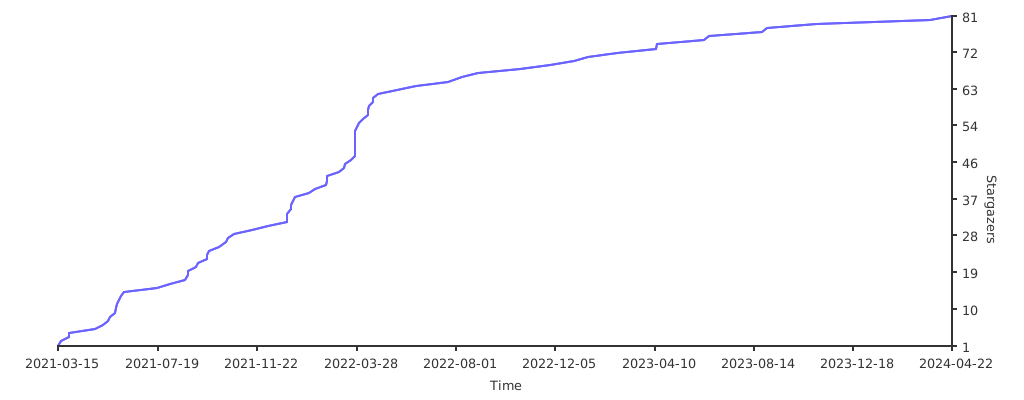](https://starchart.cc/scmn-dev/secman)
[smurl]: https://secman.dev
[miturl]: https://github.com/scmn-dev/secman/blob/main/LICENSE


