<div dir="auto" align="center">
  <h1 dir="auto" align="center"> <a target='_blank' href='https://searchpal.elijahharry.com/'>searchpal</a> <sub><sup>(search pal<s>ette</s>)</sup></sub></h1>
</div>
<div dir="auto" align="center">

Collection of components and hooks for building search palettes in React.

See a [live demo](https://searchpal.elijahharry.com/) :point_left:

<div dir="auto" align="center">

| [Usage](#usage) | [Components](#components) | [Hooks](#hooks) |
| --------------- | ------------------------- | --------------- |
</div>

<br />

<div dir="auto" align="center">

![panel.png](https://i.postimg.cc/L4kBf3wW/panel.png)

</div>

</div>

## Usage

The components in this library follow a modular design pattern. Import the ones you need, then combine them with your own to create a custom search experience. The only components exported by this library that you must use are `Search`/`Root` and `Option`, although I'd recommend utilizing a [few others](#components) to ensure proper accessibility and functionality.

Some default styles are included, enough to make the components presentable out of box. They can be easily extended or overriden: every component that renders an element can be passed custom classes, styles and attributes.

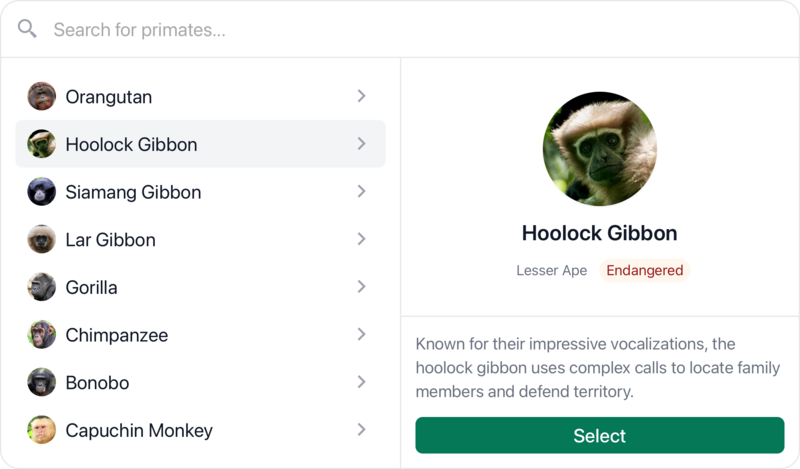
Here's an example of a custom search palette built in a [Next.js](https://nextjs.org/) application with [tailwindcss](https://tailwindcss.com/):

```jsx
"use client";
import * as Search from "searchpal";
import { useState } from "react";

import { search } from "@server/actions";

export function SearchModal({ initialOptions }) {
  const { items, inputProps, reset, isNotFound, isLoading } = Search.useQuery(
    (query) =>
      search({
        query,
        max: 8,
      }),
    {
      initialItems: initialOptions,
      format: (query) => query.trim(),
    }
  );

  const Icon = isLoading ? LoadingIcon : SearchIcon;

  return (
    <Search.Root
      open={open}
      setOpen={setOpen}
      onChange={(option) => {
        // Runs when an option is selected:
        // - Navigated to via arrow keys
        // - Hovered
        // - Focused
        console.log("Selected option:", option);
      }}
      onSubmit={(option, search) => {
        // Runs when an option is submitted:
        // - Clicked on
        // - Enter key pressed when selected
        search.close();
        alert("You chose: " + option.label);
      }}
      onClose={() => reset()}
    >
      <Search.Trigger>
        <button>Open Search</button>
      </Search.Trigger>
      <Search.Portal>
        <Search.Backdrop />
        <Search.Container>
          <Search.Panel className="w-full max-w-[600px]">
            <div className="p-2 flex gap-2">
              <Icon />
              <Search.Input
                {...inputProps}
                placeholder="Search for something..."
              />
            </div>
            <div className="flex">
              <Search.Results className="basis-1/2 flex-1">
                {items.map((option) => (
                  <Search.Option key={option.id} id={option.id} data={option}>
                    {option.label}
                  </Search.Option>
                ))}
              </Search.Results>
              {isNotFound && <div className="flex-1">No results found.</div>}
              <Search.Consumer>
                {({ selected }) => {
                  if (!(selected && window.innerWidth > 768)) return null;
                  // Render selected option details on larger screens
                  const option = selected.data;
                  return (
                    <div className="basis-1/2 flex-1">
                      <img src={option.image} />
                      <h2>{option.label}</h2>
                      <p>{option.description}</p>
                    </div>
                  );
                }}
              </Search.Consumer>
            </div>
          </Search.Panel>
        </Search.Container>
      </Search.Portal>
    </Search.Root>
  );
}
```

### Query Management

Many users will already be using a comprehensive solution for data-fetching, such as [react-query](https://www.npmjs.com/package/@tanstack/react-query) or [swr](https://www.npmjs.com/package/swr). I don't believe data-fetching should be a primary focus of this library, but want to accomodate users who lack an existing solution or would like one that is specialized for this use-case.

As a result, I've included the `useQuery` hook. It is a basic hook for data-fetching that is specifically designed for use in search palettes:

- Fetching occurs on query updates and can be debounced with a customizable delay
- Initial items can be passed to the hook, it will return them when the query is empty
- Returns a method to reset the query state
- A custom flag, `isNotFound`, is returned indicating whether or not a _"no results"_ message should be shown: Positive query length, no items and no pending query _unless_ the previous `isNotFound` flag was `true` (prevents flickering)

Reference the [example above](#usage) to see an implementation of this hook. The [live demos](https://searchpal.elijahharry.com/) also use this hook with [Next.js](https://nextjs.org/) server actions to fetch options.

### Option Groups

The `Results` component renders a `div` with the role of `listbox` (versus a `ul` or `ol` element) and will automatically populate its `aria-owns` prop with option ids. As a result, there are no restrictions on its children. You can wrap your `Option` components in any number of elements or components:

```jsx
<Search.Results>
  {groups.map((group) => {
    const labelId = `${group.id}-label`;
    return (
      <div
        key={group.id}
        role="group"
        aria-labelledby={labelId}
        className="py-2"
      >
        <span
          id={labelId}
          className="block text-sm font-medium text-gray-500 pb-1 border-b"
        >
          {group.label}
        </span>
        {group.options.map((option) => (
          <Search.Option key={option.id} value={option.value}>
            {option.label}
          </Search.Option>
        ))}
      </div>
    );
  })}
</Search.Results>
```

## API

### Components

The most essential components exported by this package are:

| Name             | Description                                                                                                                                                        |
| ---------------- | ------------------------------------------------------------------------------------------------------------------------------------------------------------------ |
| `Search`, `Root` | Provides state management and context for the search modal, so it needs to wrap all other components. `Root` is an alias for `Search`.                             |
| `Panel`          | Represents the search panel displayed within the portal. The modal will close when a user clicks outside of it, so make sure it contains all interactive elements. |
| `Input`          | Input for the search query. This component primarily manages aria attributes. Auto-focuses on initial open.                                                        |
| `Results`        | Renders a `div` with the role of `listbox`. Should contain all `Option` components; however, they do not need to be direct descendents.                            |
| `Option`         | Represents a selectable search result. Optionally provide a contextual object through the `data` prop. You can access an option's `data` in callbacks and context. |

There are also some supplementary components, these are primarily included for convenience:

| Name        | Description                                                                                                                                                                          |
| ----------- | ------------------------------------------------------------------------------------------------------------------------------------------------------------------------------------ |
| `Trigger`   | Turns its child element into a button that can be used to open the search modal. Can also be used as a consumer, the child function will recieve props you can spread onto a button. |
| `Portal`    | Attaches its children to `document.body` (or a custom container). Children will only be rendered when the search modal is open.                                                      |
| `Backdrop`  | Renders a semi-transparent overlay behind the search modal.                                                                                                                          |
| `Container` | Simple overflow container that can wrap the `Panel` component. The default styles include padding.                                                                                   |
| `Consumer`  | Can be used to access the root search state via a child render function.                                                                                                             |

### Hooks

| Name        | Description                                                                                                                                  |
| ----------- | -------------------------------------------------------------------------------------------------------------------------------------------- |
| `useSearch` | Provides access to the root search state and methods. Can be used to open/close the search modal, select an option, access all options, etc. |
| `useQuery`  | Basic data-fetching hook specifically designed for usage within search palettes. [Read more](#query-management)                              |
|             |
