---
layout: default
---
# Why ScripterI/O?
ScripterI/O is a JavaScript testing framework designed to run on Node.js. It provides a simple and fast ESM (ECMAScript Module) runner for testing JavaScript code. The framework supports writing test cases using `test` and `describe` functions, organizing tests, and performing assertions with the expected function. It includes async/await support, test annotations, and context options for tags, timeout configurations and it focused on making testing easy and enjoyable for all.
ScripterI/O is specifically designed with modern ECMAScript Modules (ESM) in mind, making it a better fit for ESM-based projects compared to older test runners.
## Demo
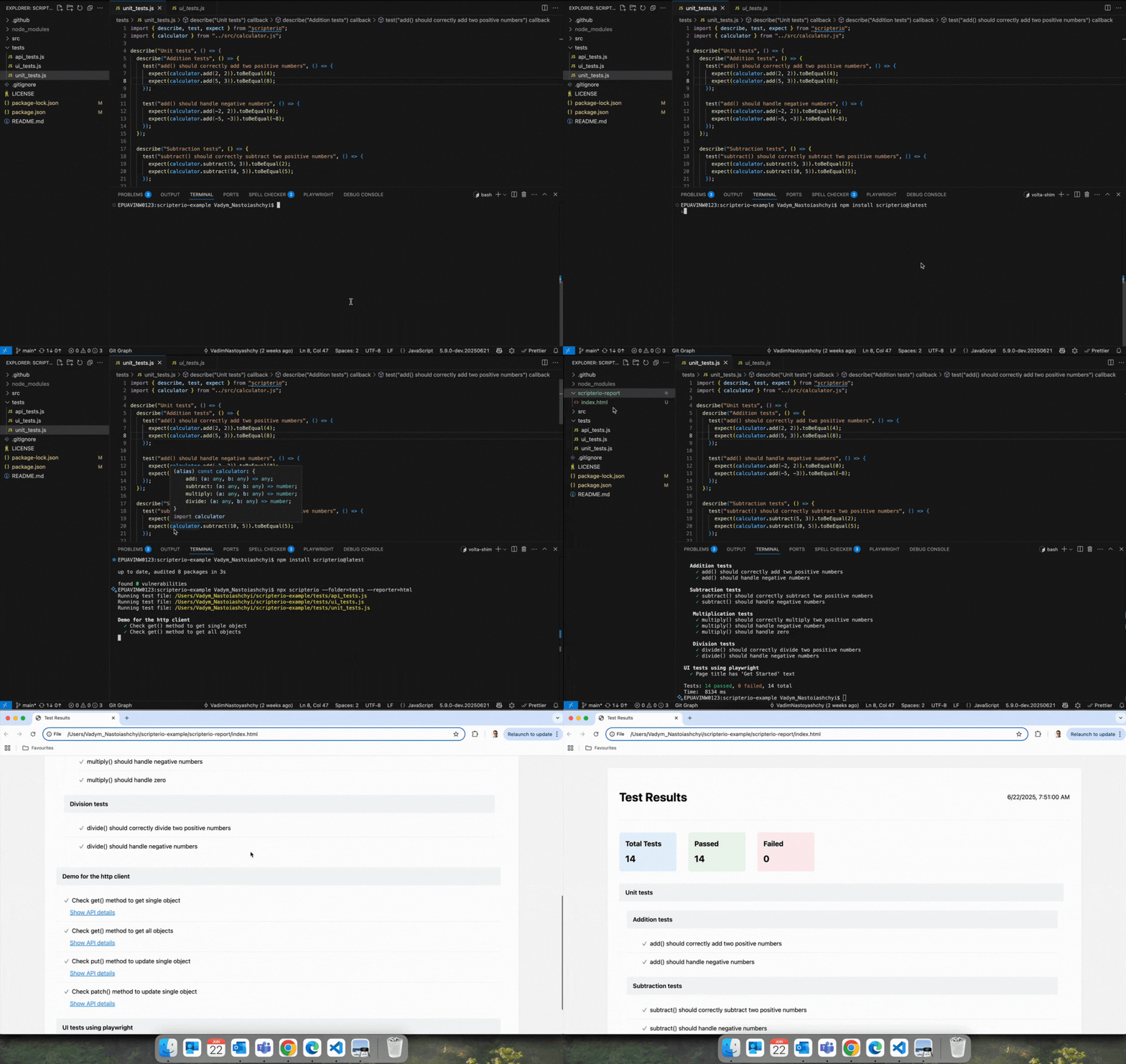
## Getting started
> **Before you follow the steps below, make sure that you have:**
[Node.js](https://nodejs.org/en/download/) installed _globally_ only your system
> *Runner has JavaScript support only!*
> *Runner has ESM support only!*
> *Tested on: Node.js - v18, v20, v22, v23, v24*
## Installing
Install for Mac, Linux, or Windows:
```bash
npm install scripterio --save-dev
//or
yarn add scripterio --dev
```
## Write your first test:
Use the `test` function to write test cases and the `describe` function to group them.
More examples:
- [https://github.com/scripterio-js/scripterio-example](https://github.com/scripterio-js/scripterio-example) (Unit, API, E2E tests)
- [https://github.com/VadimNastoyashchy/json-mcp](https://github.com/VadimNastoyashchy/json-mcp) (Unit tests)
Let's start by creating the `test.js` test file:
### `Example↓`
test.js
```js
import { describe, test, expect} from 'scripterio'
describe('Unit tests:', () => {
test('Array has correct length', () => {
const arr = [1, 2, 3]
expect(arr).toHaveLength(3)
})
})
```
## Run test:
---
Specify the **--file=** argument as the path to your test file
```bash
npx scripterio --file="test.js"
//or
yarn scripterio --file="test.js"
```
### or
Specify the **--folder=** argument as the path to your test(s) folder
```bash
npx scripterio --folder="tests"
//or
yarn scripterio --folder="tests"
```
## Test runner API
---
| Option Name | Description |
| -------------- | ------------------------------------------------------------------------------------- |
| `"test"` | `test` is where you perform individual tests |
| `"describe"` | `describe` is for organizing and grouping tests. Describe can be nested in `describe` |
| `"beforeEach"` | Command allows to define setup tasks at the beginning of every It block |
| `"afterEach"` | Command allow to define teardown tasks at the end of every It block |
| `"beforeAll"` | Command allow to define setup tasks at the beginning of describe block |
| `"afterAll"` | Command allow to define teardown tasks at the end of describe block |
---
## Assertions
Use `expect(actual_value)` with assertions:
### `Example↓`
```js
const arr = [1, 2, 3]
expect(arr).toHaveLength(3)
```
---
| Assert Name | Description |
| -------------------- | ----------------------------------------------------------------------------------------------- |
| `.toBeDefined()` | Check actual value to be not undefined `expect(1).toBeDefined()` |
| `.toHaveLength()` | Check actual array length to have expected value `expect(arr).toHaveLength(number)` |
| `.toBeFalsy()` | Check actual value to be false |
| `.toBeTruthy()` | Check actual value to be true |
| `.toBeEqual()` | Check actual and expected values are the same (using ===) `expect(value).toEqual(value)` |
| `.notToEqual()` | Check actual and expected values are not the same (using ===) `expect(value).notToEqual(value)` |
| `.toBeNull()` | Check actual value to be null |
| `.notToBeNull()` | Check actual value to be not null |
| `.toBeUndefined()` | Check actual value to be undefined |
| `.toBeNaN()` | Check actual value to be NaN |
| `.toBeGreaterThan()` | Check actual value to be greater than expected value |
| `.toBeLessThan()` | Check actual value to be less than expected value |
| `.toContain()` | Use when you want to check that an item is in an array or a string. |
| `.toMatch()` | Use .toMatch() to check that a string matches a regular expression. |
---
## Test annotations
`skip()` Declares a skipped test or test group. Test/s is/are never run.
`only()` Declares an exclusive test or test group that will be executed. If used, all other tests are skipped.
### `Example↓`
```js
test.skip('description', () => {})
//or
describe.skip('description', () => {})
```
```js
test.only('description', () => {
// Body of the only test that will be executed
})
//or
describe.only('description', () => {
// Body of the only test group that will be executed
})
```
---
## Context options
Use `{}` as the second parameter for describe and test functions.
---
| Option Name | Description |
| ------------------- | ----------------------------------------------------------------------- |
| `{ timeout: 2000 }` | Option timeout (in ms) for specifying how long to wait before aborting. |
| | The default timeout is 5 seconds. |
| `{ tags: 'smoke' }` | To tag a test, either provide an additional details object |
| | when declaring a test. |
| | You can also tag all tests in a group or provide multiple tags: |
| | `{ tags: ['smoke', 'regression'] }` |
| `{ retry: 2 }` | To specify how many times a failed test should be retried |
| | before being marked as failed |
| | If a test fails, it will be retried up to the specified number of times |
| | If the test passes on any retry, it is marked as passed |
| | If it fails all attempts, it is marked as failed |
### `Timeout example↓`
#### To specify globally for all tests, use the following CLI flag:
```bash
npx scripterio --file="test.js" --timeout=30000
# or
npx scripterio --folder="tests" --timeout=20_000
```
#### To specify individual tests, use the context option:
```js
test('Wait 1 sec and check', { timeout: 2000}, async () => {
const number = await new Promise((resolve) =>
setTimeout(() => resolve(1), 1_000)
)
expect(number).toBeDefined()
})
```
### `Tags example↓`
Single tag:
```js
describe('Unit tests:', () => {
test('Array has correct length', { tags: 'smoke' }, () => {
const arr = [1, 2, 3]
expect(arr).toHaveLength(3)
})
})
```
You can now run tests that have a particular tag with `--tags` command line option:
```bash
npx scripterio --folder="tests" --tags="smoke"
```
Multiple tags:
```js
describe('Unit tests:', () => {
test('Array has correct length', { tags: ['smoke', 'regression'] }, () => {
const arr = [1, 2, 3]
expect(arr).toHaveLength(3)
})
})
```
You can now run tests that have tags separated by `,` (comma) with `--tags` command line option:
```bash
npx scripterio --folder="tests" --tags="smoke,regression"
```
### `Retry example↓`
#### To specify globally for all tests, use the following CLI flag:
```bash
npx scripterio --file="test.js" --retry=2
# or
npx scripterio --folder="tests" --retry=3
```
#### To specify individual tests, use the context option:
```js
test('Flaky test', { retry: 2 }, () => {
// Your test code that might fail intermittently
})
```
This will retry the test up to 2 additional times if it fails.
---
## Async/Await support
Also supports async/await approach.
To use it, just add `async` keyword before the function callback inside the `test` block:
### `Example↓`
```js
test('Wait 1 sec and check', async () => {
const number = await new Promise((resolve) =>
setTimeout(() => resolve(1), 1_000)
)
expect(number).toBeDefined()
})
```
## Reporter
ScripterI/O provides test reporting functionality with multiple reporter options:
### HTML Reporter
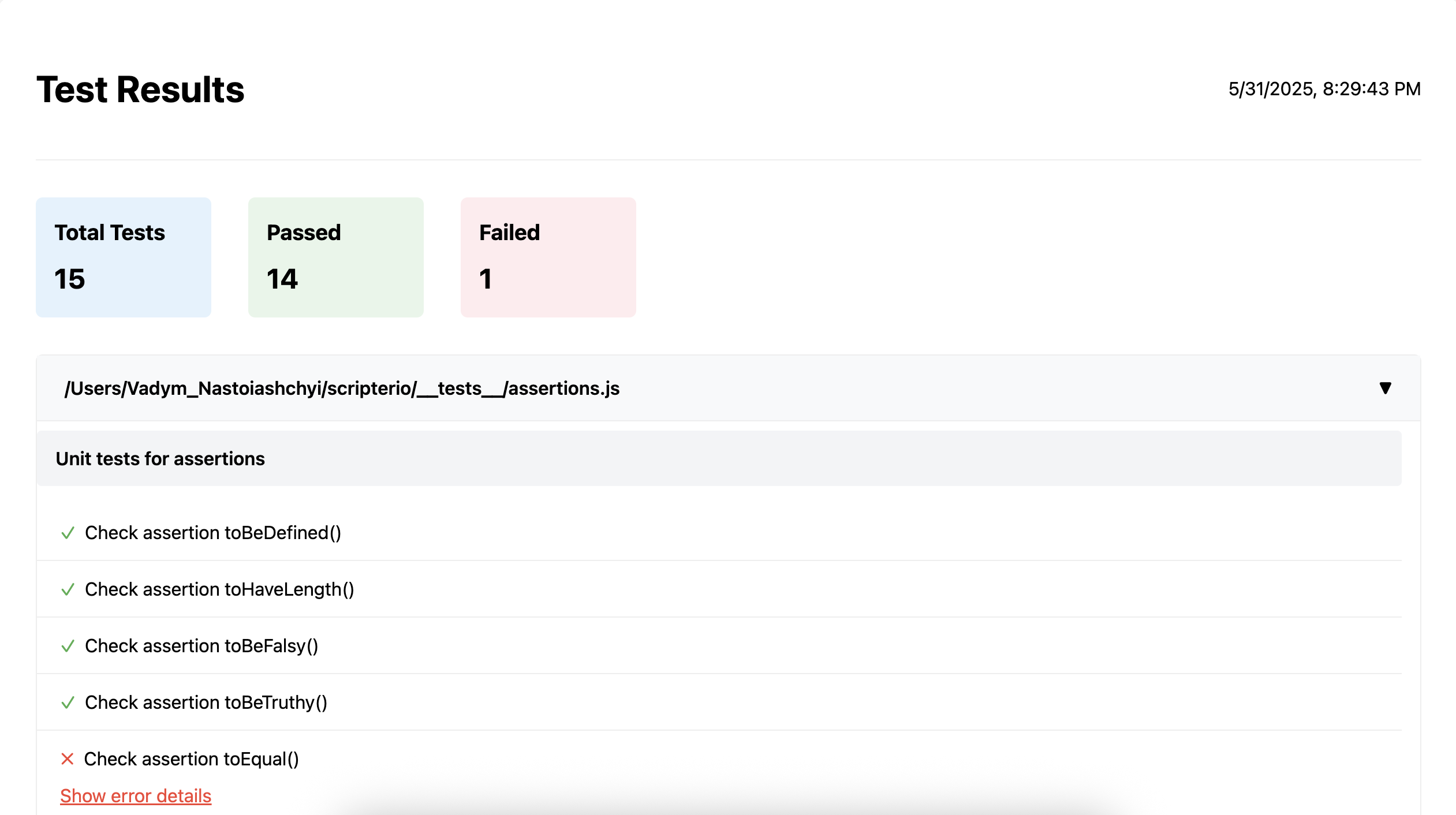
To generate an HTML report of your test results, use the `--reporter=html` flag:
```js
npx scripterio --file=test.js --reporter=html
```
This will create a detailed HTML report in the `scripterio-report` directory. The report includes:
- Total test count, passed tests, and failed tests
- Organized test results by file and test suites
- Detailed error information for failed tests
- Interactive UI to expand/collapse test suites
Example of HTML reporter:
## HTTP client
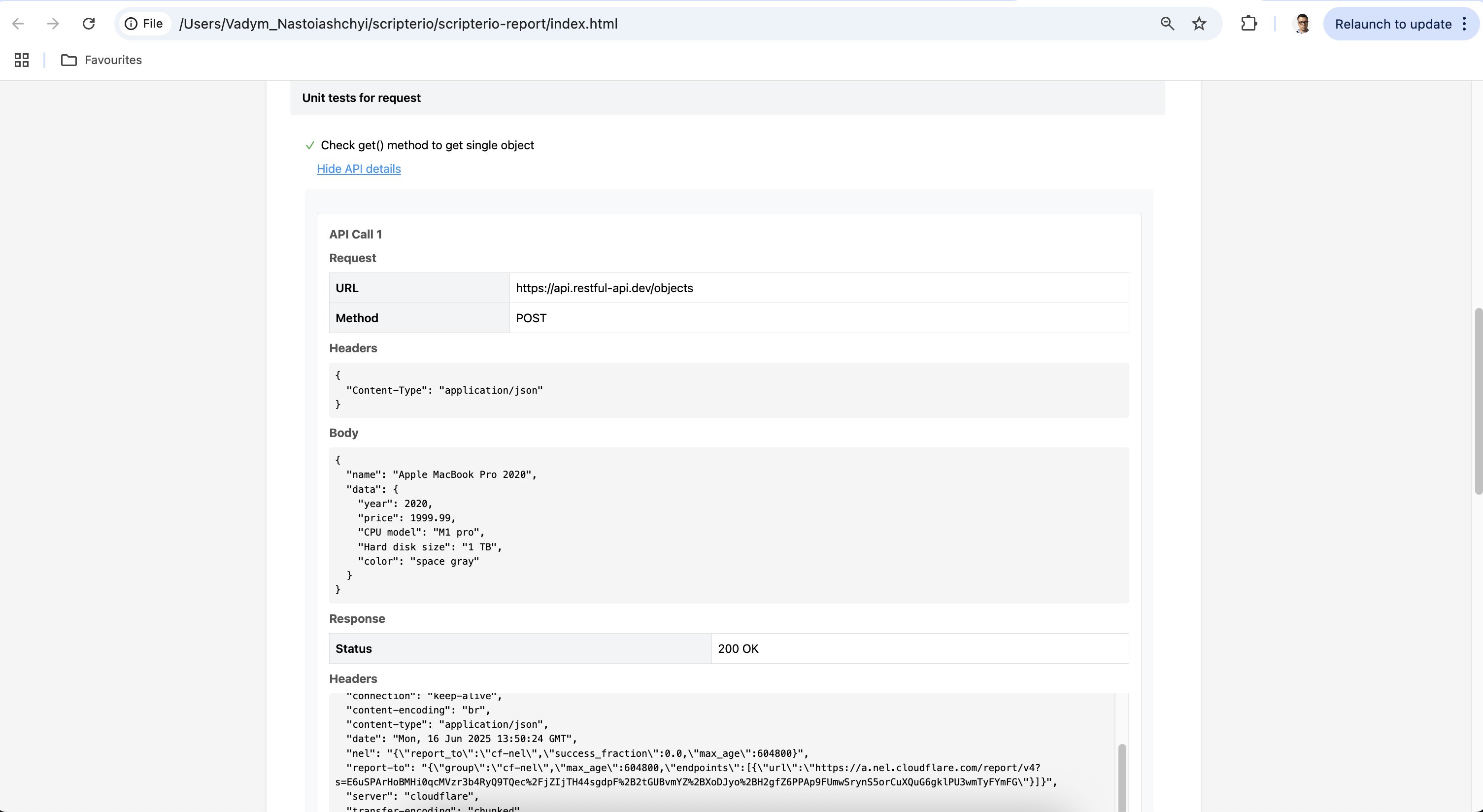
ScripterI/O has built-in http client to preform the request.
### `Example↓`
test.js
```js
import { describe, test, expect, request} from 'scripterio'
describe('Example of http client', () => {
test('Demonstrate get() method to get single object', async () => {
const response = await request.get('https://api.restful-api.dev/objects/7')
expect(response.status).toBeEqual(200)
})
})
```
> *If you use the `request` object in your tests, the network details are automatically displayed in the HTML report!*
## Request methods
---
| Option Name | Description |
| ------------------- | ----------------------------------------------------------------------- |
| `request.get()` | Sends a GET request to the specified URL and returns a Response object. |
| `request.post()` | Sends a POST request to the specified URL |
| `request.put()` | Sends a PUT request to the specified URL |
| `request.patch()` | Sends a PATCH request to the specified URL |
| `request.delete()` | Sends a DELETE request to the specified URL |
> Additional examples : [https://github.com/scripterio-js/scripterio-example/blob/main/tests/api_tests.j](https://github.com/scripterio-js/scripterio-example/blob/main/tests/api_tests.js)