
<div align="center">

<img src="https://cdn.jsdelivr.net/npm/sandboxedjs@latest/assets/logo.png" alt="SandboxedJS" width="140" />

# SandboxedJS: The Zero-Infra Sandbox for AI Agents & Code Playgrounds

**A secure, Linux-like environment written in JavaScript, running entirely inside a browser tab or a Node process.**

The ideal alternative to WebContainers and NodePod for those who need a full POSIX shell, Node.js, and Python runtimes without the infrastructure overhead. Boots in ~100 ms, all in memory.

[![npm](https://img.shields.io/npm/v/sandboxedjs?color=cb0000&label=npm)](https://www.npmjs.com/package/sandboxedjs)
[![license](https://img.shields.io/badge/license-MIT-black)](./LICENSE)
[![node](https://img.shields.io/badge/node-%E2%89%A518.17-5fa04e)](https://nodejs.org)
[![runs in](https://img.shields.io/badge/runs%20in-browser%20%C2%B7%20node-4c8bf5)](#running-in-a-browser)
![no docker](https://img.shields.io/badge/docker-not%20required-2496ed)

`shell` · `160 commands` · `Node 22` · `CPython 3.13` · `pip` · `npm` · `WASI` · `FFmpeg` · `previews`

</div>

---

```ts
import { createContainer } from "sandboxedjs";

const box = await createContainer({
  files: { "/app/hello.js": "console.log('hi from', process.platform)" },
});

await box.exec("ls -la /app");
await box.exec("node /app/hello.js"); // → hi from linux
await box.exec("python3 -c 'print(2**64)'"); // → 18446744073709551616

box.dispose();
```

The same line boots in Node and in a page. Nothing is compiled, nothing is downloaded, nothing
touches your disk.
<div align="center">
<a href="https://sandboxedjs.pages.dev">
<img src="https://cdn.jsdelivr.net/npm/sandboxedjs@latest/assets/demo.png" alt="SandboxedJS running a full-stack project in a browser" width="720" />
</a>
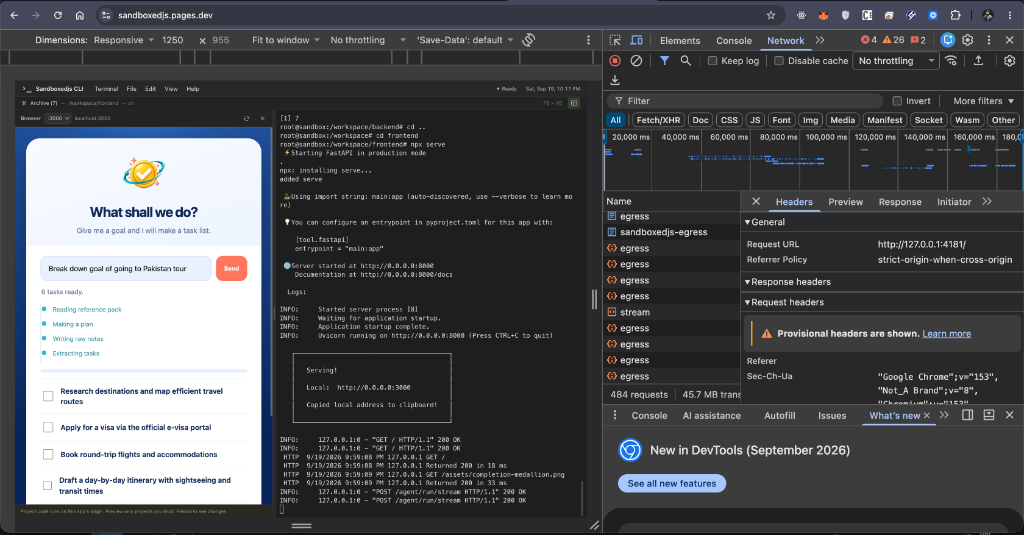
<p>Above: a full-stack project running inside a static site deployed on Cloudflare Pages. The site is a CLI for interacting with the sandbox — and just as it runs a full-stack project, so can yours. <a href="https://sandboxedjs.pages.dev">Try the live demo →</a></p>
</div>

## Why SandboxedJS?

Looking for a **WebContainer alternative** that works in both Node.js and the browser without the infrastructure overhead?

SandboxedJS is designed for cases where a real container is too heavy, too slow, or unavailable — like in a browser tab, a serverless function, or a CI pipeline.

### Best For:
- **AI Agents**: Give your LLM a real POSIX shell to manage files, run scripts, and install packages safely.
- **Code Sandboxes**: Build a browser-based IDE or interactive tutorial that boots in 100ms with zero server-side setup.
- **Secure JS Sandboxing**: Run untrusted JavaScript and Python code in an isolated environment without native module risks.

### SandboxedJS vs. The World

| Feature | SandboxedJS | WebContainers / NodePod | Traditional VMs/Docker |
| :--- | :--- | :--- | :--- |
| **Infrastructure** | Zero (Pure JS/WASM) | Medium (Browser/Host) | High (Server/Hypervisor) |
| **Boot Time** | ~100ms | Seconds | Minutes |
| **Environment** | Node + Browser | Browser-only / Server | Server-only |
| **Setup** | `npm install` | Cloud Provisioning | Complex Orchestration |

## Install

```bash
npm install sandboxedjs
```

Node 18.17+. Pure JavaScript and WebAssembly — no build step, no native modules.

## What's inside

Browser automation uses the separately distributed **Vireo** Rust/WebAssembly
document engine. Node and Python Playwright discover the built-in Chromium
compatibility command; its first launch securely installs Vireo from the
SandboxedJs application registry. See [the Vireo architecture and current
compatibility](docs/vireo.md).

|                 |                                                                                                                    |
| --------------- | ------------------------------------------------------------------------------------------------------------------ |
| **Filesystem**  | A full FHS tree in memory (`/etc`, `/usr`, `/var`, `/home`), permissions, ownership, symlinks, hard links, `umask` |
| **Shell**       | POSIX `sh` — pipes, redirection, here-docs, globbing, functions, loops, job control, traps, `[[ ]]`, `(( ))`       |
| **Commands**    | 160 programs: `ls cat grep sed awk find sort tar gzip curl wget diff sha256sum ps top` …                           |
| **Node.js**     | Its own runtime reporting v22.12.0 — CommonJS _and_ ESM, `http`, `fs`, streams, `child_process`, npm and npx       |
| **Python**      | Source-built CPython 3.13 (WASM) on the same filesystem, with `pip`                                                |
| **WebAssembly** | A WASI preview1 host: any `wasm32-wasi` binary runs as an ordinary process                                         |
| **FFmpeg**      | `ffmpeg` / `ffprobe` 5.1 over container files — [optional install](#video-and-audio)                               |
| **Network**     | In-container HTTP servers, loopback, live previews, and a proxy for real outbound calls                            |

One filesystem underneath all of it: a file written by `echo` is read by `require('fs')` and by
Python's `open()`, in any direction.

## Quick tour

```ts
const box = await createContainer({
  cwd: "/app",
  network: { allowOutbound: true },
});

await box.exec("npm install express", { cwd: "/app", timeoutMs: 300_000 });
box.spawn("node server.js", { cwd: "/app" });
await box.waitForPort(3000);

const res = await box.request(3000, { path: "/api" }); // talk to it from your code
console.log(res.status, res.json());
```

A stateful shell, when `exec` alone is too forgetful:

```ts
const session = box.session();
await session.run("cd /app");
await session.run("export TOKEN=abc");
await session.run("echo $TOKEN in $(pwd)"); // → abc in /app
```

Files in and out, snapshots, and a terminal you can wire to xterm.js:

```ts
await box.fs.writeFile("/app/config.json", JSON.stringify(config));
const snapshot = box.snapshot(); // serialisable; restore() later

import { Terminal } from "sandboxedjs";
const terminal = new Terminal(box.session(), {
  write: (d) => xterm.write(d),
  columns: 80,
  rows: 24,
});
xterm.onData((d) => terminal.input(d));
terminal.start();
```

> **Outbound access is off by default.** `npm install`, `pip install` and `npx <new tool>` all fail
> until you pass `network: { allowOutbound: true }`. This is the single most common surprise.

## Running a full-stack project in a browser

This can be the case most people arrive for: a Vite frontend and a Python backend, in one container, in
a tab — the frontend calling `http://localhost:8000`, the backend calling a real API.

The frontend-to-backend hop and the backend-to-internet hop have different requirements.
See the [full-stack deployment guide](docs/fullstack-deployment.md) for production asset staging,
Cloudflare Pages, Vercel, Node/serverless lifetimes, and troubleshooting.

### 1. Frontend → backend: nothing to configure

```
frontend (:3000) ──▶ http://localhost:8000/agent/run ──▶ FastAPI (:8000)
```

Both servers are inside the container, so `localhost:8000` is _true there_ — it means the
container's own backend, never your machine's. Leave the URL exactly as the project writes it. In a
live preview, an injected script rewrites loopback addresses to the preview's origin and the
service worker routes them back in by port, so the same code works in the frame without a proxy
config, a rewrite rule or an environment variable.

```ts
import { createContainer, createPreview } from "sandboxedjs";

// `allowOutbound` is still what lets the project install and call out at all;
// the proxy is how those calls leave a browser, not permission to make them.
const box = await createContainer({
  files: project,
  network: { allowOutbound: true },
});

await box.exec("pip install -r requirements.txt", {
  cwd: "/app/backend",
  timeoutMs: 600_000,
});
await box.exec("npm install", { cwd: "/app/frontend", timeoutMs: 600_000 });

box.spawn("fastapi run", { cwd: "/app/backend" });
box.spawn("npm run dev", { cwd: "/app/frontend" });
if (
  !(await box.waitForPort(8000, { timeoutMs: 60_000 })) ||
  !(await box.waitForPort(3000, { timeoutMs: 60_000 }))
) {
  throw new Error("Check backend and frontend startup logs");
}

const preview = await createPreview(box);
if (!preview) throw new Error("Preview requires a working service worker");
iframe.src = preview.urlFor(3000);
```

It works between preview pages and from another tab of the same browser while the owner page is
open. It does not work from Postman, curl or another machine — the container _is_ the tab; there is
no server anywhere to reach.

### 2. Backend → the internet: one file, once

```
FastAPI ──▶ https://ollama.com ──✗ blocked by the browser (no CORS headers)
FastAPI ──▶ egress proxy on your own origin ──▶ https://ollama.com ──✓
```

A page may only read a response from a host that sends CORS headers, and most APIs send none — an
`Authorization` header alone forces a preflight plenty of them answer with 405. That is the
browser's rule about _pages_, not a container limit, and the only way through it is a request made
somewhere a page is not. So add one to the project you already deploy:

```bash
npx sandboxedjs-egress init --target cloudflare --allow ollama.com,api.openai.com
```

That writes a single function file at the path your host serves — Cloudflare Pages, Vercel and
Netlify are detected, `--target` names one. Nothing else changes: a container in a browser probes
its own origin for that proxy before giving up. The guest project needs no proxy setting;
the host must deploy the generated function. For a separate relay, set `network.proxy`.
A host serving only static files cannot relay APIs that reject browser requests.

> **Cloudflare Pages:** Dashboard drag-and-drop uploads only see `dist/`. If you deploy a static zip rather than using Git integration, compile `functions/` into `dist/_worker.js` on build:  
> `"build": "vite build && wrangler pages functions build functions --outdir dist/_worker.js"`

| Where you are                     | What to do                                                                          |
| --------------------------------- | ----------------------------------------------------------------------------------- |
| Deployed (Pages, Vercel, Netlify) | `npx sandboxedjs-egress init --allow …`, then deploy                                |
| Developing                        | `npx sandboxedjs-egress` — the probe checks its port                                |
| You already have a server         | `app.use(EGRESS_PATH, egressNodeHandler({ allow: [...] }))`, before any body parser |
| Using `npx sandboxedjs-serve`     | Nothing; it mounts the proxy itself                                                 |
| Node, not a browser               | Nothing; there is no CORS to work around                                            |

```ts
// Your own Express/Node server:
import { egressNodeHandler, EGRESS_PATH } from "sandboxedjs/egress";
app.use(EGRESS_PATH, egressNodeHandler({ allow: ["ollama.com"] }));

// A static host — this is what `init` writes for you:
import { handleEgressRequest } from "sandboxedjs/egress";
export const onRequest = ({ request }) =>
  handleEgressRequest(request, { allow: ["ollama.com"] });
```

Every exit honours it — `curl`, `wget`, a guest's `fetch`, Python's sockets and `httpx` — so it
means the same thing whatever the project is written in. Loopback still stays inside the container,
and the container's own policy still applies first: the proxy widens what a _page_ can reach, never
what the container is allowed to.

> ⚠️ Anything that can reach the proxy can make requests through it carrying whatever credentials
> the project holds. Keep the `allow` list set, keep the dev proxy on loopback, and put a deployed
> one behind your app's authentication.

### 3. The page itself must be cross-origin isolated

Shared memory and threads need two headers on the **host page**, before `createContainer()` runs —
no meta tag or polyfill can add them later:

```ts
// vite.config.ts
export default {
  server: {
    headers: {
      "Cross-Origin-Opener-Policy": "same-origin",
      "Cross-Origin-Embedder-Policy": "require-corp",
    },
  },
  optimizeDeps: { exclude: ["@rolldown/binding-wasm32-wasi"] }, // see below
};
```

Production hosting needs the same two headers. For a built app, `npx sandboxedjs-serve ./dist 4173`
serves it with them already set (and the egress mounted).

That is the whole setup: two headers, one `init`, and projects that run unmodified.

## Running in a browser

`createContainer()` is the same call on both sides — there is no host to pick and no pod to pass.
Compression and hashing choose their implementation at call time, so no `node:` builtin is pulled in
when the module loads and bundlers do not trip over it.

**Vite 8 works in a browser host** through Rolldown's official WASI binding. `optimizeDeps.exclude`
above matters as much as the headers: a pre-bundled binding rewrites its worker URL into the
dependency cache, where the worker file does not exist, and the failure surfaces as an unrelated
MIME-type error.

**Python works with no extra configuration** — the CPython runtime and its worker ship in the
package. `pip install` resolves pure-Python wheels and the ABI-matched builds bundled for Pydantic 2,
so FastAPI installs as it does anywhere. Packages with C, Cython, Rust or Meson extensions are built
from source where a wheel does not exist; browsers have no compiler, so they ask one:
`npx sandboxedjs-build-wheels 4180`. See [docs/python/build-on-miss.md](docs/python/build-on-miss.md)
and [compatibility](docs/python/compatibility.md).

**Python thread offloads work in the bundled runtime:** `asyncio.to_thread`,
`run_in_executor`, and synchronous FastAPI routes use real worker threads.
For browser deployments, update `python-worker.js` and the entire `python/`
directory together. See [threading architecture and limits](docs/browser-runtime-architecture.md#python-thread-offloads).

**What does not work in a browser:** `copyIn()` / `copyOut()` and `expose()` (they need a real
filesystem and a real socket), and the CLI. They fail only if you call them.

### Showing what runs

| Need                         | Use                                   | Runs guest code on your origin?                   |
| ---------------------------- | ------------------------------------- | ------------------------------------------------- |
| One response as data         | `box.request(port, init)`             | No — nothing executes                             |
| One response rendered safely | `renderInto(box, el, { port })`       | No — opaque-origin iframe, no `allow-same-origin` |
| A whole site with real URLs  | `createPreview(box)` → `urlFor(port)` | **Yes** — trusted code only                       |

`createPreview` is what makes a dev server work: requests route by _which client is asking_, so
`/src/main.js` and `/@vite/client` resolve without rewriting anything, and a tunnelled `WebSocket`
carries HMR. Serve it from a separate origin for code you did not write. On Node, `box.expose(port)`
gives a real loopback URL instead. Full lifecycle notes: [Server previews](docs/server-previews.md).

## Command line

```bash
npx sandboxedjs --repl                # explore: every line measured, not claimed
npx sandboxedjs                       # interactive shell
npx sandboxedjs -c 'ls -la /etc'      # one command
npx sandboxedjs -v ./app:/app -w /app # mount a host directory
npx sandboxedjs --network -p 3000     # allow outbound, publish a port

npx sandboxedjs-serve ./dist 4173     # host a built app with the right headers
npx sandboxedjs-egress init           # add the outbound proxy to a deployment
npx sandboxedjs-build-wheels 4180     # build Python wheels a browser cannot
```

## For AI agents

`SandboxedJsBackend` plugs a container into
[LangChain Deep Agents](https://github.com/langchain-ai/deepagents) as its execution and filesystem
sandbox — shell plus `ls`, `read`, `write`, `edit`, `grep`, `glob`, `delete`, upload and download
(absolute paths only). It mirrors `deepagents@1.13.2`'s `SandboxBackendProtocolV2`; `deepagents` is
not a runtime dependency, so install it alongside your model provider.

```ts
import { SandboxedJsBackend, installSandboxSkills } from "sandboxedjs/agent";

const box = await createContainer({
  cwd: "/app",
  network: { allowOutbound: true },
});
await installSandboxSkills(box);
const agent = createDeepAgent({
  model,
  backend: new SandboxedJsBackend(box, { cwd: "/app" }),
});
```

## Video and audio

`ffmpeg` and `ffprobe` are FFmpeg 5.1 compiled to WebAssembly, mounted on the container's
filesystem — inputs and outputs are ordinary container files, so pipelines work as usual. It is
~31 MB of WASM, so it installs separately (`npm install @ffmpeg/core`); without it the commands
report themselves missing, as a real system does.

```js
await box.exec(
  "ffmpeg -f lavfi -i testsrc=size=640x480:rate=25:duration=5 -pix_fmt yuv420p clip.mp4",
);
await box.exec("ffmpeg -i clip.mp4 -vf scale=320:-2 -frames:v 1 thumb.png");
```

Two caveats: `ffprobe` exits without setting a status, so branch on its output rather than its exit
code; and there is no hardware acceleration or codec beyond what the WASM build ships.

## Security — read this part

The container has nothing until you grant it: the filesystem is memory (there is no `/Users` to
reach), outbound access is off, `localhost` always means the container itself, and host files enter
only through `files`, `mount()` or `copyIn()`.

What it is **not**:

- **Not a VM.** Everything runs in your JavaScript engine. A true escape is an engine escape. This
  is isolation from mistakes and ordinary untrusted programs, not from a determined attacker.
- **The user model does not constrain Node.** `user: "agent"` is enforced for the shell, the
  commands and Python — `cat /root/secret` is denied for real. It is _not_ enforced for `node`,
  which reaches the volume directly. Model ordinary multi-user behaviour with it; do not treat it
  as a privilege boundary for JavaScript you do not trust.
- **A preview shares your origin.** `createPreview` serves guest code from the page that registered
  the service worker, so its scripts can reach your DOM, cookies and storage. Use `renderInto` or a
  separate origin for code you did not write.

By default each guest program does run on its own thread in a Worker, so it cannot reach your page's
globals and `execSync` works. Without cross-origin isolation (or where a bundler moved the guest
bundle) the runtime falls back to your realm and reports why; `isolation: "worker"` refuses to boot
instead of falling back.

## Known limits

An honest list:

- **No compiled native addons.** A `.node` file cannot load; a package needs a JS or WASM fallback.
  `rollup` and `esbuild` get redirected to `@rollup/wasm-node` and `esbuild-wasm` automatically.
- **esbuild cannot run _inside_ the sandbox**, so tools that call it directly fail. On Node it
  borrows the host's `esbuild-wasm`.
- **Vite 8 / Rolldown is browser-only.** The Node binding preopens the real filesystem root and
  cannot be handed another, so it looks for your project on the actual disk. Vite 7 works on both.
  Two live browser projects need distinct absolute working directories.
- **No raw sockets** — `net`, `tls`, TCP, UDP. HTTP servers run on a virtual stack, which is what
  `request()`, previews and `expose()` speak to.
- **Processes are cooperative.** `kill -9` cannot interrupt a tight synchronous loop; `SIGSTOP`
  marks state. `chroot` runs the command in the target rather than isolating it.
- **`execSync` needs the worker runtime.** Where it is unavailable, it throws naming the command —
  answer _No_ to prompts like `npm create vite`'s "Install and start now?" and run the steps from
  the shell.
- **`node:test`** covers what test files use (`test`/`describe`/hooks/`mock.fn`, spec and tap
  reports); `run()`, coverage and mock timers are not implemented.
- **Python has one shared site-packages** — no virtualenvs, no CPython pip. Use a fresh container for
  dependency isolation. Native extensions must build for Emscripten.
- **`expose()` does not proxy WebSockets**, so HMR does not reach a Node-hosted preview iframe.

## API at a glance

`createContainer(options)` takes `files`, `cwd`, `hostname`, `user`, `env`, `memory`, `cpus`,
`network`, `timezone`, `timeoutMs`, `onStdout` / `onStderr`, `onServerReady`, `isolation`, `pod`
and `python`.

A `Container` gives you `exec` · `run` · `spawn` · `session` · `fs` · `mount` · `copyIn` / `copyOut`
· `request` · `waitForPort` · `expose` · `connect` · `snapshot` / `restore` · `dispose`, plus
`kernel`, `pod` and `net` as escape hatches.

Commands are extensible, and a new one is a real file in `/usr/bin` — `which`, `man` and shebang
dispatch all find it:

```ts
import { defineCommand } from "sandboxedjs";

box.kernel.installCommand(
  defineCommand({
    name: "greet",
    summary: "say hello",
    run: (ctx) => (ctx.line(`hello ${ctx.args[0] ?? "world"}`), 0),
  }),
);

await box.exec("greet there | tr a-z A-Z"); // → HELLO THERE
```

`Kernel`, `Vfs`, `Shell`, `Terminal` and `NetworkStack` are exported too, if you want to embed a
piece rather than the whole system.

## More

[`examples/`](./examples) — a REPL, an Express API, a React app, a Python pipeline, an agent
sandbox, a browser terminal. [`docs/`](./docs) — previews, Python build and compatibility, browser
runtime architecture, developer tool packs, frontend automation.

Optional packs add local Git (isomorphic-git), embedded Postgres (PGlite), integrity-checked WASI
commands and frontend automation; see [developer tool packs](docs/developer-tool-packs.md).

## License

MIT — and no dependency carries a stricter one.

