# roomsjs - streaming live data built to support different transporters
[](http://travis-ci.org/eladelrom/roomsjs-client)
[](http://badge.fury.io/js/roomsjs)
A Javascript Node.JS module, provides a way to send and receive messages and switch different transporters for creating rooms and streaming data between users, streaming data from a database and even stream from a 3rd party CDN.
`roomsjs`, `roomsdb` and `roomsjs-client` together combine a powerful light-weight backend/front-end libraries built to stream live data and solve same problems related to real-time communications.
This library is split into three projects:
1) roomsjs - [https://github.com/eladelrom/roomsjs](https://github.com/eladelrom/roomsjs)
2) rooms.db - [https://github.com/eladelrom/roomsdb](https://github.com/eladelrom/roomsdb)
3) roomsjs-client - [https://github.com/eladelrom/roomsjs-client](https://github.com/eladelrom/roomsjs-client)
Node.js technology relatively young and memory leaks were found in `socket.io` and issues around `engine.io`'s `Websocket` transporter on certain `nodejs` version.
The API was built to allow you to just 'switch' and use any transporter and create your own implementation. Module also have additional feature to help managing rooms easily.
The idea is to give a simple API and allowing using different transporters and modify the client implementation instead of having to do an 'open heart surgery' when you are already committed to one transporter API or another.
It's recommended to use `engine.io` since it's the high level API of `socket.io`, however there are cases where you want to have the `socket.io` bloated code for certain functionality. `rooms.js` is a lower level API, just like `socket.io`, however it's lighter weight and doesn't have the sugar and all the bell and whistle of `socket.io`, so it's here for you to use.
`roomsjs` has features such as:
1. Connect to a room
2. Register a user
2. Request number of users
3. Private message
4. Video
5. Create multiple rooms
6. Store states
7. Subscribe to data VO
8. AMS/FMS Flash Webcam fallback
9. Ability to register internal robot to send messages
11. Switch different transporters: currently supporting `socket.io`, `engine.io` and `SockJS`.
10. Database connector (such as mysql, mongodb).
12. Angularjs implementation
13. Create Express HTTP service connecting to databases with websocket using same code
14. Add multiple nodejs apps interact as a client
## Installation
Install with the Node.JS package manager npm:
$ npm install roomsjs
$ npm install rooms.db
Download the front-end roomjs min file:
[https://raw.github.com/eladelrom/roomsjs-client/master/client/dist/libs/rooms.min.js](https://raw.github.com/eladelrom/roomsjs-client/master/client/dist/libs/rooms.min.js)
Or install with bower:
> bower install roomsjs-client
## Quick getting started example
create a project and install packages:
cd ~/dev
mkdir rooms && cd $_
npm install roomsjs rooms.db express
Server code to create the rooms, services and connect to database and/or 3rd party APIs for streaming;
'use strict';

var os = require('os'),
  rooms = require('roomsjs'),
  roomdb = require('rooms.db'),
  port = (process.env.PORT || 8081);

// create express server if needed
var express = require('express'),
  app = express().use(express.static(__dirname + '/client'));

// engine.io, socket.io
var server = require('http').createServer(app).listen(port, function () {
  console.log('Listening on http://' + os.hostname() + ':' + port);
});
// OR for sockjs
// var server = require('http').createServer(app).listen(port, '0.0.0.0');

// services
roomdb.setServices('services_sample/', app); // pass the app to get rest services or null

// connect to different database/s if needed
// Mysql: npm i mysql
// roomdb.connectToDatabase('mysql', 'localhost', {user: 'root', password: ''});
// MongoDB: npm i mongoose
// roomdb.connectToDatabase('mongodb', 'mongodb://localhost/test', {});
// LevelDB: npm i level
// roomdb.connectToDatabase('leveldb', './mydb', {});
// postgres: npm i pg
// roomdb.connectToDatabase('postgresdb', 'URL', {user: 'my_user', password: 'my_password', port: 5432, database: 'my_database'});

let transporterCallback = (type, data) => {
    console.log('transporterCallback :: type: ' + type + '' + ', data: ' +JSON.stringify( data));
    if (data.hasOwnProperty('register')) {
        console.log('transporterCallback :: register userId: ' + data.register);
    } else if (data.hasOwnProperty('disconnect')) {
        console.log('transporterCallback :: disconnect userId: ' + data.disconnect);
    }
};

// set rooms
rooms = new rooms({
  isdebug : true,
  transporter : {
    type: 'engine.io', /* options: engine.io|socket.io|sockjs */
    server : server,
    p2pname: 'yourUniqueChannelName'
    transporterCallback: transporterCallback
  },
  roomdb : roomdb /* or null if db not needed */
});
Here is an example of an internal Robot signing in as a user:
// Internal Robot connects to room and send data to all collaborate users
let messagetype = require('./node_modules/roomsjs/lib/enums/messagetype.js');
let robotMsgCallback = (type, data) => {
    console.log('robotMsgCallback :: type: ' + type + '' + ', data: ' + JSON.stringify(data));
};

setTimeout(function(){
    console.log('-------- joinRoom -------- ');
    rooms[messagetype.JOIN_ROOM]({
        'roomName': 'tester',
        subscriptions : {
            RoomInfoVO : true,
            ClientVO : true
        }
    });

    rooms[messagetype.REGISTER]({
        'roomName': 'tester',
        'userId' : 'robot',
        isRobot: true,
        robotMsgCallback: robotMsgCallback
    });

    setTimeout(function(){
        console.log('-------- store change -------- ');
        rooms[messagetype.STORE_STATE]({"roomName":"tester","name":"ClientVO","vo":{"clientId":"robot","mouseX":0,"mouseY":0,"comment":"","isDrag":true},"userId":"robot"});
    }, 5000);


    setTimeout(function(){
        console.log('-------- disconnect -------- ');
        rooms[messagetype.DISCONNECT]('robot');
    }, 10000);

}, 5000);
The full working example is here: roomsjs-client/client/examples/collaborate.
Here is an example of having multiple peers (other `nodejs` apps) interacting with a room. You can join and register a user as well as send/receive messages just as a Web Client;
implementation example: let p2pslave = require('./node_modules/roomsjs/lib/utils/p2pslave.js'),
    messagetype = require('./node_modules/roomsjs/lib/enums/messagetype.js'),
    crypto = require('crypto');

let myPeerId = crypto.randomBytes(32);

p2pslave.initPeer('roomsjs', p2pslave.PEER_SLAVE, myPeerId);

setTimeout(function(){
    console.log('-------- send message -------- ');
    p2pslave.writeMessage({
        type: messagetype.JOIN_ROOM,
        data: {
            'roomName': 'tester',
            subscriptions : {
                RoomInfoVO: true,
                ClientVO: true
            }
        }
    });
}, 2000);

setTimeout(function(){
    console.log('-------- send message -------- ');
    p2pslave.writeMessage({
        type: messagetype.REGISTER,
        data: {
            'roomName': 'tester',
            'userId' : myPeerId.toString('hex'),
            isRobot: true,
            isP2P: true
        }
    });
}, 4000);
Rooms.db services examples:
[https://github.com/eladelrom/roomsdb](https://github.com/eladelrom/roomsdb)
services_example/
  |- examples/
  |  |  |- cloudsearch.js [Cloud Search data source example]
  |  |  |- getitems.js [mySQL data source example]
  |  |  |- getnames.js [Static data example]
  |  |  |- insertchatmessage.js [Mongodb example]
  |  |  |- addBlock.js [levelDB example]
  |  |  |- getId.js [postgres example]
Front-end example of getting the number of visitors and data from external sources:
Examples of front-end implementation of `rooms` includes connecting to `engine.io`, `socket.io` and `sockjs` see here:
[https://github.com/eladelrom/roomsjs-client](https://github.com/eladelrom/roomsjs-client)
client/
  |- examples/
  |  |  |- engineio
  |  |  |- socketio
  |  |  |- sockjs
  |  |  |- angular
  |  |  |- express
  |  |  |- video
  |  |  |- collaborate
## Docs:
Below is a ten thousand foot diagram that shows how the different pieces of the platform are coming together using `socketio`.
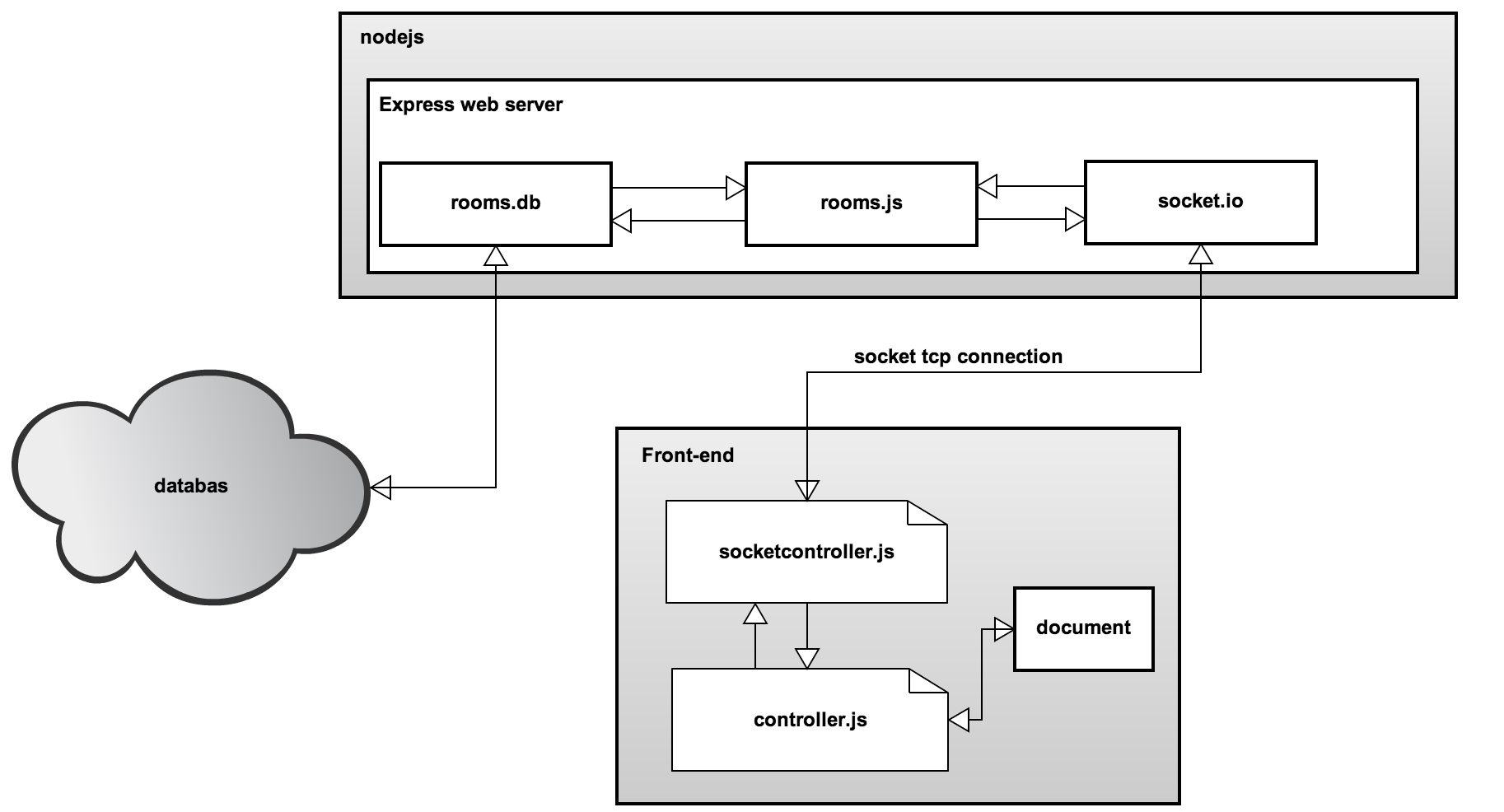
See more information see here: [https://www.apress.com/us/book/9781484220436](https://www.apress.com/us/book/9781484220436)
## LICENSE
BSD license.